Apptio for All

Apptio for All

A place for Apptio product users to learn, connect, share and grow together.

 View Only
  • 1.  Using the TimePeriod Function

    Posted 12/17/19 03:49 PM

    I'm trying to use the TimePeriod Function to calculate the 3 Month Average of a numeric value but it's giving me an error.  Here is the formula I was using.  I also tried to create a new metric but neither are working. Can anyone help? 


    =TimePeriod({Circuit Cost Data Raw.Current Month},-2)+TimePeriod({Circuit Cost Data Raw.Current Month},-1)+TimePeriod({Circuit Cost Data Raw.Current Month})/3


    I also need a 6 Month Average and a 12 Month Average for this same field.  Any advice is greatly appreciated.


    #ApptioforAll


  • 2.  Re: Using the TimePeriod Function

    Posted 12/17/19 07:00 PM

    Hi Julie,


    I think it is your brackets;


    =(TimePeriod({Circuit Cost Data Raw.Current Month},-2)+TimePeriod({Circuit Cost Data Raw.Current Month},-1)+TimePeriod({Circuit Cost Data Raw.Current Month}))/3


    But I would split this in to at least two columns;


    Three month amount =TimePeriod({Circuit Cost Data Raw.Current Month},-2)+TimePeriod({Circuit Cost Data Raw.Current Month},-1)+TimePeriod({Circuit Cost Data Raw.Current Month})

    Three month average = {Three month amount}/3


    Should work the same way for 6 and 12 month averages, let me know how you go. If it doesn't can you share your error message so I can reproduce the error it in my own sandpit?


    #ApptioforAll


  • 3.  Re: Using the TimePeriod Function

    Posted 12/18/19 02:55 AM

    Hi Julie, what is the error stating? Normally there's a little hint in there as to what isn't included or expected?


    #ApptioforAll


  • 4.  Re: Using the TimePeriod Function
    Best Answer

    Posted 12/18/19 08:20 AM

    Hi Julie.  Your formula syntax looks fine to me, however, the TimePeriod() expects a metric as its first argument, not a table column.  It's usually a safe bet that any time you're working with time in Apptio, then you'll need to work with metrics.  To fix this, you should simply need to create a calculated metric equal to the value of your Circuit Cost Data Raw.Current Month field, then replace the column with the metric in your formula:


    =(TimePeriod([new metric],-2)+TimePeriod([new metric],-1)+[new metric])/3


    I see in your original post that you mentioned that you tried creating a metric.  If what you did matches what I described, can you post a screenshot of your metric definition and the formula column that you're creating?


    #ApptioforAll


  • 5.  Re: Using the TimePeriod Function

    Posted 12/18/19 09:36 AM

    Hey @Julie Whitehurst, further to James' observation of the TimePeriod() function requiring a metric, I also noticed that the syntax of your formula above has incorrect syntax for your current month value.


    The syntax requires 2 arguments: Metric and offset period.  In your example, your last TimePeriod() function call is structured with just the Metric portion (see James' comment above).


    If I reproduce this incorrect syntax in my sandbox, I see the following error:


    =TimePeriod(Cost) !ERR: Encountered " ")" ") "" at line 1, column 17.
    Was expecting one of:
    "," ...
    <NUMBER> ...
    <IDENTIFIER> ...
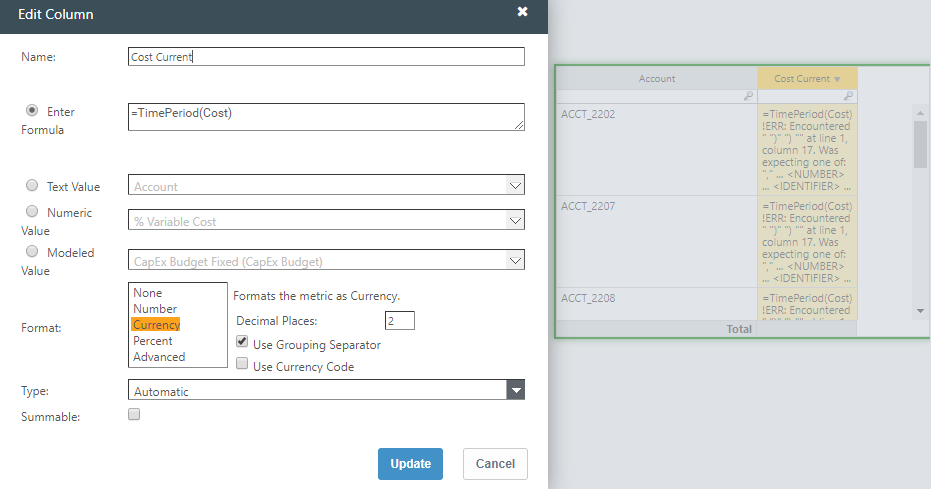
     

    If your error is similar, then you'll know that's what it is complaining about.


    James highlights that you don't technically need the TimePeriod() function in your logic if you just call the metric as is.  So that is another way to get around.  But if you want to be consistent for readability, the proper way to format the function would be "TimePeriod([metric], 0)".


    Edit - fixing typo


    #ApptioforAll


  • 6.  Re: Using the TimePeriod Function

    Posted 12/19/19 09:38 AM

    Thanks everyone, I was able to get the metric created and am getting correct data (see below). 

    Next question Since I haven't used new metrics very often, how do I add the metric to my raw data so that I can add it as a KPI in a report?  I tried inserting a new column with various formulas but it's not pulling in any data.  


    I also tried inserting the metric into the config box on the KPI in the report and it's saying No data available.

    Any help is greatly appreciated !  Thanks


    #ApptioforAll


  • 7.  Re: Using the TimePeriod Function

    Posted 12/19/19 12:29 PM

    Hey Julie,


    It'd be hard for me to confirm this without looking at what you're doing but my suspicion is that, because your metric references the 'Circuit Cost Data Raw' data set explicitly, you will need to ensure the KPI has that in context.  Otherwise the metric will have no backing data.  Normally, if you just pull in data from a table, that will automatically set the context for a KPI.  Unfortunately, for metrics, you'd have to do this manually.


    In the dropdown at the top of the 'KPI Configuration' pane (above where you dropped in your metric), just ensure you select the table the metric is based off of - 'Circuit Cost Data Raw' from the looks of your metric logic above.


    Note - If you do not have a model step on your table, it will not be present in this list.  So you may need to add a model step to that table.  You don't have to actually drive any metric or configure any allocations into/out of that table.  Just having the Model step (with appropriate Object Identifier) will be enough.


    #ApptioforAll


  • 8.  Re: Using the TimePeriod Function

    Posted 12/19/19 04:42 PM

    That was the piece I was missing.  I had modeled the data, but the metric wasn't populating.  I didn't realize I had to select the modeled data set in the config box manually.  I did that and it calculated the metric immediately.  Thank you so much Gregory !


    #ApptioforAll