If you're looking for a non-technical solution, there are a couple of options.
With TeamOne, the tm1datacompare automation task is designed specifically for this. You can compare cube views, specified MDX, or selected elements across environments, then review and filter the comparison results directly in Google Sheets.
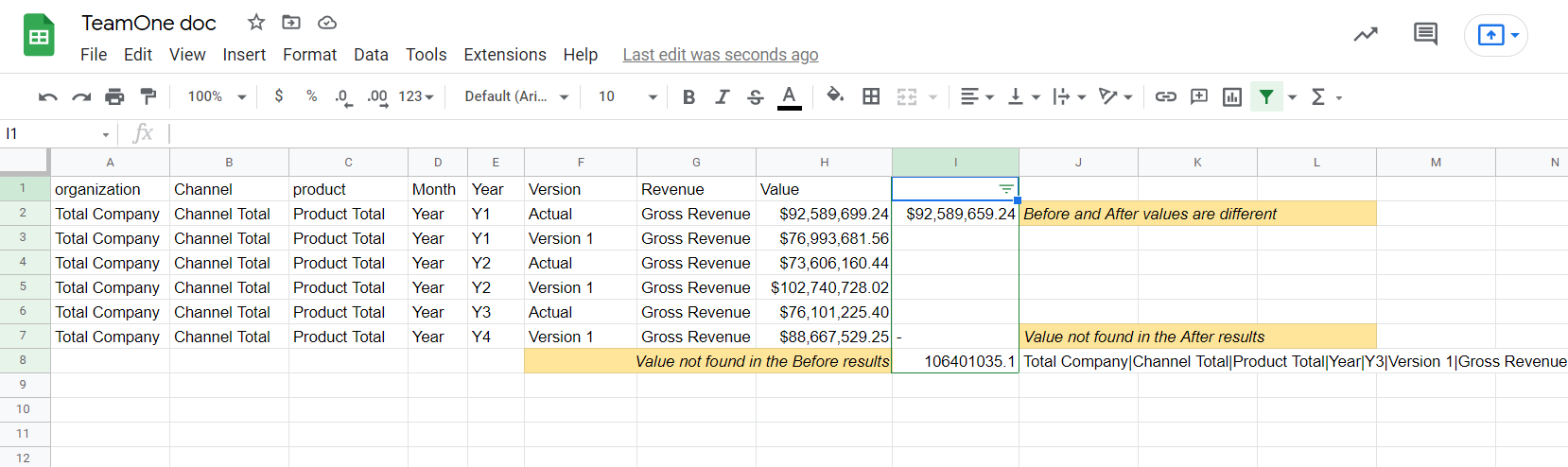
Alternatively, SPACE AI Assistant can be used to compare data directly within IBM Planning Analytics Workspace and analyze the differences using natural language:
https://succeedium.com/space/doc/ai-assistant.html
For a technical approach, TM1Py + DataComPy works well. If you're using SPACE, you can also run that Python-based comparison directly inside IBM Planning Analytics Workspace without needing to leave PAW:
https://succeedium.com/space/doc/python.html#editing-notebooks-and-scripts
And SPACE AI Assistant can write the Python script for you.
------------------------------
Vlad Didenko
Founder at Succeedium
TeamOne Google Sheets add-on for IBM Planning Analytics / TM1
https://succeedium.com/teamone/Succeedium Planning Analytics Cloud Extension
https://succeedium.com/space/------------------------------
Original Message:
Sent: 08/18/26 07:40 AM
From: Karen Hewitt
Subject: Smart ways to perform data comparison between environments
Hi John!
I've done this using Reportworq where I created a report that pulled the totals from all cubes I needed to validate between had a validation check against them and if they all tied out no email was sent but if their was a variance then the report and email was sent highlighting the variance. I've also done this with a TI script that compared cubes within the same service and would do the validation checks. If cubes are among many services could do this with a python script as well using TM1py.
------------------------------
Karen Hewitt
Head of Customer Success
Reportworq
------------------------------