This is a big issue for everyone.... Being able to monitor the reception of logs for hundred types of equipment's. In our case, for compliancy reason, monitoring was required. So, we didn't have the choice to put a working solution in place. The hardest part was figuring out the trends to set the triggers. Depending on how much different source you have, this may take a few weeks to fine tune.
There's no perfect solution for this. But James proposed a good one with the use of log source GROUP in the rules. We also use groups, but also types of log sources. The advantage of using types is that it works great with the autodetection mechanism.
Let me explain. In Qradar, you can set autodetection of log source. So, as soon as a new source sends its log to Qradar, it's automatically detected and associated to a log source type. Therefore, if someone adds a new firewall in production, and forwards its logs to Qradar, the monitoring will work automatically since we already have a rule using this type of log source.
Here are the triggers you may want to use.
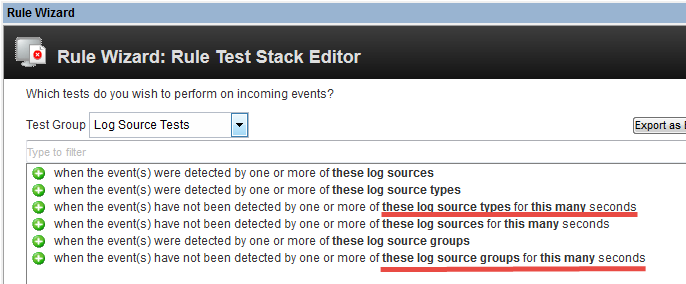
As for groups, we've created about eight groups to cover our main thresholds. So, using types and groups will get you a nice coverage.
Finally, for the default Qradar Syslog Event Timeout... forget about it. Having one setting for all your sources is irrelevant unless you only monitor one type equipment. My suggestion would to turn off these notifications and rules that triggers on them.
I hope it help some of you. Some may have better ideas, so bring them up. For instance, you could extract, from the psql log source table, the name, group and last event time, and do your verification with a script. We ruled out that solution, because we try to avoid as possible custom solutions around Qradar, because they come with a support and maintenance cost. Engineers aren't cheap ;)
Regards,
Anthony
------------------------------
Anthony Gayadeen
------------------------------
Original Message:
Sent: 11-16-2018 08:38 AM
From: Jason Granger
Subject: Silent Device Log Sources
I am looking for some assistance on how to configure a container for log sources that are not as chatty? For example, in my environment I have a handful of devices that will only send logs when an Admin logins via the webUI, and this type of activity is done only a few times a month.
Currently, my team is running reports that show log source that have not logged in a week, and continuing to open tickets on devices that are not as chatty as others.
------------------------------
Jason Granger
------------------------------