Platform

Platform

A place for Apptio product users to learn, connect, share and grow together.

 View Only
  • 1.  Show rows with zero metric values in report tables

    Posted Fri October 16, 2020 05:42 AM

    Hi


    In all the report tables that I create myself, all rows where all metric values are zero, are excluded from the table - e.g. a simple table with 2 columns: a list of Project ID's and the associated cost for current month, then the Projects that have no cost in a month are excluded from the table.

    How can I force to include these so that all rows are visible no matter the cost value? It is for sure not relevant for us that these rows are excluded, and I find it very strange that this is the default behavior.


    #Platform


  • 2.  Re: Show rows with zero metric values in report tables

    Posted Fri October 16, 2020 09:02 AM

    It is likely not showing any project ID's that don't have cost associated with them in that current month because there simply is nothing to show.  It won't show project ID's if there is no data behind them.  They may be in your project portfolio but if there is no cost in a given month, Apptio has no data to show for that particular ID.  What you might try is adding a third column using an Opex YTD perspective that has the time based query feature enabled.  If you don't need to see this column you can always hide it but it might work to show project ID's that have had cost in prior periods.


    This document outlines how to use the time based query perspective:

    How To: Include all rows from a prior fiscal year in a time-based query 


    #Platform


  • 3.  Re: Show rows with zero metric values in report tables

    Posted Fri October 16, 2020 09:41 AM

    Hi


    Thanks a lot for you reply.
    I don't really agree that there is no information in a cost of 0 EUR. You could say that there are no data, but then Apptio should just show 0. It actually works if I use Cost YTD as the only other column than Project ID. Then all rows are shown - also all the rows where Cost YTD = 0 EUR, which, in my opinion, doesn't makes sense if it is a question of no data. I guess the amount of data must be the same for both metrics Cost YTD and Cost for current month, if they both have value 0 EUR?
    I did actually try to include a third column in combination with the Cost metric, and it worked - all rows are then shown, including all the rows with a Cost = 0 EUR. But if I then hide the third column then the rows with 0 EUR disappears again…..

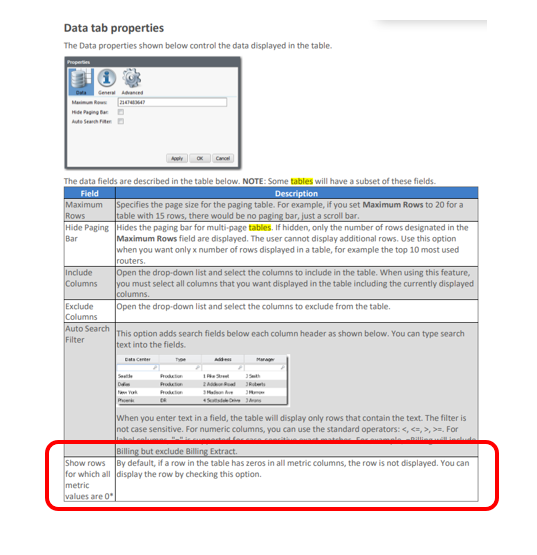
    According to Apptio's guide it should actually be possible to show these o value rows, by changing the setting in the Data Tab in the Table Properties, but apparently some tables doesn't have all the options that are listed in the guide


    #Platform


  • 4.  Re: Show rows with zero metric values in report tables

    Posted Wed November 04, 2020 04:44 PM

    Hi,


    It sounds like you might want to look at Perspectives and the "Show all rows in time based query" functionality. This allows you (within the fiscal year, as far as I understand it) to force the table to show all the rows which have a non-zero value in any of the relevant time periods, rather than just those which are non-zero in the current month.


    This also happens automatically if you use the Months YTD as a column in your report, so that you can see the trend of the metric over time.


    #Platform