IBM QRadar SOAR

IBM QRadar

Join this online user group to communicate across Security product users and IBM experts by sharing advice and best practices with peers and staying up to date regarding product enhancements.

 View Only
  • 1.  Running a script from the integration server

    Posted Thu July 04, 2019 06:54 AM
    I was wondering if anybody has been able to, from the integration server, run a script periodically (CRON Job) to check the status of all incidents in an org and then based on one or more criteria i.e. last updated, incident status and phase, get the script to run against these selected records forcing a field to update?


    ------------------------------
    Colin
    ------------------------------


  • 2.  RE: Running a script from the integration server

    Posted Fri July 05, 2019 05:12 AM
    Hi Colin,

    What is your full use case here? Could you give an example?

    You may be able to achieve the outcome using the in  In Product Rules + Scripts...

    ------------------------------
    Shane Curtin
    Integrations Engineer - IBM Resilient
    ------------------------------


  • 3.  RE: Running a script from the integration server

    Posted Fri July 05, 2019 07:33 AM

    Hi Shane, 

     I've tried using in product scripts and rules, but I encounter a constraint where I only appear to be able to update the record I'm in or the first one to meet the criteria.  Not all records that meet the conditions.     The full use case is simple it's SLA monitoring and notifications / alerting, this is stop gap until this hopefully arrives in V34.   

     So I'm writing out to two fields on a trigger, say when a phase starts (containment) the first being the date and time containment starts, I'm then calculating the second field based on the start value + the SLA time, then running a script to calculate the difference between the two,  writing this value to a third field and popping this onto screen for an analyst, so they become aware of the time left.  Unfortunately, I can't find away for force this to run an and update this field in the background.  I've tried a rule without criteria, but this only works on the single open incident is updated. 

     I was trying to find away to force this to be updated, say every 15 minutes, so the timer counts down in the background and then when certain conditions are meet i.e. minutes left is less than, a notification could be sent within Resilient, to remind / escalate as required. 

     I've got it working perfectly in product manually, but obviously this isn't going to help customers if they receive a incident, don't update it for several hours and then when they do, they'll could get 5 alerts simultaneously telling them they're near the SLA and have now exceeded it as they've just updated the incident, that's not going to be helpful :-) 

    Any suggestions on how this could be achieved would be gratefully received. 

     Colin 


    ------------------------------
    Colin Mattholie
    ------------------------------


  • 4.  RE: Running a script from the integration server

    Posted Fri July 05, 2019 10:32 AM
    Edited by Shane Curtin Fri July 05, 2019 10:36 AM
    Hi Colin,

    Really cool use case! I think it is possible to achieve what you want without having to code a new Function :)

    In fn_utilities v1.0.7 (https://exchange.xforce.ibmcloud.com/hub/extension/2b6699ac8a3976b67dfbddee26dbe3a5) we released a new Function called: Utilities Timer::
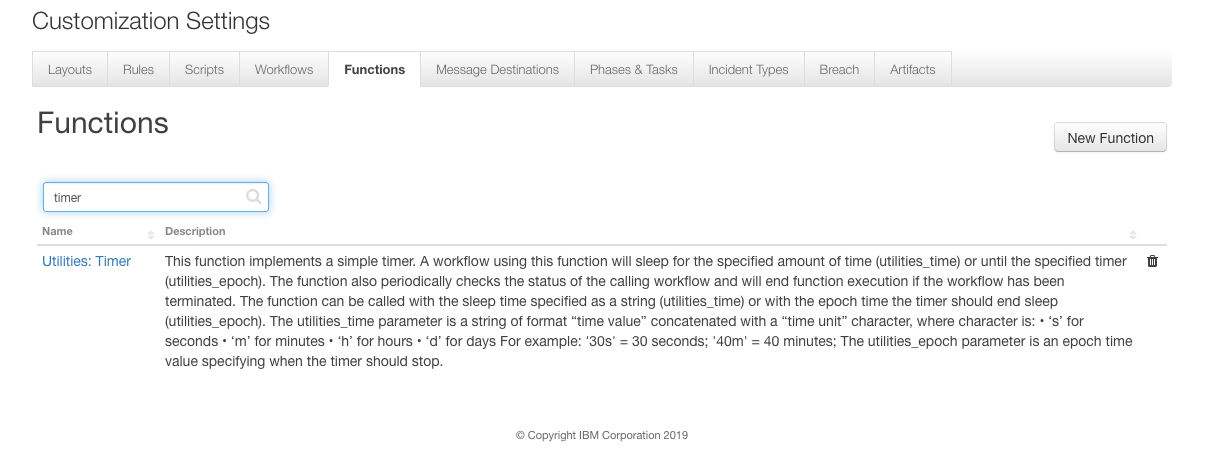


    By combining this Function with your script in a single Workflow like below, I feel you can achieve your use case:
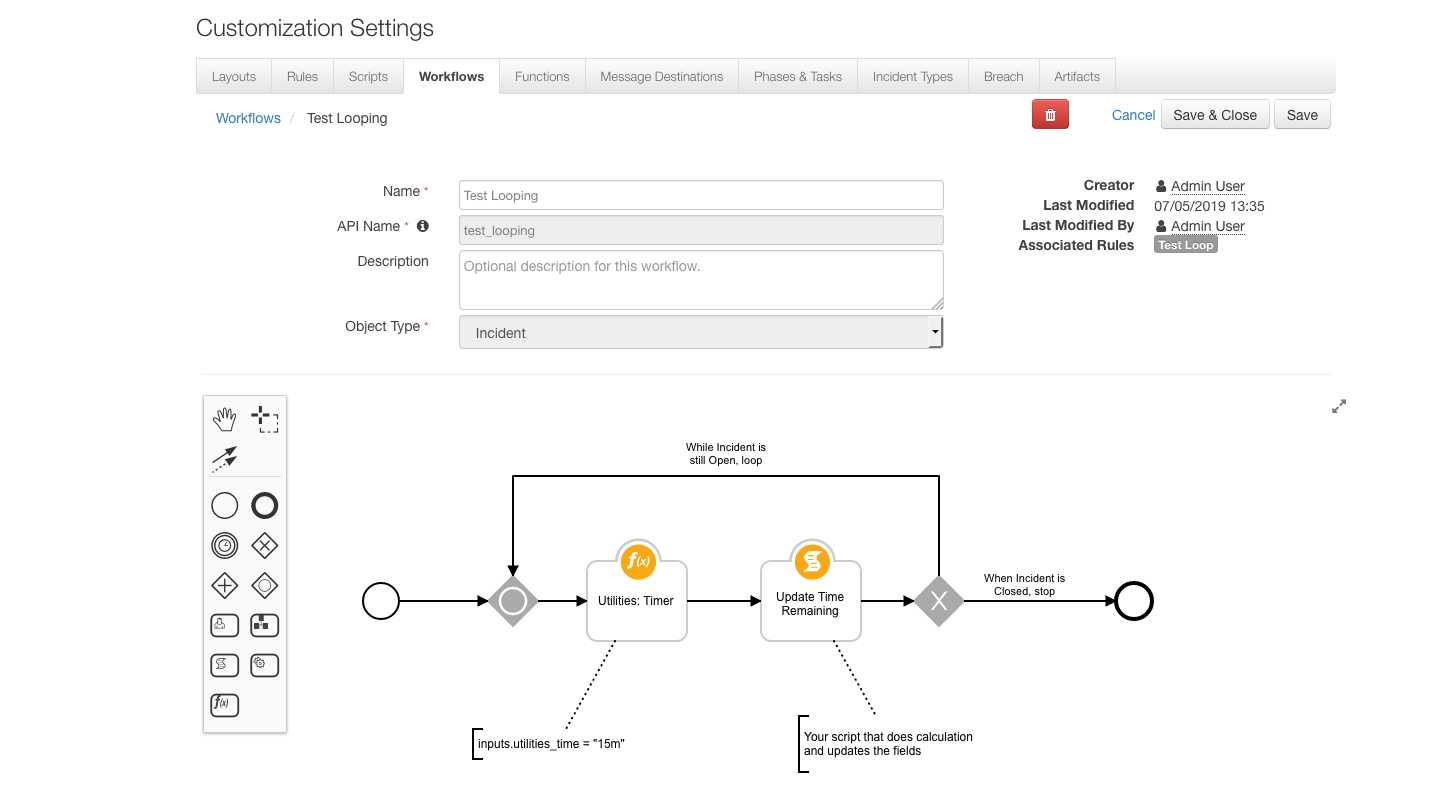
    Above we have set the Utilities Timer to sleep for 15m, after that 15m we call your script that does your time calculations and updates the fields as described in your post

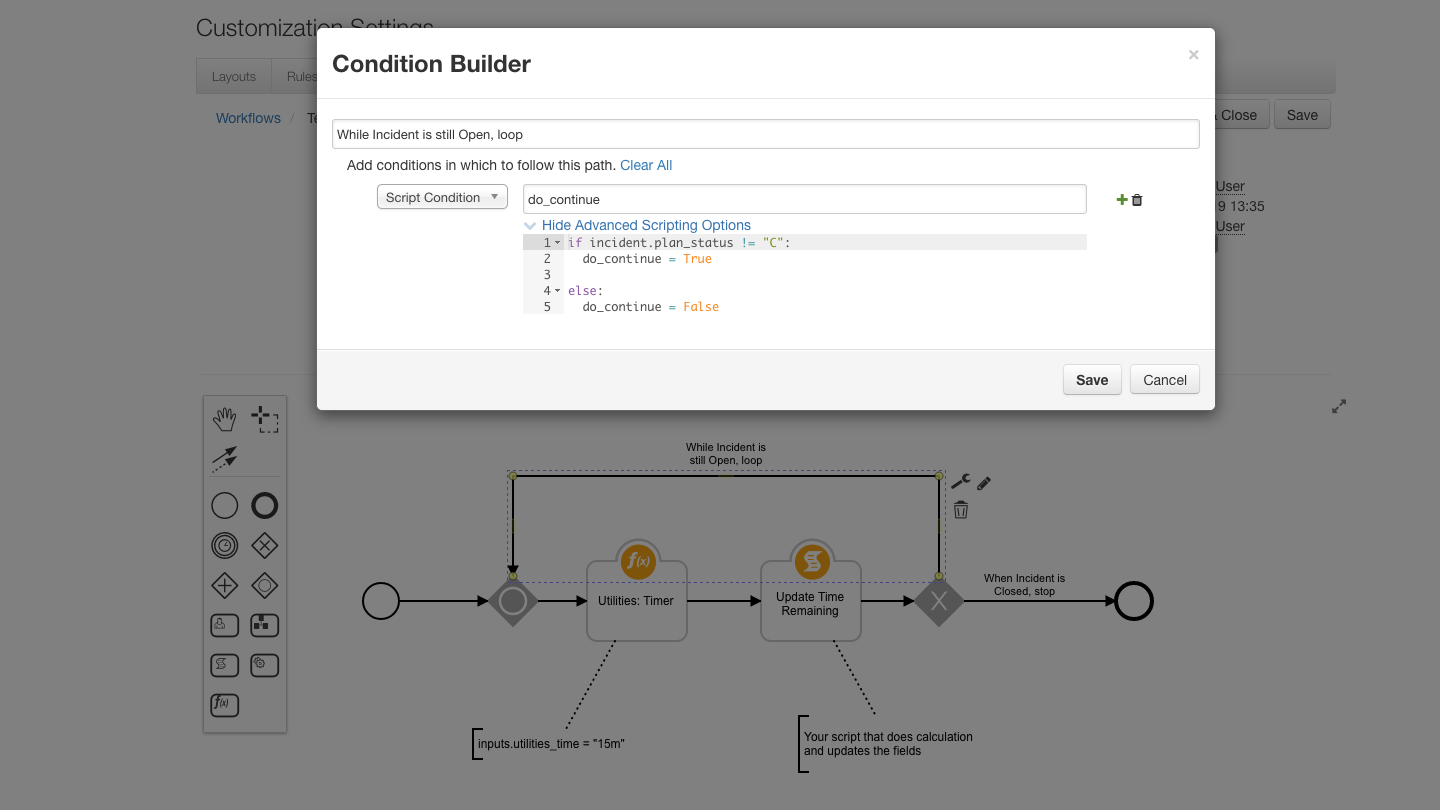
    Then in the Exclusive Gateway that follows the  Script, we have a Script Condition that checks if the Incident is in an Open or Closed State. This condition will end the Workflow if the Incident is in a Closed state:


    And for the other connector for that Exclusive Gateway we have "the opposite condition", that will continue to loop as long as the Incident is not in a Closed state:

    Finally, we would create a Rule that gets invoked on Incident Creation and targets this Workflow:


    This method will start the Workflow on Incident Creation and keep looping every 15m until the Incident is Closed. Hopefully this method of using Timers with Looping in Workflows helps solve your issue...

    ------------------------------
    Shane Curtin
    Integrations Engineer - IBM Resilient
    ------------------------------


  • 5.  RE: Running a script from the integration server

    Posted Tue July 16, 2019 01:32 PM
    Edited by Jared Fagel Tue July 16, 2019 01:33 PM
    Resilient does not support scheduling from outside an incident, nor would a per-incident workflow be efficient. It would likely be best to create a literal CRON or systemctl job that just runs a native Python script (not via Resilient), but that uses the Resilient REST API to traverse through incidents and sets the field(s) as needed.

    @Shane Curtin I created this function, way before it was added to the utilities (I believe our SE had it added as a timer function after conversation), but this should be a workflow widget in and by itself, not a function. This is a clunky implementation based on customer code, rather than product development.

    Source: https://github.com/jjfallete/resilient/blob/master/functions/utilities/utility_sleep.py


    ------------------------------
    Jared Fagel
    Cyber Security Analyst Intern
    Public Utility
    ------------------------------


  • 6.  RE: Running a script from the integration server

    Posted Thu July 18, 2019 08:38 AM
    While creating a system service, like cron, to run a script that updates Incident fields using the Resilient REST API is a possible solution to Colin's use case, it is not something we could recommend as it lies outside the Resilient Integration Framework and is not currently supported.

    Hopefully there are others in the community who can share their experiences with a similar solution.

    @Jared Fagel thank you for your contribution to the community! We are always excited to hear our customer use cases. Did you know Community Members can submit Apps to our App Exchange?

    See here: https://community.ibm.com/community/user/security/communities/community-home/digestviewer/viewthread?MessageKey=1a774b43-6cfa-4a93-9d1d-71186f235774&CommunityKey=d2f71e8c-108e-4652-b59c-29d61af7163e&tab=digestviewer#bm1a774b43-6cfa-4a93-9d1d-71186f235774


    ------------------------------
    Shane Curtin
    Integrations Engineer - IBM Resilient
    ------------------------------


  • 7.  RE: Running a script from the integration server

    Posted Tue July 16, 2024 05:53 AM

    Hi Colin,

    I have a question about the Timer function in playbooks. How many playbooks can run simultaneously?

    For example, if we have a playbook that runs for every incident with a 2-day sleep time, and we get 100-200 incidents, we'd have 200 playbook instances sleeping for 2 days. I'm concerned this might consume a lot of resources. Could this potentially cause the SOAR platform to crash if too many playbooks are running at once?

    Can you provide any insights or best practices for handling this situation?


    ------------------------------
    Cyber SOC Engineering
    ------------------------------


  • 8.  RE: Running a script from the integration server

    Posted Wed July 17, 2024 01:31 PM

    If I'm correct "who is running the timer" it's not the SOAR server itself, it's the apphost running that integration. That's why the old fn_utilities app was split into: fn_network_utilities, fn_parse_utilities, fn_rest_api and fn_timer.

    Each timer running will consume a threat of the container, from the documentation of the app you can see this:

    https://ibmresilient.github.io/resilient-community-apps/fn_timer/README.html
    The [resilient] section allows you to configure app wide settings. For the Timer function, there are two settings that are relevant and should be paid significant attention to get proper function from the app. The setting num_workers determines the maximum number of threads that the app will dispatch at the same time. This allows for concurrent timers to run. Importantly, however, the setting stomp_prefetch_limit must also be set a number greater than or equal to the value set for num_workers. Without this addition, you may experience timer delays in the function.


    So you can increase the number of "timers running" by increasing the num_wokers on the app.config and also by increasing the resources of the apphost itself.

    Take into account that this is the fn_timer app https://exchange.xforce.ibmcloud.com/hub/extension/2ece7aed703426e5c67cdec55d94385f


    ------------------------------
    Juan Paulo
    IBM
    Santiago
    ------------------------------