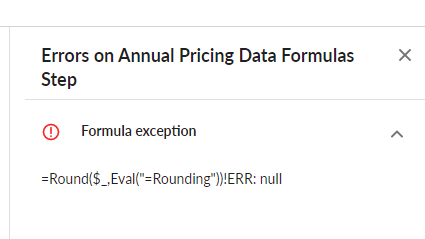
@Doug Silk Thanks for checking! Below is the error message I'm getting, leaving the column NULL. It's the same when I create new column instead of updating the existing one.
Original Message:
Sent: 04-24-2023 08:47
From: Doug Silk
Subject: Rounding based on value from another column
@Prem Kilaru That's strange, it should have worked. The following is a test I did:
Did you include the "=" in the Eval in your test?
------------------------------
Doug Silk - Apptio
------------------------------
Original Message:
Sent: 04-19-2023 11:18
From: Prem Kilaru
Subject: Rounding based on value from another column
@Doug Silk Just tried, this is not working as well.
Output is null, same as with using direct column reference.
Original Message:
Sent: 04-19-2023 10:32
From: Doug Silk
Subject: Rounding based on value from another column
@Prem Kilaru An alternative approach would be to make use of the Eval() function.
Assuming that your column controlling how many digits to round to is called Rounding, something like the following should work:
=Round(Amount,Eval("=Rounding"))
One caveat though, Eval can have significant performance impacts, so please try to avoid doing this on large datasets.
------------------------------
Doug Silk Apptio
Original Message:
Sent: 04-18-2023 04:55
From: Guillermo Cuadrado
Subject: Rounding based on value from another column
Yes, @Tobias Zimmermann , that would work (BTW, long time, no see!) However, it wouldn't be elegant at all.
@Prem Kilaru , I'd suggest you open an Enhancement Request. I'd be glad to vote it up.
------------------------------
Regards, Guillermo
Original Message:
Sent: 04-18-2023 02:25
From: Tobias Zimmermann
Subject: Rounding based on value from another column
Dear Prem,
assuming you have a finite number of rounding rules (2digits and 3 digits). In this case you could round by each rule (2 intermediate columns) and then decide with an if statement, which result is to be assigned to the final result column (1 extra column).
This might appear a little backward but serves as an adequate solution to your problem.
------------------------------
TobiasZimmermannApptioRegional Director Professional Services DACHtzimmermann@apptio.com