Hi Matt, Thanks for your response! it is very helpful with explorations!
But when I convert it to dynamic or Custom report, summation disappears and it is only reporting on first member selected in that context dimension. Is there any way to solve this issue in Custom/Dynamic report as well? let me know please. Thanks!
------------------------------
Aleksandre Metreveli
------------------------------
Original Message:
Sent: Tue December 22, 2020 09:47 AM
From: Matt Hopkins
Subject: PAX/PAW Context Filter allows only one member
Aleksandre,
In PAfE (PAx), you have the ability to SUM across the context selection for any dimension. However, this has to be enabled and is disabled by default.

You will then see the following option on the context drop down menu.
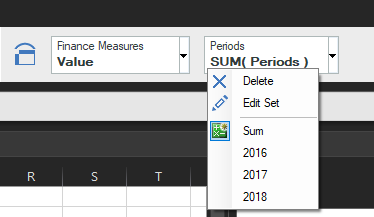
For PAW, I would take a look at Paul Glennon's suggestion in the comments of the following feature request.
https://ibm-data-and-ai.ideas.aha.io/ideas/PAOP-I-323
------------------------------
Matt Hopkins
Senior Software Engineer
QueBIT Consulting
Original Message:
Sent: Mon December 21, 2020 09:25 AM
From: Aleksandre Metreveli
Subject: PAX/PAW Context Filter allows only one member
Currently PAX/PAW only allows to filter on one member for each dimension used as a context filter. For example we are using 'Company' and 'Department' dimension a lot in context area, but we can only filter on one member for each. So we are creating a lot of custom roll-ups to find way around. Of course we can move them to row and/or column section and report on multiple members, but then it does not give us consolidated view we are looking for.
Wondering if IBM is planning enhancement in this direction.. It will be huge help for our company and I believe lot of your other customers will be happy as well :). Let me know please. Thanks!
------------------------------
Aleksandre Metreveli
------------------------------
#PlanningAnalyticswithWatson