Platform

Platform

A place for Apptio product users to learn, connect, share and grow together.

 View Only
  • 1.  Multiple / Conditional Allocation Strategies

    Posted 10/24/19 11:24 AM

    If this is possible, how do you create multiple allocation strategies in the form of conditions to flow $$ between the same two objects?  That is, have different strategies evaluated as IF ELSE conditions and cause cost to flow if any one of the conditions is met.      


    Thank you


    #Platform


  • 2.  Re: Multiple / Conditional Allocation Strategies

    Posted 10/24/19 11:34 AM
      |   view attached

    I would create the logic in a formula step in the pipeline, then when creating the allocation line use the from>if xxx “Equals” xxx


    So for example if you have 3 data points and want to allocate anything class 1 via one method, and class 2 via another


    Title         Class

    Data 1 || Class 1

    Data 2 || Class 1

    Data 3 || Class 2


    Formula = If(Class=”Class 1”,”x”,”o”)


    Then in the allocation line, you create an allocation and hit add row filter

    , choose column Formula then equals and type Class 1…then fill in logic for class one…


    Repeat as many times a necessary by nesting if statement or using the “OR” command

    Travis Cole

    Office: 402-777-4409 | Mobile: 402-699-3715


    #Platform


  • 3.  Re: Multiple / Conditional Allocation Strategies

    Posted 10/28/19 02:26 PM

    @Tolu Badejo I have something similar in use, if I'm understanding your ask correctly, and use a formula in the allocation.


    In the model step, you'd be allocating from and object to an object using "Formula" instead of the default "Weighted Value". In the formula box, you'd enter a formula using the typical syntax.


    As an example, I have the following in use:

    From: Business Services, where key contains "Mainframe"

    Allocate: Cost

    Using: Formula

    To; Business Unit Allocation

    Formula: =If({Business Unit Allocation Master Data.Cost Center} = 8808803150,(Source*.004),"")


    So If the cost center in the master data set = 8808803150, then .4% of the dollars in the source (business services contains "mainframe") is allocated, else nothing is allocated. In your case you may have an else statement where I do not.


    #Platform


  • 4.  Re: Multiple / Conditional Allocation Strategies

    Posted 10/28/19 06:13 PM

    @Stephanie Geltrude, thanks for responding. I and not sure @Travis Cole refers to the "Using" part of the allocation. To clarify further, suppose I have Application IDs in the source table that match some Application IDs in the destination table. I want to move cost when there is a match between the two objects on Application ID. However, for the records that do not match, I want to use a different strategy to move money, say where cost center and product category match in the destination object.


    Do I need to use a nested If statement in my formula or do I create two allocation lines to the same destination object using separate formulas?  Please clarify....Thanks


    #Platform


  • 5.  Re: Multiple / Conditional Allocation Strategies

    Posted 10/30/19 07:35 AM

    Based on what you just said there, I would use two allocation lines to keep it simple. Have one be the match on Application ID, then on the other one you can tick a box that means it will only send cost if it hasn't already been allocated:

    You can then configure the allocation as normal using Cost Centre and Product Category as your identifier (like your example) and it will only flow cost that didn't match on App ID in the first allocation line


    #Platform


  • 6.  Re: Multiple / Conditional Allocation Strategies

    Posted 10/30/19 12:56 PM

    I agree with @Oliver Smiths response and suggested solution.

    I would build an allocation line for each data-based reference allocation you'd like to build.


    Sample Use Case - Application ID:

    Allocate $ from IT Resource Towers to Applications using Application ID


    In IT Resource Towers Master Data, use a lookup formula on Application ID to check if it exists in Application Master Data:

    • Application ID Lookup =lookup(Application ID,Applications Master Data,Application ID,Application ID)

    Next, create a helper column that evaluates the returned value of the Application ID Lookup formula:

    • Is in Application Master Data =if(Application ID Lookup="","No","Yes")

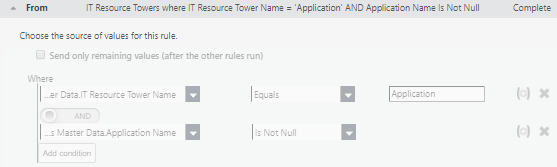
    You can use the helper column to control what rows will be allocating $ to Applications in the "From" section of the allocation configuration wizard.


       Allocation Line A (Direct - Application)

          From:

             Where

             IT Resource Towers Master Data.Is in Application Master Data Equals "Yes"


    I would use this method on the other fields you're looking to match on based on data-based references as well (i.e. Cost Center, Product Category etc.). This would help you segregate the rows whose amounts you'd like to allocate in each allocation line.


    #Platform


  • 7.  Re: Multiple / Conditional Allocation Strategies

    Posted 10/30/19 04:02 PM

    @Tolu Badejo considering the additional information you've provided, I too would take the approach @Oliver Smith identified below. 


    "suppose I have Application IDs in the source table that match some Application IDs in the destination table. I want to move cost when there is a match between the two objects on Application ID. "


    You would set your from, to, and using (probably weighted value), then in 'distributing' you'd utilize the 'data relationship' and have application ID in both your source and destination column (or whatever the column headers are for you).


    "However, for the records that do not match, I want to use a different strategy to move money, say where cost center and product category match in the destination object."


    You would select the "send remaining values..." as noted by Oliver and you would select cost center and product category as your source and destination columns. You can have multiple columns in use for establishing a relationship. An important note with this is that it's best practice to have only 1 "send remaining values..." per object. If you'd need more, then you'd want to instead set up additional lines of directed allocation language.


    Hope that helps


    #Platform