IBM webMethods Hybrid Integration

IBM webMethods Hybrid Integration

Join this online group to communicate across IBM product users and experts by sharing advice and best practices with peers and staying up to date regarding product enhancements.


#TechXchangePresenter
 View Only
  • 1.  Http response header

    Posted Tue September 16, 2003 05:55 PM

    How could I set my own key value pair in http response headers


    #webMethods
    #Flow-and-Java-services
    #Integration-Server-and-ESB


  • 2.  RE: Http response header

    Posted Tue September 16, 2003 06:05 PM

    try on these lines

    HttpHeader respHeader = Service.getHttpResponseHeader();

    respHeader.setValues((Values)pipeline);

    u may need to import com.wm.net.HttpHeader class

    regards

    Thahir


    #webMethods
    #Flow-and-Java-services
    #Integration-Server-and-ESB


  • 3.  RE: Http response header

    Posted Wed September 17, 2003 09:28 AM

    Thank you for the response

    This did not add the values to the header
    can you give the complete code pls

    George


    #Flow-and-Java-services
    #Integration-Server-and-ESB
    #webMethods


  • 4.  RE: Http response header

    Posted Thu September 18, 2003 09:23 AM

    Hi all,

    I could not find the java documentation for HttpHeader class. can somebody help me with a working sample code on how to add custom values to response http header pls

    Many thanks

    George


    #Integration-Server-and-ESB
    #webMethods
    #Flow-and-Java-services


  • 5.  RE: Http response header

    Posted Fri September 19, 2003 05:53 AM

    The com.wm.net.HttpHeader class in the IS Server Java API is undocumented.
    Here’s what I know about three methods in that class:


    // Set HTTP response code
    setResponseCode(ResponseCode_Integer);
    // Set HTTP response code with reason phrase
    setResponseCode(ResponseCode_Integer, ResponseReasonPhrase_String);
    //Add HTTP response field.
    addField(HeaderFieldName_String, HeaderFieldValue_String);


    Your code should work if you import the class. Eg:


    com.wm.net.HttpHeader h = Service.getHttpResponseHeader(null);
    h.setResponse(302, “Found”);
    h.addField(“Location”, URL);


    #webMethods
    #Flow-and-Java-services
    #Integration-Server-and-ESB


  • 6.  RE: Http response header

    Posted Sat September 20, 2003 03:45 PM

    Similar to setResponse you can also use these

    respHeader.setResponseCode(800);
    respHeader.setResponseMessage(“New Message goes here”);

    and ofcourse the one mentioned above by sonam

    respHeader.setResponse(800,“Another Message”);

    I am sorry respHeader.setValues((Values)pipeline) did not yeild any results. I did not try it before thought that might do the work. Maybe somebody would be able to say WHAT THEN it is doing

    regards

    Thahir


    #Integration-Server-and-ESB
    #webMethods
    #Flow-and-Java-services


  • 7.  RE: Http response header

    Posted Fri September 14, 2007 10:26 AM

    Hi,

    actually setValues works, but you have to setResponse first.

    I created following service to set Http headers (check attached picture for service inputs):

    HttpHeader respHeader = Service.getHttpResponseHeader(null);
    // pipeline
    IDataCursor pipelineCursor = pipeline.getCursor();
    
    // header
    IData    header = IDataUtil.getIData( pipelineCursor, "header" );
    
    if ( header != null)
    {
    
    IDataCursor headerCursor = header.getCursor();
    
    String status = IDataUtil.getString( headerCursor, "status" );
    String statusMessage = IDataUtil.getString( headerCursor, "statusMessage" );        
    respHeader.setResponse(Integer.parseInt(status), statusMessage);
    respHeader.setValues(Values.use(header));
    
    /* not needed as we're passing Values type
    // i.lines
    IData    lines = IDataUtil.getIData( headerCursor, "lines" );
    if ( lines != null)
    {
    IDataCursor linesCursor = lines.getCursor();
    String    Date = IDataUtil.getString( linesCursor, "Date" );
    String    Server = IDataUtil.getString( linesCursor, "Server" );
    String    Content_Type = IDataUtil.getString( linesCursor, "Content-Type" );
    String    Connection = IDataUtil.getString( linesCursor, "Connection" );
    respHeader.addField("Date", Date);
    respHeader.addField("Server", Server);
    respHeader.addField("Content-Type", Content_Type);
    respHeader.addField("Connection", Connection);
    linesCursor.destroy();
    }
    */
    headerCursor.destroy();
    }
    
    pipelineCursor.destroy();

    Don’t forget to put com.wm.net.HttpHeader into imports section.
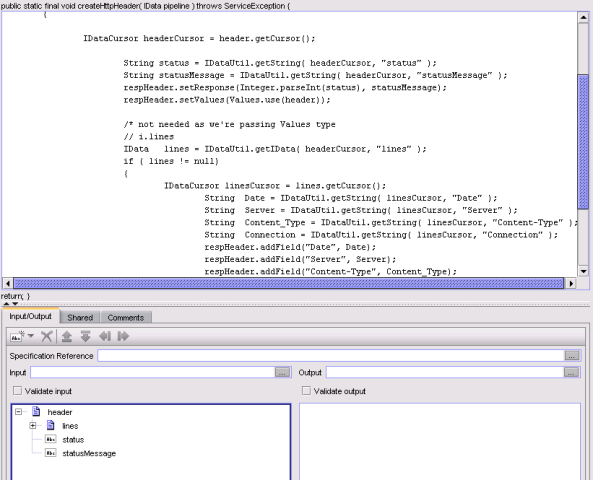
    createHttpHeader.PNG


    #Flow-and-Java-services
    #webMethods
    #Integration-Server-and-ESB