IBM QRadar

IBM QRadar

Join this online user group to communicate across Security product users and IBM experts by sharing advice and best practices with peers and staying up to date regarding product enhancements.

 View Only
  • 1.  How to use Wincollect to read Application logs

    Posted Wed September 08, 2021 02:55 PM
    Hello experts,

    How can I configure Wincollect to read logs from an application installed on a Windows host? 

    For example, I have an application "app1" that send its logs to a particular directory called C:\programs\app1\. How do i configure Wincollect to forward these logs to QRadar SIEM.?

    Thank You.


    ------------------------------
    benlinux
    ------------------------------


  • 2.  RE: How to use Wincollect to read Application logs

    Posted Thu September 09, 2021 01:56 AM
    please follow the following link... in your case, you need first to create a new device type using the DSM editor or you can use the Universal DSM in log source configuration.


    Then, Create New log source:
    set the Device Type to Universal DSM, or you can build new device type before start adding the log source as mentioned before.

    Then select the protocol type as below:
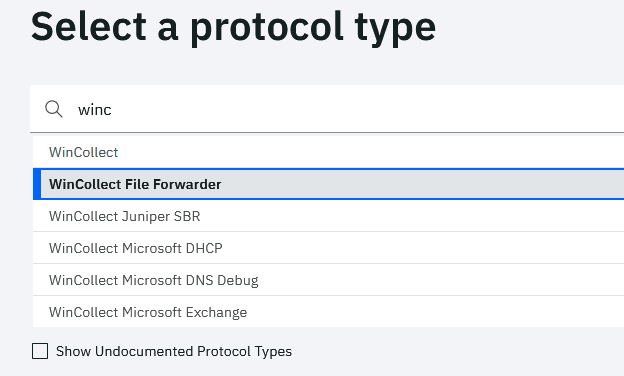
    Then you need to configure local collection as below (third configuration screen)
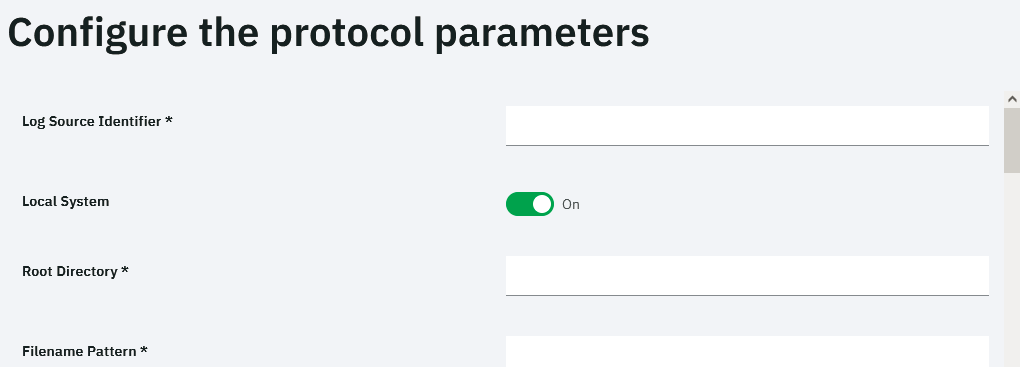
    set the parameter as in the link provided.

    ------------------------------
    ahmad zuhd
    ------------------------------


  • 3.  RE: How to use Wincollect to read Application logs

    Posted Mon September 13, 2021 05:19 AM
    Hello,
    Thank You.

    I have tested on my lab, and it seems to work.

    Most of the events come as unknown using the Universal DSM, I will have to create a new DSM for my events.

    Thanks a lot.


  • 4.  RE: How to use Wincollect to read Application logs

    Posted Mon September 13, 2021 05:08 AM
    As Ahmad mentioned, you can start with the DSM editor to create a new custom log source type for your app. I recall utilizing SMBtail protocol to read the logs from the file the custom app writes to; lowest polling interval is 10s and should be OK for near real-time ingestion/detection. Make sure to set the access to the file appropriately. For SMBtail you might need to play a bit with the regex to have the adequate file name pattern the LSM app accepts. Also, there is the option Force File Read which is turned on by default - but you would probably want to change that (when OFF, the log file is read only when QRadar detects a change in the modified time or file size  which would avoid repeated reading of previously ingested data)

    ------------------------------
    Dusan VIDOVIC
    ------------------------------


  • 5.  RE: How to use Wincollect to read Application logs

    Posted Thu September 16, 2021 08:57 AM
    This link would be helpful for using DSM editor.
    https://www.ibm.com/docs/en/qsip/7.3.3?topic=administration-processing-event-data-in-qradar

    ------------------------------
    Brian Kwak
    ------------------------------