I need to test some more, @Tran Minh Phuong. More, later.
(later) Getting close to a solution, not there yet.
------------------------------
Regards, Guillermo
------------------------------
Original Message:
Sent: 09-03-2024 20:04
From: Tran Minh Phuong
Subject: How to calculate Applcation Count by Application Family, Filter condition is Cost Center Name
Case 1: add a column Application Count [Numeric] =1. Application Count Of Office =3 is Correct, not 5. Because i want count unique application.(Work, Excel, Power Point)
Case 2: Use SumIF. When I Filter Cost Center Name = Tokyo. Office Excel will return value 0.5
That is the main problem I have.
Original Message:
Sent: 09-03-2024 10:40
From: Guillermo Cuadrado
Subject: How to calculate Applcation Count by Application Family, Filter condition is Cost Center Name
It looks like you could add a column to the table with the following formula, @Tran Minh Phuong :
Application Count [Numeric] =1
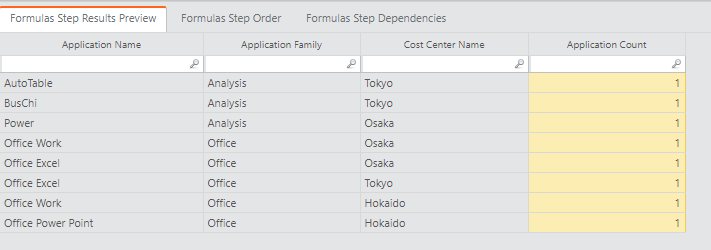
A report built on such data would look like what you want:
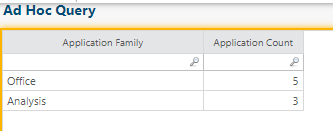
A SumIf() formula might also work, depending on what you want to do.
------------------------------
Regards, Guillermo
Original Message:
Sent: 08-30-2024 02:02
From: Tran Minh Phuong
Subject: How to calculate Applcation Count by Application Family, Filter condition is Cost Center Name
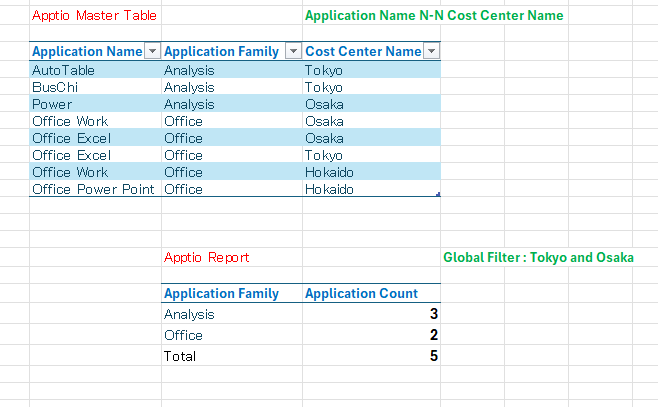
| I want to calculate Applcation Count(unique count Applcation Name) by Application Family, Filter condition is Cost Center Name = Tokyo and Osaka. The relationship between Application Name and Cost Center Name is many to many. Please help me. |
#ApptioforAll