Original Message:
Sent: 4/13/2023 2:40:00 PM
From: Angelo Alves
Subject: RE: How do you send a file and parameters in Http request with multipart form data?
Hi John,
I managed to send a file this way
defVar --name success --type Boolean
defVar --name objectStoreId --type HttpContent
defVar --name responseHeader --type StringDictionary --innertype String
defVar --name response --type String
defVar --name statusCode --type Numeric
defVar --name multipart --type HttpContent
defVar --name fileContent --type HttpContent
defVar --name authVariable --type StringDictionary --innertype String
strDictAdd --key Authorization --value "Basic cDhhZG1pbjpsaGMkbzcxMw==" --dictionary ${authVariable}
createHttpContent --formattype "Bytes" --file "I:\\OoPdfFormExample.pdf" fileContent=value
createHttpContent --formattype "Text" --body "{F94CF4D3-8FA7-43D6-8FCD-3C687E914766}" --encoding "Default" --mediatype "multipart/form-data" objectStoreId=value
createHttpContent --formattype "Multipart" --contentlist "{\"file\":\"${fileContent}\",\"objectStoreId\":\"${objectStoreId}\"}" multipart=value
httpRequest --verb "Post" --url "https://SERVER:9443/integrator/rest/docs" --headers ${authVariable} --formatter "Instance" --source "${multipart}" success=success response=value statusCode=statusCode responseHeader=headers
logMessage --message "Sucess: ${success}\r\nResponse: ${response}\r\nStatus Code: ${statusCode}\r\nResponse Header: ${responseHeader}" --type "Info"
------------------------------
Angelo Alves
IBM RPA Technical Specialist
------------------------------
Original Message:
Sent: Fri April 07, 2023 05:45 PM
From: John Bourdeau
Subject: How do you send a file and parameters in Http request with multipart form data?
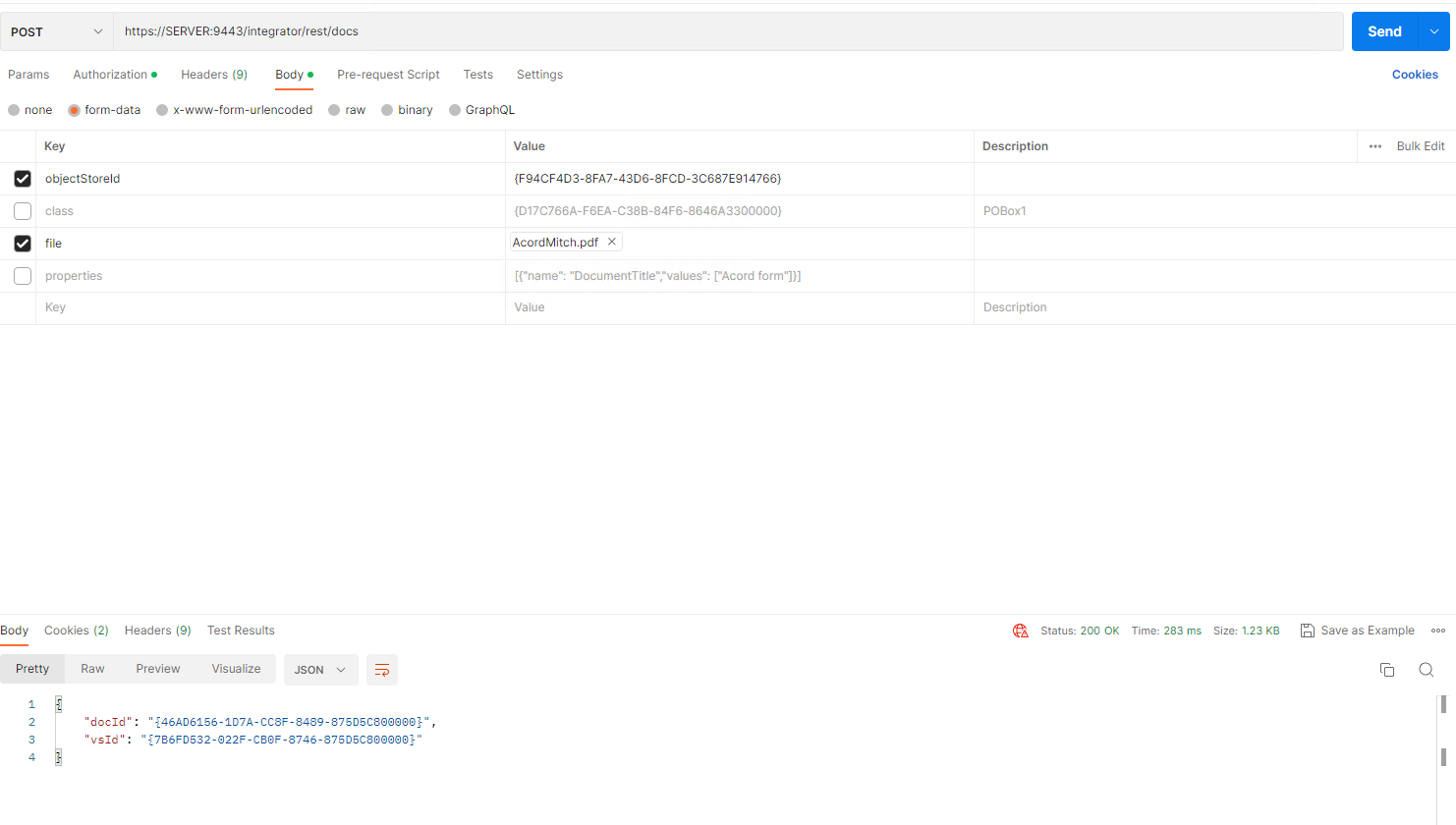
I'm able to setup Postman, however I'm unable to translate the postman code to IBM RPA. If anyone can help it would be appreciated.
IBM RPA
defVar --name success --type Boolean
defVar --name objectStoreId --type HttpContent
defVar --name content --type HttpContent
defVar --name responseHeader --type StringDictionary --innertype String
defVar --name multicontentvar --type HttpContent
defVar --name response --type String
defVar --name statusCode --type Numeric
defVar --name multipart --type HttpContent
defVar --name fileContent --type HttpContent
defVar --name authVariable --type StringDictionary --innertype String
strDictAdd --key Authorization --value "Basic cDhhZG1pbjpsaGMkbzcxMw==" --dictionary ${authVariable}
createHttpContent --formattype "Bytes" --file "C:/Accord/AcordMitch.pdf" fileContent=value
createHttpContent --formattype "Multipart" --contentlist "{\"file\":\"${fileContent}\"}" multipart=value
createHttpContent --formattype "Json" --body "{\"objectStoreId\": \"{F94CF4D3-8FA7-43D6-8FCD-3C687E914766}\"}\n " objectStoreId=value
createHttpContent --formattype "Multipart" --contentlist "objectstore=${objectStoreId}" content=value
createHttpContent --formattype "Multipart" --boundary asdfasf --contentlist "content1=${content}, content2=${multipart}" multicontentvar=value
httpRequest --verb "Post" --url "https://SERVER:9443/integrator/rest/docs" --headers ${authVariable} --formatter "Instance" --source "${multicontentvar}" success=success response=value statusCode=statusCode responseHeader=headers
logMessage --message "Sucess: ${success}\r\nResponse: ${response}\r\nStatus Code: ${statusCode}\r\nResponse Header: ${responseHeader}" --type "Info"
Postman
------------------------------
John Bourdeau
------------------------------