Platform

Platform

A place for Apptio product users to learn, connect, share and grow together.

 View Only
  • 1.  Default reporting period

    Posted 08/19/19 10:44 AM

    Our experience is that the first time you open a report on the Apptio reporting portal (Landing page), the first month of the project is used. The second time you open a report, Apptio is using the period you used in the previous Apptio session. Actually nothing wrong so far. However, when our customers using the Apptio Reporting Portal (Landing page) for the first time, reports will be launched in the first project month where the data in our project is not mature. We like to prevent this situation as this is causing a wrong first impression. 


    We think about the following options:

    1. Arrange new data for the period the data is incomplete and/of not mature (almost impossible);
    2. Set the project start date to a month the date is complete and mature;
    3. Create a default month for the reporting environment were the data is complete and mature. This is the preferred solution but we don't know if this is possible.


    Do you know if option 3 is possible?

    If not, do you have a better solution than option 1 or 2?


    #Platform


  • 2.  Re: Default reporting period

    Posted 08/19/19 11:48 AM

    Hello,


    You can set the default time period in both R11 and R12. You would go to the Project Time Settings and you can enable that functionality, as well as set the default month you want users to see. Like all other settings, this requires a promotion to the Production environment.


    R11:


    R12:


    Good Luck!


    Christy


    #Platform


  • 3.  Re: Default reporting period
    Best Answer

    Posted 08/19/19 11:53 AM

    Hi, Menno!


    You can set a default month for the reporting environment. This default month actually is effective for all three environments (dev, staging, and prod), but as you've already pointed out, dev reporting months are preserved via session cookies. In production, the user will always be taken to the default month first, regardless of where they ended their last session.


    While in the dev environment, click the Project tab at the top of TBM Studio. There is a button called Time Settings.
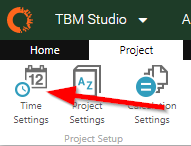
     

    In the window that appears, check the Enable Default Time Period checkbox, and then choose a default time period.
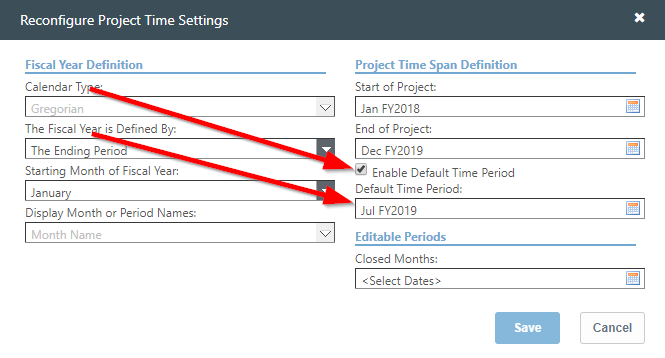
     

    These will not take effect until you check in your changes. After you do, wait for staging to finish calculating, and then promote to production (if you want these changes to take effect right away). When you promote, whichever month you have in the Default Time Period field will be the first time period that users will see in production when they load Apptio.


    #Platform


  • 4.  Re: Default reporting period

    Posted 08/20/19 02:28 AM

    Thank you very much @Christy Harrod and @Jonathan Cutting for the reply/explanation and instructions. Much appreciated. I marked Jonathans information as correct because he added the difference in behaviour of this setting for DEV, Staging and Production.


    #Platform