Platform

Platform

A place for Apptio product users to learn, connect, share and grow together.

 View Only
  • 1.  Decrease number of Rows in a Report Table

    Posted Mon May 13, 2019 11:36 AM

    Does anybody have a good method for limiting the number of rows in a report table? I can change the column or structure, but want to decrease the number of rows? Any tips and tricks?


    #Platform


  • 2.  Re: Decrease number of Rows in a Report Table
    Best Answer

    Posted Mon May 13, 2019 11:45 AM

    If you want to limit the number of rows in a table on a report, make sure that you are in the development/config environment. Switch to edit mode, then right-click on the table and select Properties. On the Data tab, there is a field that says Maximum Rows, where you can select the number of rows that you want to show on the report per page.
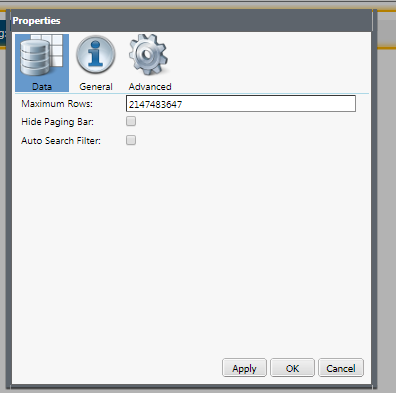


    Hope this is what you're looking for!


    Thanks, Christy


    #Platform


  • 3.  Re: Decrease number of Rows in a Report Table

    Posted Mon May 13, 2019 12:01 PM

    One more thing -- if you don't want the user to be able to move beyond the number of rows you specify, you select Hide Paging Bar also


    Thanks, Christy


    #Platform


  • 4.  Re: Decrease number of Rows in a Report Table

    Posted Mon May 13, 2019 12:47 PM
      |   view attached

    There may be other methods, but I change the Maximum rows in the Properties - Data tab for the report table. See below -


    Zach


    Zach Cartozian

    zxcartozian@aetna.com<mailto:zxcartozian@aetna.com>

    415-710-8088


    Proprietary


    #Platform