Platform

Platform

A place for Apptio product users to learn, connect, share and grow together.

 View Only
  • 1.  Creating a Year To Date Metric?

    Posted Mon September 30, 2019 09:23 AM

    I am trying to build a custom table that compares budget vs actuals.  I've appended in several data sources - our budget, actuals from various sources and some labor data.  Each of these pulls in the current month totals but I'm having trouble understanding how the YTD metric works.  If anyone has any insight on what I would need to do in order to show YTD totals I would love to hear from you!


    #TBMStudio


  • 2.  Re: Creating a Year To Date Metric?

    Posted Mon September 30, 2019 11:07 AM

    Hi Charles,


    There should be Cost YTD, Budget YTD OOTB metrics in your CT project. You would pull those metrics in in addition to the monthly metrics in order to see both on your report.


    Let me know if you want more information,

    Lauren Griessel


    #TBMStudio


  • 3.  Re: Creating a Year To Date Metric?

    Posted Tue October 01, 2019 01:58 PM

    Thanks Lauren.  Because of the nature of this report, I'm creating a custom table and the OOTB metrics don't seem to work with it.  I'll try to explain the report.... Our Projects report up a hierarchy of 3-4 levels.  We have a need to report costs at these levels but broken out by labor and non labor expenses.  I've been able to create a table that does this for the current month but would like to get the YTD totals in the table.  Is there anything I can do to create my own metric maybe that would calculate the YTD total within my table?  


    #TBMStudio


  • 4.  Re: Creating a Year To Date Metric?

    Posted Tue October 01, 2019 02:51 PM

    Ok I think I have an idea. Try inserting a formula column into the table and set it to YTD or use the Year to date formula in it.


    Let me know if the above works,

    Lauren Griessel


    #TBMStudio


  • 5.  Re: Creating a Year To Date Metric?

    Posted Tue October 01, 2019 04:02 PM

    When you say "set it to year to date" do you just mean put a year to date formula around my data?  I already have several formula driven columns and I've appended in an "Amount" column from several data sources.  I've tried doing YearToDate() in both the append step and in my formula step and keep getting errors that this formula will only work with a metric.  


    My table includes data appended from a budget, actuals and some time tracking data.  I've appended in the "amount" column from all of these sources.  I then added some formulas to get the amounts in specific columns i've needed... for instance Budget Amount = if(Source Dataset = "Budget", Amount, "").  I've tried wrapping this in a YearToDate() formula as well but am getting the same error.  


    #TBMStudio


  • 6.  Re: Creating a Year To Date Metric?

    Posted Fri September 04, 2020 06:51 AM

    You can try the YearToDate() function. Your example is complex, so it might not work out of the box.

    You might have to create a metric after doing all the preparation work you describe. This metric would carry the number you want, and then can turn it into a YTD value, or display both:
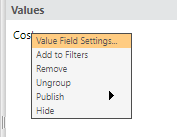
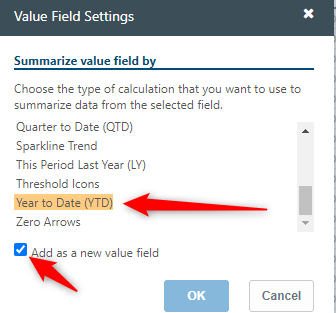
    You can certainly create a new metric, be it monthly or YTD.


    (Apologies if I'm stating the obvious :-O)


    #TBMStudio