Platform

Platform

A place for Apptio product users to learn, connect, share and grow together.

 View Only
Expand all | Collapse all

Columns missing from AWS import through Datalink

  • 1.  Columns missing from AWS import through Datalink

    Posted Tue August 06, 2019 07:12 AM

    We're trying to build out a report in Cloud Cost Management with the Invoice ID and Billing Period Info, but for some reason those columns aren't coming through on our Cost and Usage report data via Datalink.


    Our AWS Admins have told me the data is there and sent me this screenshot they took from the Raw file that is in the S3 bucket Datalink pulls from:
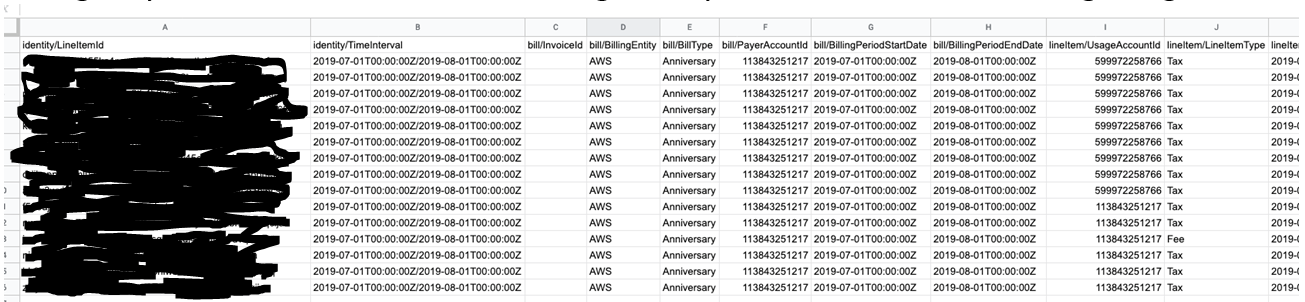
     

    Unfortunately these columns don't appear in Apptio in AWS Cost and Usage Report Raw.


    I can see the other columns that are on the screenshot, such as Payer Account ID, Usage Account ID etc. But nothing that starts "bill/"


    Has anyone else come across this/ can you see that data?


    Any help is appreciated. We really need this data in to help with internal accounting processes that Finance want to run through Apptio


    Thanks!


    #Platform


  • 2.  Re: Columns missing from AWS import through Datalink

    Posted Tue August 06, 2019 07:33 AM

    Oliver,


    I have asked this question to Randy Tennant, who has confirmed that while this information was both available (prior to the new Multi Cloud connector) and is included in the AWS Cost and Usage Report, Apptio Cloud does not allow users to access the data. The issue seems to be with the architecture and inability to pass additional data through the pre processor architecture.


    We need to put pressure on Apptio to allow additional data to be reported and included in Apptio Cloud.


    John Feore


    @Randall Tennant


    #Platform


  • 3.  Re: Columns missing from AWS import through Datalink

    Posted Tue August 06, 2019 08:50 AM

    Hi John,


    Thank you very much for the response. Good to know it's meant to happen but very annoying nonetheless. 


    #Platform


  • 4.  Re: Columns missing from AWS import through Datalink

    Posted Tue August 06, 2019 05:26 PM

    Oliver,


    I have a conference call with Randy in about 3 hours during which this will be significant topic of discussion and some other issues with R12.6 and Multi Cloud Connector eg must use ATUM v2 or v3 does not support ATUM v1, Tags not included, time zone issues, etc


    I will update your question after the meeting.


    John


    #Platform


  • 5.  Re: Columns missing from AWS import through Datalink

    Posted Thu August 08, 2019 06:13 AM

    Hi John, did you get any good updates on your call with @Randall Tennant? Thanks


    #Platform


  • 6.  Re: Columns missing from AWS import through Datalink

    Posted Thu August 08, 2019 01:28 PM

    Hi Oliver - Apptio does limit the columns that come through from the CUR as there are potentially a very large number of them and we normalize those fields into a common schema to be able to show a multi-cloud view.  We could add those two columns, but some minor code changes would be required.  I will put in a request with engineering team, but cannot commit to a specific timeframe as of now.


    #Platform


  • 7.  Re: Columns missing from AWS import through Datalink

    Posted Tue February 04, 2020 02:23 PM

    @Randall Tennant  Does the logic behind how the columns are limited impact how users are able to bring in tags?  When we moved to the multicloud connector, our tags were missing even though Apptio was importing the same CUR files from S3 as another cloud analysis application.  When I raised the issue with support, they weren't able to resolve at the time.  Is there a recommended fix for this now?


    #Platform


  • 8.  Re: Columns missing from AWS import through Datalink

    Posted Tue February 04, 2020 05:31 PM

    @Nancy Bugajski - The Multicloud connector is designed to bring in all the tags that are available in your CUR. So, if there is a tag or tags in your CUR that you're not seeing in the AWS Cost and Usage Report Raw dataset, please raise a support ticket.

    Note: While the Multicloud connector is designed to bring in all tag columns available in the AWS CUR, it does not necessarily bring in all the CUR columns as there can be several hundred columns and many are not needed within Apptio.


    #Platform


  • 9.  Re: Columns missing from AWS import through Datalink

    Posted Mon September 23, 2019 09:16 AM

    I'm very glad that we're still able to use the legacy cloud connectors as we use the invoice ID as part of our allocation from contracts


    #Platform


  • 10.  Re: Columns missing from AWS import through Datalink

    Posted Mon September 23, 2019 04:54 PM

    Oliver,


    You should check with your CSM, as we have been able to add the Invoice number and a small number of other fields to the MCC and Pre processor. While the discussion has been long the result is now great, as there are a number of reports that require the Invoice number.


    The result is we have the information we need and the impact on build times is minimal (for these additions).


    John


    #Platform


  • 11.  Re: Columns missing from AWS import through Datalink

    Posted Tue September 24, 2019 05:13 AM

    Thank you John, I had discussed adding the fields with Apptio support before, but was told they may be added to a later build. It’s good to know you managed to get them added. I may bring this up again if our finance team still have the requirements!


    Thanks again,

    Oli


    #Platform


  • 12.  Re: Columns missing from AWS import through Datalink

    Posted Tue February 04, 2020 08:35 AM

    Hi all,

    sorry for hijacking the discussion but I've stumbled across the same issue : while trying to analyze the Savings Plan within Apptio (and how we could follow/monitor them through the CUR), I noticed that a lot of columns aren't included. In our case everything under savingsPlan/ is required as well as the lineItem/LineItemType column.

    Shouldn't there be a possibility within the connector to chose which columns we require so that we can fit th import to our needs?

    Thanks in advance,

    David 


    #Platform