Platform

Platform

A place for Apptio product users to learn, connect, share and grow together.

 View Only
  • 1.  Adding Tables to a Model Report

    Posted 04/13/20 11:25 AM

    If a table is used for Column Mapping to Master Data- I can not build model on that table- that means I cannot add that table or any column from that table to my Model Report. Is this correct?


    #ATUM


  • 2.  Re: Adding Tables to a Model Report

    Posted 04/13/20 12:28 PM

    Hi Moncia,

    I'm not sure I'm understanding your question.  Are you saying that you want to be able to add columns from your raw data that are not mapped into your master data set into a Model report?   I can't really think why you'd want to do that.  A  model report is based on the model, including all of the allocations involved in the model, so I'm not quite clear on what you are trying to achieve. Can you provide a little more detail on what you are trying to do and why? 


    Also, this Ask an Instructor page is specfic to the courses.  It feels like this might be a more general question about your organization's specific model, so I'm going to go ahead and move it to the Q&A page where we can get some additional eyes and feedback for your question.


    If it is specific to an Apptio Course, please let me know and I'll move it back.


    Kind regards,

    Debbie


    #ATUM


  • 3.  Re: Adding Tables to a Model Report

    Posted 04/13/20 12:42 PM

    Hi Debbie,


    Thanks for responding. Let me rephrase my query.


    Note: It might not have any business benefit, but I am just trying out things.... to understand what is possible and what isn't while building Model reports.


    So, you see I am building a model..
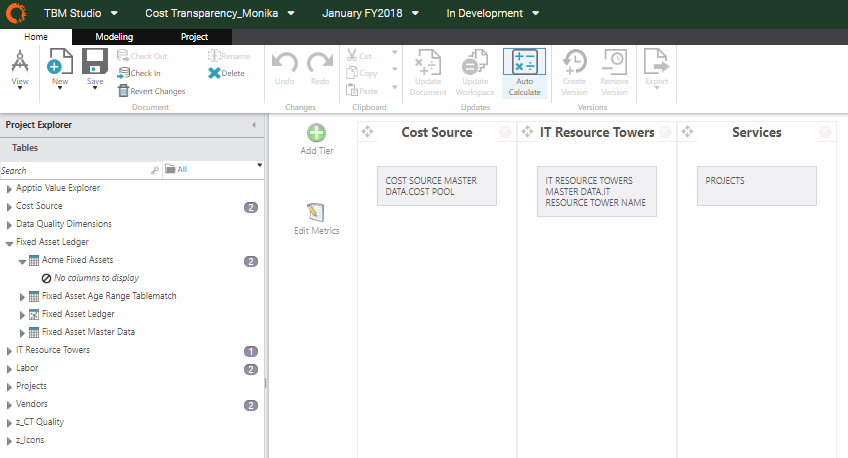
     

    where I want to add a column from a table- Acme Fixed Assets. But it says - No columns to display.

    Also, if I try adding entire table - Acme Fixed Assets into my model report. It gives an error- 'This table is not modeled. You need to add a model step.'


    So I go to my table and try adding a model step. But here is what it shows to me- 'Step not compatible to your pipeline.'
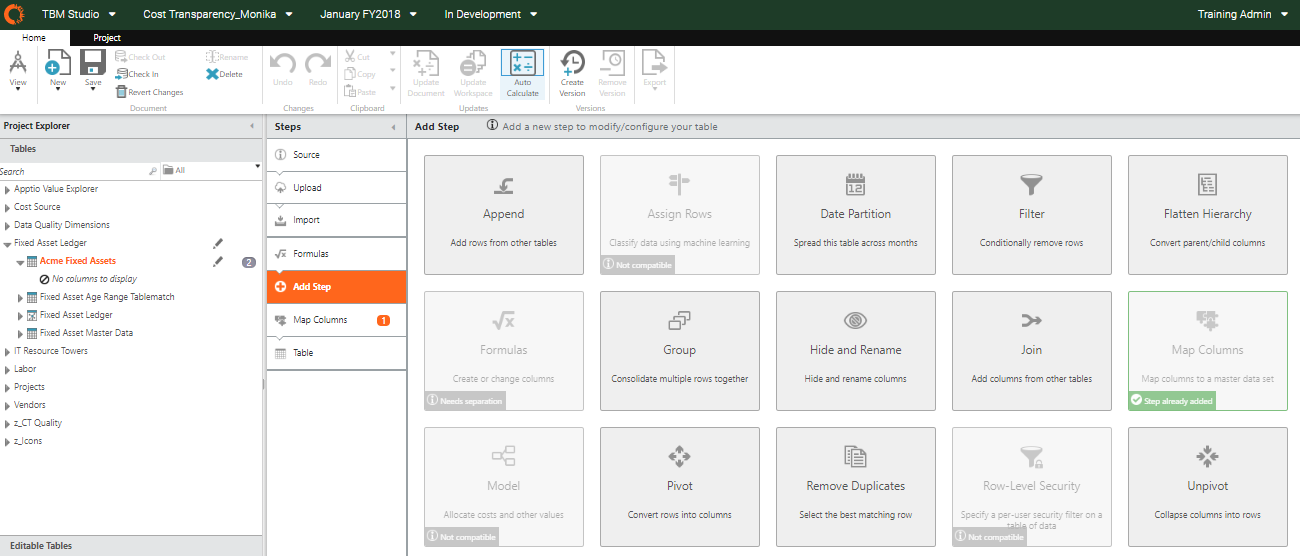


    So I tried couple of other tables and realized, all the tables where I have used the 'Map Columns' step, 'Model' step is incompatible, while I am able to add 'Model' step to other tables like below-
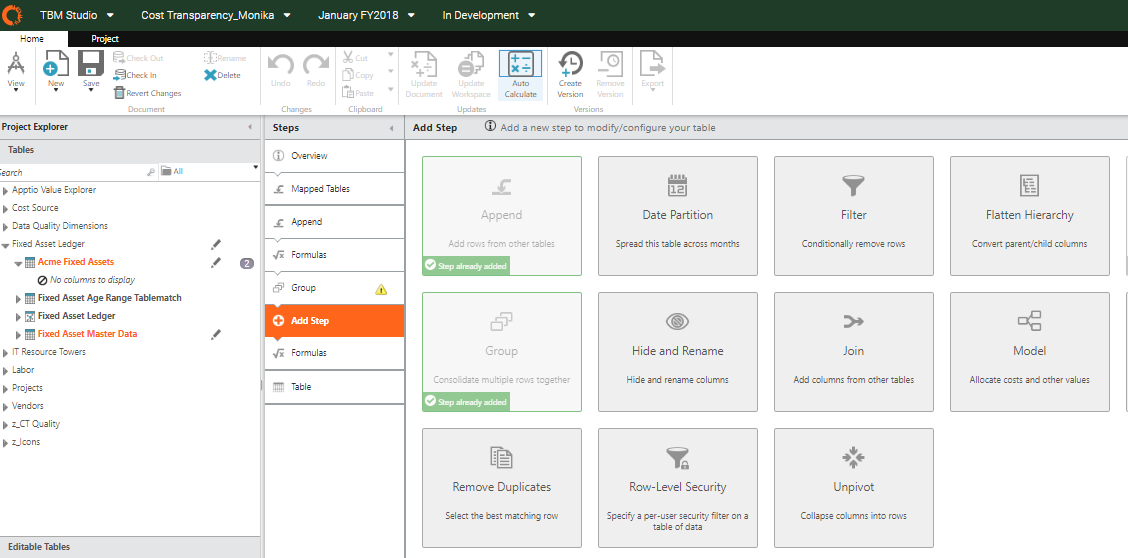


    So--- once again....my question is


    'Is it like, if a table has 'Map Columns' step in its transformation pipeline, the 'Model' step is incompatible?


    Hope this gives a clear idea of what my doubt is.


    Thanks!


    #ATUM


  • 4.  Re: Adding Tables to a Model Report

    Posted 04/15/20 02:20 PM

    Hi Monika,

    Sorry for the delay in responding.  I believe that is an intentional guardrail, but I'm trying to get a response as to why.  The net is, that you can't do it but I'm trying to get you an answer for the reason behind that. 


    Additionally, I can't think of a business value for creating a model report on a raw data set.  Model reports are intended to show how the value moves through the model accounting for all the allocations and calculations. If you are just adding a model step to a raw data set so you can put it in a model report, there isn't really any model flow that's happening. Those Raw data sets are mapped to the master data sets, which feed the model, which is what we're trying to report on in a model report.


    I am still trying to get a response as to whether there is a technical reason for this and will respond with what I find out.  Thanks for your patience.


    Cheers,

    Deb


    #ATUM