With the new IBM RPA version 30.0.1, the Execute Script command allows you to load and run another script synchronously within the flow of your current automation. With it, you can execute both local scripts and scripts stored in an IBM RPA tenant, making it easier to modularize and reuse logic across your bots.
Automatic Parameter Preloading
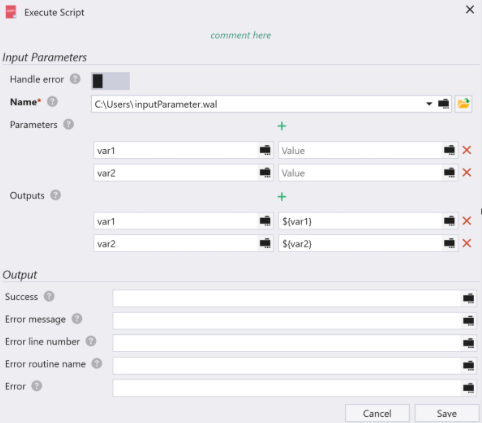
If the referenced script contains input parameters, the IBM RPA Studio now automatically loads those parameters for you. Instead of manually adding them, all you need to do is assign values.
The same improvement also applies to output parameters.
This enhancement not only speeds up the setup process but also helps prevent errors caused by missing or incorrectly named parameters.
New Input and Output Validations
To further improve reliability, the command now includes additional validations for both input and output parameters.
Input Parameter Validations
- The parameter name must exist in the selected script.

- Parameter names must be unique.

Even though parameters are preloaded automatically, you can still edit them if needed. These validations ensure that changes don’t introduce issues like typos or duplicate names.
Output Parameter Validations
- The parameter name must exist in the selected script.

- Parameter names must be unique.

- Each parameter must be assigned a value, and that value must be a variable.

- The variable type must be Text or match the parameter type defined in the selected script.

These checks prevent both naming errors and type mismatches, helping you ensure that the receiving variables can properly store the returned values.
By streamlining parameter handling and adding smart validations, the updated Execute Script command makes your automations more robust, organized, and efficient.