IBM Watson® Machine Learning Accelerator for Cloud Pak for Data provides IBM Watson Machine Learning Accelerator within IBM Cloud Pak for Data.
IBM Watson Machine Learning Accelerator is an end-to-end, deep learning platform for data scientists. This includes the complete lifecycle management from installation and configuration; data preparation; building, optimizing, and distributing the training model; to moving the model into production. WML Accelerator enables you to iterate through the training cycle on more data to continuously improve the model over time.
For multiple organizations or users, IBM Watson Machine Learning Accelerator support multi tenancy and resource management, such as:
- Design multiple resource limitation for each organization or user or workloads.
- Separate storage for each organization or user.
- Resource reclaim between different organization or user.
- Resource metering show for multiple organizations or users.
- And so on.
1. Instance Level for Resource Limitation
Normally, one cpd cluster have one wmla instance which installed in a namespace, user can set resource quota or resource limit range for the wmla namespace. For example:
Resource Quota
apiVersion: v1
kind: ResourceQuota
metadata:
name: quota-test
namespace: test
spec:
hard:
requests.cpu: "2"
requests.memory: 2Gi
limits.cpu: "4"
limits.memory: 4Gi
requests.nvidia.com/gpu: 4
pods: "3"
services: "6"
Limit Range
apiVersion: v1
kind: LimitRange
metadata:
name: lr-test
spec:
limits:
- type: Container
max:
cpu: "1"
memory: "1Gi"
min:
cpu: "100m"
memory: "100Mi"
default:
cpu: "900m"
memory: "800Mi"
defaultRequest:
cpu: "200m"
memory: "200Mi"
maxLimitRequestRatio:
cpu: 2
memory: 1.5
- type: Pod
max:
cpu: "2"
memory: "2Gi"
- type: PersistentVolumeClaim
max:
storage: 2Gi
min:
storage: 1Gi
2. Application level and User level for GPU ratio and limit
WMLA provide resource plan for resource usage. The resource plan specifies how resources are allocated between projects or users within the namespace.
WML Accelerator provides GPU resource sharing enforcement by setting the share ratio and limit for the resource plans within a cluster.
Resource sharing refers to the temporary allocation of unowned resources from a share pool or cluster to a project with an unsatisfied requests. You can configure resource sharing for your projects or users by setting the share ratio, which specifies the ratio of resources to be allocated from the share pool or cluster, and the limit, which specifies the max limitation of resources to be allocated from the share pool or cluster.
Application level
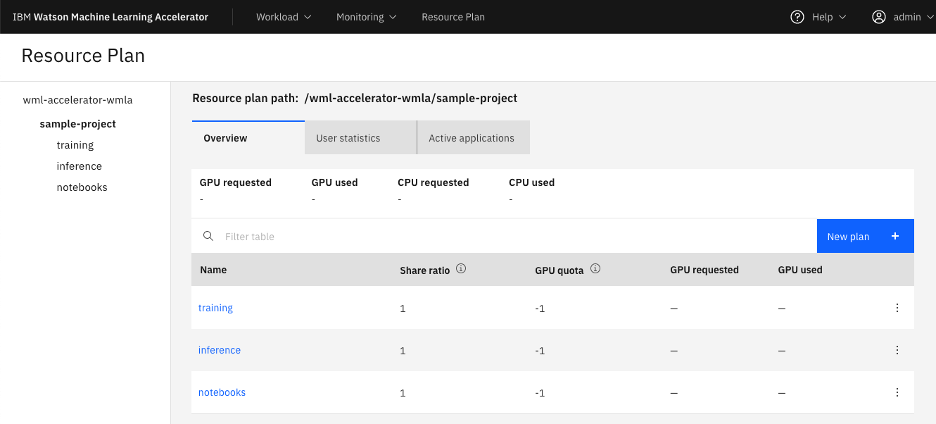
By default, wmla provided a sample-project resource plan, and training, inference, notebooks under this resource plan to distinguish different types of applications.
User can specify their own resource plan for different applications. For example, user create a new resource plan project1, and dev-team, qa-team, support-team under it. Then dev, qa, support team has a 4:2:2 share of the resource distribute to its parent project1. Assuming all teams have the same number of requests, dev team will receive the most number of resources. And since GPU quota setting, dev-team can get 4 GPUs at the most, while qa-team and support-team only can get 2 GPUs at the most.
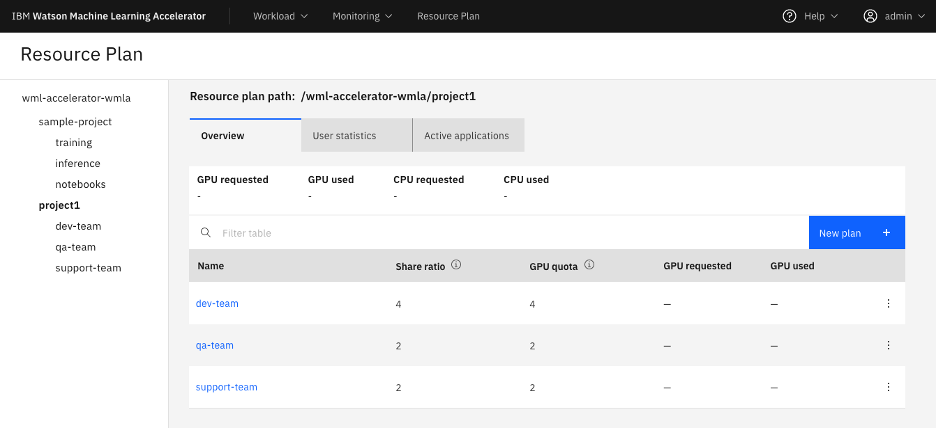
For example, user submit a training using resource plan qa-team with a request of 4 GPUs, then it failed since GPU limit. User submit a training using resource plan dev-team with a request of 4 GPUs, then it can finished.
python ./dlicmd.py --exec-start PyTorch --consumer /wml-accelerator-wmla/project1/qa-team --rest-host <wmla-host> --rest-port -1 --workerDeviceNum 4 --cs-datastore-meta type=fs,data_path=msdtool/ --appName pytorch-mnist-gpu --model-dir models/pytorch_mnist --model-main main.py --batch-size 64 --epochs 4
...
The consumer node is already using or reserving more GPU resources than is allowed in its run pod quota policy;
python ./dlicmd.py --exec-start PyTorch --consumer /wml-accelerator-wmla/project1/dev-team --rest-host <wmla-host> --rest-port -1 --workerDeviceNum 4 --cs-datastore-meta type=fs,data_path=msdtool/ --appName pytorch-mnist-gpu --model-dir models/pytorch_mnist --model-main main.py --batch-size 64 --epochs 4
...
FINISHED.
User level
For each resource plan, wmla will add username at the end of resource plan automatically to distinguish different user. It depends on your logon user. All users’ share ratio is 1:1 by default.
python ./dlicmd.py --logon --rest-hosts <wmla-host> --rest-port -1 --username user1 --password user1pwd --debug-level info
python ./dlicmd.py --exec-start PyTorch --consumer /wml-accelerator-wmla/project1/dev-team --rest-host <wmla-host> --rest-port -1 --workerDeviceNum 4 --cs-datastore-meta type=fs,data_path=msdtool/ --appName pytorch-mnist-gpu --model-dir models/pytorch_mnist --model-main main.py --batch-size 64 --epochs 4
Then the real resource plan is /wml-accelerator-wmla/project1/dev-team/user1
Reclaim
WMLA also support reclaim mechanism. If reclaim is triggered, a child resource plan takes back its requested number of resources in use by other projects, up to its planned share. For example, if a child project is experiencing an unmet demand, it reclaims resources directly from another child resource plan who is using more than its planned share of resources.
The first child resource plan reclaims without consideration of the needs or planned share ratio of the second project. The first child resource plan does not care if the project that it reclaims from falls below the project's deserved number of resources.
Submit jobs with different resource plan or different user will trigger reclaim.
For example, there are 4 GPUs totally in an env, user1 submit job1 which request 4 GPUs, and it will occupy the whole 4 GPUs. Then user2 submit job2 which also request 4 GPUs using same resource plan, then job2 will reclaim 2 of 4 GPUs since different user’s share ratio is 1:1.
3. Storage level for data separation
WMLA provide access control by storage level for each user. WMLA will create new directory for each user, when job submitted, the running pod only mount the user directory, for example, user1 submit a job, then the pod only mount /gpfs/myresultfs/user1, user1 can not see the files for other users.
# pwd
/gpfs/myresultfs
# ls -l
drwxr-xr-x 3 1000850000 1000850000 17 Jul 16 12:58 user1
drwxr-xr-x 3 1000850000 1000850000 17 Jul 16 12:58 user2
drwx------ 10 1000850000 1000850000 138 Jul 30 02:47 admin
drwxr-xr-x 3 1000850000 1000850000 29 Jul 16 04:00 enterprise_gateway
drwxr-xr-x 2 1000850000 1000850000 63 Aug 3 02:27 jupyterhub
4. Multiple Metering for different resource request and usage
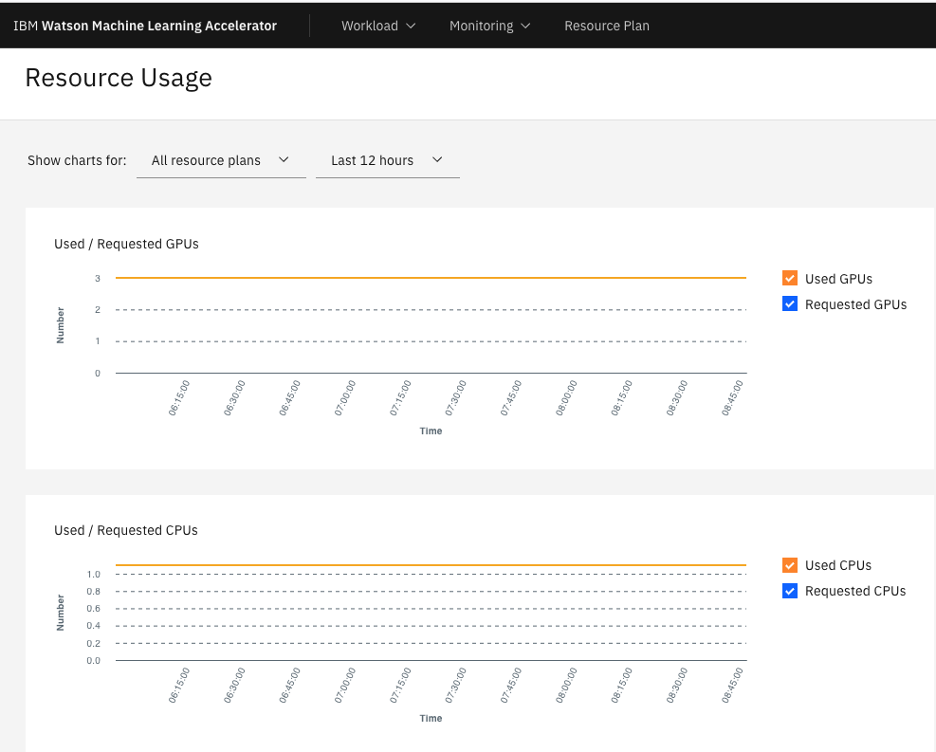
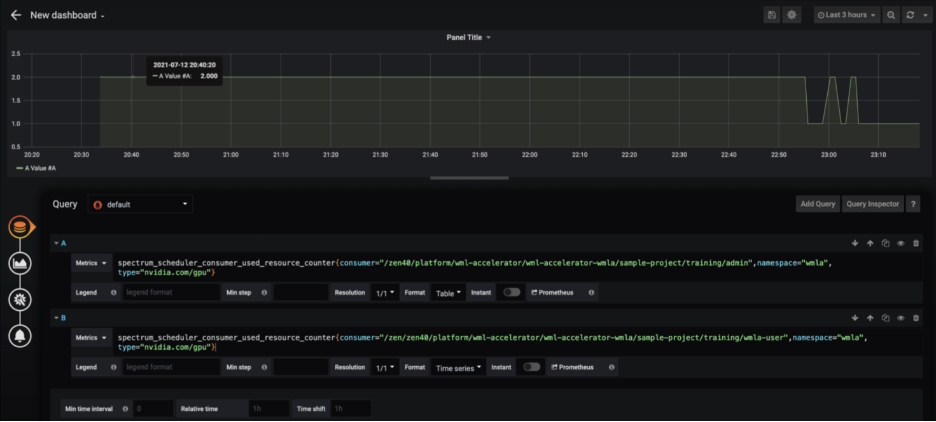
Resource usage is available in chart format showing the requested and used CPU and GPU resources. Charts can be adjusted to show data based on resource plan or specific period of time.
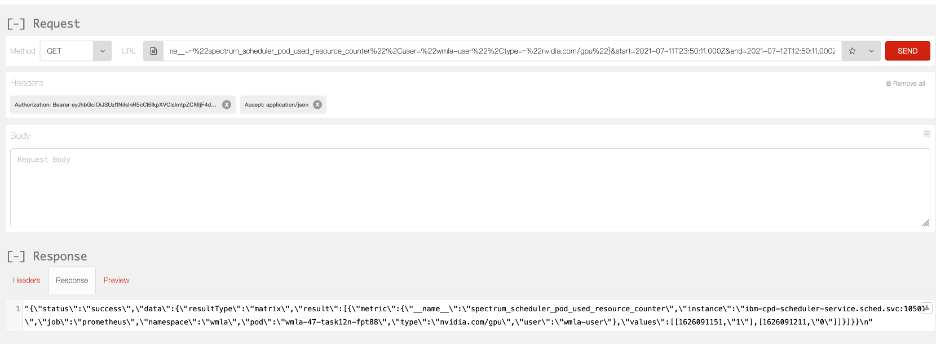
User can get the result from wmla GUI or restful API or Grafana GUI.
WMLA GUI
Restful API
Grafana GUI
5. Reference
Resource plan guide
https://www.ibm.com/docs/en/wmla/2.3.0?topic=resource-plan
Resource usage guide
https://www.ibm.com/docs/en/wmla/2.3.0?topic=monitoring-monitor-resource-usage
#CloudPakforDataGroup