Originally posted by: Ajith Shanmuganathan
Platform Symphony MultiCluster is a feature of Platform Symphony Advanced Edition, which links several Platform Symphony clusters to provide the following capabilities:
· Workload placement to multiple clusters
· Centralized resource and workload monitoring to manage clusters
· Ability to move compute hosts from one cluster to another
This article describes the improvements to the workload placement component of the Platform Symphony 7.1.1 MultiCluster feature. The workload placement component allows Platform Symphony clients to submit sessions to different clusters based on a user-defined policy.
Improvements
In Platform Symphony 7.1.1, workload placement has improved in two ways:
- The addition of a policy framework, which allows administrators to customize cluster selection based on filters and ranking rules.
- The ability for each application to be associated with a different policy.
Client configuration
The workload placement component allows a Platform Symphony client to create a session on any cluster managed by Platform Symphony MultiCluster, without the need of modifying of recompiling code. You configure workload placement with two environment variables set in the client environment:
- SMC_GLOBAL_PLACEMENT=enabled|disabled
- SMC_MASTER_CLUSTER_URL=master_list://host_name:port
The first variable enables workload placement, and the second one identifies the Platform Symphony MultiCluster cluster.
The placement policy is configured in the Platform Symphony MultiCluster GUI (management console) by an administrator and cannot be controlled from the client.
Basic flow
A client connects to the Platform Symphony MultiCluster master and requests a session placement decision. The master evaluates the policy for the application and provides a ranked list of cluster URLs to the client. The client then connects to the first available cluster and submits sessions. The session ID is loaded with the cluster name, which tells the client which cluster is processing the session. The placement decisions are based on cluster metadata and data sampled from the Platform Symphony clusters.
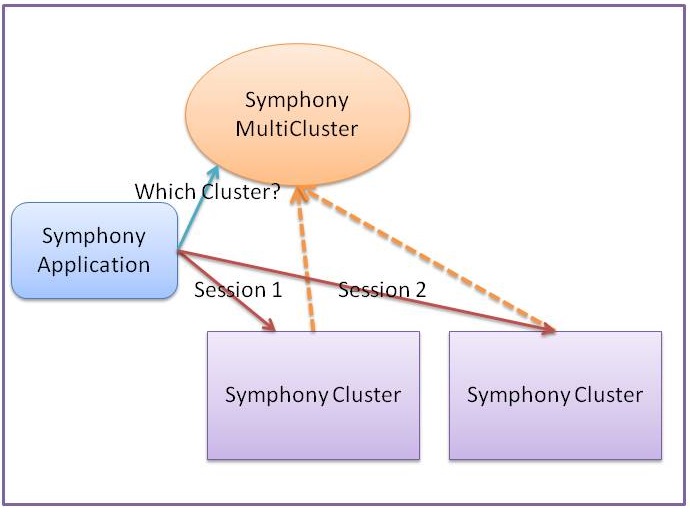
Both GUI and CLI are available for administrators to configure and manage the placement policy.
Prerequisites
The application must be deployed and enabled on all required clusters. Platform Symphony MultiCluster considers an application with the same name on different clusters as the same application for placement purposes. The workload submission user’s credentials must be synchronized on all target clusters.
Policy framework
The workload placement framework allows an administrator to assign an application to a specific policy. An application can only be associated with one policy.
The policy finds a cluster based on the following rules:
1. [A cluster attribute such as cluster name, data center name, data center location set to a specific value] and
2. [A cluster sampled metric such as done tasks per minute, that meets a specific condition] and
3. [A cluster ranking based on a static cluster preference list] and
4. [A cluster ranking based on a sampled metric such as active tasks drain time]]
Rule type 1 is a static filter. Rule type 2 is a dynamic filter or cluster “full” condition. Rule type 3 and 4 are ranking rules.
The static cluster preference list can be split into a primary cluster group and secondary overflow cluster group. Each group is considered in order. After rule processing, if the first group has no clusters remaining after filtering, the overflow group is considered.
Clusters can be located on-premises or in the cloud. On-premises clusters can be both local to the submission client’s datacenter or in a remote data-center.
Scenarios
The following are some common scenarios for workload placement:
1. An application administrator can provide a ranked list of clusters for the application. If the first cluster in the list is offline, the next cluster will be used.
2. An application administrator can configure an application to distribute sessions across multiple clusters using round-robin sequence.
3. An application administrator can configure an application to use an on-premises cluster until it is busy, and then use another cluster which could be on the cloud until the first cluster is less busy.
Summary
The workload placement component of Platform Symphony MultiCluster allows an application to send sessions to more than one cluster based on a configurable policy. This allows an application to be more fault tolerant and to effectively use idle compute resources on multiple clusters in parallel.
More information can be found in IBM Knowledge Center.
#SpectrumComputingGroup