Originally posted by: ChristineLi
Have you ever used a manual page to check the information about XL compiler commands? If not, we bet you would love to give it a try after you learn about it here.
What are XL compiler manual pages
The XL compiler manual pages are available on the AIX or Linux system where you run the compiler. You can find the manual pages for the following two types of commands:
- Compiler invocation commands: xlc, xlC, xlf, etc. where the following sections are available:
- A list of all compiler invocation commands
- Name
- Syntax
- Supported language standards
- Usage
- A list of all compiler options
- Name
- Syntax
- Supported suboptions
- Purpose
- Default
- Utilities: showpdf, CreateExportList, urt, etc. where the following sections are available:
- Name
- Syntax
- Purpose
- Supported options
What do manual pages look like
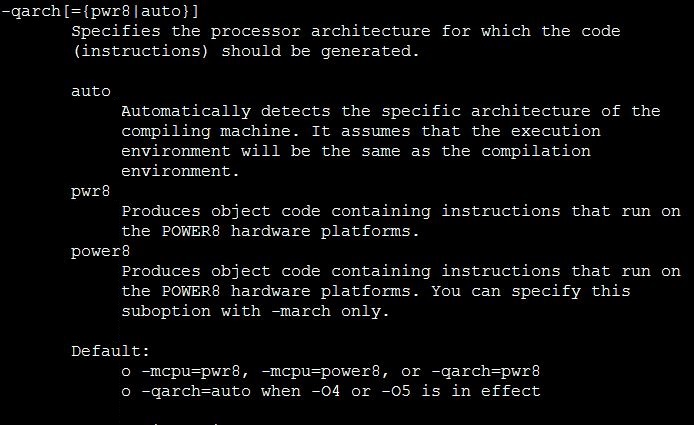
Manual pages are in plain text format. Indentation is used to improve readability.
In manual pages for invocation commands, compiler options are categorized by their purposes, such as output control and optimization. As for each option, you can find all the supported suboptions there.
Below is an example of the description of one option.
How to invoke manual pages
You can view the manual pages by issuing the following command:
man <command>
Command is one of the following commands:
- Any compiler supported invocation commands
- cleanpdf
- showpdf
- mergepdf
- xlc_configure or xlf_configure (Linux only)
- CreateExportList (AIX only)
- urt (AIX only)
- xlcndi, xlCndi, xlfndi (AIX only)
- gxlc (XL C for AIX only)
- gxlc++ (XL C/C++ for AIX only)
- c++filt (XL C/C++ for AIX only)
- linkxlC (XL C/C++ for AIX only)
- makeC++sharedLib (XL C/C++ for AIX only)
Alternatively, to view the manual page for a compiler invocation command, you can also use the –qhelp compiler option:
<compiler_invocation_command> -qhelp
Note: You must enable manual pages first before viewing them. Find detailed procedure in the reference section below.
Reference
How to enable manual pages
You must add the full directory path to the MANPATH environment variable to read the compiler-supplied manual pages.
On Linux
The command that accomplishes this depends on the Linux shell that you are using.
- To set the MANPATH environment variable using the Bourne, Korn, or BASH shell, use the following command:
export MANPATH=<installation_path>/<xlC/xlf>/<v.r.m>/man/<LANG>:$MANPATH
- To set the MANPATH environment variable using the C shell, use the following command:
setenv MANPATH <installation_path>/<xlC/xlf>/<v.r.m>/man/<LANG>:$MANPATH
Where LANG is any of the following supported locales:
- en_US
- EN_US
- ja_JP
- JA_JP
- Ja_JP
- zh_CN
- ZH_CN
- Zh_CN
On AIX
Run the following commands:
MANPATH=$MANPATH:/opt/IBM/<xlc/xlC/xlf>/<v.r.m>/man/<LANG>
export MANPATH
Where LANG is any of the following supported locales:
- en_US.utf8
- en_US.UTF-8
- en_US
How to find information in manual pages
Manual pages are in plain text format so you can search for any string and then locate the occurrences. Here are some useful hot keys:
- /string: Search for string downwards
- ?string: Search for string upwards
- n: Find the next occurrence
- N: Find the previous occurrence
#IBM-XL-C,-C++,-and-Fortran-Compilers-for-POWER-servers-blog#C/C++andFortran