Originally posted by: Shinnosuke Okada
 Are you thinking of adopting Apache Spark but you do not know how you can integrate with the existing security framework? Or are you an existing user of Apache Spark who is only looking for multi-tenancy and management capabilities offered by IBM Spectrum Conductor with Spark, and want the same open-source feel to your Spark cluster? With IBM Spectrum Conductor with Spark v2.2.1, setting up a Spark cluster of your desired security settings for users is easier than ever.
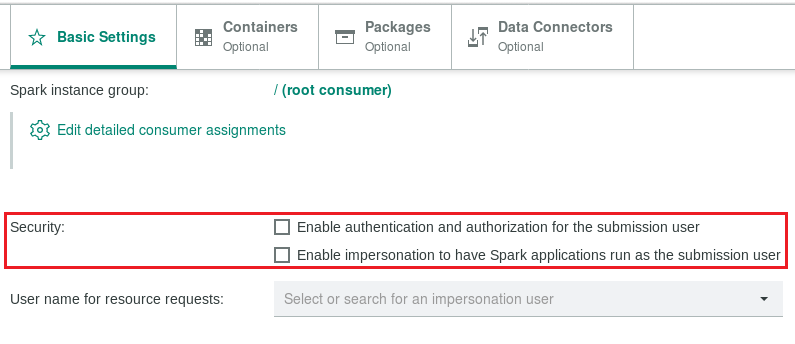
With prior versions of IBM Spectrum Conductor with Spark, security settings for users were found in different configuration parameters. Now, with IBM Spectrum Conductor with Spark v2.2.1, it is as simple as configuring the desired cluster-wide authentication protocol, and selecting or unselecting two check-boxes in the cluster management console when you create or modify a Spark instance group.
Scenario 1
You are new to both Apache Spark and Spectrum products, and are looking for a quick solution to have a Spark cluster that integrates with the existing Kerberos framework at a company.
- Integrate IBM Spectrum Conductor with Spark with the existing Kerberos framework by configuring the EGO security plug-in, namely the sec_ego_gsskrb plug-in, which controls the Kerberos authentication within the IBM Spectrum Conductor with Spark cluster. Details are available in the following documentation: https://www.ibm.com/support/knowledgecenter/SSZU2E_2.2.1/managing_cluster/kerberos_client_container.html
- When you are creating or modifying a Spark instance group, perform the following:
- In the Basic Settings tab, select Enable authentication and authorization for the submission user. This enables authentication by using the integrated Kerberos framework, and authorization with our role-based access control. Remember to assign an appropriate role to users or else you might encounter permission issues.
- Leave Enable impersonation to have Spark applications run as the submission user unselected. Without impersonation, Spark applications run as the consumer execution user for the driver and executor, which provides Spark instance group administrators more file system access control by restricting the workload execution user.

Scenario 2
You are thinking of migrating from open-source Apache Spark to simply benefit from multi-tenancy and management capabilities that are offered by IBM Spectrum Conductor with Spark. Looking for a Spark cluster where users have full control over workload execution, rather than having a designated workload execution user.
- When creating or modifying a Spark instance group, perform the following:
- In the Basic Settings tab, leave Enable authentication and authorization for the submission user unselected. If authentication and authorization are disabled, the Spark master trusts all specified users and accepts any workload submissions.
- Select Enable impersonation to have Spark applications run as the submission user. By enabling impersonation, Spark applications run as the submission user, which provides users full control over workload execution.

Scenario 3
You are a Spectrum product user that is familiar with the concept of consumers, and you are looking for a smooth transition from existing Spectrum products to tap into the capabilities of Apache Spark.
- Choose and configure an appropriate EGO security plug-in to set the cluster-wide authentication protocol.
- When creating or modifying a Spark instance group, perform the following:
- In the Basic Settings tab, select Enable authentication and authorization for the submission user. With authentication and authorization enabled, the Spark instance group should provide the same user experience as other Spectrum products where logins are required.
- Leave Enable impersonation to have Spark applications run as the submission user unselected. Without impersonation, workload execution is controlled by consumers.

The examples above show how easily and quickly you can get started with a Spark cluster of your desired security settings for users. If you are interested in learning more, be sure to check out our documentation here!
You can download an evaluation version of IBM Spectrum Conductor with Spark v2.2.1 here. If you have any questions about our product or about Spark instance group security settings, post them in our forum or let us know using our Slack channel!
#SpectrumComputingGroup