Originally posted by: DonBis
 The Apache Zeppelin 0.7.0 notebook is now available for integration with IBM Spectrum Conductor with Spark 2.2.0.
The Zeppelin 0.7.0 release focuses on pluggable visualization and better interpreter support. Zeppelin 0.7.0 can be used with all supported Spark versions in IBM Spectrum Conductor with Spark 2.2.0: Spark 1.5.2, 1.6.1, 2.0.1, and 2.1.0 (download here).
Downloading Zeppelin 0.7.0
To try out Zeppelin, download the notebook package from IBM Fix Central and follow the instructions in the Readme file.
Adding a notebook package
IBM Spectrum Conductor with Spark 2.2.0 includes Zeppelin 0.5.6, however you can add new notebook packages by following the instructions described here:
- Log into the cluster management console and navigate to Workload > Spark > Notebook Management.
- Click Add, then select the Zeppelin 0.7.0 package that you downloaded.
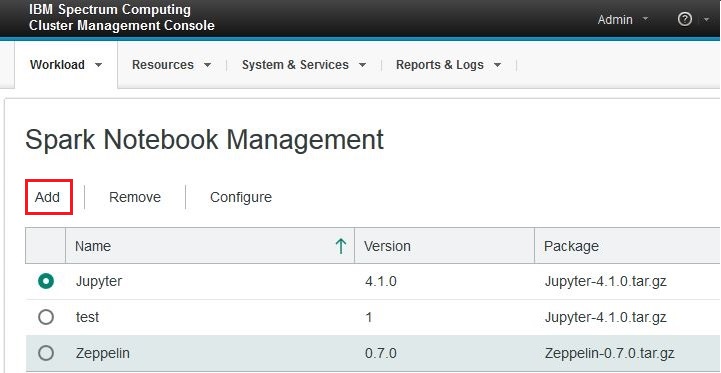
- Enter the required fields in the Deployment Settings tab.
- Under the Environment Variables tab, click Add a variable and specify the supported_spark_version variable to be one of the following options:
- Specify a single Spark version to use that Spark version with the notebook (for example, "1.5.2")
- Specify multiple Spark versions separated by a comma to use those Spark versions with the notebook (for example, "1.5.2, 1.6.1, 2.0.1")
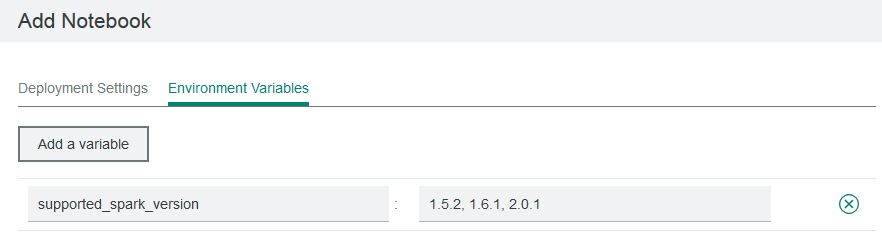 Note: Do not specify this variable if you want to use all available Spark versions with the notebook.
- Click Add.
Once the package is added, the Apache Zeppelin 0.7.0 notebook is available to use with Spark instance groups in IBM Spectrum Conductor with Spark. For more information on adding notebook versions, see Adding notebooks in the IBM Spectrum Conductor with Spark Knowledge Center.
If you are interested in trying IBM Spectrum Conductor with Spark 2.2.0, you can download an evaluation version here.
If you have questions about this blog post or our product, please comment below, post in our forum, or join us on Slack!
#SpectrumComputingGroup