By:Ratnaker Katipally
This article describes the technical detail of PowerVM remote restart feature provided by PowerVC v1.2.3. For an overview of remote restart, see Remote restart overview.
The sections that follow provide a description remote restart status, state transition during remote restart, handling remote restart failure and cleanup after successful remote restart of a virtual machine (VM).
The PowerVC Remote Restart feature provided is implemented via POWER8 Simplified Remote Restart. With POWER8 Simplified Remote Restart , current configuration of the partition along with partition state data is collected and persisted on the HMC automatically and stored in the data and configuration file.
The implementation and technical details are described in the Simplified Remote Restart White Paper. This article will include some key information. However, for more details, please refer to the white paper.
Simplified remote restart data and configuration file:
It is important to know that all remote restart operations are dependent on an HMC configuration file that is created for each VM that has remote restart enabled.
The configuration file specific to the VM is kept under the /data/srr/<cecid>/<vm_uuid> directory. The HMC updates the file at regular intervals so the VM profile data is maintained upto date . Configuration information includes partitions network, storage, memory, processor and adapter information as part of the partition profile. This is the critical file for remote restart of the VM.
For example:

.data and config.xml contains the specific VM profile data and configuration information.
This configuration file is created only for the partitions with simplified remote restart property enabled. The partition profile in the configuration file is periodically updated. To ensure that the partition updates are made, the RMC connection for both the VIOS and partition must be running., The data persisted on the HMC is updated automatically for any configuration change when the RMC connections are configured and active.
The user has the flexibility to disable Simplified remote restart to improve the performance of the HMC, as it will reduce the profile update calls from the HMC to the VIOS but would lose updates to LPARs in the event of a remote restart.
PowerVC UI Remote restart status and troubleshooting :
The VM is eligible for remote restart only if the remote restart status is 'remote restartable'.
Remote restart state not only displays the status but also indicates the eligibility of the VM for remote restart. The VM is not eligible for remote restart if the VM is in any of the below states. User should make sure the VM is in 'remote restartable' remote restart state, by using the remedies mentioned below for each ineligible remote restart state.
Following are the common remote restart states seen in the PowerVC user interface:
Please refer to HMC documentation for other remote restart states not listed above.
If the remote restart state of the VM is either 'Partial Update' or 'Local Data Invalid' it indicates the configuration data persisted on the HMC is out of sync with the current configuration of the VM, then one of the above corrective actions is necessary. After the corrective action is complete, the refdev command should be run to manually update (re-synchronize) the persisted configuration information. Similarly, if any configuration changes related to the client VM are performed directly on the VIOS, the persisted configuration information needs to be updated manually using the refdev command to be run on HMC.
Usage: refdev [ m <managed system> ] [ p <VM name> | id <VM ID> ] [ w <wait time> ]
How remote restart works:
If the source host is down and in “power-off”, “error” or “error-dump in progress” status on HMC, a user can invoke remote restart of the VM or host level remote restart.
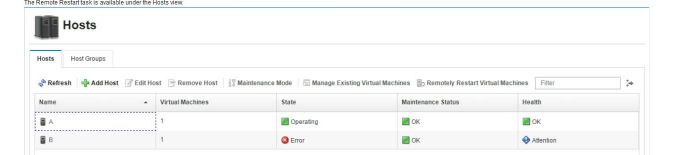
Host level remote restart invokes remote restart of each VM after the PowerVC scheduler chooses a destination host or a host specified by the user. The scheduler considers the available resources, remote restart capability, and storage connections as the filters along with existing placement policies and filters to choose the destination host. No more than 10 parallel remote restart operations are concurrently active on the source host and no more than 4 concurrent remote restart operations are active on any particular destination host (current PowerVM hypervisor restriction).
As the HMC receives the remote restart request for the VM, it creates a new VM on the destination host and applies the configuration on the VM on the destination host. It creates the VM with same name and unique ID on the destination host with the same configuration.
The state transition of the VM on PowerVC:
“Remote Restart Error”
This state means that at least one of the resident VMs could not be remote restarted. The user will need to diagnose the problem and initiate another host level remote restart once the problem is resolved; refer to /var/log/nova/nova-ibm-ego-ha-service.log for details.
The below state transitions are used for programmatic validation of VM remote restart in PowerVC, and user can monitor the remote restart process by viewing remote_restart_status for the VM on the source host and destination host on the HMC console.
The transition of remote_restart_status on the source host:
remote restartable
source remote restarting
remote restarted
The transition of remote_restart_status of the VM on the destination host:
The VM on the source host is eligible for cleanup if the VM is in “remote restarted” status.
If remote restart fails:
If remote restart fails, PowerVC recovers the VM and the VM will be back in “remote restartable” state on the source host. User is notified with the failure reason however parallely recover operation for the VM is performed. If the remote restart process is taking longer than expected—e.g., the operation times out, PowerVC aborts the operation and recovers the VM. Once the VM recovered, it exists on source host and will not be on the destination host.
Cleanup post remote restart:
During the remote restart, PowerVC unmaps any vSCSI-connected volumes from the source host and maps the volumes on the destination host. If the VM is in “remote restarted” state on the source host, once the source host is back up and running, a periodic task from PowerVC deletes all the remote restarted VMs one by one. The periodic task time interval can be configured using inventory_instances_interval. The default is 120 seconds.
For VMs with vSCSI-connected storage, the leftover hdisks are also removed in the same periodic task.
The Remote Restart capability can provide a simple way to recover from physical host failures.
For more information please reach out to,
Christine Wang ( ijuwang@us.ibm.com )
Joseph Cropper ( jwcropper@us.ibm.com )
Ratnaker Katipally ( ratnaker.katipally@in.ibm.com )