- How do I login?
- How do I change my time zone?
- How do I view my transcript?
- How do I register for a course?
- How do I view the Instructor-led courses I am registered for?
- How do I reschedule a session?
- How do I join a Virtual Instructor Led Training session (via Zoom)?
- What do the green dots in my course outline show?
- What is a passing score for the ACP exams?
- How long do I have to complete an ACP exam?
- I have significant experience with the product already, can I go straight the exam?
How do I login?
- Navigate to education.apptio.com
- If you already have access, login via the link in the upper right corner.
- If you do not already have access, you will be able to register and request access.
How do I change my time zone?
- The system will automatically detect the time zone you are in, allowing Virtual Instructor Led Trainings to reflect in your time zone as well.
How do I view my transcript?
- From your Dashboard, you will see your name in the right hand corner, click the carrot to expand the section and view your Transcript. This will show all completed training material, as well as any earn certificates.

- To see your training Activity, you can scroll down to the Activity section and expand it to see:
- any completed content

- any scheduled instructor led trainings

- any Learning Paths you are enrolled in

- any Certificates you have earned

How do I register for a course?
- Click into your learning path, for example Apptio Certified Practitioner: ApptioOne Learning Path
- You are able to select Start Course, or if it is an instructor led training you are able to select Select Session
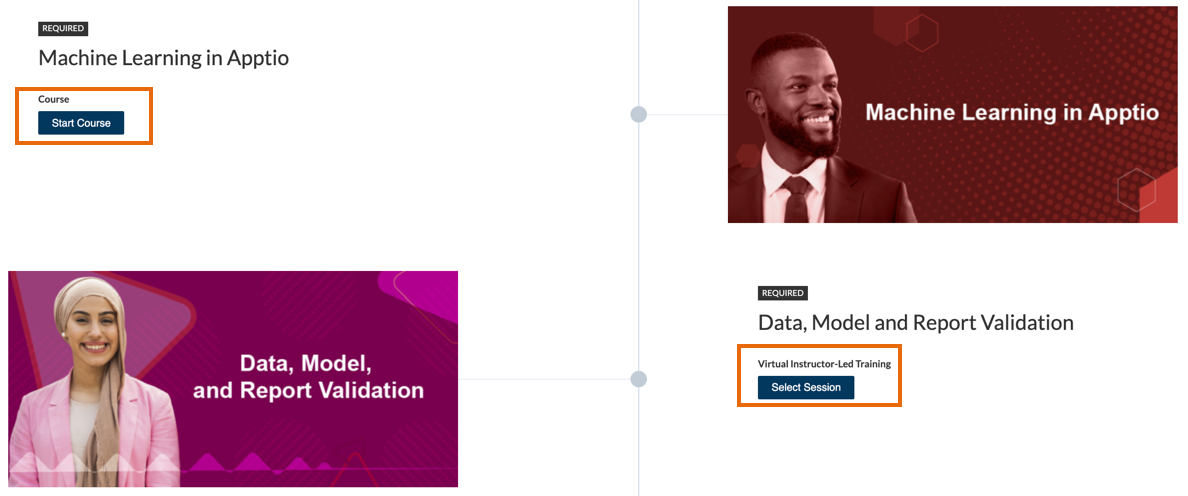
- For Instructor Led Trainings, you will see the list of available sessions --> click on the session you wish to register for.
If you do not see the option to start course or select a session you have not completed the required pre-requisites to start the course.
How do I view the Instructor-led courses I am registered for?
- From your Dashboard, scroll down to Activity, click into Events.
How do I reschedule a session?
- From your Dashboard, scroll down to Activity, click into Events.
- Under the course you are attempting to reschedule, select the Reschedule option then click on the session you wish to register for.

How do I join a Virtual Instructor Led Training session (via Zoom)?
- You can join by clicking into the Learning Path, navigating to the course and selecting Start Virtual Instructor-Led Training

- OR you can join by clicking into the Activity section of your Dashboard, clicking into Events, and selecting Continue for the course

- Once you have clicked into the course, you will see any course materials on the left-hand side as well as the meeting for the training. There will be a Join Button that will appear at the session start.

Which browser should I be using for the best experience?
The latest versions of the following browsers:
- Google Chrome (Preferred)
- Firefox
- Safari
What do the green dots in my course outline show?
The dots next to course materials turn green as you navigate through and complete the content items.

Please note: Most of our courses are set for a learner to view 90% of the content to receive course completion. If the course contains a test, a learner will have to view 90% of the content AND pass the test to receive course completion. This means that at some times your course completion/progress percentage may be different than the percent of Content Viewed until the test is passed.

What is a passing score for the ACP Exams?
The passing score is 75%.
How long do I have to complete the ACP Exam?
There is no time limit.
I have significant experience with the product already, can I go straight the exam?
While we strongly encourage you to not miss out on the education we have created for your professional benefit and the success of your programs, we also do not want to burden those how may already have significant knowledge and experience with our products, therefore there are no pre-requisites to the take the exam.
Questions?
If you have any questions about our Learning Management System (LMS), please email Apptio-education@ibm.com