The IBM RPA Product Team is excited to announce new features and fixes in the 30.0.1 release of IBM RPA
Release Schedule:
| Platform |
Version |
Release Date |
| OnPrem |
30.0.1 |
2nd Dec 2025 |
| Red Hat Openshift Container Platform |
30.0.1 |
2nd Dec 2025 |
| SaaS |
30.0.1 |
6th Dec 2025 |
The IBM RPA team is pleased to announce the General Availability of IBM Robotic Process Automation (RPA) 30.0.1. This new release encompasses a wide range of improvements and new features, expanding control over Bot Runs, improving reports capabilities, and delivering improved and new RPA commands! UIAgent, currently in Closed Beta, also includes a set of enhancements were web automation creation becomes more intuitive, manageable, and robust.
Some of the Key Features and improvements made available with IBM RPA 30.0.1 :-
Support running bots in Windows Terminal Service using multiple user sessions:
Currently, IBM Robotic Process Automation, runs all bots in the computer's console session, which means that they all run in the same Windows session/user.
When several bots are run concurrently, if these bots use surface automation (OCR, mouse, and keyboard simulation), interference between bots may occur. With the new multi-session feature, IBM Robotic Process Automation takes advantage of Windows Server's ability to have more than one user simultaneously connected to the machine using Remote Desktop Protocol to run each bot in a different user session.
Since each Windows session has its own isolated environment, concurrent executions will not interfere with each other.
Cancel bot execution using the Control Center:
IBM RPA now provides enhanced control over bot executions by enabling users to stop Runtime execution directly from the Control Center, allowing them to remotely terminate an actively running RPA bot. This eliminates the need to log into the runtime machine to manually terminate or kill the execution process, thereby reducing unnecessary access to production environments.
Dashboard Enhancements:
Starting from the latest release (30.0.1) dashboards show the name of the user who created them at the top right, like the image below:

Added additional ‘Download Log’ options:
Users can now download logs for bot runs with Finished or Failed statuses directly from the Bot Runs page, without navigating into each run individually. Role-based access control ensures that only users with permissions to view or manage bot runs can access and download these logs, maintaining compliance and protecting sensitive operational data.
Autoload script metadata for ‘executeScript’ command:
With the new IBM RPA version 30.0.1, the Execute Script command allows you to load and run another script synchronously within the flow of your current automation. With it, you can execute both local scripts and scripts stored in an IBM RPA tenant, making it easier to modularize and reuse logic across your bots.
Automatic Parameter Preloading
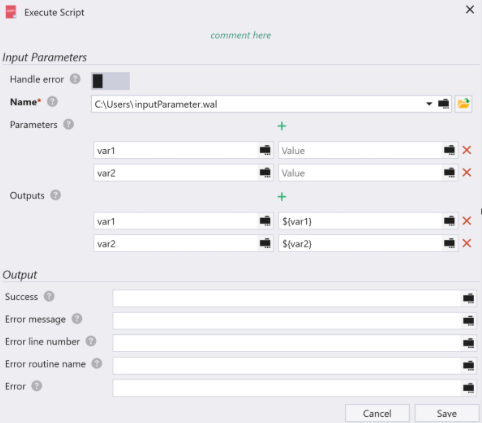
If the referenced script contains input parameters, the IBM RPA Studio now automatically loads those parameters for you. Instead of manually adding them, all you need to do is assign values.
The same improvement also applies to output parameters.
This enhancement not only speeds up the setup process but also helps prevent errors caused by missing or incorrectly named parameters.
Added ‘runCSharpCode’ command:
IBM RPA now has a powerful functionality: the ability to execute C# code directly within the WAL script through the runCSharpCode command. In addition to allowing you to make full use of the .NET 4.8 framework, the command also allows you to import external libraries, whether you created them or a third party. This adds a new layer of flexibility and potential to automations.
Added ‘ftpCreateDir’ and ‘ftpDeleteDir’ commands:
These new commands allow you to create and remove folders from an FTP server.
Added ‘Certificate’ parameter for ‘httpRequest’ command:
Users can create private and public Dashboards in IBM RPA Control Center, but it wasn't possible to know who created the dashboard, specially on dashboards set as public which are visible tenant wise. Now it is easier to spot the owner and ask for updates or changes.
This new parameter allows bot developers to send certificates in your HTTP requests.
Added ‘Right Click’ parameter for ‘click’ and ‘webClick’ commands:
This new parameter allows you to perform click actions with the right mouse button in Windows, Java, SAP, or Web automations.
Added ‘IBM OCR’ provider for all OCR commands and tools:
We have introduced a new OCR provider powered by IBM WatsonX, making it possible to perform OCR (Optical Character Recognition) tasks with enhanced accuracy and AI-driven capabilities.
UIAgent (Closed Beta SaaS)
UIAgent empowers business users to create resilient, web-based automations without writing code or relying on IT support.
UIAgent is now available in Closed Beta. If you are interested in a trial, enroll by using the "UIAgent integration with IBM RPA" form.
Below are some of the enhancements made for UIAgent
Users can now update flows after creation with ease. They can insert steps before or after existing ones, remove steps as needed, and safely undo changes, providing greater control and flexibility. This enhancement significantly improves user experience and reduces update time by approximately 50% for modifications made in the middle of a flow.
The editor now supports nested if-then-else constructs, enabling more decision-making within flows. Conditions can be based on input data, the status of intermediate steps, or even the enabled/disabled state of web controls, allowing for dynamic and responsive automation design.
-
Human in the loop during resiliency check:
During automation execution, the resiliency feature may occasionally fail to identify the exact screen elements taught during the teaching phase. In such cases, instead of aborting the automation, a set of potential matching web controls is returned, allowing the user to select the most appropriate control manually.
During the automation teaching phase, users can insert pauses within the automation flow to validate inputs or enter sensitive data—such as credentials for password fields— before resuming the automation.
-
Support Outputs to a File:
The automation can now extract data from websites - such as stock quotes, order numbers, or status messages - and save it to a file. When processing multiple UI elements, each record is added as a new line under a header row. Supports Excel and CSV formats.
UIAgent now enables business users to specify an exact URL for navigation within an automation. This capability is particularly valuable in loop scenarios where a process begins at Point A, ends at Point B, and must restart from Point A.