Cloud Pak for Data

Cloud Pak for Data

Come for answers. Stay for best practices. All we’re missing is you.

 View Only

How to choose a system architecture for large scale machine learning model training - Series 2: Train multiple models concurrently - Loop training in single notebook

By GUANG MING ZHANG posted Wed January 20, 2021 01:01 AM


Table of Content

1. Background
2. Decision Tree
3. Three solutions
4.Loop training in single notebook

1. Background
In some machine learning scenarios, the models are short-lived and require regular retraining; There is the same kind of model that requires a lot of concurrent training. The most typical example is that in a specific AIOps scenario, we need to build anomaly detection models based on the time series of 50 metrics from 5000 databases, so 250,000 models need to be trained once a month or regularly retrained when drift is detected 
 
The scenario is how a single data scientist can launch periodically thousands or millions of machine learning model training without using complex deployment frameworks. In fact, the tasks can be launched from a single Python script which can be run from an interactive shell such as Jupyter Notebook. The tasks can be themselves parallelized in order to run faster and making use of available computational capacity and operating large scale data.
We still take the anomaly detection model in the AIOps case as an example to lay out the training properties.
  1. ML algorithms such as ARIMA, LSTM are in use.
  2. The model frameworks are Scikit-Learn and Tensorflow.
  3. The number of models is 250,000.
  4. The data has two features: timestamp and value.
  5. The data is structured data with a data size of 500GB or more.
  6. Models need to be retrained monthly or as soon as drift is detected.
  7. Training data is stored in a relational database.
  8. Models should be stored in a deployment space capable of managing them.
  9. Models should be packaged into groups and deployed in batch at a more granular level.
  10. Models can be inferred in the form of batch or online RESTAPI.
After collected all the factors to consider, we can move forward to take the decision tree in next section and trace down to the right scalable architecture and pick up the right technical solution for the large scale training in IBM Cloud Pak for Data.

2. Decision Tree
The following is a summary of the decision tree. 

In the diagram above, there are several branches.  Firstly, it is divided by concurrent training. Secondly it is divided either by training time or training data size. Lastly, there are 6 solutions on the leaf node.  You could find the right solution following the tree. In the blog, we'll cover the solution : Train multiple models concurrently - Loop training in single notebook.

3. Three solutions
For scenarios where there are multiple models of an algorithm, in Cloud Pak for Data There will be graphical tools like SPSS to support multi-model training of certain algorithms. The advantage of using graphical tools is to get started quickly and efficiently, for a certain scale of the model training is sufficient. The disadvantage is that only the resources allocated to the SPSS tool can be used. For this chapter, we talk about the other approach of Notebook-based multi-model training. The advantages of the Nobebook-based multi-model training are: more algorithms supported, better horizontal expansion capability, and the ability to leverage the resources provided by the entire cluster.
Based on the total training duration and the size of the training data, we divide the single-algorithm multi-models into the following three solutions:
  1. Loop training in single Notebook
  2. Mult-process training in single Notebook
  3. Multiple notebooks training
The codes template for the three solutions could be downloaded from the link.

4. Loop training in single notebook
This solution can be used when the user needs to train different models of an algorithm based on different data,  and the models are relatively simple, the data volume is not large, and the total training time is not long.
Entry Criteria:
  1. Total model training time < The specified threshold
  2. Total model training data volume < 1/3 node memory
The specified threshold is an acceptable training duration for the user, such as one hour or one day. In some scenarios, all models need to be trained in one hour, so a decision based on one hour is fine. Also there are situations when the model needs to be trained in one day, so set it to one day. In short, choose an appropriate threshold for your situation, and depending on whether the training duration is less than the specified threshold to decide whether to use loop training.
The total amount of data trained by the model should be less than 1/3 node memory mainly in terms of the amount of data a Notebook can be trained on. Let's assume here that for a machine with 64 gigabytes of RAM, we can handle 40-50 gigabytes of data. And in most cases, memory space is required for data processing before the model can be trained, so we assume that data less than 20 gigabytes can be trained in a Notebook. 
Solution:
The solution is divided into the following steps.
  1. Slice the data, with each slice for a model
  2. Use notebook to build model training algorithms
  3. Migrate model training codes to the 'worker' notebook
  4. Configure loop mode and run the entire 'worker' notebook for training.
4.1 Slicing Data
For multiple models of the same algorithm, their data sources are generally from a single place. We need to define a specification for how the data is sliced so that the different slices are assigned to the corresponding models.
In the blog, we handle data from two typical sources:
  1. databases
  2. object storage
We can create a split.csv file describing how to slice. 
For data from a database, the recommended structure is as follows:

The detailed explanation of each column is as follows.
  • id : The ID used to define the slice
  • database : The database from which the data is taken.
  • table: The table from which the data came.
  • column: The column from which the data came
  • train_from: Specifies the value from which the training data starts.
  • train_to: Specifies the value to which the training data ends.
  • test_from: Specifies the value from which the test data starts.
  • test_to: Specifies the value to which the test data ends.
For data from files such as CSV, the recommended structure is defined as follows:
The detailed explanation of each column is as follows.
  • id : The ID used to define the slice
  • file : The file from which the data came.
  • train_from: Specifies the value from which the training data starts.
  • train_to: Specifies the value to which the training data ends.
  • test_from: Specifies the value from which the test data starts.
  • test_to: Specifies the value to which the test data ends.
The above provides an example of database and object storage. In real case, the user can customize the structure of the file according to their own needs, to achieve the purpose of data slicing.
4.2 Building model algorithms
There are many algorithmic frameworks for building machine learning, such as Scikit-Learn, Spark ML, XGBoost, Tensorflow, etc. You can build all kinds of models using your favorite frameworks. After building the models, you need to make sure that the models can run in Cloud Pak for Data through on test data and meet certain criteria, such as accuracy > 95%.
For example, in the following example, we have used Tensorflow to build a CNN neural network model for MNIST . The most important training codes are as follows.
4.3 Integration into the 'worker' training notebook
The worker training template is a template to help simplify training efforts.
The major works done by the template
1. Access to slice metadata
2.Provide slicing data to the model
The training codes gets the required data through the get_data(row) method. The row parameter defines the index of the corresponding slice of the data.
3. Train models in sequence in one process or mult-process (used in the next series: Series 3)
In the above codes, first create a queue and put all the indexes of the data to be trained into the queue. Then is_multiple_processors will be set to False and the path the codes takes will be else path. process(workQueue,0) method will retrieve the slicing index from the queue in order and pass it to the training method train(row,index). The training method reads the corresponding slicing data and trains it.
If is_multiple_processors is set to True in the next series Mult-process training in single notebook, then the path the codes takes will create a pool and start multiple processes to do training in parallel.
The works that users need to customize include:
1. Read the corresponding data from the database or storage according to the index of the provided.
Users can build their own get_data() method based on the model.  get_data() method is to read the corresponding slicingdata through the passed index.
2.Provide the training codes
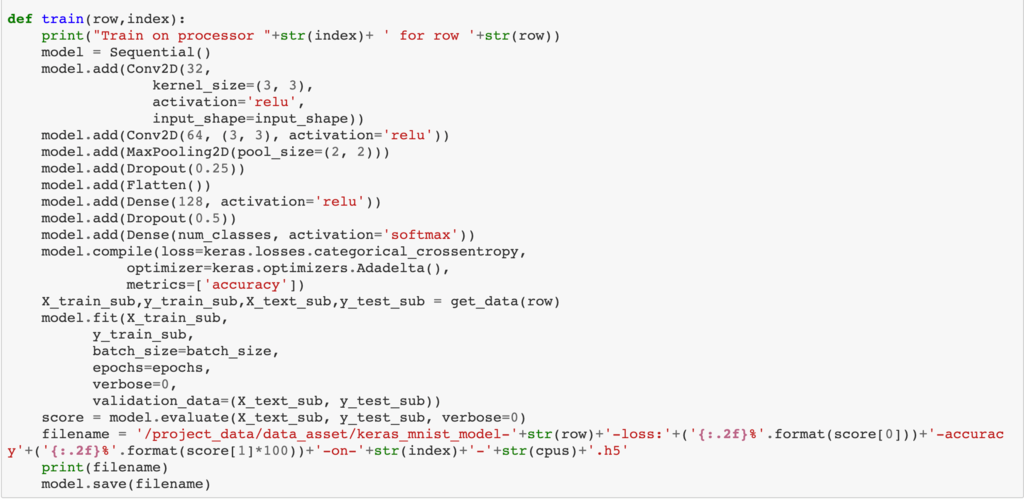
Migrate the training codes to the train() method, and accept the incoming slicing index. Call the get_data() method defined above to read the corresponding sliced data, at the end save the trained model as a file.
4.4 Configure the parameter and start training
The 'worker' framework supports two modes of operation.
  1. single-process multi-loop
  2. multi-process multi-loop
In this solution, we use the first approach. The difference between the two ways is achieved by a configuration parameter is_multiple_processors. In the solution, we need to set is_multiple_processors to False.
You can then run the entire Notebook to start sequential training.

#CloudPakforDataGroup
0 comments
11 views

Permalink