Release date: August 7, 2018
TIP See also previous TBM Studio and Applications R12 release notes. To see details for all recent Apptio product releases, see the "What's New" details on the .
In this release:
Apptio TBM Studio 12.5
TIP See also the full knowledge base (KB):
NOTE With the R12.5 release, all application content changes, including new features and fixes, are delivered through a new template, Version 105. No content changes were made to Version 104 or earlier templates.
New features
Print Layout. We've added Page Layout options for customizing reports for .pdf file format export.

(Click to enlarge)
SEE ALSO
[BIIT-48551]
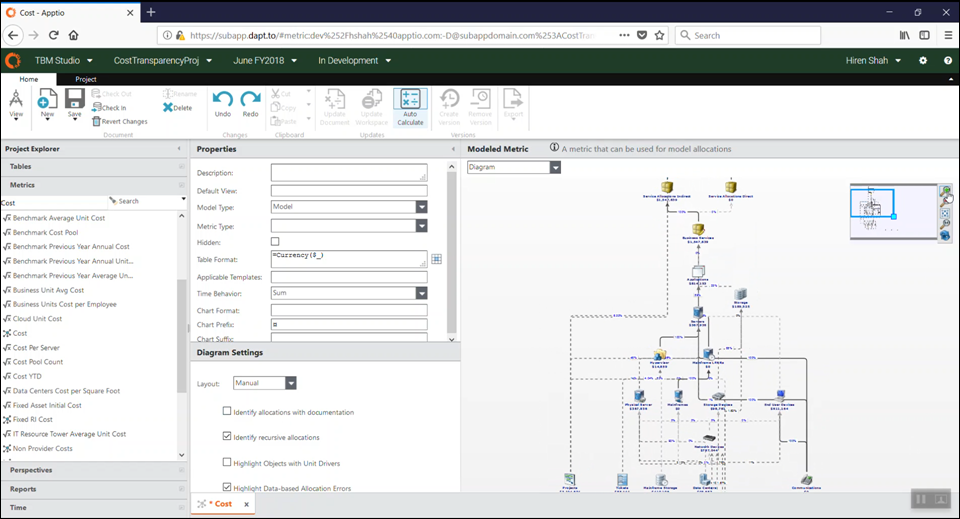
Diagram tracing. In addition to the Sankey-diagram (Learn more), the Modeler now supports diagram tracing with the Diagram model view.
SEE ALSO
[BIIT-72769]
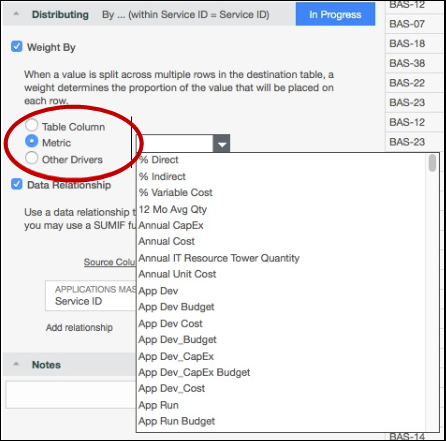
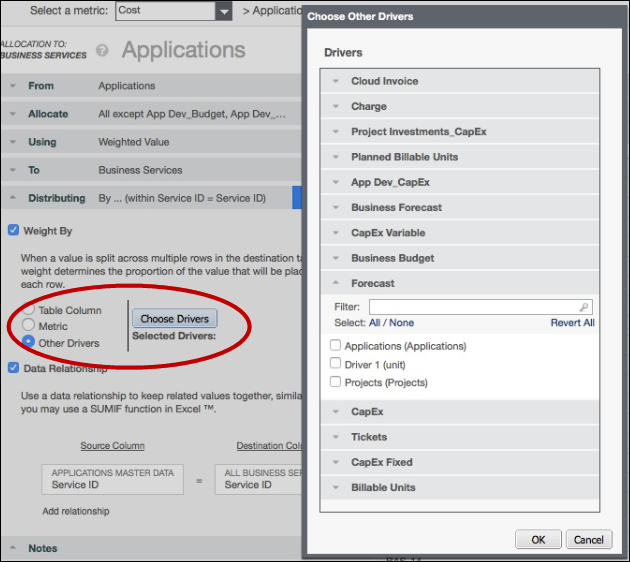
Weight by Metrics or Other Drivers. In Model Studio, Weight By allocations now support two new options. Weight by Metrics:
And Weight by Other Drivers:
SEE ALSO Weighted Value allocations
[BIIT-50878]
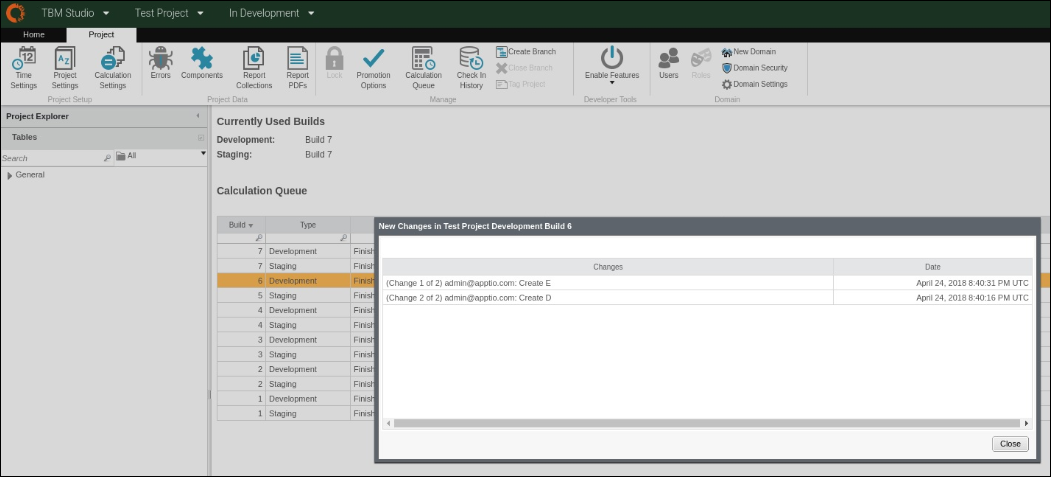
View all calculation changes. You can now see a summary of all changes in the current build. In the Calculation page, right-click anywhere in the Calculation Queue, and, in the shortcut menu that appears, click View All Changes. A list of changes to the selected project build appears.
[BIIT-72068]
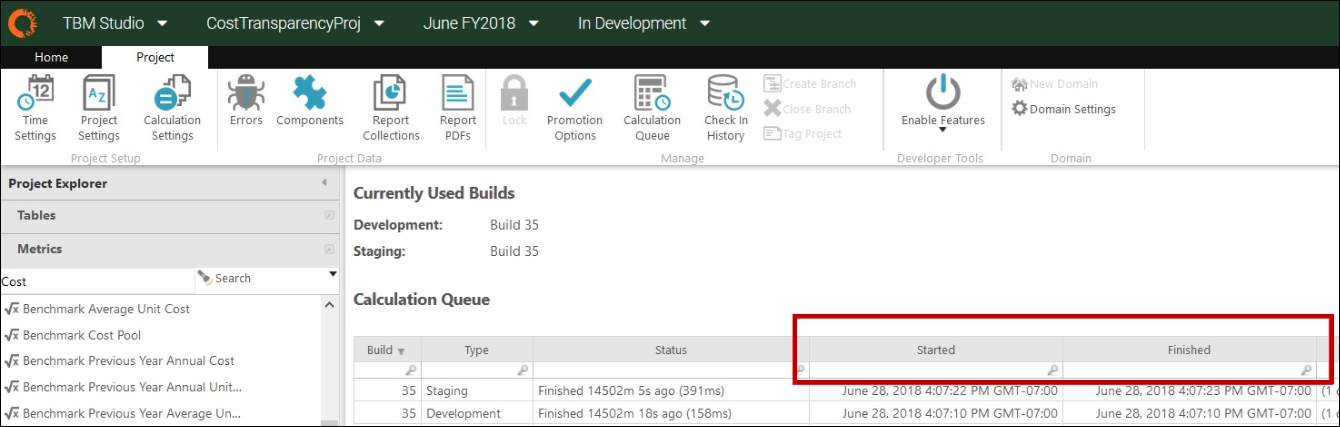
Build start and finish times. The Calculation page now includes Started and Finished values per build.
SEE ALSO
[BIIT-72916]
Show Filter Context option for drill-down navigation. Drill report can now include headers that identify the slicers and drill details that have been applied. To do so, enable the Show Filter Context Bar option in the report’s Ad Hoc dialog box. [BIIT-71129]
Updated Show API URL. Previously, Show API URL showed recommended API URLs and a separate URL to use with DataLink. DataLink now supports the modern APIs, so that DataLink-only APIs have been removed. This means that DataLink connectors that were recently set up will have the features of the APIs added in version 11.8.3, such as displaying the same column name as shown on the report. (Learn more) [BIIT-67039]
Improved server error conditions. We improved the wording and display of server error conditions (Learn more). Some former errors now appear as warnings.
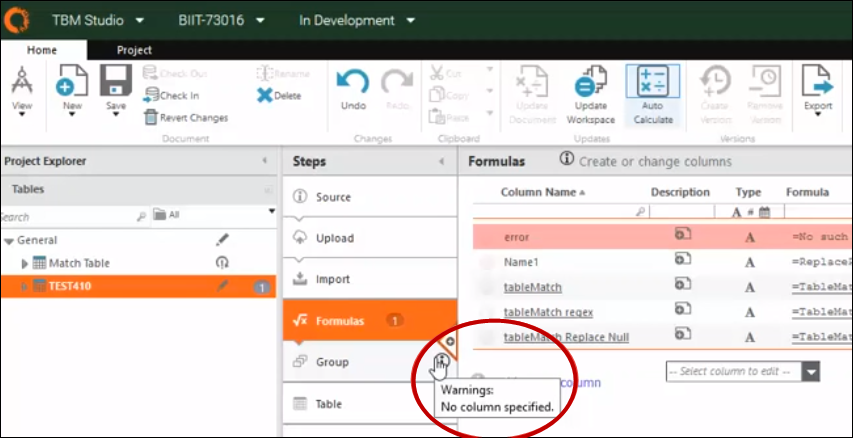
[BIIT-68786, BIIT-73016]
TableMatch function update. We added two new optional arguments to this function (Learn more) to return a different column if TableMatch does not match any rows. (Previously, the function would return a blank.) The new arguments are:
- useRegex: Use regular expressions when matching, and treat the match table as regular expressions.
- specifiedColumn: Return the value from specified source table column rather than a null value.
[BIIT-73453]
Performance Review component. The Performance Review component is an in-application utility that creates reports that an Apptio TBM Studio Administrator can use to gain insight into the impact their current project configuration has on application performance. This component is available in R12.5+ and was part of the v.105 content payload (Learn more).
Fixed in this release
"Ignored" project menu title. Under certain circumstances, the project menu title (Learn more) could incorrectly appear as "Ignored." This is now fixed. [BIIT-62091]
Missing totals for Allocated and % columns. In the Model Pipeline Step, the Allocated and % Allocated columns could incorrectly display 0 for the total value when filtering the table. This is now fixed. [BIIT-63957]
Unspecified Source System. After uploading table data and checking it in and then later changing the specified source field from "Unspecified," the Source System field would revert back to "Unspecified." This is now fixed. [BIIT-66770]
Model Studio: Hidden tables. To reduce clutter, the Modeler now hides tables from the modeled metric overview that have no drivers or allocations. [BIIT-66949]
Merge "Server error". Previously, TBM Studio could incorrectly display a "Server error" message when merging a branch back into the trunk (Learn more) with an item checked out. This is now fixed. [BIIT-69689]
Export failure. When exporting an entire report to Excel (as opposed to an individual report component), the export would fail with an "This site can't be reached" error. This is now fixed. [BIIT-69758]
Download fail in Transform pipeline. Certain data files that were uploaded could not be downloaded from the Transform pipeline (Learn more) via the Download command on the shortcut menu. This is now fixed. [BIIT-70957]
Some percentage columns multiplies by 100x. With multi-currency enabled (Learn more), percentage columns in reports could sometimes add two trailing zeros, for example "100%" could appear as "10,000%." This is now fixed. [BIIT-71862]
Revert failure. You may have been unable to revert a document that had been checked out (Learn more). This is now fixed. [BIIT-72198]
Tables with a source of 'Enter Manually' would break in branches. When creating a branch, if it has a table with the source of "enter manually" that is never edited in the branch, after awhile, the table would stop computing in the branch and not have any data when viewed. This is now fixed. [BIIT-73276]
Missing negative values on bar charts. When viewed in a non-US locale, bar charts could incorrectly exclude negative values. This is now fixed. [BIIT-73966]
Incorrect warning message in Waterfall chart. After applying global filters in the Waterfall chart, the message "'You have unsaved, invalid changes on a waterfall chart" could incorrectly appear. This is now fixed. [BIIT-74004]
Incorrect values in Waterfall chart. In certain circumstances, values can be multiplied by 10 when manually entering values below the Waterfall chart. This is now fixed. [BIIT-74006]
Disappearing objects in Modeler. Previously, when a model step was removed but not the drivers/allocations, its object would remain visible. This is now fixed so that the object is also removed. [BIIT-62217]
Incorrect fields in Single Object Model. In the Single Object Model view (Learn more), you can drill into costs to see source table rows that contributed to an allocation. Previously, the source table preview for these rows could incorrectly add allocation and percentage columns. This is now fixed. [BIIT-73091]
Visibility rules. Previously, some visibility rules were not being applied correctly. This is now fixed. [BIIT-75710]
Performance improvements. You should see improved performance in Project Explorer and reduced calculation times.
Known issues
TIP In addition to the known issues described below, some of the fixes described above may result in product interface or performance changes that you or your end-users may notice. We recommend that TBMAs review the fixes described above in this context.
Better-looking charts. TBM Studio has updated its underlying chart visualization library. Consequently, report users may notice small changes (and generally improvements) in how chart elements appear. [BIIT-70778]
Specific changes to charts that users may notice include the following:
- Change to how overlay chart layers are aligned on top of the base layer. [BIIT-74341]
- When hovering the mouse pointer on a pie chart, a gray slice with its numeric value appears. [BIIT-74343]
- Words in charts may appear truncated. [BIIT-74396]
- In chart legends, the color definitions now appear in circles instead of squares. [BIIT-74402]
- On charts with an the x-axis, the number of incremental tick marks has increased. [BIIT-74393]
- Some chart callouts now appear bolded. [BIIT-74398]
- Improvements to treemap charts, and improved support for screen readers (Learn more). [BIIT-70778]
- When hovering the mouse pointer on a point in a line chart, a gray bar appears to visually connect the point with every other point with the same value on the x-axis. [BIIT-74342]
- Improved label alignment in pie charts. [BIIT-74926]
- Data values equal to zero no longer appear in stacked bar charts. [BIIT-74383]
- Improved line breaks for chart labels. [BIIT-74394]
Studio 11 upgrade issues with customized report layouts. Support for TBM Studio 12 custom .pdf file layouts (see "New Features>Export to PDF" above) will affect Studio 11 reports' customized .pdf file layouts at upgrade. It is recommended that Studio 11 customers with customized report layouts work with their Apptio Account Manager or Success Manager to update any affected report layouts. [BIIT-74158]
"Error: null" message after deleting uploaded document. TBM Studio may show an "Error: null" message for documents uploaded by DataLink, but then manually deleted from the Upload step in TBM Studio.
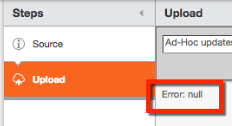
Workaround: If you encounter this issue, try this:
- Rerun the same DataLink connector with the original time period settings.
[BIIT-75879]
Cost Transparency (Template v105)
TIP See also full KB:
New features
Addition to RI Consumption Report. The Reserved Instances report (Learn more) has a new RI Consumption tab that compares reserved instance usage with on-demand usage in detail. For a full description, see Cloud Cost Management below. [BIIT-70769]
Org Hierarchy and Application attributes now on Potential Savings report. When you map from a linkedaccountId, you can now get a better view of who and what has waste. For a full description, see Cloud Cost Management below. [BIIT-72749]
Fixed in this release (none this release)
Known issues
Better-looking charts. TBM Studio has updated its underlying chart visualization library. Consequently, report users may notice small changes (and generally improvements) in how chart elements appear. See a full description of chart changes above under TBM Studio > Known Issues > Better-looking charts. [BIIT-70778]
Cloud Cost Management (Template v105)
TIP See also full hub: Hub: Apptio Cloud Business Management
New features
Addition to RI Consumption Report. The Reserved Instances report (Learn more) has a new RI Consumption tab that compares reserved instance usage with on-demand usage in detail. Allocation between Reserved Instances and Cloud Service Provider has been updated to allocate with more granular detail when the Cost Allocation Report only is being used. If Purchase data is loaded with the Cost Allocation Report, the allocation will use Purchase data only by default.
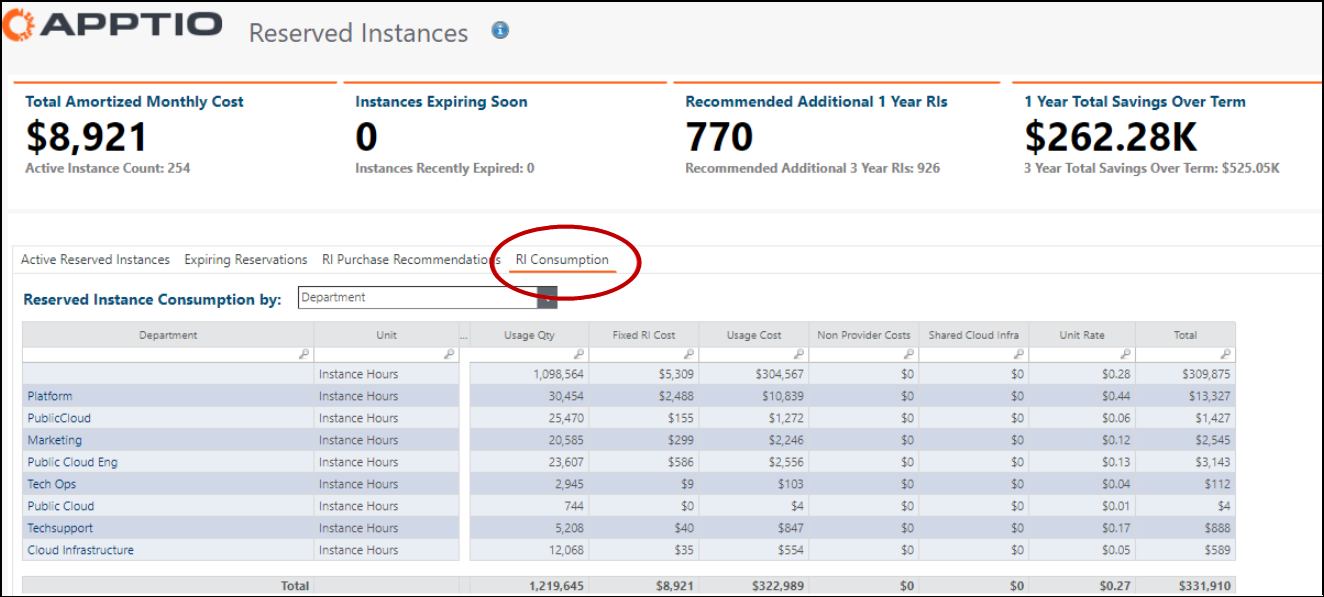
TIP If you have both purchase data and the Cost Allocation Report loaded, and you want to use the Cost Allocation report to allocate reserved instances costs instead, you must delete the purchase data from Apptio so that it will instead use the Cost Allocation Report data. [BIIT-70769]
Record Type slicer added to Monthly TCO report. Cloud Infrastructure owners can now get a better understanding of the costs associated with types of billing line items for which they're charged, such as credits and discounts. You can filter for just those types of billing line items, see the costs associated with those items broken down by products, organizational units, applications, and so on. Drill in down to the invoice line item (Learn more) to get more details about those. [BIIT-72746]
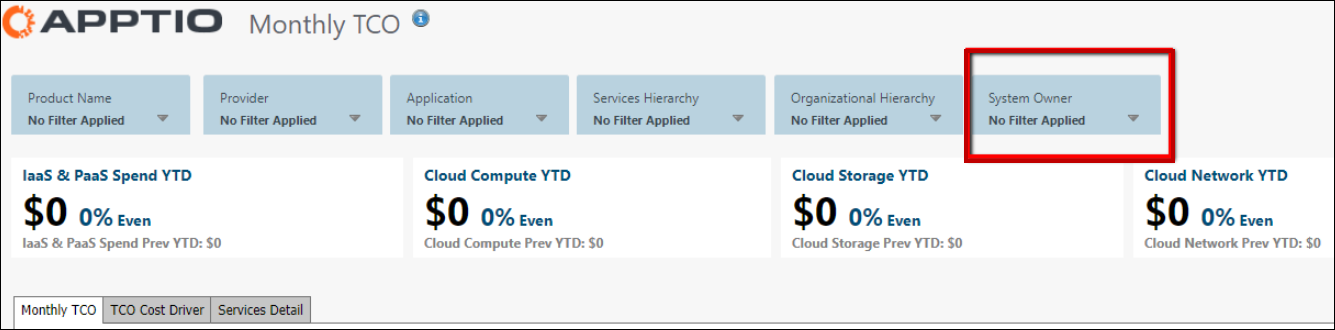
System Owner slicer now on Monthly TCO report. Cloud Infrastructure owners can now get a better understanding of the costs associated with people in their organization who are responsible for those costs. Filter for specific people to see a break down of associated costs by products, organizational units, applications, and so on. Drill in down to the invoice line item (Learn more) to get more details about those. [BIIT-72748]
Org Hierarchy and Application attributes now on Potential Savings report. When you map from a LinkedAccountId, you can now get a better view of who and what has waste by using the same mapping from LinkedAccountId that you use for Monthly TCO reporting. We have added the following fields to the Pivot, Slicers, and Table sections of the Potential Savings report (Learn more):
- Business Unit
- Department
- Team
- System Owner
- Application
[BIIT-72749]
Multicloud compute comparisons for Cloud. Compare cloud compute spend among multiple service providers by comparing costs of instances with similar CPU cores, memory, and storage.
Cloud Compute Attributes mapping. We've published the Cloud Compute Attributes file to map your compute attributes, such as memory, storage, and CPU cores, to the corresponding columns in the Cloud Service Provider Master Data table. See Cloud Compute Attributes mapping. [BIIT-71598]
Fixed in this release
Missing "Consumer" field. Previously, the TBM Dashboard, Cloud Service Provider report tried to reference the data field "Consumer" which was missing from the table. This is now fixed; the report references the "Business Unit" field. [BIIT-72794]
Known issues (none this release)
Bill of IT (Template v105)
TIP See also full KB:
New features
Accessibility. Bill of IT reports are now fully keyboard-accessible (Learn more).
Export custom report layouts to PDF. Of special interest to Bill of IT customers: We've added Page Layout options for customizing reports for .pdf file export. See Best Practices: Printing to PDF.
Fixed in this release
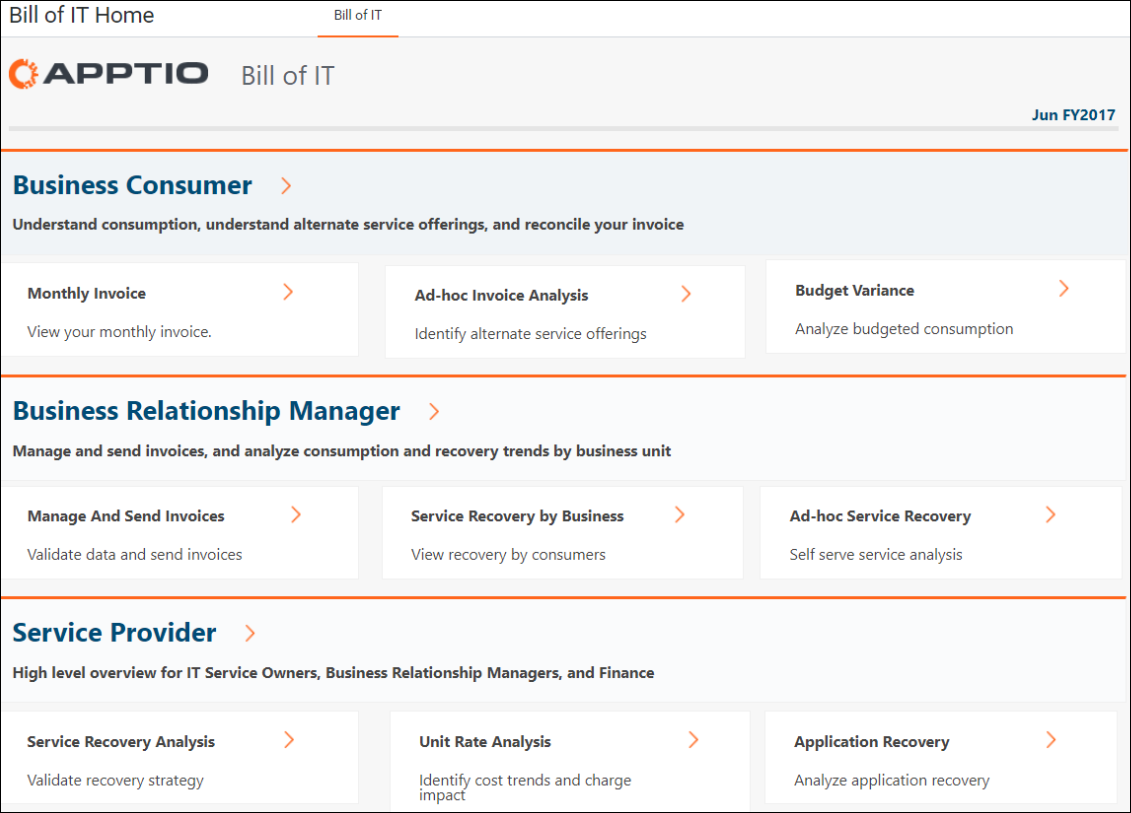
Updated home page. We've redesigned the Bill of IT home page to better meet the needs of Business Consumers, Business Relationship Managers (BRMs), and Service Providers.
[BIIT-70684]
Known issues (none this release)
Business Insights (Template v105)
TIP See also full KB:
New features
Updates to Data Quality report. Use the updated Data Quality report to help you analyze the quality of the acquired data for Vendor Insights, and discover where data is missing or in need of being updated in the your source systems. See Data Quality report (Vendor Insights) .
Vendor Insights release. New features include:
- Vendor name normalization
- Multi-year purchase order burndown
- Contract expiration fixes
See full details in Vendor Insights: What's new in R12.5.x
Fixed in this release (none this release)
Known issues (none this release)
Product availability
These new features and fixes are available now for customers with the TBM Studio v12.5 release. Please contact your Apptio Account Manager or Success Manager to schedule your upgrade to this version, and to begin taking advantage of these new features.
Other goodies in Product Central
Since the last major TBM Studio release, we've added or updated several resources in the product KBs, including the following.
Cross-application:
For TBM Studio R12
For Cost Transparency:
See also the full
For Cloud Cost Management:
See also the full Hub: Apptio Cloud Cost Management
For Business Insights:
See also the Business Insights modules
For IT Financial Management Foundation (ITFMF):
See also the Hub: Apptio IT Financial Management Foundation
For Frontdoor (User administration):
See also the full
For IT Benchmarking:
See also the full
For DataLink:
See also the full
For IT Planning:
See also the full
(Back to top)
This article is open for your feedback. At the bottom of this screen, click Add a comment.