Original Message:
Sent: Fri June 05, 2026 10:53 PM
From: Douglas Partch
Subject: Connecting using DS 4.2.2 not working and connecting using DS4.1.4 works
So your license errors are do to the DB2 connect or driver Version you are using, has not been activated yet on the mainframe.
This is must do if you are moving from DB2 connect or drivers that are 11.5 to 12.1 which is the new vision. This process must be done once for each new version ( not fix pack)
You can resolve this by 2 ways
1st you need to get the 12.1 license zip file.
- Follow the instructions for activating the license file on the mainframe for each DB2 system. This is generally done by your Sr DBAs (either application or systems).
- Copy the DB2 12.1 license jar file into the Java directory which your DBAs will have.
Note the 11.5 and 12.1 license files will have the same names, so when installing it is best to use a high level directory name to install into(keep them separate). Assuming you still want to run both versions on the same PC or server.
Make sure you tell the DBAs which db2 or drive version you are using so they can provide you with the correct files
------------------------------
Douglas Partch
CEO
Database Nerds
Omaha NE
------------------------------
Original Message:
Sent: Fri June 05, 2026 06:27 PM
From: S V
Subject: Connecting using DS 4.2.2 not working and connecting using DS4.1.4 works
Please see if this is helpful: (I removed connection string lines as I already provided above)
A connection attempt was unsuccessful.
Summary
SQL4230N A connection attempt has failed and generated an SQLException.
Try the following suggestions to help solve the problem:
Follow the link in the Additional Resources section to learn more about the SQL code generated and how to fix it.
Verify that the host name and other properties on the General page are valid.
To further diagnose the problem, return to the Properties section and use the Tracing page to enable tracing. Contact the database administrator and provide the trace and other support information available.
Full message content: [jcc][t4][10509][13454][4.36.6] Connection to the data server failed. The IBM Data Server for JDBC and SQLJ license was invalid
or was not activated for the DB2 for z/OS subsystem. If you are connecting directly to
the data server and using DB2 Connect Unlimited Edition for System z, perform the
activation step by running the activation program in the license activation kit.
If you are using any other edition of DB2 Connect, obtain the license file,
appropriate consv license edition jar, from the license activation kit, and follow the installation
directions to include the license file in the class path.
Explanation
<b>Explanation:</b><br/><br/>The connection attempt has generated an SQLException. The content of the SQLException is: [jcc][t4][10509][13454][4.36.6] Connection to the data server failed. The IBM Data Server for JDBC and SQLJ license was invalid
or was not activated for the DB2 for z/OS subsystem. If you are connecting directly to
the data server and using DB2 Connect Unlimited Edition for System z, perform the
activation step by running the activation program in the license activation kit.
If you are using any other edition of DB2 Connect, obtain the license file,
appropriate consv license edition jar, from the license activation kit, and follow the installation
directions to include the license file in the class path. ERRORCODE=-4230, SQLSTATE=42968
<br/><b>User response:</b><br/><br/>Inspect the SQL code associated with the SQLException to determine the cause of the problem.
SQLSSTATE: 42968
Support
Connection Properties
Environment
Driver class name = com.ibm.db2.jcc.DB2Driver
Driver version = 4.36.6
Driver JAR file path = F:\Program Files\IBM\SDP\..\SDPShared\plugins\com.ibm.datatools.db2_2.3.0.202603121632\driver\db2jcc4.jar;F:\Program Files\IBM\db2jcc_license_cisuz.jar
Operating system name = Windows Server 2016
Operating system architecture = amd64
Operating system version = 10.0
JVM implementation vendor = IBM Corporation
JVM runtime = IBM Semeru Runtime Certified Edition
Java version = 17.0.13+11
JRE 17 Windows Server 2016 amd64-64-Bit Compressed References 20241015_808 (JIT enabled, AOT enabled)
OpenJ9 - 1d5831436e
OMR - d10a4d553
JCL - 4e6d65012a0 based on jdk-17.0.13+11
Launcher = F:\Program Files\IBM\SDP\eclipse.exe
Stack Trace
com.ibm.db2.jcc.am.SqlSyntaxErrorException: [jcc][t4][10509][13454][4.36.6] Connection to the data server failed. The IBM Data Server for JDBC and SQLJ license was invalid
or was not activated for the DB2 for z/OS subsystem. If you are connecting directly to
the data server and using DB2 Connect Unlimited Edition for System z, perform the
activation step by running the activation program in the license activation kit.
If you are using any other edition of DB2 Connect, obtain the license file,
appropriate consv license edition jar, from the license activation kit, and follow the installation
directions to include the license file in the class path. ERRORCODE=-4230, SQLSTATE=42968com.ibm.db2.jcc.am.b5.a(b5.java:810)
com.ibm.db2.jcc.am.b5.a(b5.java:66)
com.ibm.db2.jcc.am.b5.a(b5.java:133)
com.ibm.db2.jcc.am.ao.a(ao.java:2367)
com.ibm.db2.jcc.am.Connection.isLicenseValidatedWithServerLicenseProc(Connection.java:9359)
com.ibm.db2.jcc.am.Connection.checkForLicenseRestrictions(Connection.java:5183)
com.ibm.db2.jcc.am.Connection.completeConnect(Connection.java:5097)
com.ibm.db2.jcc.t4.b.completeConnect(b.java:726)
com.ibm.db2.jcc.t4.b.a(b.java:488)
com.ibm.db2.jcc.t4.b.a(b.java:434)
com.ibm.db2.jcc.t4.b.<init>(b.java:372)
com.ibm.db2.jcc.DB2SimpleDataSource.getConnection(DB2SimpleDataSource.java:262)
com.ibm.db2.jcc.DB2SimpleDataSource.getConnection(DB2SimpleDataSource.java:216)
com.ibm.db2.jcc.DB2Driver.connect(DB2Driver.java:491)
com.ibm.db2.jcc.DB2Driver.connect(DB2Driver.java:117)
org.eclipse.datatools.connectivity.drivers.jdbc.JDBCConnection.createConnection(JDBCConnection.java:208)
org.eclipse.datatools.connectivity.DriverConnectionBase.internalCreateConnection(DriverConnectionBase.java:105)
org.eclipse.datatools.connectivity.DriverConnectionBase.open(DriverConnectionBase.java:55)
org.eclipse.datatools.connectivity.drivers.jdbc.JDBCConnection.open(JDBCConnection.java:76)
org.eclipse.datatools.enablement.ibm.db2.internal.zseries.JDBCZSeriesConnectionFactory.createConnection(JDBCZSeriesConnectionFactory.java:27)
org.eclipse.datatools.connectivity.internal.ConnectionFactoryProvider.createConnection(ConnectionFactoryProvider.java:83)
org.eclipse.datatools.connectivity.internal.ConnectionProfile.createConnection(ConnectionProfile.java:392)
com.ibm.datatools.connection.internal.ui.databases.NewDatabaseConnnectionWizardPage.handleTestConnection(NewDatabaseConnnectionWizardPage.java:989)
com.ibm.datatools.connection.internal.ui.databases.NewDatabaseConnnectionWizardPage$10.handleEvent(NewDatabaseConnnectionWizardPage.java:403)
org.eclipse.swt.widgets.EventTable.sendEvent(EventTable.java:89)
org.eclipse.swt.widgets.Display.sendEvent(Display.java:4243)
org.eclipse.swt.widgets.Widget.sendEvent(Widget.java:1063)
org.eclipse.swt.widgets.Display.runDeferredEvents(Display.java:4060)
org.eclipse.swt.widgets.Display.readAndDispatch(Display.java:3632)
org.eclipse.jface.window.Window.runEventLoop(Window.java:823)
org.eclipse.jface.window.Window.open(Window.java:799)
com.ibm.datatools.connection.ui.databases.actions.NewDBConnectionAction.run(NewDBConnectionAction.java:38)
org.eclipse.jface.action.Action.runWithEvent(Action.java:474)
org.eclipse.jface.action.ActionContributionItem.handleWidgetSelection(ActionContributionItem.java:580)
org.eclipse.jface.action.ActionContributionItem.lambda$4(ActionContributionItem.java:414)
org.eclipse.swt.widgets.EventTable.sendEvent(EventTable.java:89)
org.eclipse.swt.widgets.Display.sendEvent(Display.java:4243)
org.eclipse.swt.widgets.Widget.sendEvent(Widget.java:1063)
org.eclipse.swt.widgets.Display.runDeferredEvents(Display.java:4060)
org.eclipse.swt.widgets.Display.readAndDispatch(Display.java:3632)
org.eclipse.e4.ui.internal.workbench.swt.PartRenderingEngine$5.run(PartRenderingEngine.java:1155)
org.eclipse.core.databinding.observable.Realm.runWithDefault(Realm.java:338)
org.eclipse.e4.ui.internal.workbench.swt.PartRenderingEngine.run(PartRenderingEngine.java:1046)
org.eclipse.e4.ui.internal.workbench.E4Workbench.createAndRunUI(E4Workbench.java:155)
org.eclipse.ui.internal.Workbench.lambda$3(Workbench.java:648)
org.eclipse.core.databinding.observable.Realm.runWithDefault(Realm.java:338)
org.eclipse.ui.internal.Workbench.createAndRunWorkbench(Workbench.java:555)
org.eclipse.ui.PlatformUI.createAndRunWorkbench(PlatformUI.java:156)
org.eclipse.ui.internal.ide.application.IDEApplication.start(IDEApplication.java:152)
org.eclipse.equinox.internal.app.EclipseAppHandle.run(EclipseAppHandle.java:203)
org.eclipse.core.runtime.internal.adaptor.EclipseAppLauncher.runApplication(EclipseAppLauncher.java:136)
org.eclipse.core.runtime.internal.adaptor.EclipseAppLauncher.start(EclipseAppLauncher.java:104)
org.eclipse.core.runtime.adaptor.EclipseStarter.run(EclipseStarter.java:401)
org.eclipse.core.runtime.adaptor.EclipseStarter.run(EclipseStarter.java:255)
java.base/jdk.internal.reflect.NativeMethodAccessorImpl.invoke0(Native Method)
java.base/jdk.internal.reflect.NativeMethodAccessorImpl.invoke(NativeMethodAccessorImpl.java:77)
java.base/jdk.internal.reflect.DelegatingMethodAccessorImpl.invoke(DelegatingMethodAccessorImpl.java:43)
java.base/java.lang.reflect.Method.invoke(Method.java:575)
org.eclipse.equinox.launcher.Main.invokeFramework(Main.java:659)
org.eclipse.equinox.launcher.Main.basicRun(Main.java:596)
org.eclipse.equinox.launcher.Main.run(Main.java:1467)
org.eclipse.equinox.launcher.Main.main(Main.java:1440)
------------------------------
SV
------------------------------
Original Message:
Sent: Wed June 03, 2026 08:13 PM
From: Sara Falconer
Subject: Connecting using DS 4.2.2 not working and connecting using DS4.1.4 works
Hi SV, I'm fairly certain that you don't need a DB2 Connect license in order to use Data Studio (although in our case we do have Connect for Z license installed on our mainframe).
It's a bit hard to diagnose your issue without detailed logs. I would recommend raising a service request with IBM. Just make sure you specify Data Studio not DB2 V11, as that is now unsupported. Hopefully they can review your logs and recommend a solution for you.
Good luck! Regards, Sara
------------------------------
[Sara] [Falconer]
[Tech Lead Mainframe Database]
[IAG]
[Perth] [WA]
------------------------------
Original Message:
Sent: Wed June 03, 2026 04:46 PM
From: S V
Subject: Connecting using DS 4.2.2 not working and connecting using DS4.1.4 works
Thanks for the reply and appreciate your reply. It did not work. :-(
Followup questions: any help is appreciated
~ Did you activate the license or product, I never did for the data studio, please let me know the steps.
~ Mine is DB2 Zos 11.x version using TLSv1.1.
I did for both DS 4.1.x and DS 4.2 , already edited the java.security file to remove from the disabled algorithm list.
DS 4.1.x works, DS 4.2 not working
Additionally, I can connect using DB visualizer Pro and also using the Python, Powershell code
Regards
- SV
------------------------------
SV
------------------------------
Original Message:
Sent: Tue June 02, 2026 08:45 PM
From: Sara Falconer
Subject: Connecting using DS 4.2.2 not working and connecting using DS4.1.4 works
My apologies, my documentation of the change was incorrect (sorry). I added it in the Optional tab as well - and it doesn't appear in the connection string. However, it made it work :)
Sounds like it didn't help you?
------------------------------
[Sara] [Falconer]
[Tech Lead Mainframe Database]
[IAG]
[Perth] [WA]
------------------------------
Original Message:
Sent: Tue June 02, 2026 05:16 PM
From: S V
Subject: Connecting using DS 4.2.2 not working and connecting using DS4.1.4 works
I tried adding like below:
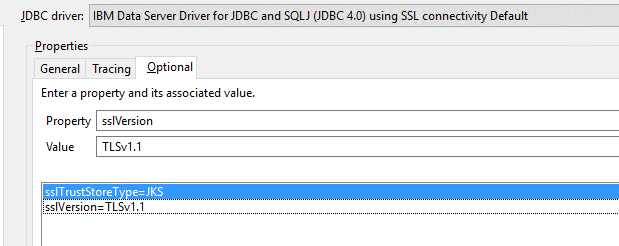
But it is not showing the connection string. it is showing as below:
jdbc:db2://DNS:PORT/LOCATION:retrieveMessagesFromServerOnGetMessage=true;emulateParameterMetaDataForZCalls=1;sslConnection=true;
My DB2 is Z/OS v11.x compatible.
I will be glad to learn if you show how to get the connection string like yours. Thanks in advance.
------------------------------
SV
------------------------------
Original Message:
Sent: Tue June 02, 2026 01:38 AM
From: Sara Falconer
Subject: Connecting using DS 4.2.2 not working and connecting using DS4.1.4 works
I found some differences going from DS 4.14 to DS 4.2 as well. Here is our connection string
jdbc:db2://DNS:PORT/LOCATION:retrieveMessagesFromServerOnGetMessage=true;emulateParameterMetaDataForZCalls=1;sslConnection=true;sslTrustStoreType=JKS;sslVersion=TLSv1.2
I had to add sslTrustStoreType=JKS;sslVersion=TLSv1.2 to make it work
Hope this helps!
Sara
------------------------------
[Sara] [Falconer]
[Tech Lead Mainframe Database]
[IAG]
[Perth] [WA]
------------------------------