Overview
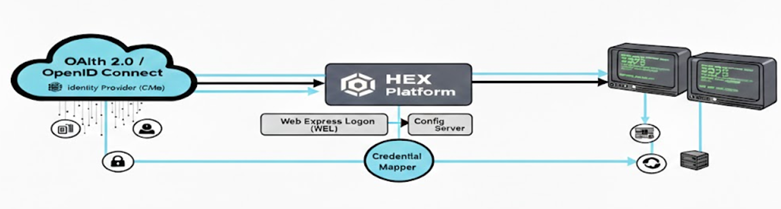
HOD HEX Client v16.0.1 supports Single Sign-On (SSO) using OAuth 2.0 / OpenID Connect (OIDC) to provide seamless and secure authentication for :
· Host systems (3270 / 5250) using Web Express Logon (WEL) with Credential Mapper
· Domain-based model pages (Config Server access) created using the IBM Host On-Demand Deployment Wizard
With this integration, users authenticate once through their enterprise identity provider (for example, Okta). HOD HEX Client then leverages the authenticated identity to manage access to host sessions and configuration-based applications, eliminating the need for additional credential prompts.
Config Server Login (Domain-Based Model Pages)
HOD HEX Client also supports OAuth-based Single Sign-On (SSO) for both domain-based model pages and host systems through Web Express Logon (WEL) configurations generated using the IBM Host On-Demand Deployment Wizard.
Behavior
· After OAuth authentication, the username derived from the email ID is used as the Config Server username.
· Session profiles are fetched based on the group level.
User Management
· If the user exists in the Config Server, the assigned session profiles are loaded automatically.If the user does not exist, a new user can be created automatically under the configured group, provided this option is enabled by the administrator.
· Administrators can also pre-create users either manually or by using the DirUtil tool provided with HOD.
When users access the application (http://<address>:<port>/<context-root>/<page-name.html>), they are presented with an SSO login prompt for authentication. After successful authentication, the username derived from the email ID is used as the Config Server username.
Configuration Steps
1. OAuth Configuration (web.properties)
Update the following properties in the HOD publish directory:
oidc_domain=https://<oauth-provider-domain>
client_id=<client-id>
redirect_uri=http://<server-host>:<port>/<context-root>/callback
scope=openid profile email
AuthorizationEndpoint=https://idp.example.com/oauth2/v1/authorize
The AuthorizationEndpoint property specifies the OAuth 2.0 authorization endpoint of the identity provider. This endpoint is used to initiate the OAuth authorization flow by redirecting the user to the identity provider for authentication and consent.
claim_id=preferred_username
The claim_id property specifies the OAuth/OpenID Connect claim that uniquely identifies the authenticated user. When configured in web.properties, the HOD HEX Client uses this claim to extract the user identity from the OAuth token during authentication.
Ensure all values match the OAuth provider configuration.
2. Client Secret Configuration (web.xml)
Add the OAuth client secret to web.xml:
<context-param>
<param-name>client_secret</param-name>
<param-value>[YOUR_CLIENT_SECRET]</param-value>
</context-param>
Replace [YOUR_CLIENT_SECRET] with the actual secret provided by your OAuth provider.
3. Redirect URI Registration
The redirect_uri specified in both web.properties and your OAuth provider must match exactly. The value should use the following format:
Format:
http://<server-host>:<port>/<context-root>/callback
Example:
http://myserver.company.com:9080/hex/callback
Host System Login using OAuth 2.0 and Credential Mapper
HOD HEX Client now supports Single Sign-On (SSO) via OAuth 2.0 for both domain-based model pages and host systems through Web Express Logon (WEL).
This section describes the process of logging in to 3270/5250 host systems using Credential Mapper.
Architecture Summary
1. User authenticates with an OAuth 2.0 provider.
2. HOD HEX Client receives and validates the ID Token.
3. User identity information is stored in the HTTP session.
4. The same authenticated identity is reused for:
o Automatic host logon via WEL Credential Mapper
o Config Server user identification and session profile loading
Authentication Flow
1. Application Access
The user accesses the HEX application using a URL such as:
http://<server>:<port>/<context-root>/<page>
If OAuth SSO is enabled, HOD HEX Client redirects the user to the configured OAuth provider for authentication.
2. OAuth Authentication
· The user logs in using enterprise credentials at the OAuth provider.
· On successful authentication, the provider redirects the user back to HOD HEX Client using the configured redirect URI.(e.g., http://localhost:9080/hex/callback).
· The redirect contains an authorization code.
3. Token Exchange and Session Creation
· HOD HEX Client exchanges the authorization code for an ID Token (JWT).
· The ID Token is validated and stored in the HTTP session.
· The token contains identity attributes such as email, username, and network ID.
4. Token Handling
· HOD HEX Client extracts the ID Token and stores it in the HTTP session as id_token.
· The ID Token contains user identity attributes like email, name, etc.
5. Credential Mapping
· When telnet connection is started an SSO auto-start macro is triggered.
· Macro fetches host system credentials from WEL custom plugin.
For NetworkPlugin please refer below code :
package com.ibm.networkPlugin;

import java.io.BufferedReader;
import java.io.IOException;
import java.io.InputStream;
import java.io.InputStreamReader;
import java.io.OutputStream;
import java.io.StringReader;
import java.net.MalformedURLException;
import java.net.URL;
import java.util.Base64;

////////////////////////////////////////////////////////////////////////////////
//HATS sample plug-in for either Network Security or
//Credential Mapper purposes
//
//This sample is provided AS IS.
//Permission to use, copy and modify this software for any purpose and
//without fee is hereby granted. provided that the name of IBM not be used in
//advertising or publicity pertaining to distribution of the software without
//specific written permission.
//
//IBM DISCLAIMS ALL WARRANTIES WITH REGARD TO THIS SAMPLE, INCLUDING ALL
//IMPLIED WARRANTIES OF MERCHANTABILITY AND FITNESS. IN NO EVENT SHALL IBM
//BE LIABLE FOR ANY SPECIAL, INDIRECT OR CONSEQUENTIAL DAMAGES OR ANY
//DAMAGES WHATSOEVER RESULTING FROM LOSS OF USE, DATA OR PROFITS, WHETHER
//IN AN ACTION OF CONTRACT, NEGLIGENCE OR OTHER TORTIOUS ACTION, ARISING
//OUT OF OR IN CONNECTION WITH THE USE OR PERFORMANCE OF THIS SAMPLE.
////////////////////////////////////////////////////////////////////////////////

import java.util.Properties;

import javax.json.Json;
import javax.json.JsonObject;
import javax.json.JsonReader;
import javax.net.ssl.HttpsURLConnection;

import com.ibm.eNetwork.security.sso.CMRequest;
import com.ibm.eNetwork.security.sso.CMResponse;
import com.ibm.eNetwork.security.sso.PasswordCipher;
import com.ibm.eNetwork.security.sso.Ras;
import com.ibm.eNetwork.security.sso.SSOConstants;
import com.ibm.eNetwork.security.sso.cms.CMInterface;

public class NetworkPlugin implements CMInterface {
	private static final String className = "com.ibm.networkPlugin.NetworkPlugin";

	private static final int DEFAULT_TRACE_LEVEL = Ras.TRACE_NONE;

	// Configured parameters to this plug-in
	private String userID;
	private String password;
	private int status;
	private int traceLevel;
	private boolean initOK = true;
	private String cmID = null;
	private Properties pInit = null;

	public int Init(Properties p, String id) {

        return 0;
	}

	/**
	 * This sample plug-in has no actions to take at destroy time
	 */
	public void Destroy() {
	}

	/**
	 * Retrieve the requested credentials here, and return them to Credential Mapper
	 */
	public CMResponse CMSGetUserCredentials(CMRequest req) {

		System.out.println("host destination :"+req.getHostDestination());
		String hostID ="";
		hostID = req.getHostDestination();
		// Option 1: Retrieve the ID token from the session (if it was stored after authentication).
		String idToken = (String)req.getHttpRequestObject().getSession().getAttribute("id_token");
		// Option 2: Retrieve the ID token directly from the HTTP request parameter (if passed in the request).
		//String idToken = req.getHttpRequestObject().getParameter("id_token");

		System.out.println("payloadJson "+ idToken);

		 String[] jwtParts = idToken.split("\\.");
         String payloadJson = new String(Base64.getUrlDecoder().decode(jwtParts[1]));
         JsonReader reader = Json.createReader(new StringReader(payloadJson));
         JsonObject payload = reader.readObject();
         reader.close();

         String email = payload.getString("email");
         if(email == null) {
        	 email = payload.getString("name");
         }
         String uname = email.split("@")[0]; // Extract username before @
         uname = uname.replaceAll("[^a-zA-Z0-9.-]", "-");
         uname= uname.toLowerCase();


		String zUserName ="";


	       String  OID_use_name =uname;// jsonObject.getString("name", null).toLowerCase();
		System.out.println("OID_use_name "+ OID_use_name);


	    //sample user OID_use_name and zUserName is added below(We can add n number of users below)
		if(OID_use_name.contains("username"))
	    	  zUserName = "zusername";
	         CMResponse resp = new CMResponse();
		 resp.setID(zUserName);
		return (resp);
	}

	/**
	 * Return plug-in information to the Toolkit Web Express Logon Editor
	 */
	public String getName() {
		return ("Fixed credentials (for testing)");
	}

	public String getDescription() {
		return ("Hard-codes returned credentials based on parameters (for testing)");
	}

	public String getAuthor() {
		return ("Plugin author, for example IBM Corporation");
	}

	/**
	 * Return the list of parameters this plug-in uses/allows to the Toolkit Web
	 * Express Logon Editor
	 */
	String strParms[] = {  };

	public String[] getParameters() {
		return (strParms);
	}

	/**
	 * Return information about the requested parameter to the Toolkit Web Express
	 * Logon Editor
	 */
	public Properties getParameterInfo(String strParm) {
		Properties p = new Properties();

		return (p);
	}

	/**
	 * Retrieve the parameter value
	 */
	private String getProperty(String propName) {
		final String methodName = "getProperty";

		if (traceLevel >= Ras.TRACE_MAXIMUM)
			Ras.traceEntry(className, methodName, propName);

		boolean requiredParm = "true".equals(getParameterInfo(propName).getProperty(CMInterface.cmiRequired));
		boolean encryptedParm = "true".equals(getParameterInfo(propName).getProperty(CMInterface.cmiEncrypted));
		String value = pInit.getProperty(cmID + propName); // must use cmID prefix !!

		if (value == null || value.trim().equals("")) {
			value = pInit.getProperty(propName);
		}
		if ((value == null || value.trim().equals("")) && requiredParm) {
			if (traceLevel >= Ras.TRACE_MINIMUM)
				Ras.logMessage(Ras.MSG_ERROR, className, methodName, "PARAMETER_ERROR", propName);
			initOK = false;
		} else if (encryptedParm)
			value = PasswordCipher.decrypt(value);

		if (traceLevel >= Ras.TRACE_MAXIMUM)
			Ras.traceExit(className, methodName, (encryptedParm ? "********" : value));

		return (value);
	}
}
For ssoplugin please refer to below code:
package com.ibm.networkPlugin;

import java.io.BufferedReader;
import java.io.FileInputStream;
import java.io.IOException;
import java.io.InputStream;
import java.io.InputStreamReader;
import java.io.OutputStream;
import java.io.StringReader;
import java.net.MalformedURLException;
import java.net.URL;
import java.util.Arrays;

////////////////////////////////////////////////////////////////////////////////
//HATS sample plug-in for either Network Security or
//Credential Mapper purposes
//
//This sample is provided AS IS.
//Permission to use, copy and modify this software for any purpose and
//without fee is hereby granted. provided that the name of IBM not be used in
//advertising or publicity pertaining to distribution of the software without
//specific written permission.
//
//IBM DISCLAIMS ALL WARRANTIES WITH REGARD TO THIS SAMPLE, INCLUDING ALL
//IMPLIED WARRANTIES OF MERCHANTABILITY AND FITNESS. IN NO EVENT SHALL IBM
//BE LIABLE FOR ANY SPECIAL, INDIRECT OR CONSEQUENTIAL DAMAGES OR ANY
//DAMAGES WHATSOEVER RESULTING FROM LOSS OF USE, DATA OR PROFITS, WHETHER
//IN AN ACTION OF CONTRACT, NEGLIGENCE OR OTHER TORTIOUS ACTION, ARISING
//OUT OF OR IN CONNECTION WITH THE USE OR PERFORMANCE OF THIS SAMPLE.
////////////////////////////////////////////////////////////////////////////////

import java.util.Properties;
import java.util.stream.Stream;

import javax.json.Json;
import javax.json.JsonObject;
import javax.json.JsonReader;
import javax.net.ssl.HttpsURLConnection;
import javax.net.ssl.SSLContext;
import javax.net.ssl.TrustManager;
import javax.net.ssl.TrustManagerFactory;
import javax.net.ssl.X509TrustManager;

import java.security.KeyStore;
import java.security.Security;
import java.security.cert.CertificateException;
import java.security.cert.X509Certificate;

import com.ibm.eNetwork.security.sso.CMRequest;
import com.ibm.eNetwork.security.sso.CMResponse;
import com.ibm.eNetwork.security.sso.PasswordCipher;
import com.ibm.eNetwork.security.sso.Ras;
import com.ibm.eNetwork.security.sso.SSOConstants;
import com.ibm.eNetwork.security.sso.cms.CMInterface;

public class ssoplugin2 implements CMInterface {

// Configured parameters nbvbnvto this plug-in

	private boolean initOK = true;
	private String cmID = null;
	private Properties pInit = null;
	private int status;
	private int traceLevel;

	public int Init(Properties p, String id) {
		this.pInit  = p;
        this.cmID   = id;
        this.initOK = true;

        status          = 0;
        String traceStr ="0";// getProperty(KEY_TRACE_LEVEL);


//        if ( traceStr != null )
//               traceLevel = Integer.parseInt(traceStr);
//        else
//               traceLevel = DEFAULT_TRACE_LEVEL;
        return 0;
	}

	/**
	 * This sample plug-in has no actions to take at destroy time
	 */
	public void Destroy() {
	}

	/**
	 * Retrieve the requested credentials here, and return them to Credential Mapper
	 */


    private void trustAllCertificates() throws Exception {
    	System.out.println("Trust all for now");
        TrustManager[] trustAll = new TrustManager[]{
                new X509TrustManager() {
                    public X509Certificate[] getAcceptedIssuers() { return null; }
                    public void checkClientTrusted(X509Certificate[] certs, String authType) {}
                    public void checkServerTrusted(X509Certificate[] certs, String authType) {}
                }
        };

        SSLContext sc = SSLContext.getInstance("TLS");
        sc.init(null, trustAll, new java.security.SecureRandom());
        HttpsURLConnection.setDefaultSSLSocketFactory(sc.getSocketFactory());
    }
    public void useCustomTrustStore() throws Exception {
        // Load default system trust store
        TrustManagerFactory defaultTmf = TrustManagerFactory.getInstance(TrustManagerFactory.getDefaultAlgorithm());
        KeyStore defaultKs = KeyStore.getInstance(KeyStore.getDefaultType());
        try (FileInputStream fis = new FileInputStream(System.getProperty("java.home") +
                "/lib/security/cacerts")) {
            defaultKs.load(fis, "changeit".toCharArray()); // default password for cacerts
        }
        defaultTmf.init(defaultKs);

        // Download trust.jks from the HTTP server
        KeyStore customKs = KeyStore.getInstance("JKS");
        try (InputStream is = new URL("http://localhost:8080/hod" + "/CustomizedCAs.jks").openStream()) {
            customKs.load(is, "hodpwd".toCharArray()); // Replace with actual password if different
        }

        TrustManagerFactory customTmf = TrustManagerFactory.getInstance(TrustManagerFactory.getDefaultAlgorithm());
        customTmf.init(customKs);


    	KeyStore tokenCAs = null;
    	TrustManagerFactory tokenCAsTmf =null;;
    	if(true){
    			try {
    				Class c = Class.forName("com.ibm.security.capi.IBMCAC");
    				if(Security.getProvider("IBMCAC") == null){
    					java.security.Provider p = (java.security.Provider)c.newInstance();
    		            Security.addProvider(p);
    				}
    				 tokenCAs = KeyStore.getInstance("Windows-ROOT");
    				 tokenCAs.load(null, null);
    				// return tokenCAs;

    			} catch (Exception e) {
    				try{
    						Class c = Class.forName("sun.security.mscapi.SunMSCAPI");
    						if(Security.getProvider("SunMSCAPI") == null){
    							java.security.Provider p = (java.security.Provider)c.newInstance();
    							Security.addProvider(p);
    						}
    						tokenCAs = KeyStore.getInstance("Windows-ROOT");
    						tokenCAs.load(null, null);
    					//	return tokenCAs;
    				}catch (Exception e1) {
    					System.out.println("Failed to load MSIE keyring " +e1);
    				}
    			}

    			tokenCAsTmf = TrustManagerFactory.getInstance(TrustManagerFactory.getDefaultAlgorithm());
    			tokenCAsTmf.init(tokenCAs);
    	}


        // Combine both trust managers
        TrustManager[] combinedTrustManagers = combineTrustManagers(defaultTmf.getTrustManagers(),customTmf!=null? customTmf.getTrustManagers():null,tokenCAs!=null?tokenCAsTmf.getTrustManagers(): null);


        SSLContext sc = SSLContext.getInstance("TLS");
        sc.init(null, combinedTrustManagers, new java.security.SecureRandom());
        HttpsURLConnection.setDefaultSSLSocketFactory(sc.getSocketFactory());
    }

    private TrustManager[] combineTrustManagers(TrustManager[] tm1, TrustManager[] tm2, TrustManager[] tm3) {


        return new TrustManager[]{
                new X509TrustManager() {
                    private final X509TrustManager[] trustManagers = new X509TrustManager[]{
                            (X509TrustManager) tm1[0],
                            (X509TrustManager) tm2[0],
                            (X509TrustManager) tm3[0]
                    };

                    @Override
                    public void checkClientTrusted(X509Certificate[] chain, String authType) throws CertificateException {
                        for (X509TrustManager tm : trustManagers) {
                            try {
                                tm.checkClientTrusted(chain, authType);
                                return;
                            } catch (CertificateException ignored) {}
                        }
                        throw new CertificateException("Client certificate not trusted");
                    }

                    @Override
                    public void checkServerTrusted(X509Certificate[] chain, String authType) throws CertificateException {
                        for (X509TrustManager tm : trustManagers) {
                            try {
                                tm.checkServerTrusted(chain, authType);
                                return;
                            } catch (CertificateException ignored) {}
                        }
                        throw new CertificateException("Server certificate not trusted");
                    }

                    @Override
                    public X509Certificate[] getAcceptedIssuers() {
                        return Stream.concat(
                                Arrays.stream(trustManagers[0].getAcceptedIssuers()),
                                Arrays.stream(trustManagers[1].getAcceptedIssuers())
                        ).toArray(X509Certificate[]::new);
                    }
                }
        };
    }
	public CMResponse CMSGetUserCredentials(CMRequest req) {
		// Perform whatever business logic is needed here to assign credentials.
		// This testing sample just returns the plug-in's configured values.
//		System.out.println("CM request "+req);
//		System.out.println("CM request id "+req.getID());
		System.out.println("host destination :"+req.getHostDestination());
		String hostID ="";
		hostID = req.getHostDestination();
		if(hostID == null) {
			hostID ="10.134.71.214";
		}
		/*if(true) {
			CMResponse resp = new CMResponse("jeyasre", "admin321", 0);
			return (resp);
			}*/
//		System.out.println("getServletContext :"+req.getServletContext());
//		System.out.println("getHttpRequestObject :"+req.getHttpRequestObject());
//		System.out.println("CM request hashcode "+req.hashCode());


		/*String payload = req.getHttpRequestObject().getParameter("payloadJson");
		System.out.println("payloadJson "+ payload);


		  JsonReader jsonReader = Json.createReader(new StringReader(payload));
	        JsonObject jsonObject = jsonReader.readObject();
	        jsonReader.close();*/

	       String  OID_use_name = req.getID();//jsonObject.getString("name", null).toLowerCase();
	       OID_use_name= OID_use_name.toLowerCase();
		System.out.println("OID_use_name_ssoplugin "+ OID_use_name);
		String zUserName =OID_use_name;

	     /* if(OID_use_name.contains("praveen"))
	    	  zUserName = "praveen";
	      if(OID_use_name.contains("sayani"))
	    	  zUserName = "sayani";
	      if(OID_use_name.contains("madhu"))
	    	  zUserName = "madhu";
	      if(OID_use_name.contains("suneel"))
	    	  zUserName = "suneel";
	      if(OID_use_name.contains("badal"))
	    	  zUserName = "badal";
	      if(OID_use_name.contains("VijayalakshmiN.Vi"))
	    	  zUserName = "vijaya";*/
//		String idToken = (String) req.getServletContext().getAttribute("id_token");
//
		String idToken = (String) req.getHttpRequestObject().getSession().getAttribute("id_token");
        String ctcURL = "https://" + hostID +":6793" + "/jwt2ctc";
        StringBuilder jsonPayload = new StringBuilder();
        jsonPayload.append("{")
                   .append("\"version\":1,")
                   .append("\"jwt\":\"").append(idToken).append("\",")
                   .append("\"mfaId\":\"").append(zUserName).append("\"")
                   .append("}");
//
//
//
//        // Set up HTTP POST request
        HttpsURLConnection connection;
        String responseBody = null;
		try {


//				trustAllCertificates();
			useCustomTrustStore();

			connection = (HttpsURLConnection) new URL(ctcURL).openConnection();
			 connection.setHostnameVerifier((hostname, session) -> true);


			 connection.setRequestMethod("POST");
		        connection.setRequestProperty("Content-Type", "application/json");
		        connection.setDoOutput(true);

		        // Send JSON payload
		        try (OutputStream os = connection.getOutputStream()) {
		            os.write(jsonPayload.toString().getBytes("UTF-8"));
		        }

		        // Handle response
		        int responseCode = connection.getResponseCode();
		        InputStream responseStream = (responseCode < 400) ? connection.getInputStream() : connection.getErrorStream();


		        try (BufferedReader br = new BufferedReader(new InputStreamReader(responseStream, "UTF-8"))) {
		            StringBuilder response1 = new StringBuilder();
		            String line;
		            while ((line = br.readLine()) != null) {
		                response1.append(line.trim());
		            }
		            responseBody = response1.toString();
		        }
		        System.out.println(responseBody);
		} catch (MalformedURLException e) {
			// TODO Auto-generated catch block
			e.printStackTrace();
		} catch (Exception e) {
			// TODO Auto-generated catch block
			e.printStackTrace();
		}


        JsonReader jsonReader1 = Json.createReader(new StringReader(responseBody));
        JsonObject jsonObject1 = jsonReader1.readObject();
        jsonReader1.close();
        String ctc=jsonObject1.getString("ctc", null);
        System.out.println("ctc is: "+ctc);
//
//
//
		CMResponse resp = new CMResponse(zUserName, ctc, 0);
		return (resp);
	}

	/**
	 * Return plug-in information to the Toolkit Web Express Logon Editor
	 */
	public String getName() {
		return ("Fixed credentials (for testing)");
	}

	public String getDescription() {
		return ("Hard-codes returned credentials based on parameters (for testing)");
	}

	public String getAuthor() {
		return ("Plugin author, for example IBM Corporation");
	}

	/**
	 * Return the list of parameters this plug-in uses/allows to the Toolkit Web
	 * Express Logon Editor
	 */

	String strParms[] = {  };
	public String[] getParameters() {
		return (strParms);
	}

	/**
	 * Return information about the requested parameter to the Toolkit Web Express
	 * Logon Editor
	 */
	public Properties getParameterInfo(String strParm) {
	Properties p = new Properties();

		return (p);
	}


	/**
	 * Retrieve the parameter value
	 */
	private String getProperty(String propName) {
		final String methodName = "getProperty";


		boolean requiredParm = "true".equals(getParameterInfo(propName).getProperty(CMInterface.cmiRequired));
		boolean encryptedParm = "true".equals(getParameterInfo(propName).getProperty(CMInterface.cmiEncrypted));
		String value = pInit.getProperty(cmID + propName); // must use cmID prefix !!

		if (value == null || value.trim().equals("")) {
			value = pInit.getProperty(propName);
		}
		if ((value == null || value.trim().equals("")) && requiredParm) {
//			if (traceLevel >= Ras.TRACE_MINIMUM)
//				Ras.logMessage(Ras.MSG_ERROR, className, methodName, "PARAMETER_ERROR", propName);
			initOK = false;
		} else if (encryptedParm)
			value = PasswordCipher.decrypt(value);

//		if (traceLevel >= Ras.TRACE_MAXIMUM)
//			Ras.traceExit(className, methodName, (encryptedParm ? "********" : value));

		return (value);
	}
}
We need to configure the credential mapper HOD server port and user id in ssoplugin.java
WEL custom plugin:
Network Plugin:
· During the initial SSO authentication, the Network ID is derived from the id_token provided either in the request parameters or in the headers.
Credential Mapper Plugin:
In this plugin, the Network ID is mapped to the corresponding host system credentials using configured sources such as a database, RACF, zMFA service, or other credential repositories.
WEL Custom Plugin Deployment (Host Login Only)
· Deploy custom Network and Credential Mapper plugin JARs using the HOD HEX Client Admin Console.
· Map the plugins under WEL settings.
Host System Login (3270 / 5250) using Credential Mapper
When a host session is started, HOD HEX Client uses Web Express Logon to automatically authenticate the user to the host system.
Host Login Flow
1. A telnet session is initiated.
2. An SSO auto-start macro is triggered.
3. The macro invokes a WEL custom plugin.
4. The plugin extracts the Network ID from the OAuth ID Token.
5. The Credential Mapper resolves host credentials for the user.
6. The resolved credentials are used to log in to the host system automatically.
Conclusion
OAuth 2.0 integration in HOD HEX Client delivers a modern, secure, and unified authentication framework. By combining OAuth-based Single Sign-On with Web Express Logon and Credential Mapper, organizations can enable seamless access to both host systems and configuration-based applications while preserving robust security and centralized identity management.
https://community.ibm.com/zsystems/uploads/image/content-card/qw5r3ucn1ym.webp