If you work in a large enterprise environment, the login process is probably all too familiar. You sign in to your workstation, authenticate with your identity provider, access your web applications, and then, just when you think you're done, you're prompted to enter yet another password to access your legacy mainframe terminal.
This repeated authentication not only disrupts productivity but also contributes to password fatigue. For years, the isolated nature of green-screen applications has made it challenging to integrate them with modern identity and access management solutions, preventing organizations from delivering a truly seamless Single Sign-On (SSO) experience across enterprise applications.
Fortunately, IBM Host On-Demand (HOD) bridges the gap between modern identity management and legacy mainframe systems. With support for OpenID Connect (OIDC)-based Single Sign-On (SSO), HOD enables users to authenticate through modern Identity Providers (IdPs), eliminating the need for repeated password prompts and delivering a seamless sign-on experience.
In this blog, we'll explore how this powerful capability works, its key benefits, and the steps required to configure it to modernize and secure your mainframe access.
HOD Server Logon Using OIDC
Historically, accessing the HOD web application required a distinct set of credentials. By implementing OIDC-based SSO, organizations can configure HOD to work with any standard Identity Provider. This eliminates repeated authentications, allowing users to move seamlessly between HOD and other enterprise apps. It drastically improves user experience while centralizing identity management and security enforcement.
The Core Flow of Events
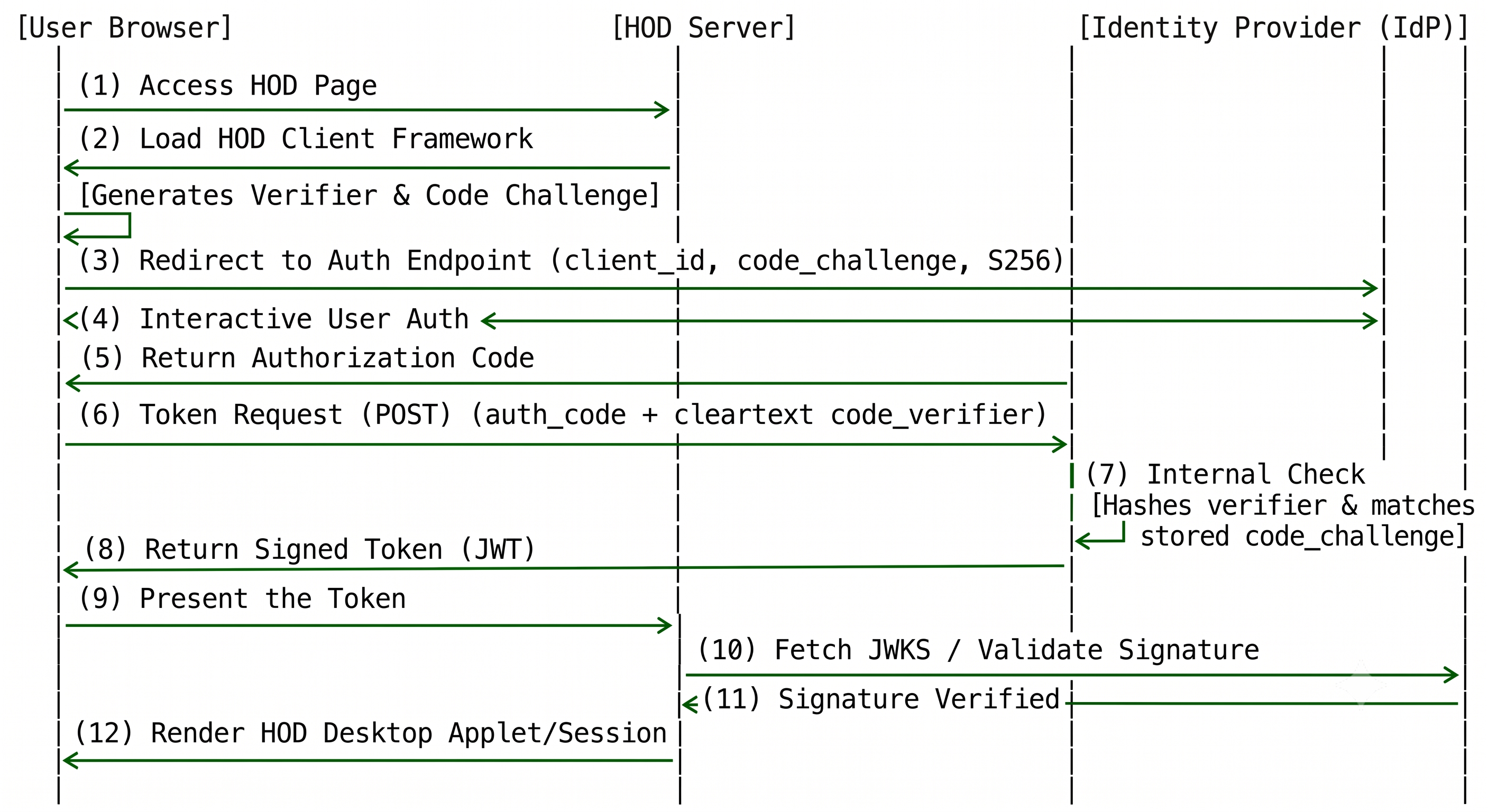
To protect sensitive identity information as it passes between the client and the Identity Provider (IdP), Host On-Demand uses the OAuth 2.0 Authorization Code flow with Proof Key for Code Exchange (PKCE).
Phase 1: The Challenge Generation & Redirection
-
- Step 1 & 2: The user attempts to access the protected HOD application page. The browser loads the underlying HOD client framework. Before redirecting the user to log in, the client framework dynamically generates a high-entropy cryptographically random string (the
code_verifier) and computes its SHA-256 hash (the code_challenge).
- Step 3: The browser redirects the user to the IdP's authorization endpoint, passing along the
client_id, the redirect_uri, the code_challenge, and the code_challenge_method=S256. The IdP logs this challenge against the session.
Phase 2: User Authentication & Code Capture
-
- Step 4 & 5: The user authenticates against the IdP (via standard single sign-on, corporate directory, etc.). Upon successful validation, the IdP generates a short-lived Authorization Code and transmits it back to the browser via the registered redirect URI.
Phase 3: The Cryptographic PKCE Exchange
-
- Step 6: This is the critical step missing from the basic diagram. The browser client bypasses the user-facing interface and sends a back-channel secure
POST request directly to the IdP's /token endpoint. It presents the raw Authorization Code alongside the plaintext code_verifier it held in memory.
- Step 7 & 8: The IdP executes the
S256 hashing algorithm on the incoming code_verifier. If the output perfectly matches the code_challenge provided during Step 3, the IdP knows with absolute certainty that the client requesting the token is the exact same application entity that initiated the login. It issues a signed JSON Web Tokens (ID Token and Access Token) back to the browser.
Phase 4: Mainframe Session Authorization
-
- Step 9: The browser client presents the cryptographically signed ID Token to the HOD server backend.
- Step 10 & 11: The HOD server verifies the token's authenticity. It parses the payload, validates the cryptographic signature against the IdP's public keys (JWKS), and ensures it hasn't expired.
- Step 12: With identity confirmed, the HOD server maps the configured profile and securely renders the emulation environment for the user.
Configuration for Administrators
Activating this foundational layer requires coordinated configuration across three execution spaces:
1. The HOD Deployment Wizard
Administrators must generate or modify an active configuration model template page using the Deployment Wizard utility. Within the Logon Properties configuration interface:
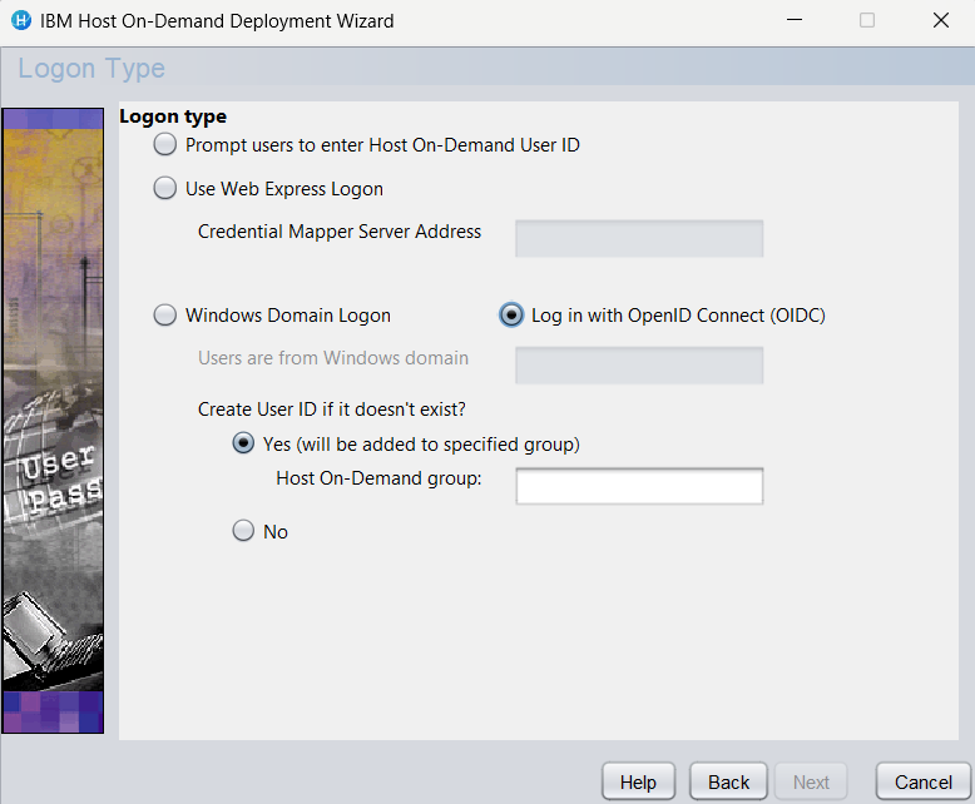
● Log in with OpenID Connect (OIDC): Check this flag to delegate portal entry to your designated identity layer.
● Create User ID if it doesn't exist?: Define provision rules for incoming directory personas that lack preconfigured definitions inside the HOD profile database.
-
-
Selecting Yes dynamically provisions a local account profile upon successful IdP validation and joins the new account to a specified destination group. For non-LDAP environments, you can input a comma-separated array to populate memberships across multiple target groups. Note that you must explicitly enable the "Allow users to create account" global setting within the HOD Administrative Console to allow this dynamic provisioning sequence.
-
Selecting No strictly denies entry to any directory identity that has not been explicitly registered in advance by an administrator within the HOD server engine.
2. Client-Side Framework Properties (config.properties)
The client configuration file maps properties directly to the Identity Provider endpoint boundaries:
oidc_domain
Specifies the base canonical domain URL of the enterprise Identity Provider.
client_id
Clarifies the target application identifier string registered within the IdP environment.
redirect_uri
Mandates the local callback context string: http://localhost:<PORT_NUMBER>/callback. Context root additions are explicitly rejected by the client runtime. Only raw HTTP loopback bindings are handled; this design accommodates desktop terminal constraints securely without requiring local client-side certificate paths.
scope
Evaluates the token scope of flags passed during redirection, which must explicitly contain openid profile email tokens.
AuthorizationEndpoint
Tracks the precise endpoint URL where the browser initiates the primary user login session challenge.
claimid
Determines which precise JSON attribute key inside the validated JWT payload represents the unique user ID (e.g., hod_server_username, email, or first_name).
3. Server-Side Framework Validation (ssoConf.properties)
To guarantee that tokens have not been altered or forged, the HOD server profile engine evaluates signature structures using server properties defined in ssoConf.properties:
● expectedIssuer: Validates that the token's internal origin claim string exactly matches this defined identity provider address.
● jwks_uri: Specifies the public URI that contains the JSON Web Key Set (JWKS). The server uses these public cryptographic keys to verify the digital signature of tokens.
● clientIdClaimNames & expectedClientId: Optional. These properties provide granular authorization filtering. Administrators can designate the exact token attribute field (such as azp or cid) containing the application origin and crosscheck it against a comma-separated blacklist or whitelist array of expected IDs.
● expectedAudience: Optional. Restricts execution paths by confirming that the incoming token's intended target claim exactly identifies this HOD deployment destination string.
Operational Note: The Host On-Demand server engine must be restarted after saving any changes to the ssoConf.properties file before the validation rules take effect.
OIDC-based zMFA Logon to Host Applications Using WEL
Why Automated Host Logon is Required
Securing entrance into the HOD Application layer is only half the battle. If a user must still type a mainframe password upon launching an individual terminal window, the security loop remains broken, and the user's experience remains fragmented.
Chaining OIDC tokens down to the green-screen terminal via the Web Express Logon (WEL) provides automated credential mapping. This strategy allows companies to eliminate static, high-risk RACF passwords across the enterprise's desktop landscape. Instead, it replaces them with dynamic, short-lived cryptographic tokens known as Cache Token Credentials (CTC).
Furthermore, this setup integrates cleanly with zMFA (Multi-Factor Authentication for z/OS). This architecture enforces multifactor validation at the enterprise border layer, transforming the authenticated web token into a compliant host for credential string without forcing users to re-enter complex secondary pins inside their terminal views.
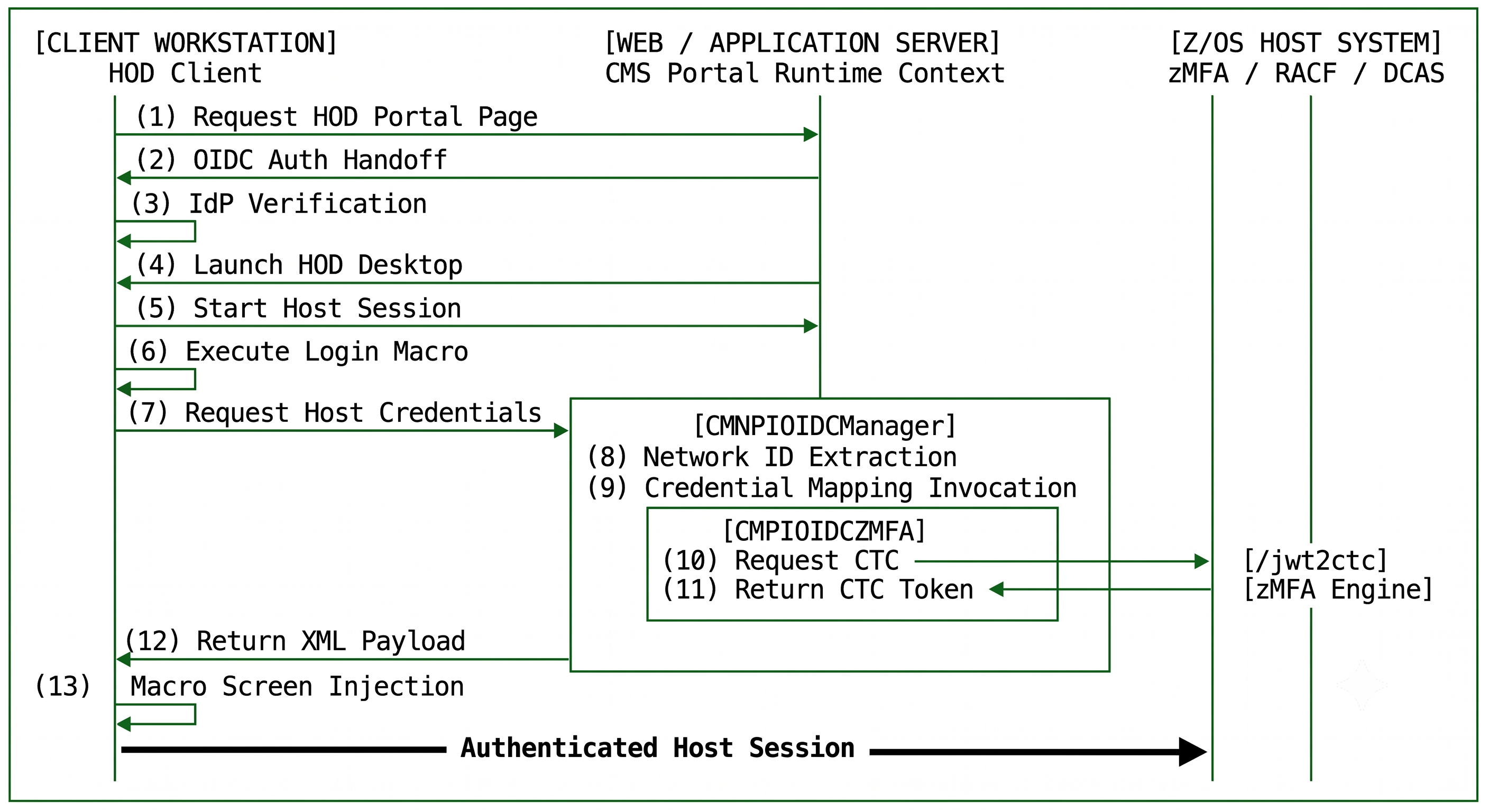
1.Request HOD Portal Page: The user initiates the access loop by navigating to the designated HOD web configuration directory URL.
2. OIDC Auth Handoff: Recognizing the page configuration, the application server redirects the request to the configured corporate Identity Provider (IdP) endpoint.
3. IdP Verification: The user completes corporate single sign-on verification. The browser client securely captures and caches the validated JSON Web Token (JWT) payload.
4. Launch HOD Desktop: The portal page returns and initializes the central desktop panel, rendering authorized host terminal emulation connections.
5. Start Host Session: The user double-clicks an explicit connection icon to instantiate a 3270 Telnet connection to the target mainframe.
6. Execute Login Macro: Because the session is configured for Web Express Logon (WEL) under preference settings, an automated login macro (sso.mac) executes immediately upon host screen detection.
7. Request Host Credentials: The macro invokes the underlying client framework hooks ($SSO.getUserID()$ and $SSO.getPassword()$), prompting the system to pass the cached OIDC JWT to the backend Web Express Logon service via an HTTPS POST request.
8. Network ID Extraction: The native Network Security plugin context (CMNPIOIDCManager.java) intercepts the request payload, decodes the JWT structure, and isolates the corporate user network identity based on the configured CMNPI_CLAIMID_AS_HOSTUID.
9. Credential Mapping Invocation: The CMS framework routes the identity metadata directly into the designated Host Credential Mapper plugin engine (CMPIOIDCZMFA.java). Here, custom business logic (such as a 1-to-1 map or LDAP query) can be executed to translate the network identity to a valid z/OS User ID.
10. Request Cache Token Credential (CTC): The mapper plugin utilizes the parameters configured in CMPI_zMFA_TRUSTSTORE to open a secure SSL path to the enterprise zMFA processing endpoint, targeting the /jwt2ctc path to exchange the JWT for an authenticated host token.
11. Return Cryptographic CTC Token: The IBM zMFA service validates the incoming JWT signatures against its trust rules and returns a short-lived, 8-character cryptographic Cache Token Credential (CTC).
12. Return XML Credential Payload: The mapper engine serializes the mapped z/OS User ID and the generated CTC token into a structured XML data stream returned directly over the client connection.
13. Macro Screen Injection: The active HOD client macro interprets the XML configuration payload, extracts the credentials, and automatically injects the z/OS User ID and the dynamic CTC token into the standard mainframe terminal login fields, bypassing the manual entry step completely to establish the authenticated host session.
Component Configuration & Parameters
1. Default OIDC Network Plugin: CMNPIOIDCManager.java
The network plugin is responsible for intercepting the web request and extracting the necessary identity information from the OIDC token. Administrators define configuration properties for the plugin within the primary application initialization block:
-
-
CMNPI_CLAIMID_AS_HOSTUID (Optional): Dictates the target JSON string key inside the decoded JWT payload utilized to extract the identity name (e.g., email or name).
CMNPI_OIDC_TRACE_LEVEL (Optional): Sets the debugging trace level to help administrators troubleshoot the extraction process. Higher integers output explicit token structures and decoded strings directly to the server log files.
2. Default OIDC Credential Mapper Servlet: CMPIOIDCZMFA.java
Once the network plugin identifies the user, the credential mapper takes over to negotiate with the zMFA backend and exchange the OIDC token for a mainframe-compatible CTC token. Administrators configure execution options for the credential mapper plugin using parameters defined within the application server initialization file:
-
-
CMPI_zMFA_JWT2CTC_ENDPOINT (Required): The specific URL where the Web Express Logon service (zMFA endpoint) is running to convert the JWT token to a dynamic CTC token.
CMPI_zMFA_TRUSTSTORE, CMPI_zMFA_TRUSTSTORE_TYPE, and CMPI_zMFA_TRUSTSTORE_PASSWORD (Required): These parameters define the cryptographic keystore used to securely establish the SSL connection with the zMFA backend. The password is saved in an encrypted format.
CMPI_zMFA_USE_NETID_AS_HOSTID (Optional): A boolean flag. If set to true, the system uses the network ID directly from the request context. If false, it reads the identity from the specified JWT claim.
CMPI_CLAIMID_AS_HOSTUID (Optional): If CMPI_zMFA_USE_NETID_AS_HOSTID is set to false, this parameter specifies the exact claim key from the token to use as the target host ID.
CMPI_zMFA_HOST_ADDRESS & CMPI_zMFA_HOST_PORT (Optional): Clarifies the target mainframe host network address and port for environmental routing.
CMPI_zMFA_TRACE_LEVEL (Optional): Enables localized framework logging to trace the success or failure of the secure CTC token generation.
CMPI_zMFA_NO_FIPS & CMPI_zMFA_VERSION (Optional): Allows configuration for FIPS compliance overrides and dictates specific zMFA protocol parsing versions.
Architectural Summary and Enterprise Blueprint
By chaining OIDC Server Logon with Web Express Logon for the green screen, IBM Host On-Demand offers a highly versatile, end-to-end SSO experience. It aligns legacy architecture with Zero Trust network philosophies, establishing a modern, multi-layered identity framework for enterprise mainframe deployments.
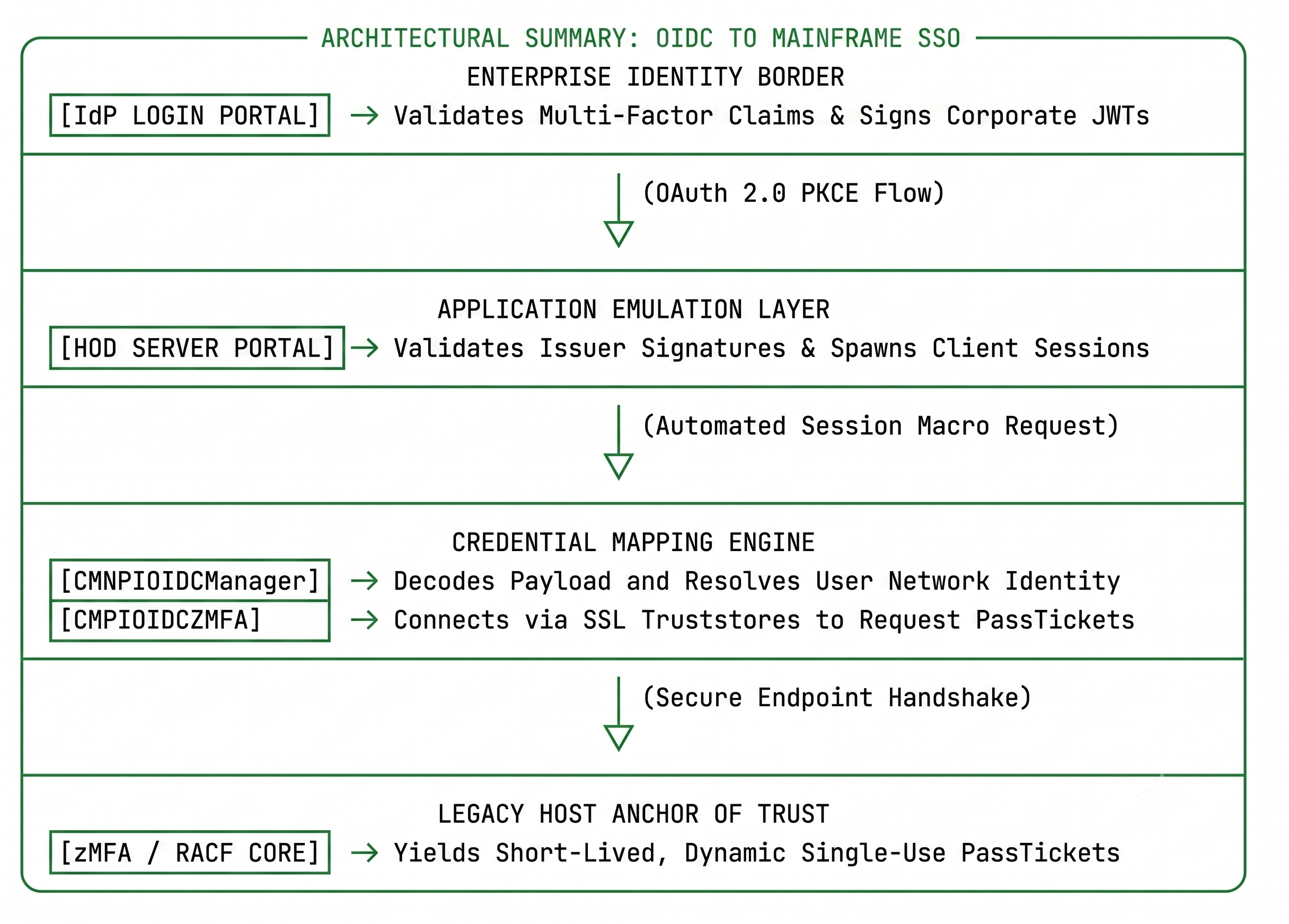
This integration delivers significant security and operational benefits:
- Mitigation of Password Risks: Mainframe logins change from vulnerable static passwords to dynamic, short-lived Cache Token Credentials (CTC) that automatically expire after a brief validity window.
- Unified Access Management: Identity tracking is unified within your core directory infrastructure, allowing administrators to apply uniform conditional access rules across both web apps and legacy terminals.
- Simplified Workflows: Users authenticate just once at the network perimeter to open their terminal sessions seamlessly without manual credential entry screens.
- Zero-Trust Alignment: Traditional core terminal systems are integrated into modern identity validation frameworks, extending the operational life of critical infrastructure without compromising your enterprise security posture.
Customization and Extension Reference
The standard components (CMNPIOIDCManager.java and CMPIOIDCZMFA.java) handle default OIDC token mapping and zMFA exchanges out of the box. However, organizations with unique infrastructure rules can build entirely custom tracking layers.
The Web Express Logon framework includes an open Java extension. Administrators can develop specialized behaviors by writing custom classes that implement three foundational interfaces:
● com.ibm.eNetwork.security.sso.cms.CMInterface: The core lifecycle plugin container. Manages setup configurations via Init(Properties p, String id), cleans up resources on shutdown using Destroy(), and routes active credentials through CMSGetUserCredentials(CMRequest req).
● com.ibm.eNetwork.security.sso.CMRequest: Encapsulates transaction attributes passed down to custom plug-ins, including network identities, application IDs, target host destinations, and active servlet request objects.
● com.ibm.eNetwork.security.sso.CMResponse: Packages custom calculation data, returning status codes, resolved IDs, and generated passwords or PassTickets back to the central engine.
For complex security landscapes, consult the API Programming Guide within your product documentation to learn how to compile and integrate custom credential-mapping classes into your application environment.