IDEA CSM-I-233 - Automate Safeguarded Copy Validation with z/OS LPAR Actions
- Once you have a connection to a zHMC, you can now setup to automate Safeguarded Copy Validation. There is a new Action Type in the scheduled task wizard called z/OS LPAR actions. You can setup z/OS LPAR actions to issue any of the available LPAR commands listed before: Activate, Deactivate, Reset Clear and Load.
- The Activate, Deactivate and Reset Clear LPAR actions simply issue those commands with or without the force option.
- But the Load LPAR action though allows you to setup a lot more.
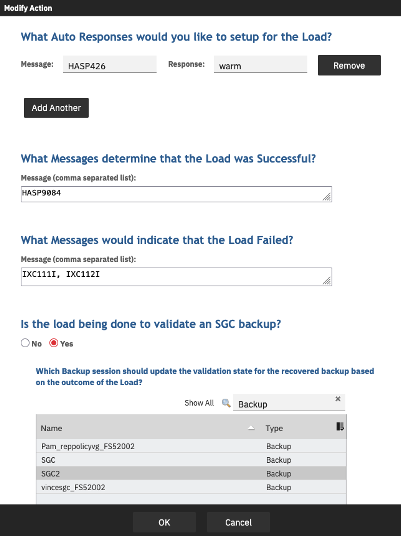
Define the LOADADDR - This allows you to specify a specific load address that should be used for the load.
Define the LOADPARM - This allows you to specify a specific load parm that should be used for the load.
Add one more messages and their desired responses - CSM will monitor the z/OS console and if it sees any of these message it will automatically determine the response number and respond for you!
Provide a list of success messages - CSM will continue to monitor the z/OS console until all of the messages specified are seen. Once all messages are seen then the Load will be considered a success! If the load action however times out before all the messages are seen then the load will be considered failed.
Provide a list of failure messages - CSM will monitor the z/OS console and if any of the failure messages are seen the load will be immediately considered failed.
Mark the recovered backup on the SGC session with the results - Based on the result of the load, you can optionally have CSM automatically mark the currently recovered backup for a specific CSM SGC session with the validation result. This allows you to go back and see which backups were successfully validated, which failed, which weren't tested and which may have had warnings.
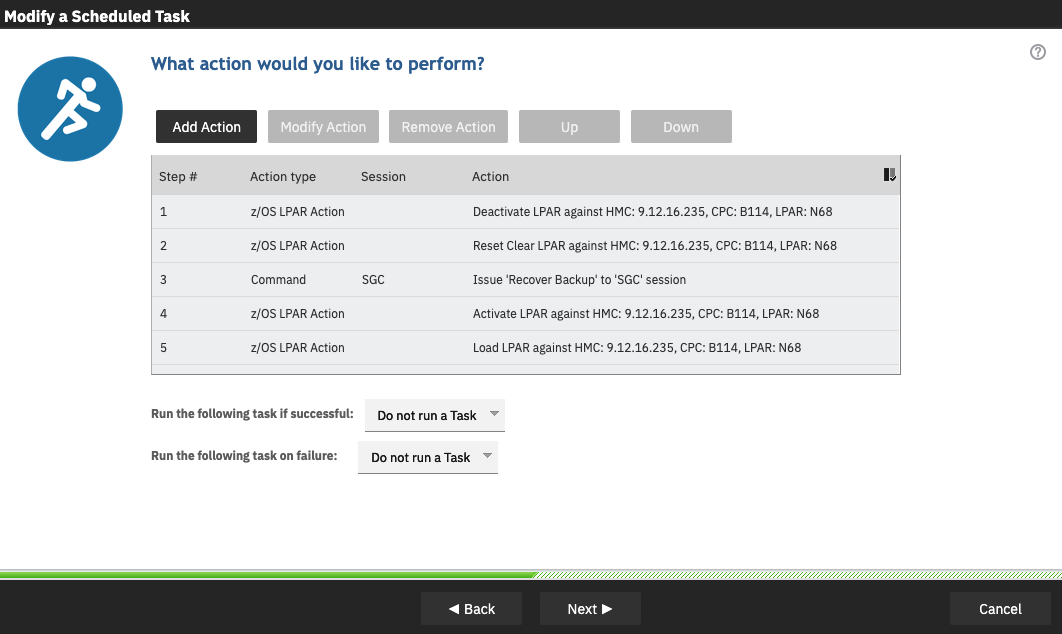
With these actions you can now create a Validation work flow that you run regularly against the backups in the SGC session. For example, a potential work flow may look something like the following:
-
Deactivate the test z/OS LPAR Reset Clear the test z/OS LPARIssue 'Recover Backup' on SGC sessionActivate the test z/OS LPARLoad the test z/OS LPARIssue 'Terminate H1R1' on the SGC session
The above steps will prep the test LPAR and make sure it's down before we update the volumes and then update the volumes using the recover for the last backup taken on the session and IPL the LPAR with the Load. If the LPAR starts up....you've done at least Type 1 validation.
If you want to do Type 2 or 3 validation though, which looks closer at the actual application data in order to look for more targeted attacks on the application, you can contact IBM Expert Labs who has a zData Validation Asset Utility service offering.