In the years I've been working in the MQ Support Organisation, one issue that pops up on a regular basis is customers asking why they are seeing the message:
BFGTR0068I: Transfer ID: <transfer identifier>, to destination agent <destination agent>, is entering recovery, immediately, due to recoverable error: BFGTR0064I: The transfer sender timed out waiting for a response from the transfer receiver.
in their agent’s event log (output0.log) and the entry:
{"dateTime":"<date and timestamp> UTC", "transferId":"<transfer identifier>","eventDescription":"BFGTL0071E: A recoverable error occurred. Transfer is entering recovery.","errorDescription":"BFGTR0068I: Transfer ID: <transfer identifier>, to destination agent <destination agent>, is entering recovery, immediately, due to recoverable error: BFGTR0064I: The transfer sender timed out waiting for a response from the transfer receiver."}
in the agent’s transfer log (transferlog0.json). These messages indicate that a managed transfer has gone into recovery during the negotiation phase. In this blog post, we’ll look at why that can happen and what you can do to resolve it.
What happens during the transfer negotiation phase:
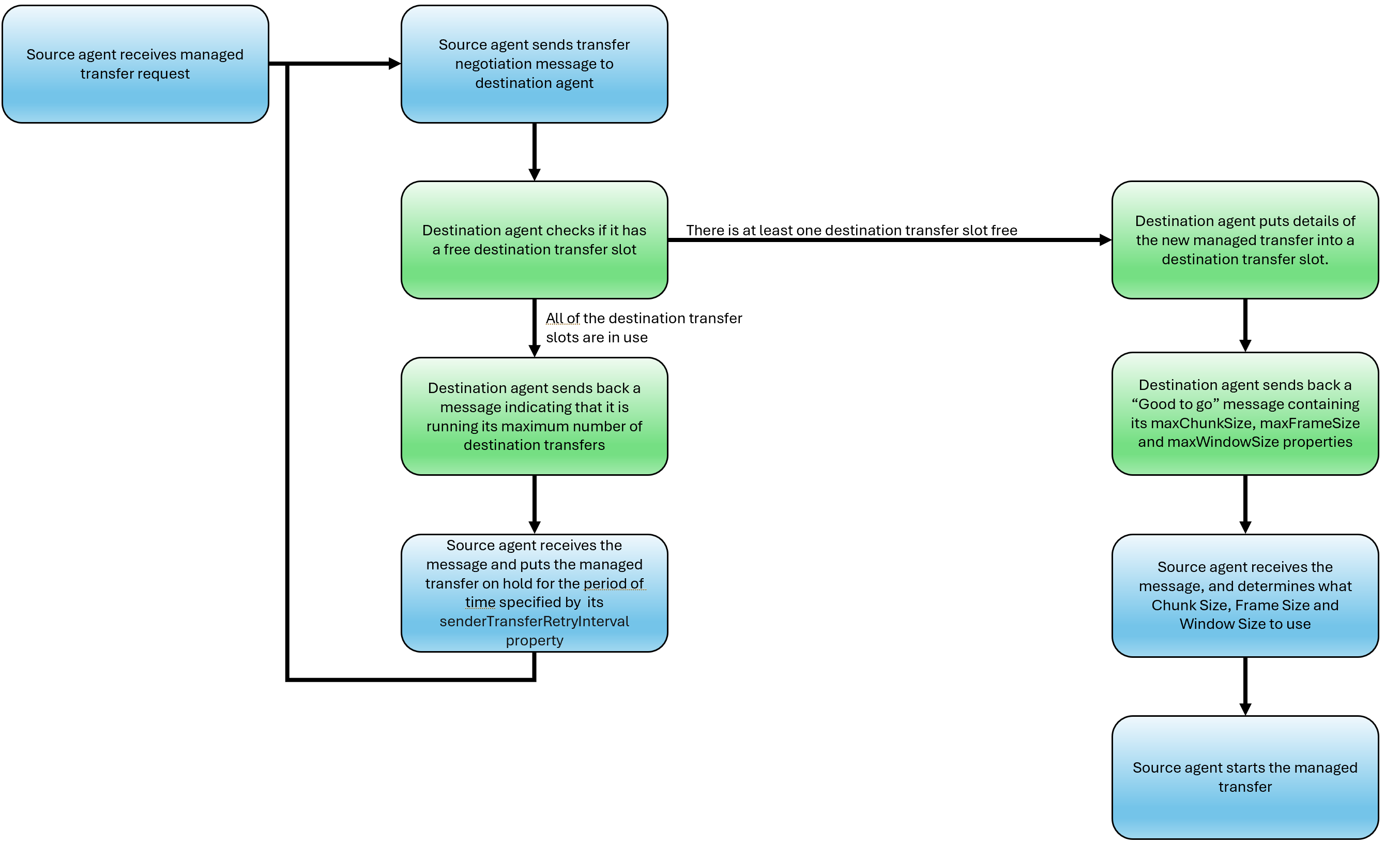
The first phase of any managed transfer is the negotiation. At a high level, this involves the following steps:
- Initially, the source agent sends a transfer negotiation message to the destination agent.
- When the destination agent receives the message, it checks if it has a free destination transfer slot.
- If all of its destination transfer slots (as specified by the destination agent's maxDestinationTransfers property), then it sends a message back to the source agent indicating that it is currently too busy. The source agent receives this and then puts the managed transfer on hold for a period of time (as specified by the agent’s senderTransferRetryInterval property) before resending the negotiation message again.
- If the destination agent does have a free destination transfer slot, though, then it puts details of the new managed transfer request into one of the slots and sends a message to the source agent indicating that it is good to go. The message also contains the values of the destination agent’s maxChunkSize, maxFrameSize and maxWindowSize properties.
- When the source agent receives this message, it compares the values of these properties with its own values and then picks the largest ones to use during the managed transfer.
- Finally, the source agent starts the managed transfer.
Here is a flowchart that shows this (the steps carried out by the source agent are shown in blue, and the ones performed by the destination agent are in green):
How the transfer negotiation can time out:
Typically, a managed transfer can time out during the negotiation phase for one of three main reasons:
Reason 1:
The first reason is simply that the destination agent is not running. If you have access to the system when the agent has been defined, then you should log on and check that it is up. If you don’t, however, you can run either the ftePingAgent or fteListAgents commands to see what state it’s in. If it is stopped, then you should restart it. This should then allow managed transfers involving the agent to start, and so prevent the timeout errors from occurring.
Reason 2:
If the destination agent is running, then the next thing to look at are any sender and receiver channels between the source and destination agents. If any of them are down, then the transfer negotiation messages will not be able to flow between the agents which can cause managed transfers to time out. In this situation, restart the channels to allow the messages to flow between the queue managers.
For example, suppose that we have the following MFT topology:
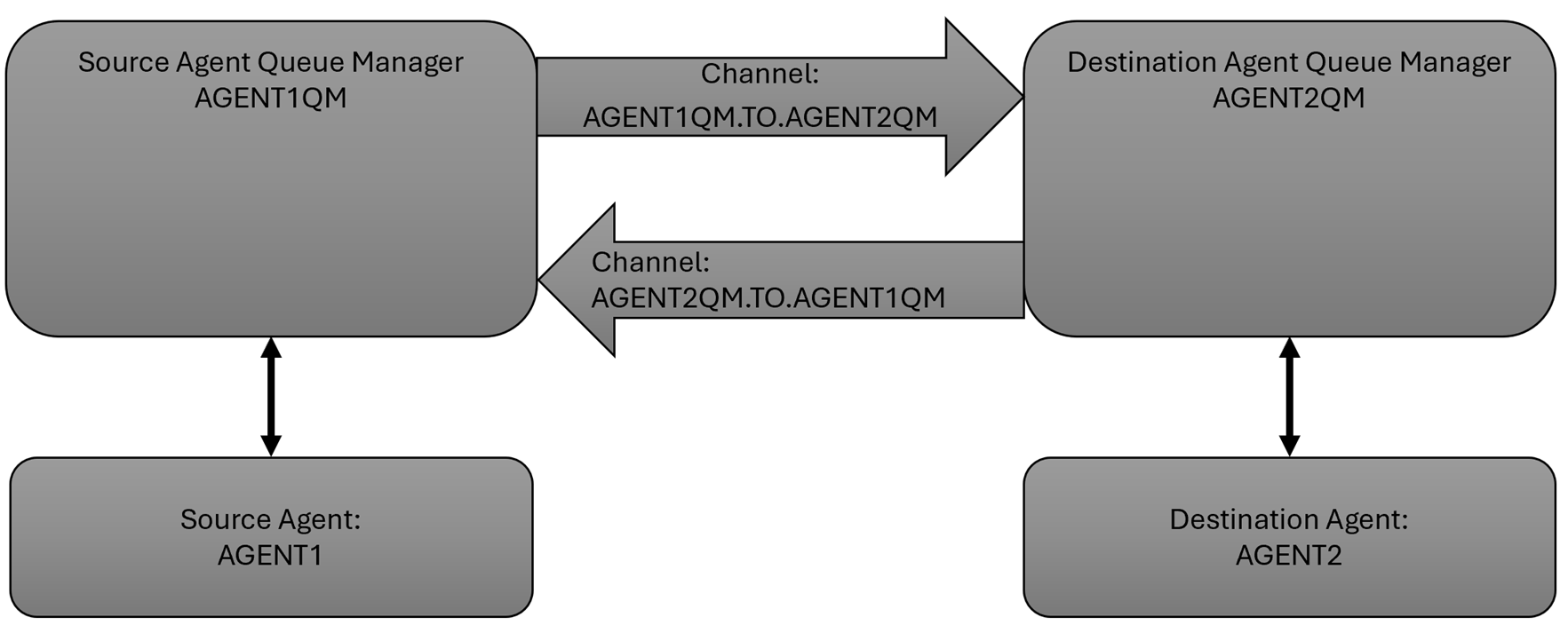
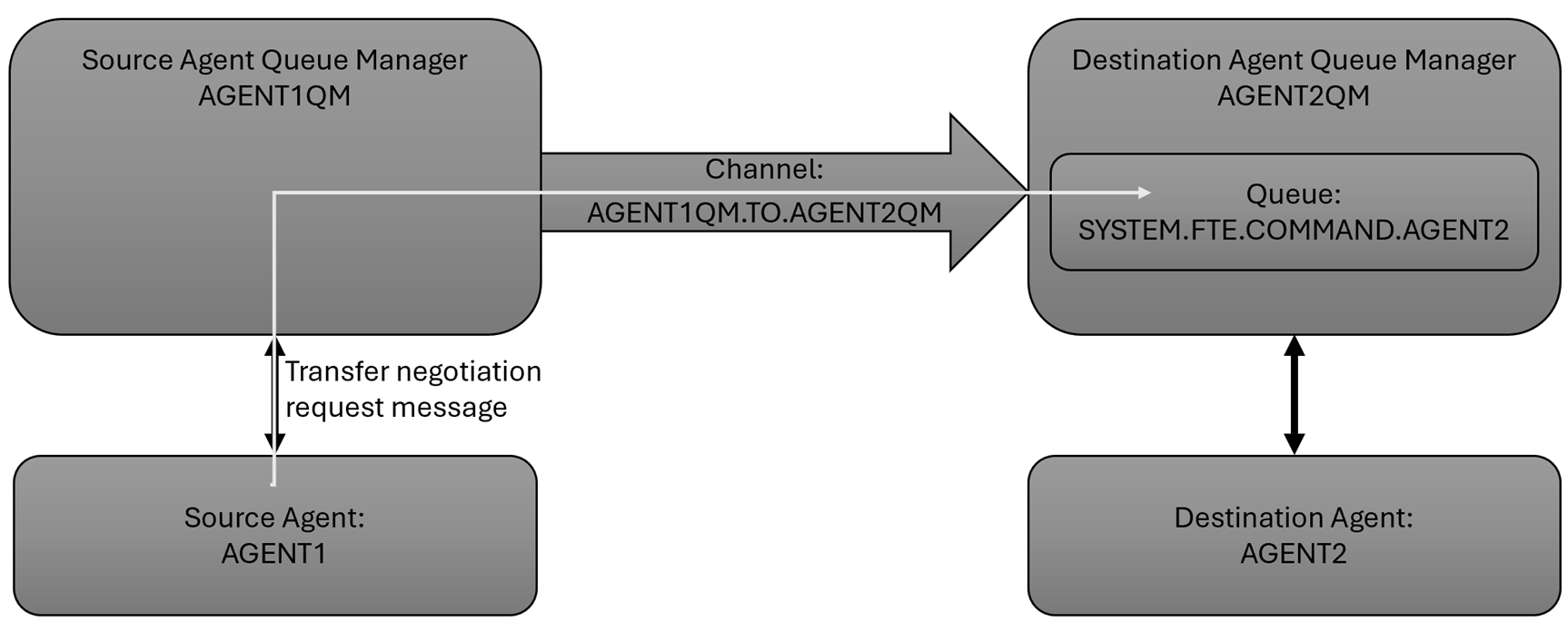
During the transfer negotiation phase, AGENT1 puts the transfer negotiation message to AGENT2’s command queue (SYSTEM.FTE.COMAND.AGENT2) on AGENT2’s queue manager (AGENT2QM). This results in the message flowing over the channel AGENT1QM.TO.AGENT2QM, like this:
Similarly, when AGENT2 has processed the transfer negotiation message and sends back its response, that message flows over the channel AGENT2QM.TO.AGENT1QM before arriving on AGENT1’s command queue (SYSTEM.FTE.COMMAND.AGENT1):
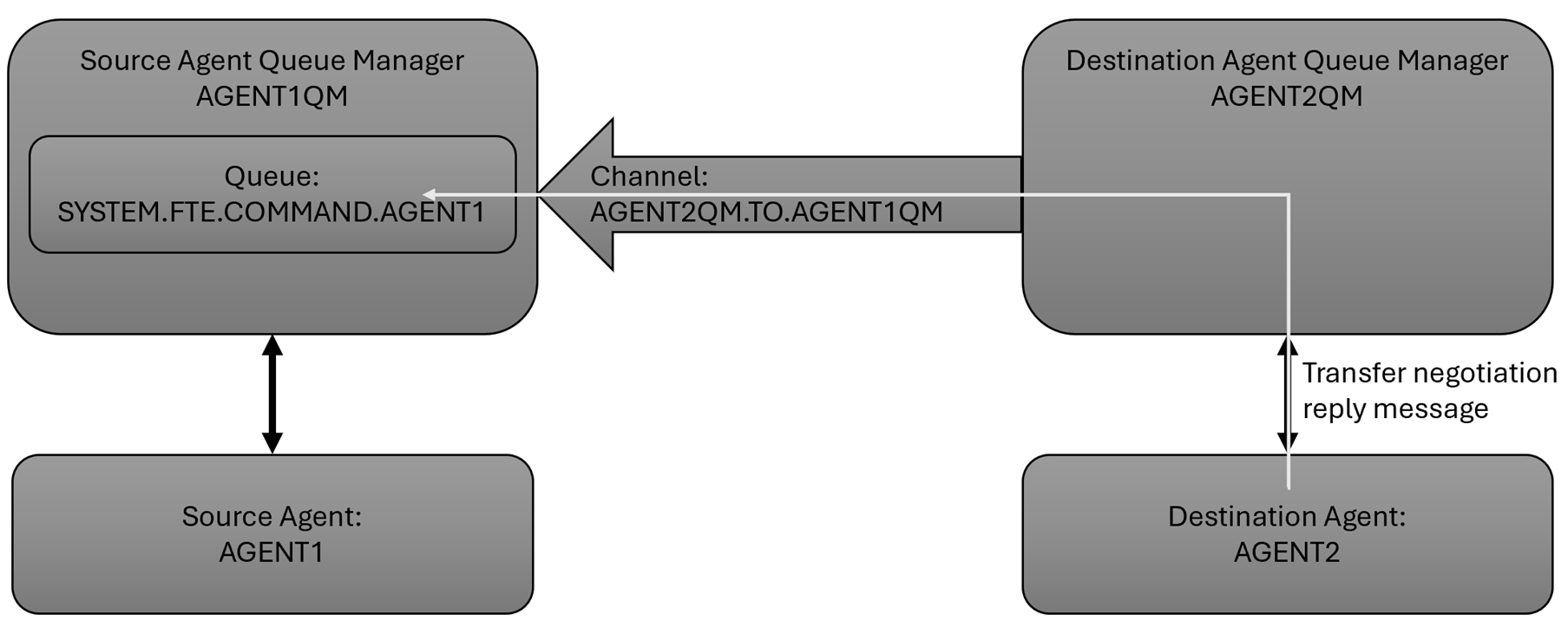
Now, if the AGENT2QM.TO.AGENT1QM channel is down, then the transfer negotiation reply message will never arrive on AGENT1’s command queue. Instead, it will be stuck on the transmission (XMIT) queue for the channel on AGENT2QM:
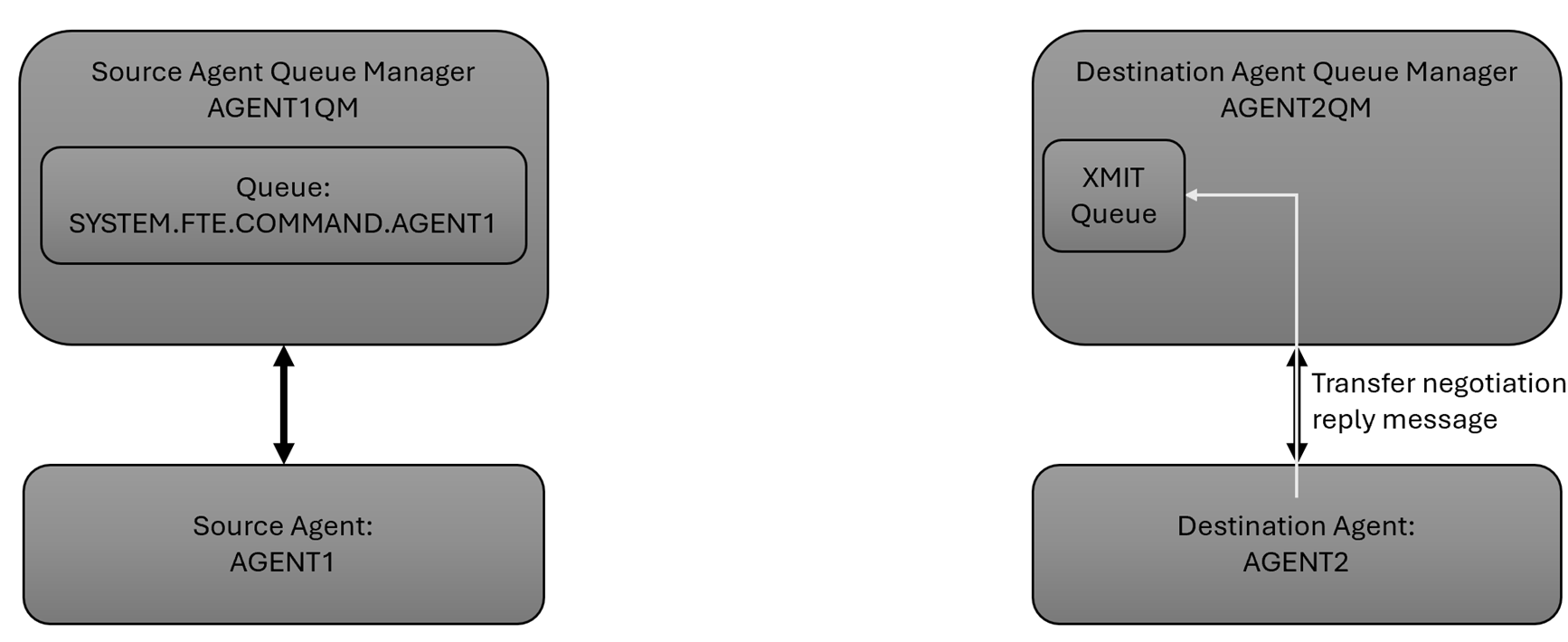
As a result, the negotiation will time out and AGENT1 will write a BFGTR0068I message containing a BFGTR0064I message to its event log and transfer log.
Reason 3:
Now, both of the reasons above are “hard failures” and mean that managed transfers between the source and destination agents will always time out in the negotiation phase until the issue has been resolved.
Sometimes, though, you might see that the majority of the transfers completing successfully, with just the occasional one timing out. This is typically the result of either the source or destination agent’s command queue containing a lot of messages.
As we saw in Reason 2, during the negotiation phase:
- The source agent puts the transfer negotiation request message to the destination agent’s command queue.
- The destination agent sends the reply message to the source agent’s command queue.
Every agent contains an internal thread called the CommandHandler which is responsible for getting messages from its command queue. Depending on the type of message it receives, the thread will either process it itself or hand it off to a CommandHandlerWorker thread for processing.
If there are a lot of messages on the command queue, then it might take the CommandHandler thread some time to process them. This could mean that:
- A transfer negotiation request message could be sat on the destination agent’s command queue for a while before the destination agent gets it.
- And the transfer negotiation reply message could be on the source agent’s command queue before that agent’s CommandHandler thread picks it up and processes it.
If you run into this situation, then you should consider increasing the value of the source agent’s maxTransferNegotiationTime property from its default value of 30000 milliseconds (30 seconds). This will allow the source agent to wait for a bit longer to receive the transfer negotiation reply before timing out.
As always, I hope all of this helps! If you have any questions, feel free to ask and I’ll be happy to answer them.