Ever wondered...
What if you could keep track of every change in your code, work smoothly with your team, and always have a safe backup of your work?
With Git, you can do all of this easily.
Git is the de facto industry standard source code manager (SCM). It helps developers manage code changes, work together efficiently, and improve software quality.
Introduction
In today's fast-paced development environment, managing source code effectively is more important than ever. As teams work on new features, bug fixes, and enhancements, keeping track of changes can become challenging. A reliable Source Code Management (SCM) solution helps teams stay organized, maintain code quality, and work more efficiently. Git has become a popular choice for managing code changes and supporting modern development practices.
What is Git?
Git is a free and open-source distributed version control system (DVCS) created by Linus Torvalds in 2005.
Every developer holds a complete copy of the repository and its full history.
Three features matter most for IBM i work:
· Branching and Merging – Developers can create separate branches for new features or bug fixes and later merge them into the main code.
· Full change history – Every commit records what changed, who changed it, and when.
· Team Collaboration – Multiple developers can work on the same project at the same time without affecting each other's work.
Why Git on IBM i
As IBM i teams grow and development practices evolve, managing code changes, coordinating between developers, and maintaining a reliable history of modifications becomes important.
Git helps bridge this gap by providing a structured, modern approach to source code management on IBM i.
|
Need
|
What Git provides
|
|
Know who changed what, and why
|
Immutable commit history with author, timestamp, and message
|
|
Two developers, one program
|
Branches plus a real three-way merge instead of member sign-out
|
|
Get back to a known-good state
|
Any prior commit is one command away
|
|
Code review before promotion
|
Pull requests and diffs on GitHub, GitLab, etc.
|
|
Automated build and deploy
|
Git is the trigger every CI/CD tool expects
|
|
Offsite copy of source
|
Every clone is a full backup
|
By improving visibility, collaboration, and control, Git helps organizations build better software while making the development process smoother and more efficient.
Setup Git on IBM i
Git installs through Yum in PASE, or through the Open-Source Package Management interface in IBM Access Client Solutions (ACS).
Step 1: Install and verify:
To install Git, open a PASE session on IBM i and run:

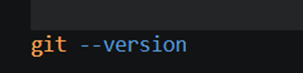
Verify Git is installed:
Step 2: Configure SSH keys for secure remote access
Generate a key pair in PASE:

Display the public key so you can copy it:

This command only prints the key to your screen. You must then paste it into your hosting platform yourself — on GitHub, Settings → SSH and GPG keys → New SSH key.
Test the connection:

Step 3: Configure your Git Identity:

Step 4: Clone into the IFS
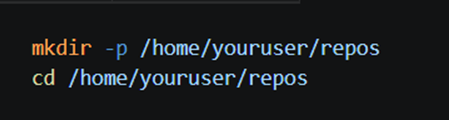
On IBM i, Git repositories should live in the IFS, not in library source files.
1. Create a working directory in IFS:
2. Clone your repository:

Step 5: Pick Your Source Strategy
- IFS-Based Workflow: Store source in the IFS (Integrated File System) as stream files and compile using `CRTBNDRPG SRCSTMF(...)`. Git works natively here.
- Source Member Extraction: Use tools like The Object Builder for i (TOBi) or `CPYTOSTMF` command to extract source members from `QSYS` libraries to IFS stream files, version them in Git, and compile back as usual.

The return trip — back into a member to compile

Building Objects from Git
This is where most Git-on-IBM i projects stall, and it is the part the setup steps alone cannot deliver.
IBM i libraries don't isolate the way Git branches do.
MYLIB/MYPGM is one object — two branches cannot both hold their own version of it. If two developers build from two branches into the same library, the second build overwrites the first, and Git's isolation guarantee stops at the source directory.
2 approaches to pick from:
- Library per branch. Each branch builds into its own library (FEAT1LIB, FEAT2LIB), with the library list ordered so that library sits ahead of the production library. Cleanest isolation; costs library sprawl and a naming convention you must enforce.
- Library per developer. Simpler to manage, and adequate when developers rarely work two branches at once.
You also need a build engine. TOBi (Better Object Builder) is an open-source, make-based, dependency-aware, designed for this exact problem. The usual starting point, and the tool behind Code for IBM i's build support.
Conclusion
Git is a powerful, free, and reliable version control system that can be successfully used on IBM i. It improves code management, supports team collaboration, speeds up software delivery, and reduces costs.
By providing proper training, support, and planning, organizations can adopt Git smoothly and gain significant benefits in their development process.
Git helps teams build better software, work together efficiently, and deliver applications faster.