IBM Maximo Manage 9.x · Maximo Asset Configuration Manager 9.3 · Configuration management · Hands-on guide
An aircraft, a train set or a gas turbine is not one asset. It is a structure of hundreds of serialized components, and only some combinations of parts are allowed, in specific positions. A missing component, a part number that is not approved for a position, or a swap that nobody recorded can ground the fleet or fail an audit. Maximo Asset Configuration Manager (ACM) adds configuration control to Maximo Manage: it records what an asset is allowed to look like, builds real assets from that definition, tracks every install and removal by date, and runs a rules engine, the Build Data Interpreter (BDI), that says whether each asset is valid right now. This guide builds one regional turboprop from nothing, changes an engine three times, and explains every screen, field and status on the way.
Watch first: the whole story in under four minutes, on the same lab records as the guide.
What you will learn
- Why configuration management exists, and what ACM controls that plain Maximo asset hierarchies do not.
- The ACM building blocks: CM items, models, build items, labels, build positions (LCNs), configurations and revisions.
- How a model becomes a real, serialized aircraft with New Asset Assemblies, sub-assembly by sub-assembly.
- What the Build Data Interpreter checks, where it runs, how Maximo reaches it, and how to read its verdict (OK, ALERT, INVALID) and problem codes.
- How an engine change is recorded with Install / Remove, how an approved alternate part is accepted, and why a bare spare engine still leaves the aircraft invalid.
- What a fresh install needs before a model can even be saved, and the messages you will meet on the way.
Every step was run on Maximo Manage 9.3 with the Asset Configuration Manager 9.3 add-on and the standard demo data (organization EAGLENA, site BEDFORD). Record numbers in the screenshots are the ones the lab created. The aircraft, part numbers and registration are invented for the lab.
1Why serialized fleets need configuration management
Plain Maximo already has asset hierarchies: an aircraft asset can have engine assets as children, and each engine can have a propeller below it. That records what is there. It does not record what should be there, so it cannot tell you whether what is there is acceptable. Three questions show the gap:
- Is this part allowed here? Two engines can look identical in the hangar and differ by one dash number, for example an improved hot section. One dash number is approved for the aircraft and the other is not, or only from a given serial number onwards.
- Is anything missing? An aircraft with an empty mandatory position is not airworthy, even if every component that is fitted is in perfect condition.
- What did this aircraft look like on a given date? After an incident, or in an audit, you have to show which serial number sat in each position on that day, and how long each component had been fitted.
Configuration management answers them by keeping two pictures side by side: the definition of every allowed build (the as-designed picture) and the real, dated history of each serialized asset (the as-maintained picture). A rules engine compares the two continuously.
Benefits
- Fewer invalid builds reach service. The aircraft turns red the moment a mandatory position is emptied or a wrong part is fitted, not at the next audit.
- One controlled definition. Approved part numbers, alternates and positions are entered once on the model and every aircraft built from it follows them.
- Complete traceability. Every install and removal is dated. The structure, history and meter totals of an asset can be viewed "as of" any past date.
- Compliance evidence. Airworthiness directives, service bulletins and modifications (Technical Records) and the maintenance programme hang off the same definition.
IBM describes ACM as a rules-based configuration management system for high-value, complex, regulated assets: aircraft, rail vehicles, engines and weapon systems. Its origins are in the military logistics standard MIL-STD-1388-2B (Logistics Support Analysis Record). That is why positions are keyed by an LCN, a Logistics Control Number. The same mechanism serves commercial airlines, train operators and engine manufacturers. Maximo Aviation is built on top of ACM and shares its applications and its BDI.
2What ACM adds to Maximo Manage
ACM installs as an add-on to Maximo Manage. On the lab system it added more than fifty applications, all with ids that start with PLUSA, and it extends core objects. Asset, location, meter reading and work order all get ACM behaviour. It also needs one service outside Manage: the Build Data Interpreter.
| Application (as named in the menu) |
App id |
What it is for |
| CM Item Master (CM) |
PLUSACA |
The catalogue of controlled part numbers (CM items), with serial formats, serial ranges and the master PMs that apply to each part. |
| Models (CM) |
PLUSACM |
The definition of an allowed build: build items, labels, the position hierarchy, position rules, configurations and revisions. |
| Build Position Master (CM) |
PLUSABITMA |
Reusable position codes (system, position code, series) with their allowed part numbers and zones. |
| Series (CM), Zones (CM) |
PLUSACMSER, PLUSAZONE |
Groups of related models; physical areas of the asset where maintenance is done. |
| New Asset Assemblies (CM) |
PLUSANEWAS |
Builds a real, serialized asset and all its sub-assemblies from a model. |
| New Asset Assemblies - Receiving (CM) |
PLUSANAREC |
The same, started from receiving. |
| Assets (CM) |
PLUSAASSET |
The configuration-aware asset application: the View tab tree, Install / Remove, BDI Status, as-of history, CM rules. |
| BDI Queue Status (CM) |
PLUSABDIQ |
Every validation request sent to the BDI, its status and the server that ran it; the BDI end point settings. |
| Master PM (CM), Preventive Maintenance (CM), PM Groups, PM Extensions |
PLUSAMASPM, PLUSAPM, PLUSAPMGRP, PLUSAPMEXTENSION |
The maintenance programme attached to CM items, and the asset PMs generated from it. |
| Technical Records (CM) |
PLUSATR |
Airworthiness directives, service bulletins and modifications, with compliance and the part they upgrade. |
| Fleet Management (CM), Fleet Usage Load (CM) |
PLUSACMFLE, PLUSAFLEUL |
Dynamic fleets of end items; bulk entry of meter readings for a fleet. |
| Flight Log Book (CM), Flight Log Book Setup (CM) |
PLUSAFLB, PLUSAFLBSU |
Operational logs (flights, discrepancies) that feed meters and status. |
| Maintenance Planning (CM), Maintenance Forecasting (CM) |
PLUSAMNTPL, PLUSAMNTFO |
Work packages and the forecast of upcoming maintenance per asset. |
| Work Order Tracking (CM), Quick Reporting (CM), Item Master (CM), Inventory (CM), Purchase Orders (CM)… |
PLUSAWO, PLUSAQRP, PLUSAITEM, … |
Core applications with ACM behaviour added, such as install and remove from a work order. |
Where the BDI runs The Build Data Interpreter is not part of the Manage server. In Maximo Application Suite, activating ACM (or Aviation) in the Manage workspace deploys BDI instances as their own service. Each instance reads and writes the Manage database directly. Maximo reaches it through an
end point: a host, a port and an SSL flag, kept in
BDI Queue Status (CM) → Manage BDI End Points. Every change to a configuration-managed asset puts the top asset on the BDI queue, and the BDI validates it within seconds.
Lab 7 shows the queue and the end point.
3The ideas, in plain words
The definition side (as-designed)
| CM item |
A controlled part number in the CM Item Master, for example EN50-100. It is the type of a component, not a physical one. It is related to the base Item Master but is a separate catalogue. |
| Model |
The name of an allowed build, or a family of builds: here the TP-70 aircraft. The model carries the label system, the LCN structure and the whole position tree. |
| Build item |
A named group of CM items that can fill a position, for example ENGINE = {EN50-100, EN50-110}. Every CM item in a build item is interchangeable in the positions that use it. This is how ACM expresses approved alternates. |
| Label and label system |
A reference code on a build item, from a coding system such as ATA (the air transport chapter numbering: 72 engine, 61 propellers, 32 landing gear, 49 APU). Labels make the tree readable and let other systems refer to positions. |
| Build position and LCN |
A physical slot on the model where a component can be fitted, such as ENGINE L. Each position has a Logistics Control Number (LCN) whose characters encode the tree. With LCN structure 1222 and top LCN T, the aircraft is T, its first child T01, the first child of that T0101, and so on: one character for level 1, then two per level. |
| Indenture |
The depth of a position in the tree: 1 for the aircraft, 2 for an engine, 3 for its propeller. |
| Indicator |
The kind of position: E end item (the top), S sub-assembly, I installation point, N non-tracked item, W software. |
| Mandatory |
A position rule: the asset is invalid if the position is empty. In this lab every position is mandatory except the APU. |
| Configuration (variation) |
A version of the model for a design, an equipment list or a role. Creating a model creates a Base Variation. A configuration flagged Abstract is a template that cannot be used on a real asset; it must be non-abstract and ACTIVE before assets can be built. |
| Revision |
A dated snapshot of the model definition. Revision 0 is created with the model as a draft. A revision must be released (not draft) and have an active date before assets can be created. |
The real side (as-maintained)
| New asset assembly |
A work record that turns a model into real assets: one top asset and one sub-assembly row per position, each with its own asset number and serial number. Create Asset then writes the assets. |
| CM asset |
An asset that knows its CM item and, through its top asset, its model, configuration and position. Its place in the structure can only change through Install / Remove. |
| Install / Remove |
The dated action that takes a component out of a position, fits one in, or both at once. It writes the install history that the as-of views and life calculations use. |
| As Of Date |
The date and time at which the View tab shows the structure. Set it in the past to see the aircraft as it was. |
| Build Data Interpreter (BDI) |
The rules engine that validates each top asset position by position against its model, configuration and rules, and writes a status and a list of problems. |
| BDI status |
OK (valid), ALERT (acceptable, with non-critical problems), INVALID (must be corrected). Maximo Aviation adds AOG, aircraft on ground. |
| Problem code |
A three-letter reason with a severity. The lab meets SEI: a mandatory position is empty. Others include SIR (part not valid for the position), SSR (duplicate part and serial), SMM (mandatory position missing from the structure) and EBD (maintenance event overdue). |
4How the records connect
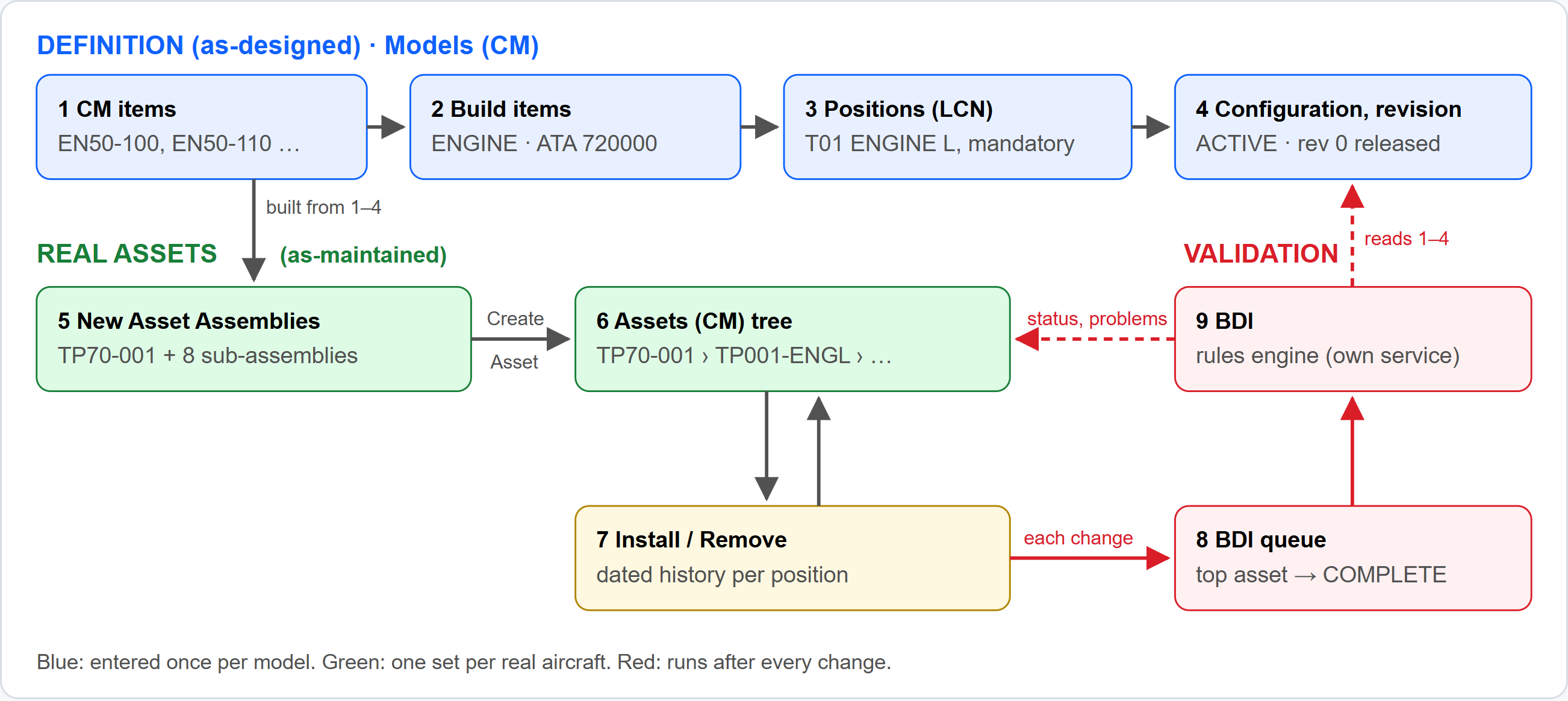
Figure 1. The definition (1–4) is entered once per model. New Asset Assemblies turns it into real assets (5–6). Every Install / Remove (7) puts the top asset on the BDI queue (8); the BDI (9) compares the real structure with the definition and writes the verdict that Assets (CM) shows.
5The lab aircraft
The lab defines a fictional regional turboprop, the TP-70, and builds one aircraft, serial MSN1042, registration N742TP. Engines are fitted left and right with a propeller on each. There are two main gear legs, a nose gear and an APU (auxiliary power unit).
| LCN |
Position |
Build item (ATA label) |
Approved CM items |
Mandatory |
Asset / serial on MSN1042 |
| T |
aircraft |
TP70 (000000) |
TP70 |
(end item) |
TP70-001 / MSN1042 |
| T01 |
ENGINE L |
ENGINE (720000) |
EN50-100, EN50-110 |
yes |
TP001-ENGL / EN50412 |
| T0101 |
PROPELLER L |
PROPELLER (610000) |
PR4-200 |
yes |
TP001-PROPL / PR88301 |
| T02 |
ENGINE R |
ENGINE (720000) |
EN50-100, EN50-110 |
yes |
TP001-ENGR / EN50417 |
| T0201 |
PROPELLER R |
PROPELLER (610000) |
PR4-200 |
yes |
TP001-PROPR / PR88302 |
| T03 / T04 |
MAIN GEAR L / R |
MAIN GEAR (321000) |
MLG-300 |
yes |
TP001-MLGL / MLG7711, TP001-MLGR / MLG7712 |
| T05 |
NOSE GEAR |
NOSE GEAR (322000) |
NLG-310 |
yes |
TP001-NLG / NLG3301 |
| T06 |
APU |
APU (490000) |
APU-90 |
no |
TP001-APU / APU9015 |
Spares: SPR-EN51003 (EN50-110, serial EN51003), an approved alternate engine, and SPR-EN50399 (EN50-100). A part number APU-95 exists in the catalogue but is deliberately not approved for any position.
Figure 2 places each position on the aircraft. Keep it in mind through the labs: every record you create below is one of these slots, a part allowed in it, or the real serialized part fitted in it.
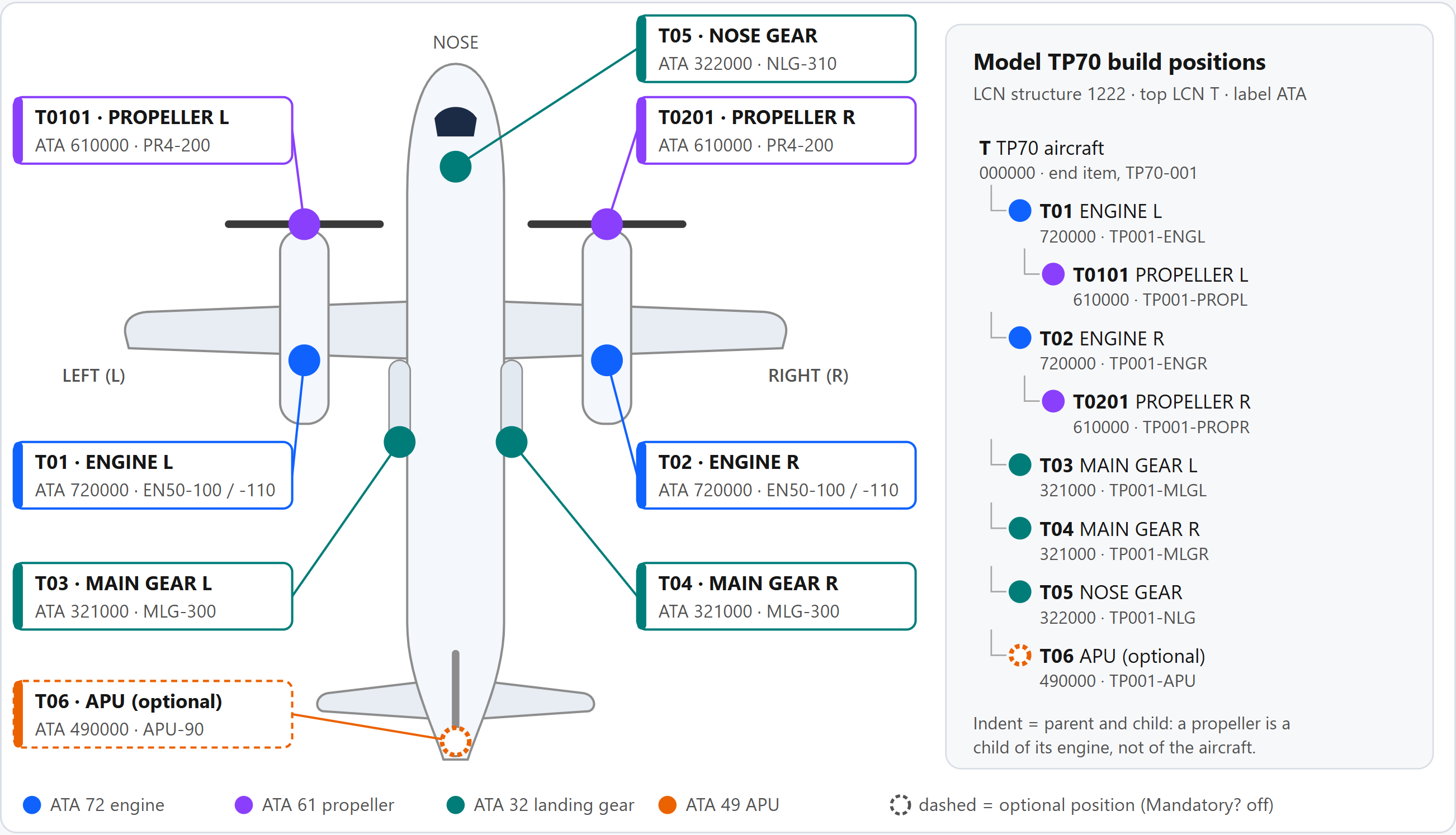
Figure 2. The TP-70 seen from above, with every build position of model TP70 where it sits on the aircraft, and the same positions as the LCN tree that Models (CM) shows. L and R are the position codes; the ATA label groups positions by aircraft system. Each propeller sits under its engine in the tree (T0101 under T01), so removing an engine takes its propeller with it.
6Step 0: what a fresh install needs
On a fresh Manage 9.3 system with ACM, three things had to be in place before the labs worked. Check them first.
The default label system (or no model can be saved)
When you create a model, ACM adds a top build item with a default label row. That row's label system comes from the organization option Default Label System, which is empty on a fresh install. With it empty, saving the first model fails because the label row has no label system. The field cannot be filled in reliably on the new model either. Set the option once per organization: Organizations (CM) → organization EAGLENA → CM Options → Default Label System = ATA → OK → Save.
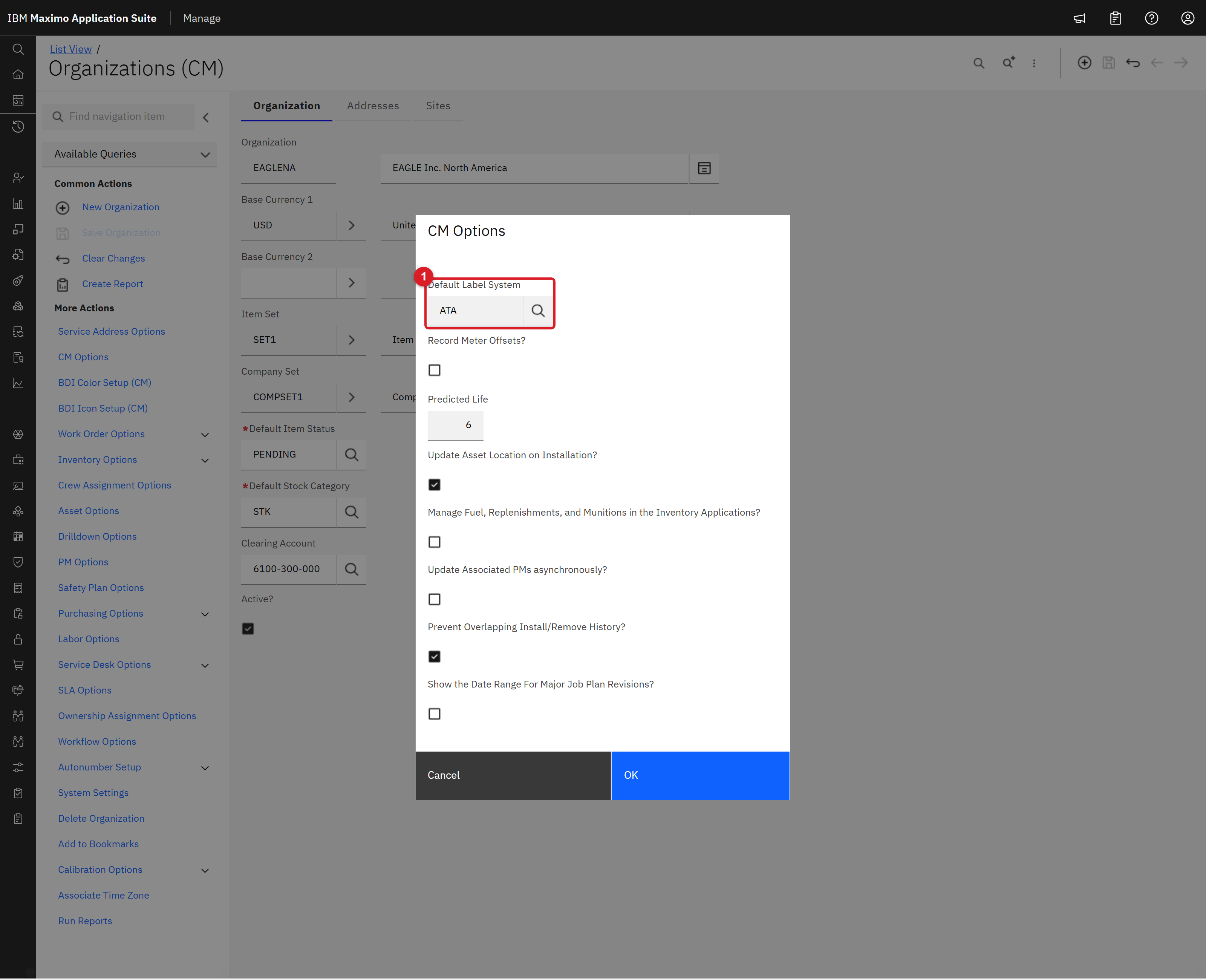
Figure 3. Organizations (CM) → CM Options. (1) Default Label System. The other options control predicted life, meter offsets, location updates on install, and whether overlapping install history is prevented.
Set up the BDI server
ACM does not validate anything by itself. The checks run in the Build Data Interpreter (BDI), a separate Java service. Maximo sends it the top asset of each changed configuration, the BDI reads the model and the asset tree straight from the Manage database, and it writes the verdict back to the same database. Maximo finds the BDI through a BDI end point: a host name, a port and an SSL flag stored in the database. If no BDI is running, or the end point is wrong, ACM still lets you build and change assets, but no verdict ever comes back: BDI Queue Status stays empty or the requests never reach COMPLETE.
Problem → benefit The BDI is the part of ACM that is easiest to miss: nothing in the Assets (CM) screens says it is missing, validation just never happens. With the server up and the end point checked once, every Install / Remove is validated within seconds, for every aircraft, with no manual step.
Option A: Maximo Application Suite on OpenShift
In MAS you do not install the BDI yourself. When ACM or Aviation is activated as a component of Manage in a MAS workspace, the Manage operator deploys one BDI instance with default settings, as its own pod next to the Manage server pods. What to do:
- In the MAS administration UI, open the workspace → Manage → the activation (update) page, and select Asset Configuration Manager (or Aviation) as a component.
- In the BDI section of the same page, click View on the instance to review its settings: Name (keep the default), Max memory (the Java heap,
-Xmx), ACM and Aviation Options (codes that switch BDI features on or off), cache, monitor, VREX (scheduled re-validation of all assets) and async-job settings. The settings are stored in the bdiConfigurations array of the ManageWorkspace custom resource.
- Apply the change and wait until Manage is Ready. In the OpenShift console, project
mas-<instance>-manage, a BDI pod is now Running.
- Check the end point (below). In MAS the service host has the form
<instanceId>-<workspaceId>-<bdi name>.mas-<instanceId>-manage.svc, port 9443, SSL on.
One instance serves a normal fleet. If validation cannot keep up, IBM's advice is to tune the cache settings first, then add a second instance on the same page and give it its own end point (below).
Option B: run the BDI image yourself
On a Manage server that the MAS operator does not manage, for example a test or development system, run the BDI from IBM's image yourself. It is the same Liberty application the operator deploys.
- Get the image. It is
cp.icr.io/cp/manage/bdi in the IBM Entitled Registry. Log in with user cp and your entitlement key (the key from My IBM that also pulls the Manage images). Pick the newest 9.3 build tag, for example 9.3.17_11050-amd64.
- Start it only after Manage is installed with ACM. On start the BDI checks and updates ACM tables in the Manage database. Start it once the database update and the ACM package install have finished, not on an empty database.
- Set the environment variables in the table below. They tell the BDI which database to use and who it is.
- Choose its ports. The image listens on 9080 (HTTP) and 9443 (HTTPS), the same ports as a Manage server. If the BDI runs on the same host as Manage, move it with a Liberty override file (shown below) to 9180 and 9543.
- Register the end point in Maximo (next section) and check it.
| Variable |
What it does, with an example |
BDI_XDB_CONNECT |
JDBC URL of the Manage database. Db2: jdbc:db2://dbhost:50000/BLUDB. Oracle: jdbc:oracle:thin:@//dbhost:1521/MAXPDB. SQL Server: jdbc:sqlserver://dbhost:1433;databaseName=MAXDB;encrypt=false;trustServerCertificate=true. The three drivers are in the image. |
BDI_XDB_USER
BDI_XDB_PASSWORD |
The Maximo schema owner and its password, the same user Manage connects with, for example maximo. |
INSTANCE_ID |
A short name for the Maximo instance, for example prod. |
WORKSPACE_ID |
A short name for the workspace, for example main. |
BDI_INSTANCE_NAME |
The BDI's own name. It must be <INSTANCE_ID>-<WORKSPACE_ID>-<name>, for example prod-main-bdi. It appears as Server Name in BDI Queue Status. |
SERVICE_HOST_NAME |
The host name the BDI registers for itself, for example prod-bdi. Use a name of its own, not localhost (see the traps below). |
The port override is a Liberty configDropins file: an XML fragment Liberty reads at start and lays over its server configuration. Mount it at /opt/was/liberty/wlp/usr/servers/default/configDropins/overrides/ports.xml:
XML
<server>
  <!-- Manage owns 9080/9443 on this host, so the BDI listens on 9180/9543 -->
  <httpEndpoint id="defaultHttpEndpoint" host="*" httpPort="9180" httpsPort="9543"
                sslOptionsRef="endpointSSLOptions"/>
</server>
A complete start command, with Docker or Podman:
Shell
echo "$ENTITLEMENT_KEY" | docker login cp.icr.io -u cp --password-stdin
docker run -d --name prod-bdi --restart unless-stopped \
  -p 9543:9543 \
  -v "$PWD/ports.xml:/opt/was/liberty/wlp/usr/servers/default/configDropins/overrides/ports.xml:ro" \
  -e BDI_XDB_CONNECT='jdbc:db2://dbhost:50000/BLUDB' \
  -e BDI_XDB_USER=maximo -e BDI_XDB_PASSWORD="$MAXIMO_DB_PASSWORD" \
  -e INSTANCE_ID=prod -e WORKSPACE_ID=main \
  -e BDI_INSTANCE_NAME=prod-main-bdi -e SERVICE_HOST_NAME=prod-bdi \
  cp.icr.io/cp/manage/bdi:9.3.17_11050-amd64
The BDI is ready when its log shows CWWKZ0001I: Application bdi started, and https://<bdi host>:9543/ answers.
Register and check the end point
Maximo calls the BDI at the address in BDI Queue Status (CM) → More Actions → Manage BDI End Points (Figure 13). When the list is empty, the BDI adds a default row the first time it starts.
- Open BDI Queue Status (CM) → More Actions → Manage BDI End Points.
- Make sure one row points at the BDI: Server Host = the BDI's host as Manage reaches it, Port = its HTTPS port (9443 in MAS, 9543 with the override above), SSL? checked. Delete rows that point anywhere else, such as the Manage server itself or a host Manage cannot resolve.
- Optional: fill Item Set, Organization or Site on a row to send only those assets to that BDI instance. This is how two instances share the load.
- OK, then change any configuration-managed asset (for example Install / Remove in Lab 8). Within seconds BDI Queue Status shows the top asset with status COMPLETE and your
BDI_INSTANCE_NAME as Server Name.
The end point is ordinary data in table PLUSABDILISTENERS (server host, port, SSL). On a system you rebuild often, ship it as a DBC script with a guarded insert, so every new environment gets the same row:
XML
<freeform description="BDI end point">
  <sql target="sqlserver"><![CDATA[insert into plusabdilisteners (serverhost, listenerport, usessl, plusabdilistenersid)
    select 'prod-bdi.example.com', 9543, 1, next value for plusabdilistenersseq
    where not exists (select 1 from plusabdilisteners where serverhost = 'prod-bdi.example.com')]]></sql>
</freeform>
A DBC sql statement names its database. Add a target="db2" line with nextval for plusabdilistenersseq and from sysibm.sysdummy1, and a target="oracle" line with plusabdilistenersseq.nextval and from dual, so the same script runs on all three.
Traps
- Wrong instance name. If
BDI_INSTANCE_NAME does not start with <INSTANCE_ID>-<WORKSPACE_ID>-, the BDI fails at start in its end point manager with a StringIndexOutOfBoundsException.
SERVICE_HOST_NAME = localhost. On every start the BDI resets end points that use its own host name to port 9443 with SSL, the MAS default. With localhost and a BDI on 9543, it rewrites your end point to localhost:9443, which is the Manage server, and validation stops after the next BDI restart.- Started on an empty database. Started before Manage and ACM are installed, the BDI logs SQL errors and its table updates can collide with the install. Start it afterwards.
- BDI stopped, Maximo running. Nothing warns you. If BDI Queue Status stops showing new COMPLETE rows, check the BDI first. Give it a restart policy (
--restart unless-stopped) and start it with Manage.
- Testing with a plain asset. Only assets in an ACM configuration (with a model) are queued. Changing an ordinary asset never shows up in BDI Queue Status, even when the BDI works.
The BDI crontask instances
The BDI writes status straight to the database for speed. Work that needs Maximo business logic, such as creating asset PMs, generating PM work orders or changing work order status, is handed back to Maximo as asynchronous jobs. The crontask PlusABDIAsyncImmediateJobCron runs them, one instance per job type (PlusABDIAsync_CreatePM, …_GeneratePMWO, …_RevisePM, …_ChangeWOStatus, …_CreateSEIWO, …_CreateMELWO and others). On the lab system all twelve were active after the install. Confirm in Cron Task Setup.
7Lab 1: the part catalogue (CM items)
Problem → benefit Configuration rules need a stable list of the part numbers they talk about. The CM Item Master is that list. Every later rule (which part fits which position, which master PM applies, which serial numbers are affected by a modification) refers to a CM item.
Open CM Item Master (CM) and create one record per part number. The lab created eight:
| Part (CM item) |
Description |
| EN50-100 |
EN-50 turboprop engine, dash 100 |
| EN50-110 |
EN-50 turboprop engine, dash 110 (improved hot section) |
| PR4-200 |
PR-4 four-blade propeller assembly |
| MLG-300 / NLG-310 |
Main / nose landing gear leg assembly |
| APU-90 |
APU-90 auxiliary power unit |
| APU-95 |
APU-95 auxiliary power unit (never approved for the TP-70) |
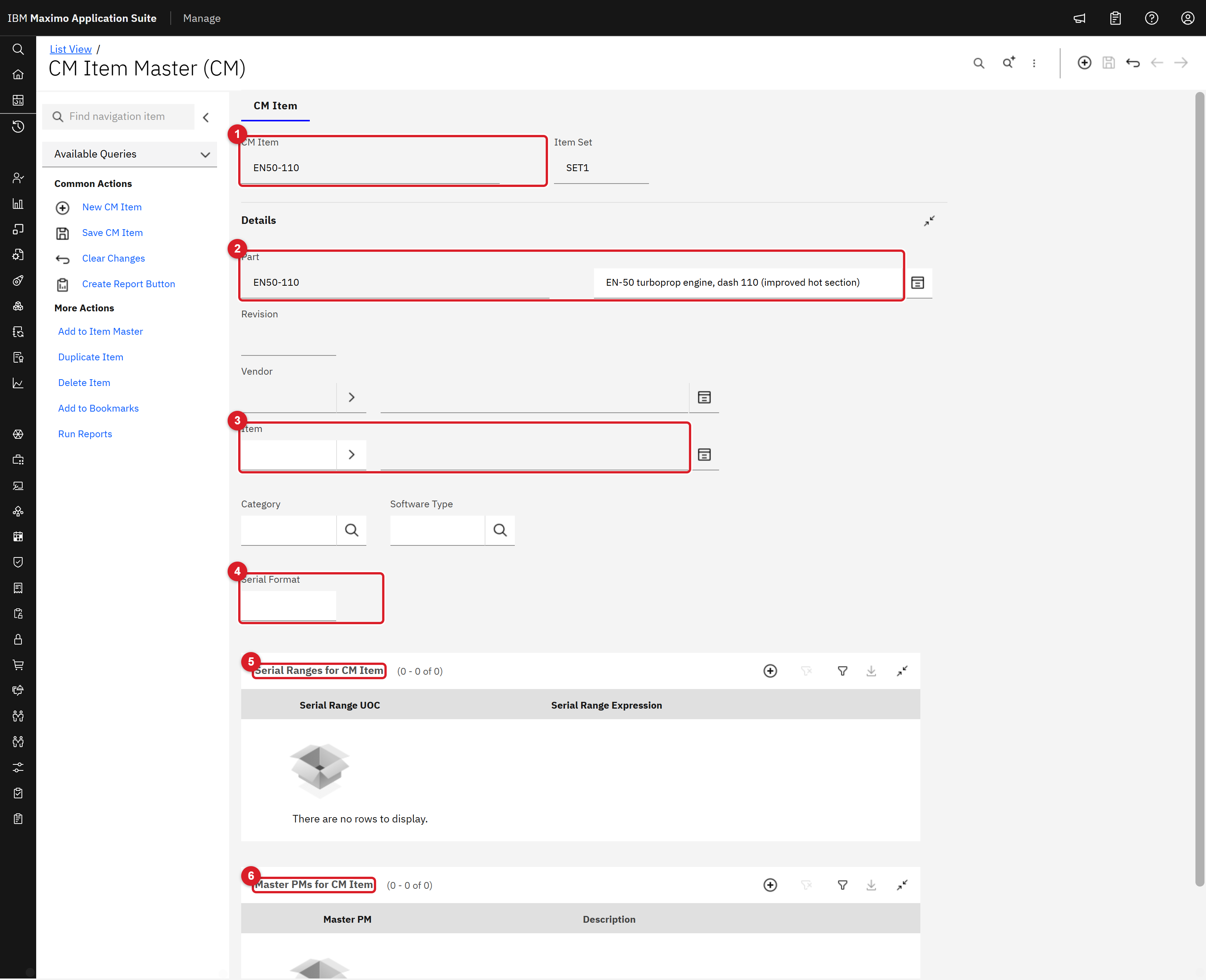
Figure 4. CM Item Master (CM), record EN50-110. (1) CM Item, generated from the part. (2) Part, the only required field. (3) Item links to the base Item Master when the part is also stocked. (4) Serial Format can enforce a serial number pattern. (5) Serial Ranges hold "usable on" effectivity by serial. (6) Master PMs for CM Item attach the maintenance programme to the part.
You do not create a CM item for the aircraft itself: the model creates its own top CM item (TP70) in the next lab.
What you should see Eight records in the list view. The CM item number equals the part number. The Revision and Vendor fields stay empty: they matter when the same part number comes from several vendors.
8Lab 2: the model
Problem → benefit Without a model, every aircraft is built by hand and nothing says whether it is complete. The model is the single definition every TP-70 is checked against. Change it once and the BDI applies the change to the whole fleet.
- Open Models (CM) → New Model.
- Model
TP70, description "TP-70 regional turboprop".
- Label System
ATA. LCN Structure 1222. Top LCN T.
- Save. The tabs Configurations, Build Hierarchy and Position Rules and Advanced appear.
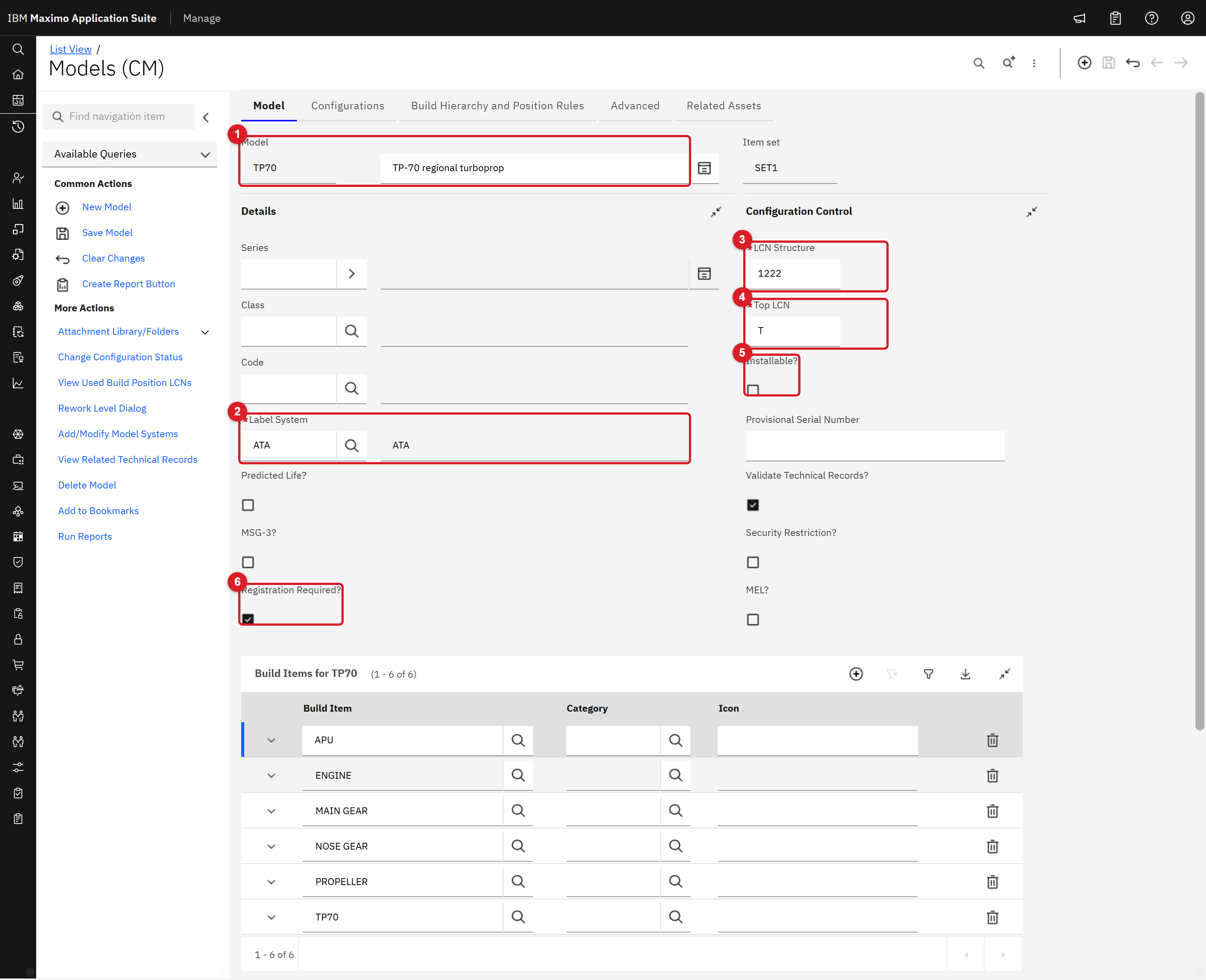
Figure 5. The TP70 model after saving. (1) Model. (2) Label System. (3) LCN Structure 1222: 1 character for level 1, then 2 per level. (4) Top LCN T. (5) Installable? stays off: the TP-70 is a top asset. An engine model that must be fitted into another model would be installable. (6) Registration Required? (on by default) makes every aircraft carry a registration. The Build Items table at the bottom already holds the top build item TP70.
Saving did more than write the header. ACM created:
- the top build item TP70, with a label
000000 in the default label system;
- a top CM item TP70, the default part for the top position;
- the top position, LCN T, indicator E (end item), indenture 1;
- the Base Variation configuration TP70, flagged Abstract, status DRAFT;
- Revision 0 "BASE REVISION", draft.
Trap If saving the first model fails on the Labels table with an empty Label System, the organization's Default Label System is not set (
Step 0).
9Lab 3: build items, labels and approved parts
Problem → benefit A position must say which part numbers may fill it. A build item does that once and every position that uses it inherits the list. Approving an alternate engine is one row on ENGINE, not an edit to every aircraft.
On the Model tab, add one row to Build Items for TP70 per kind of component. For each row, set its label in Labels for … and its approved parts in CM Items for …:
| Build item |
Label (ATA) |
CM items |
| ENGINE |
720000 |
EN50-100, EN50-110 |
| PROPELLER |
610000 |
PR4-200 |
| MAIN GEAR |
321000 |
MLG-300 |
| NOSE GEAR |
322000 |
NLG-310 |
| APU |
490000 |
APU-90 |
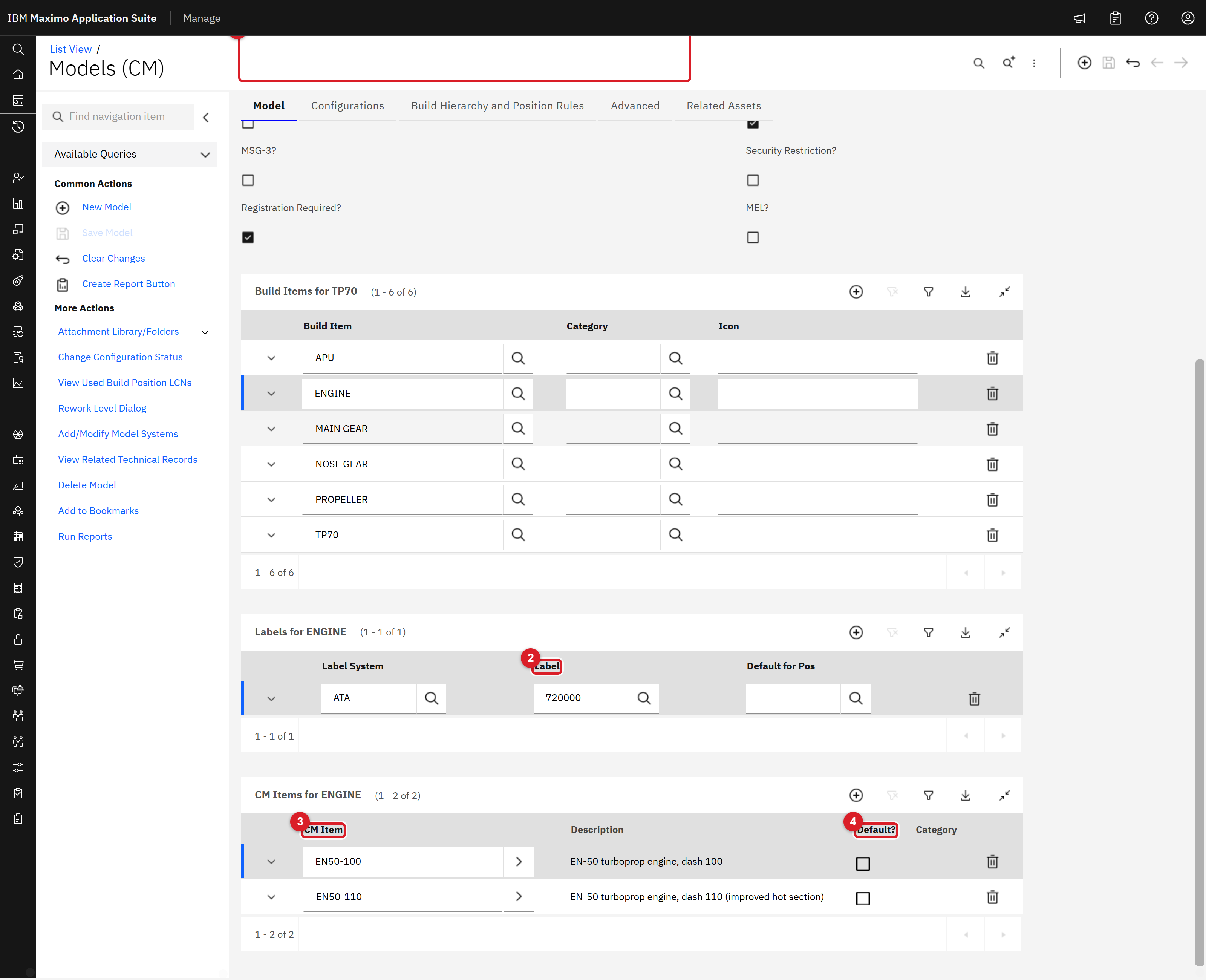
Figure 6. Build Items for TP70 with ENGINE selected. (1) Label System and (2) Label: ATA 720000. (3) CM Item: both dash numbers are approved, so either engine can be fitted in any ENGINE position. (4) Default? marks the part proposed first.
Trap A new build item already has one empty CM Items row. Fill that row instead of adding a new one, or the save fails with BMXAA4195E A value is required for the CM Item field on the PLUSACMXCAT object.
APU-95 is in no build item. Lab 9 shows what that means in practice.
10Lab 4: the build hierarchy and position rules
Problem → benefit The tree of positions is what "complete" means for this model. Marking positions mandatory turns that tree into a rule the BDI can check: an empty mandatory slot makes the aircraft invalid.
- Open the Build Hierarchy and Position Rules tab. The Hierarchy Tree shows the top position T.
- Select the T row and choose New Child. In the dialog set Indicator
S (sub-assembly), Build Item ENGINE, Position L. ACM fills Indenture (2) and the LCN (T01). Click OK.
- Repeat for ENGINE R (T02), MAIN GEAR L and R (T03, T04), NOSE GEAR (T05) and APU (T06). Save.
- Expand T, select T01 and add a child PROPELLER, position L (T0101). Do the same under T02 (T0201). Save.
- Select each position except T06 and tick Mandatory? in the By Configuration section. Save after each.
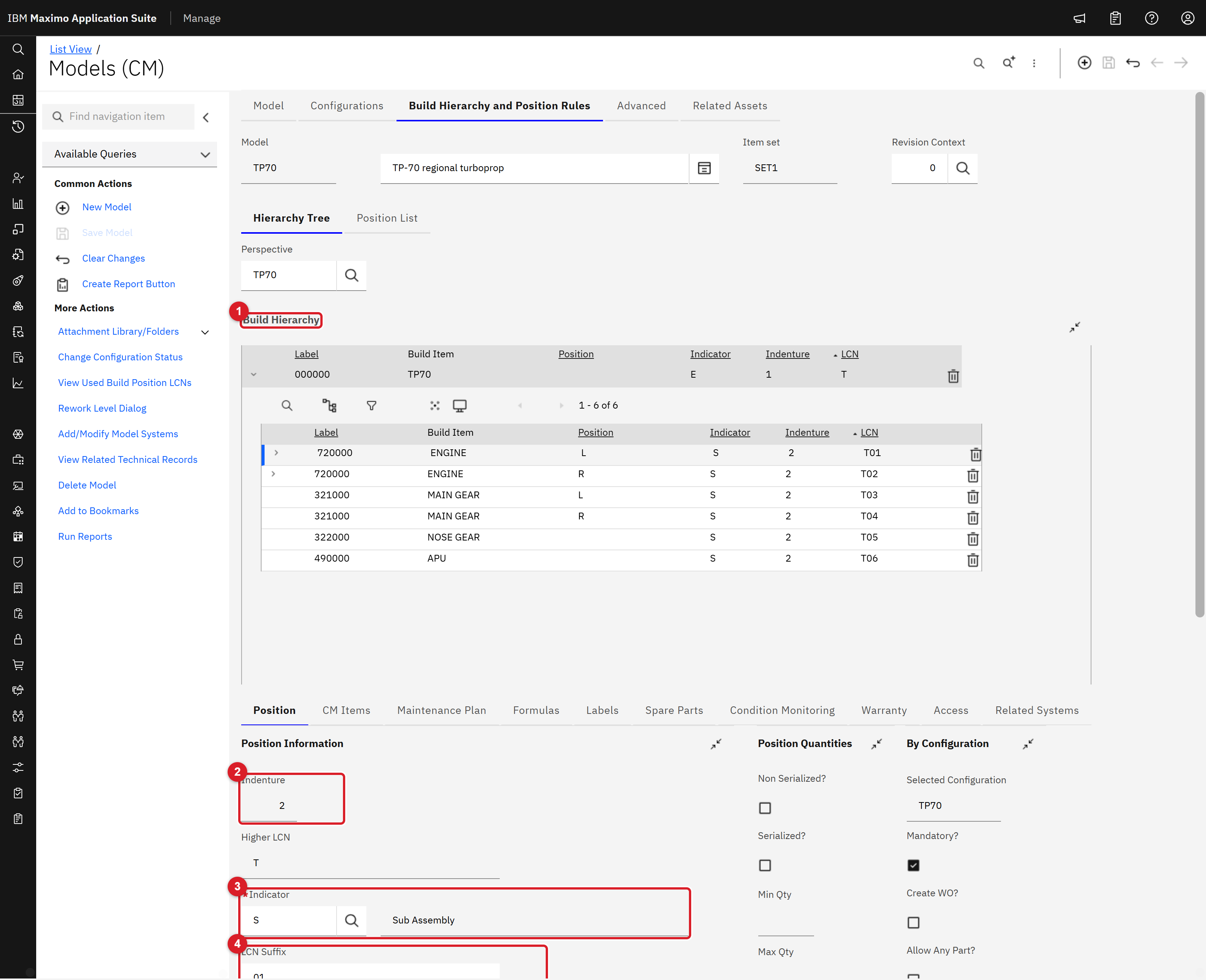
Figure 7. The finished hierarchy. (1) Build Hierarchy: label, build item, position, indicator, indenture and LCN of every slot. (2) Indenture 2 for ENGINE L. (3) Indicator S, sub-assembly. (4) LCN Suffix 01: with the higher LCN T this gives T01.
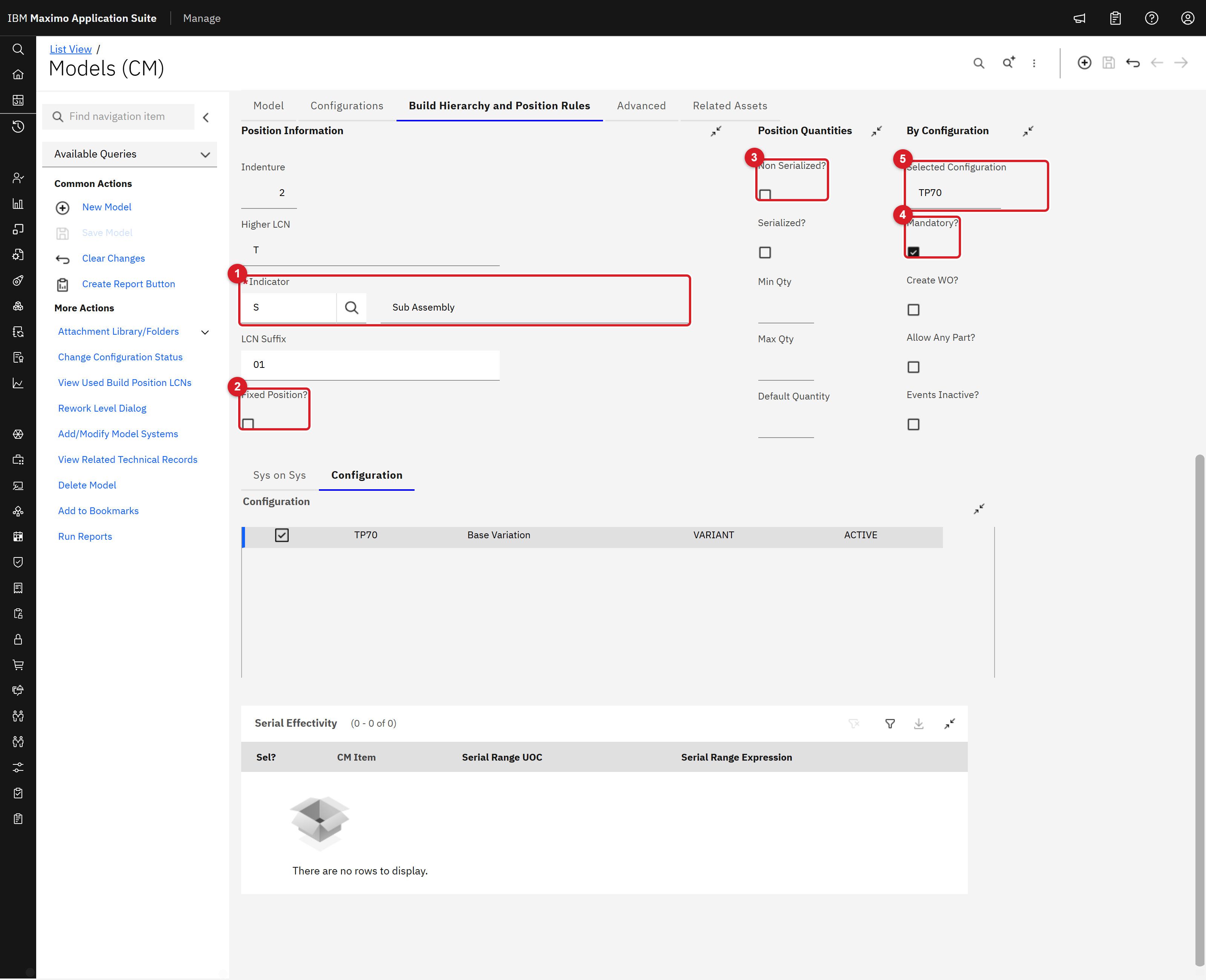
Figure 8. Position rules for ENGINE L. (1) Indicator. (2) Fixed Position? would forbid removing the component. (3) Non Serialized? is for quantity positions such as bolts, with Min and Max Qty. (4) Mandatory? is ticked. (5) The rule belongs to the Selected Configuration TP70: a different configuration can make the same position optional.
Why "By Configuration" Mandatory, Create WO? and similar flags are stored as configuration rules, not as columns of the position. One model can serve several variations: a cargo version might make the APU mandatory and remove a seat position. The rule is always read for the configuration selected at the top of the section.
What you should see View Used Build Position LCNs (More Actions) lists T, T01, T0101, T02, T0201, T03, T04, T05 and T06.
11Lab 5: release the configuration and the revision
Problem → benefit A definition being drafted must not be used on real aircraft. ACM uses two gates: the configuration's status, and the revision's draft flag plus active date. Until both are released, nothing can be built from the model.
- Open the Configurations tab. In Configuration Node, clear Abstract? on TP70 (Base Variation). Save.
- More Actions → Change Configuration Status → New Status
ACTIVE → OK → Save.
- In Revisions, set an Active Date for revision 0. It cannot be earlier than the revision date. Save.
- Click the revision row's Change Status icon, clear Draft?, OK, Save. The revision status becomes ACTIVE.
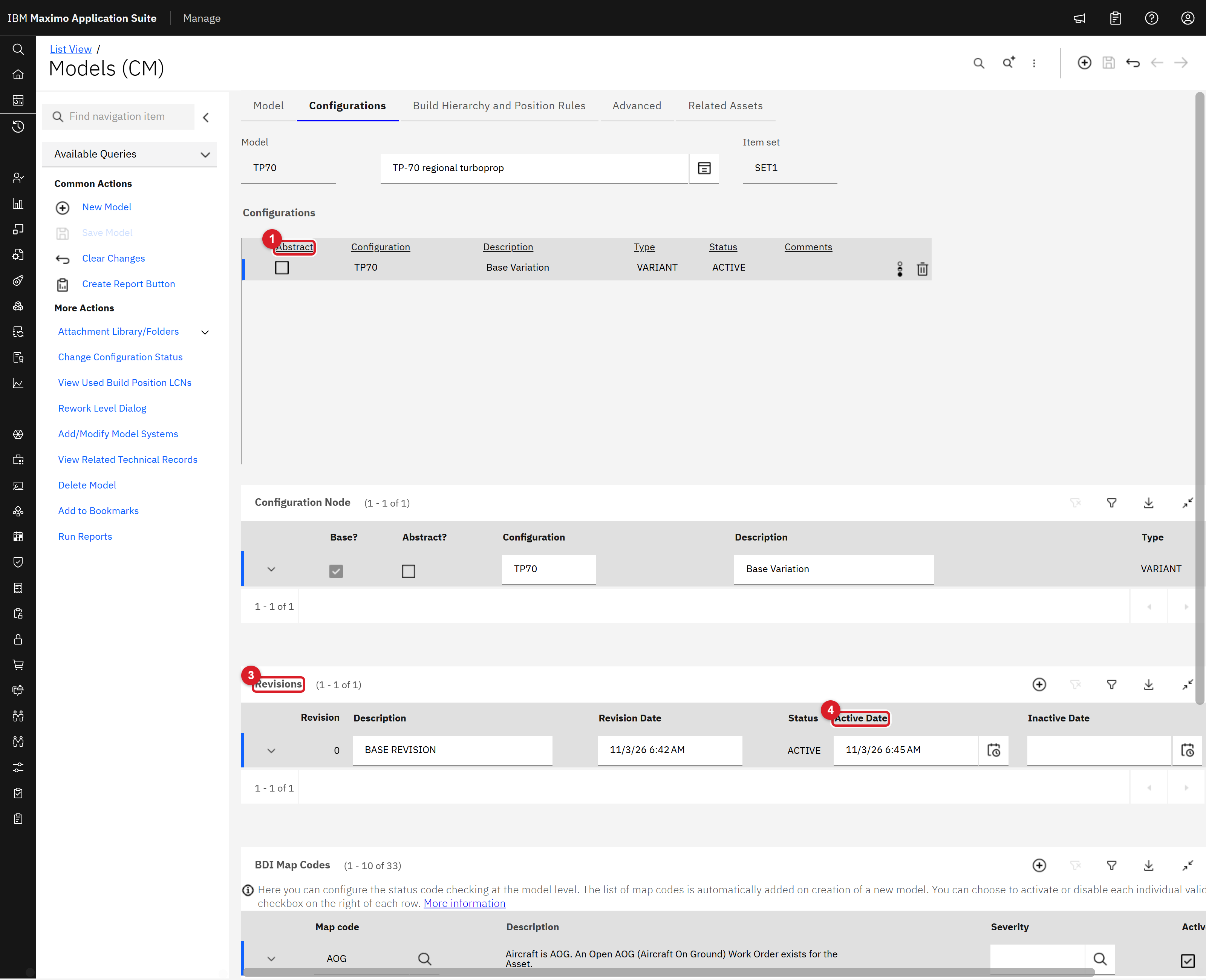
Figure 9. Configurations tab after release. (1) Abstract is cleared. (2) Status ACTIVE. (3) Revisions: revision 0 "BASE REVISION" is ACTIVE (4) from its active date. BDI Map Codes, below, can switch individual BDI checks off for this model.
Trap With an active configuration but a draft revision, Create Asset fails with BMXAM1460E The Model TP70 does not have a valid active Revision. Setting the active date alone is not enough: clear Draft? as well.
When to use more variations and revisions The usual practice is to keep the base variation as an abstract superset and create child variations for each real build standard, such as passenger and cargo. Each child becomes ACTIVE on its own. Revisions record changes over time: a new revision with a later active date can add a position or approve a new part, and assets can be auto-upgraded to it. The lab uses the base variation directly to keep the steps short.
12Lab 6: build the aircraft (New Asset Assemblies)
Problem → benefit Entering nine assets by hand, with the right parents, parts and positions, is slow and easy to get wrong. New Asset Assemblies generates every sub-assembly row from the model. You only supply the identities (asset numbers and serials), and the result is complete by construction.
- Open New Asset Assemblies (CM) → New. New Asset
TP70-001, CM Item TP70, Model TP70. Configuration TP70 and site BEDFORD fill in. Serial MSN1042, Registration N742TP, Asset Status OPERATING (the status the real asset will get).
- Clear the three Automatically Add boxes (Spare Parts?, Measure Points?, Warranty Contracts?) unless your model defines them. See the trap below.
- Save, then More Actions → Create Sub Assemblies from CM Build: BMXAM0226I New asset sub assemblies and their meters created successfully.
- On Sub Assembly Details, give each row its asset number and serial (table in section 5). Save.
- Change Status → ACTIVE. Then Create Asset → OK (or run it in the background): BMXAM0224I Asset created successfully. Asset Created? is now ticked.
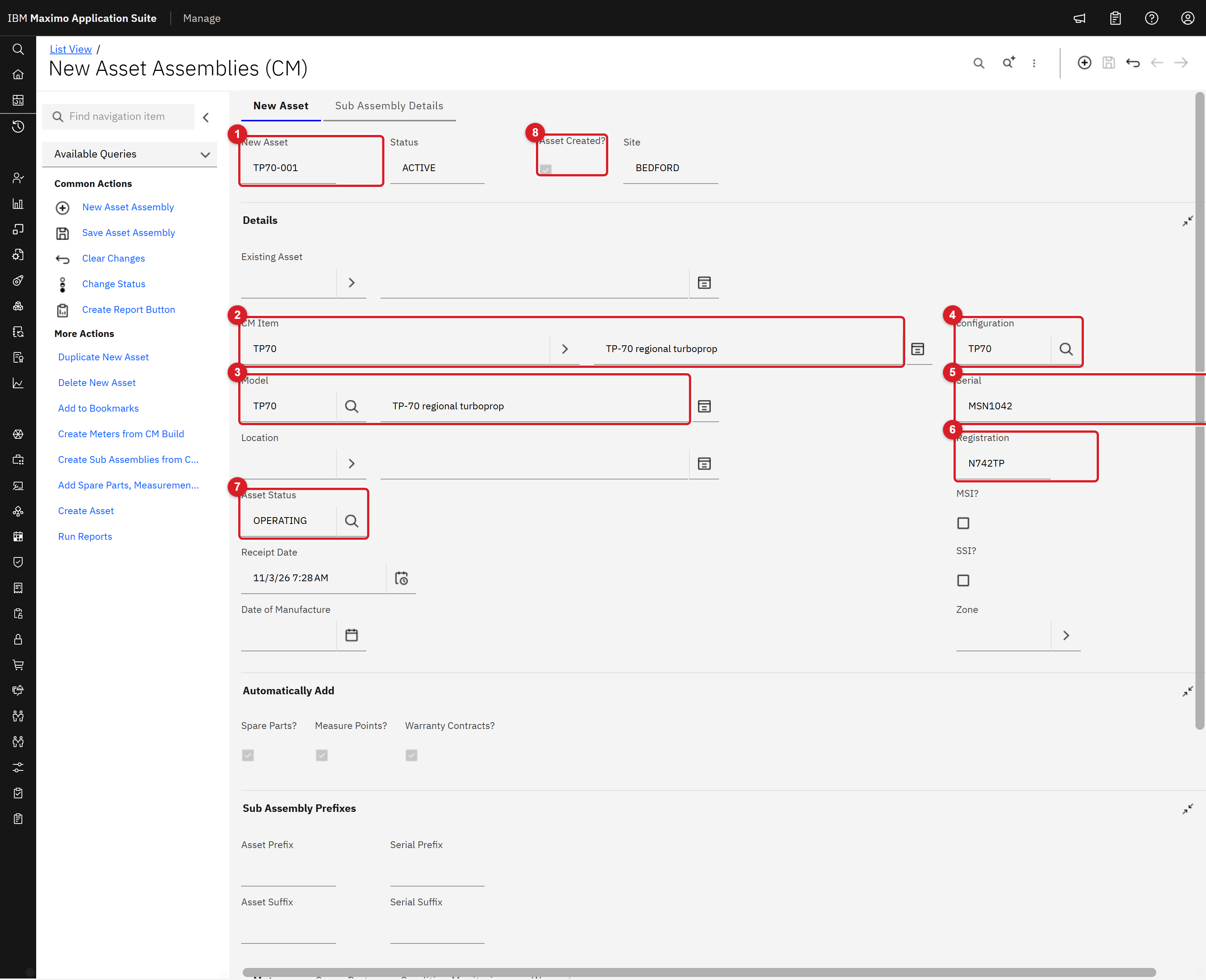
Figure 10. New Asset Assemblies, TP70-001 after Create Asset. (1) New Asset. (2) CM Item and (3) Model define what is built. (4) Configuration. (5) Serial and (6) Registration identify this aircraft. (7) Asset Status is given to every created asset. (8) Asset Created? confirms the assets exist.
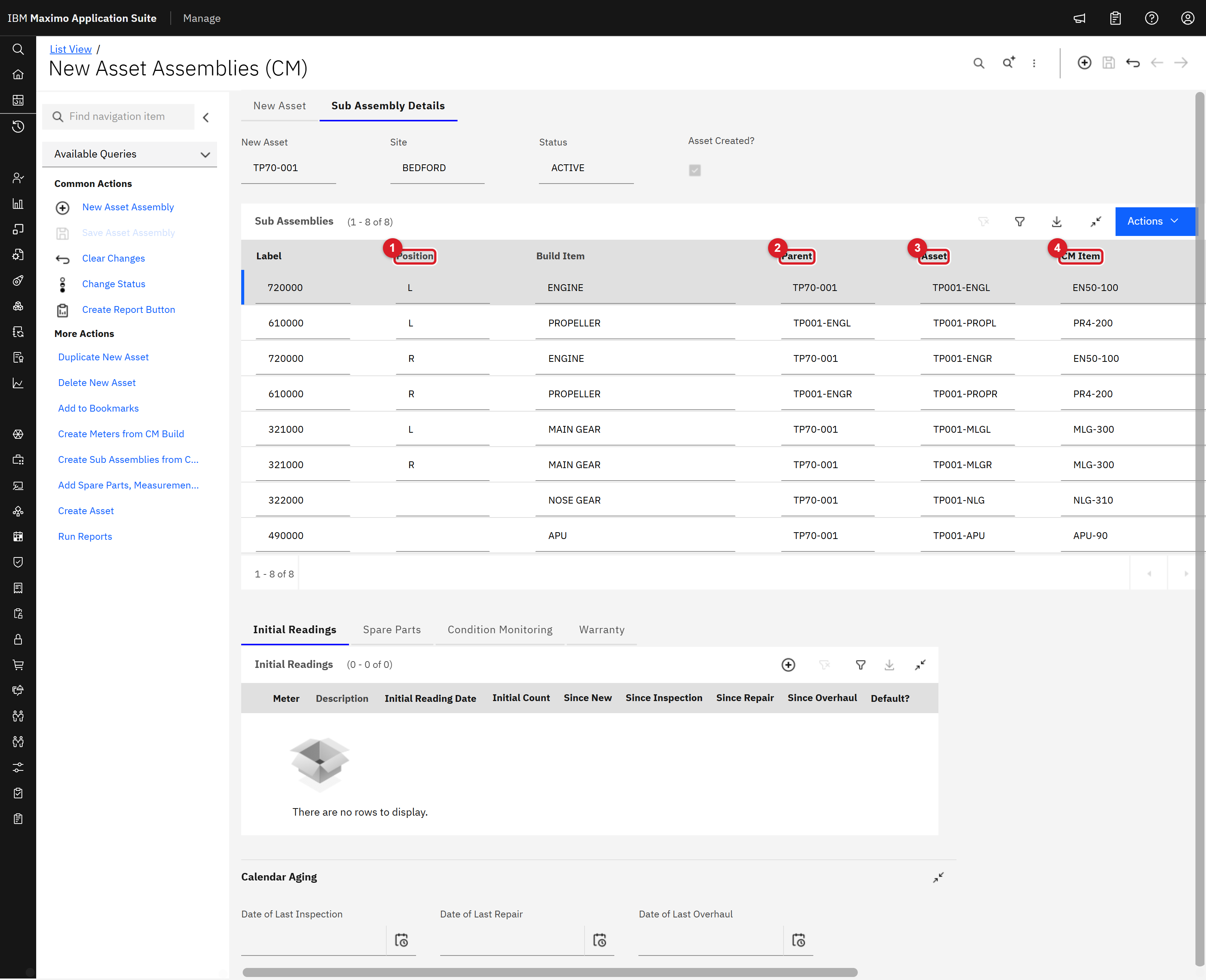
Figure 11. Sub Assembly Details. One row per position of the model. (1) Position. (2) Parent: the aircraft, or the engine for a propeller. (3) Asset and (5) Serial are what you enter. (4) CM Item is proposed from the build item.
Trap: shared asset prefixes If you fill Asset Prefix under Sub Assembly Prefixes, every row starts with the same asset number (the prefix). Rows also find their parent by that number. When you rename the first engine, both propellers follow it, and the right propeller ends up under the left engine. Parent is read-only on this tab. Leave the prefix empty and give every row a unique number before the first save, or use prefixes that make each number unique.
Trap: Automatically Add With Spare Parts?, Measure Points? and Warranty Contracts? ticked and a model that defines none of them, Create Asset stopped with BMXAA4195E A value is required for the Asset field on the ASSET object. With the three boxes cleared, it succeeded.
13Lab 7: the Build Data Interpreter's first verdict
Problem → benefit A tree of assets looks complete whether or not it is valid. The BDI gives every aircraft a verdict and a list of reasons, within seconds of each change, so planners and engineers see at once whether an aircraft can fly.
Creating the assets put TP70-001 on the BDI queue. BDI Queue Status (CM) lists every validation request with its status, start and finish time and the BDI instance that ran it. The lab's first validation took 0.82 seconds; later ones took 0.05 to 0.3 seconds.
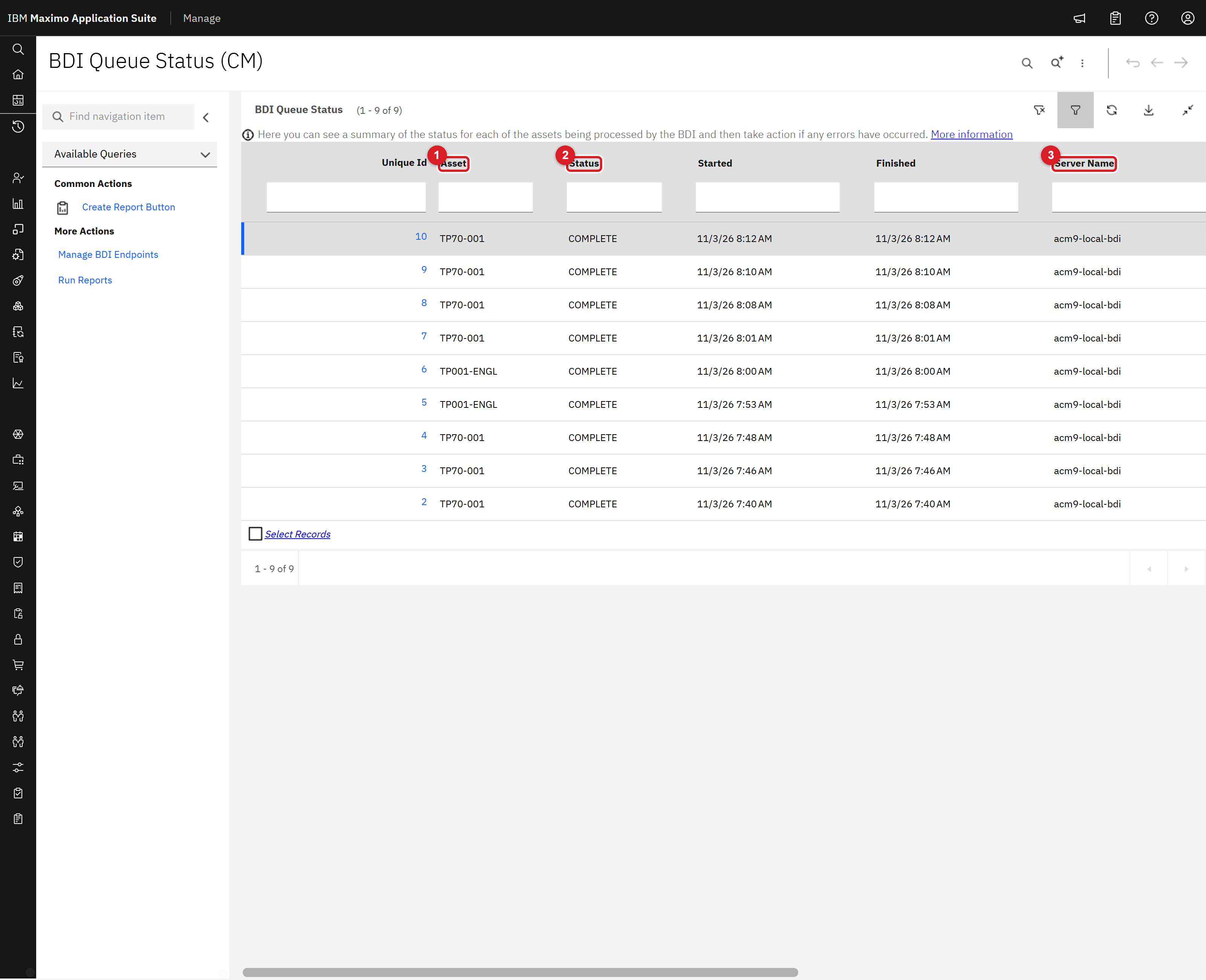
Figure 12. BDI Queue Status (CM) at the end of the labs. (1) Asset: the top asset that was validated. A removed engine is its own top asset (TP001-ENGL). (2) Status COMPLETE. (3) Server Name: the BDI instance.
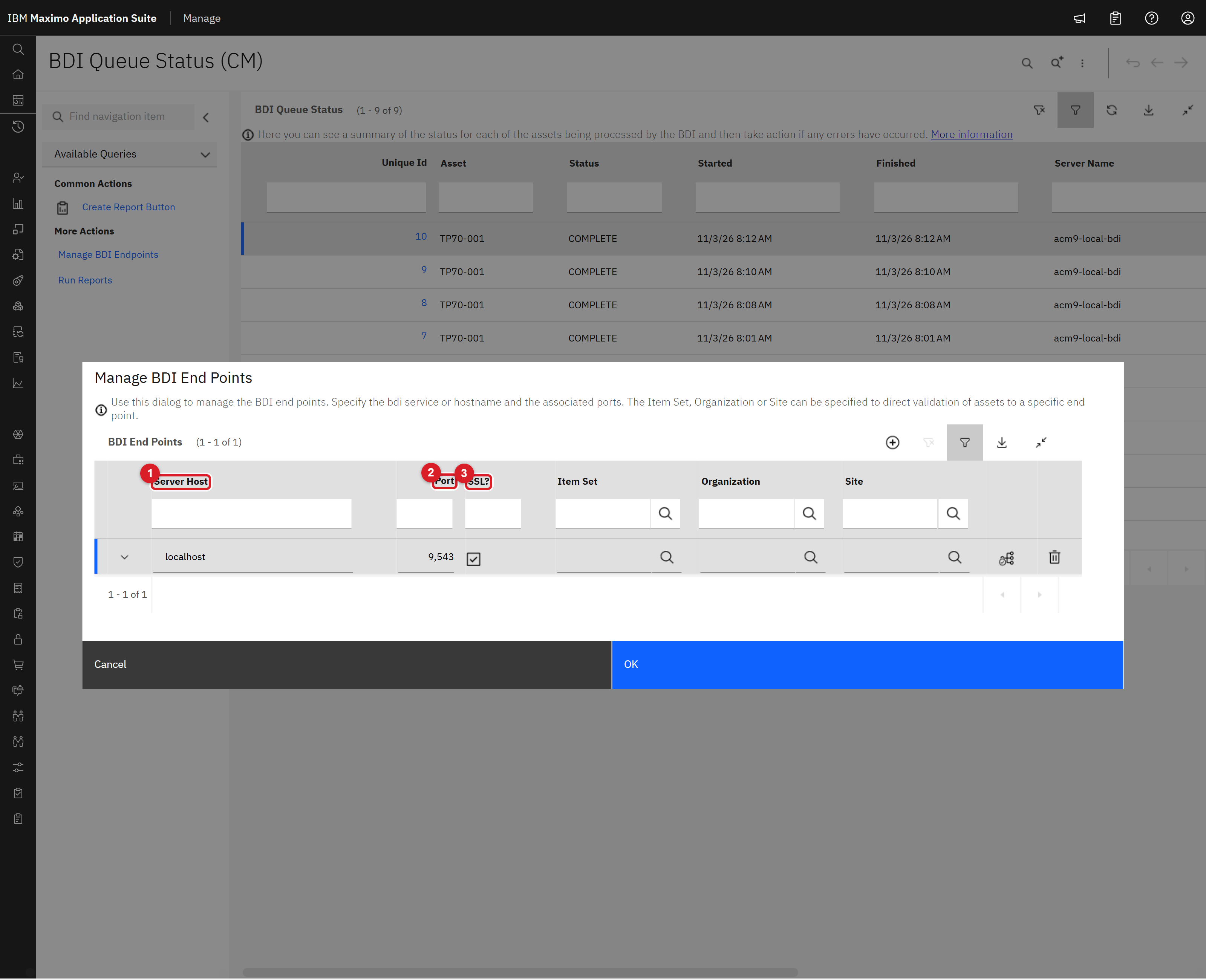
Figure 13. More Actions → Manage BDI End Points. (1) Server Host, (2) Port and (3) SSL? tell Maximo where the BDI listens. Rows can be limited to an item set, organization or site to route assets to different instances.
Now open Assets (CM) → TP70-001 → View tab, and expand the tree.
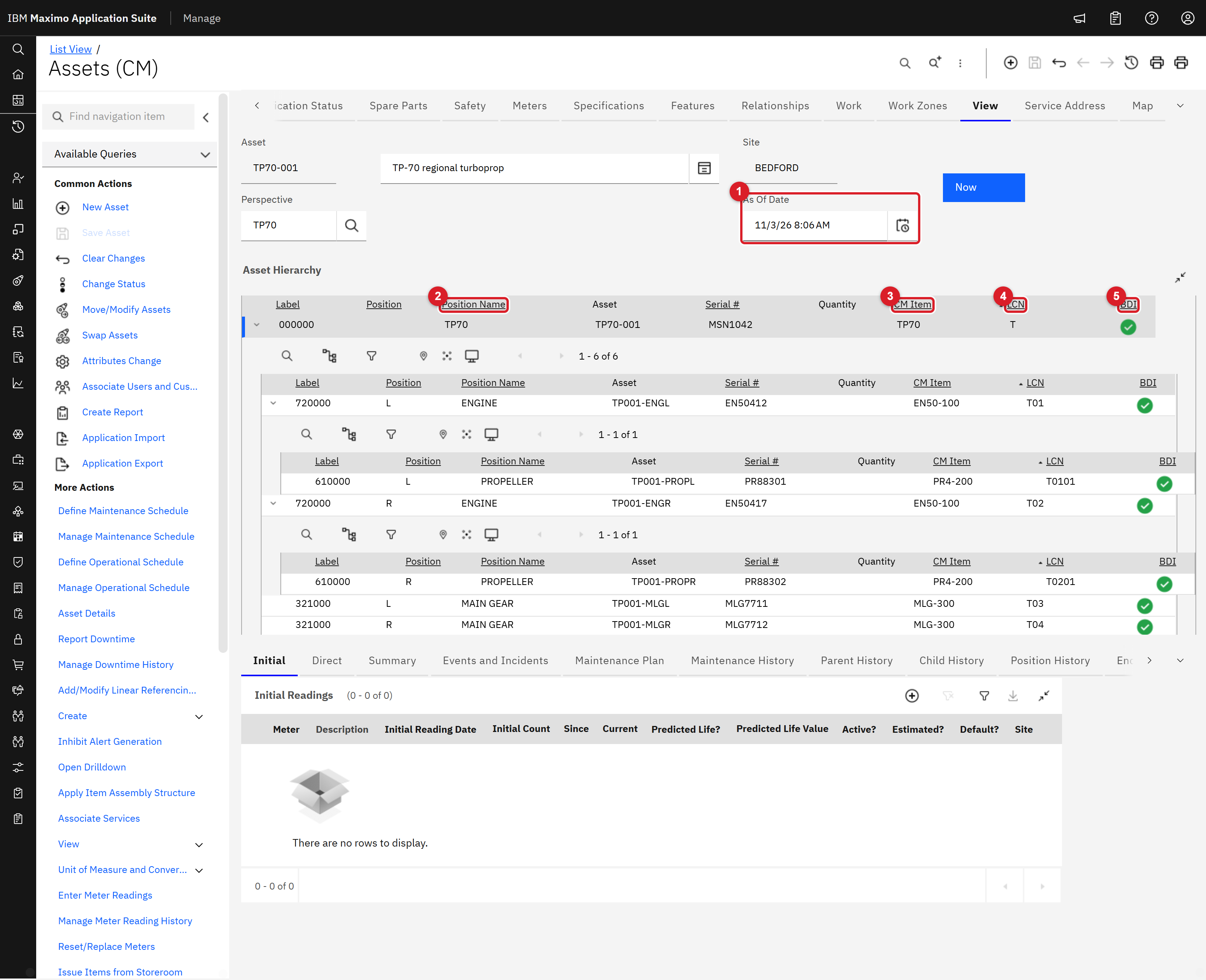
Figure 14. The View tab. (1) As Of Date: the moment the tree shows (Now). (2) Position Name, (3) CM Item and (4) LCN of each slot. (5) BDI: a green tick on every position. Each engine row expands to its propeller.
More Actions → View BDI Status shows the verdict for the whole aircraft:
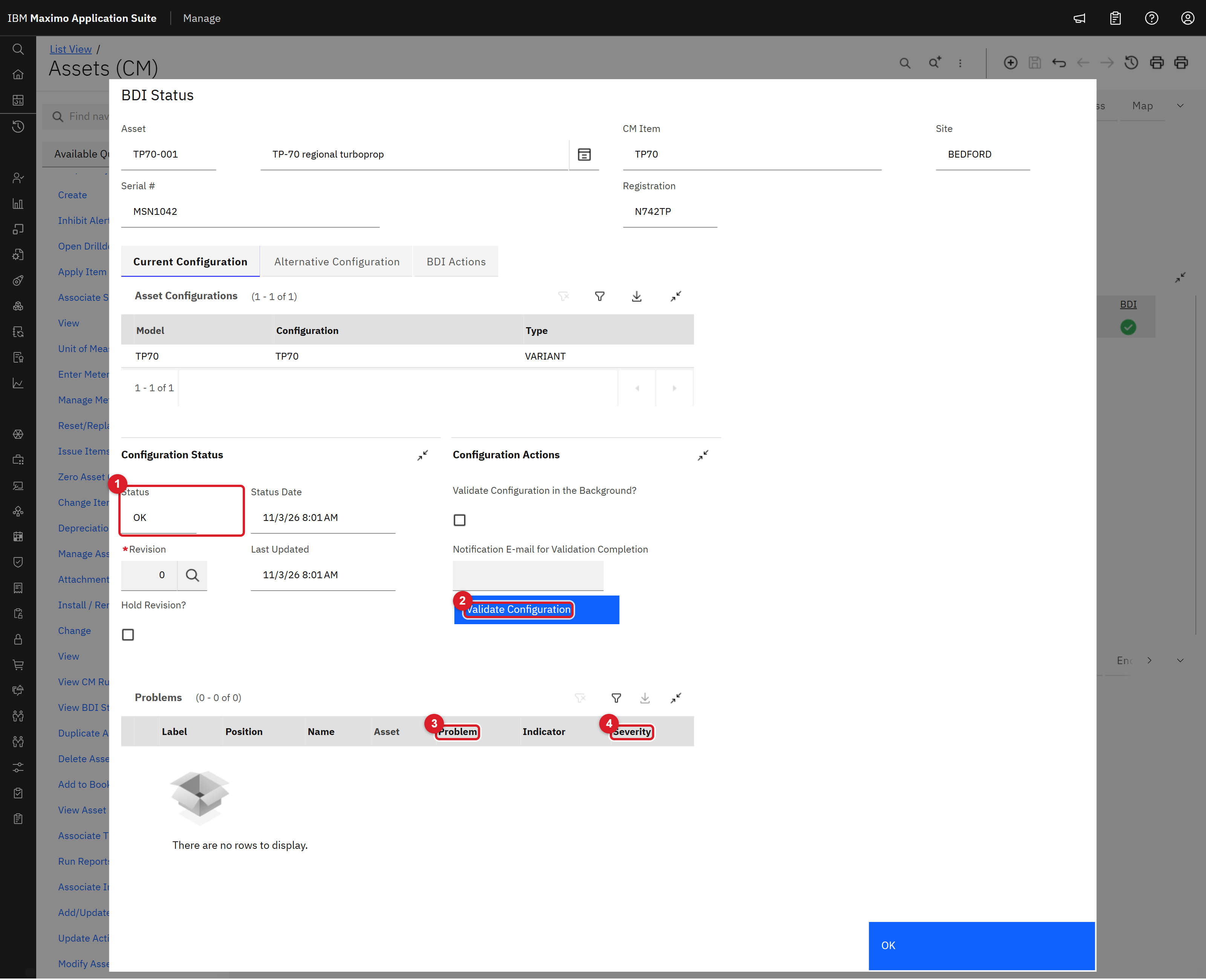
Figure 15. BDI Status. (1) Status OK for configuration TP70, revision 0. (2) Validate Configuration runs the BDI on demand, in the background if you prefer. (3) Problem and (4) Severity are empty. The Alternative Configuration tab tests whether the asset would be valid in another configuration; BDI Actions lists the asynchronous jobs the BDI asked Maximo to run.
14Lab 8: remove an engine
Problem → benefit An engine leaves the aircraft for a shop visit. The record must say when, and the aircraft must not look serviceable while a mandatory slot is empty. Install / Remove does both in one action.
- On the View tab, select TP001-ENGL (ENGINE L).
- More Actions → Install / Remove → Install / Remove.
- Leave Installation Details empty. Remove Asset? is set because a component is fitted. Remove to Site BEDFORD. OK, then Save.
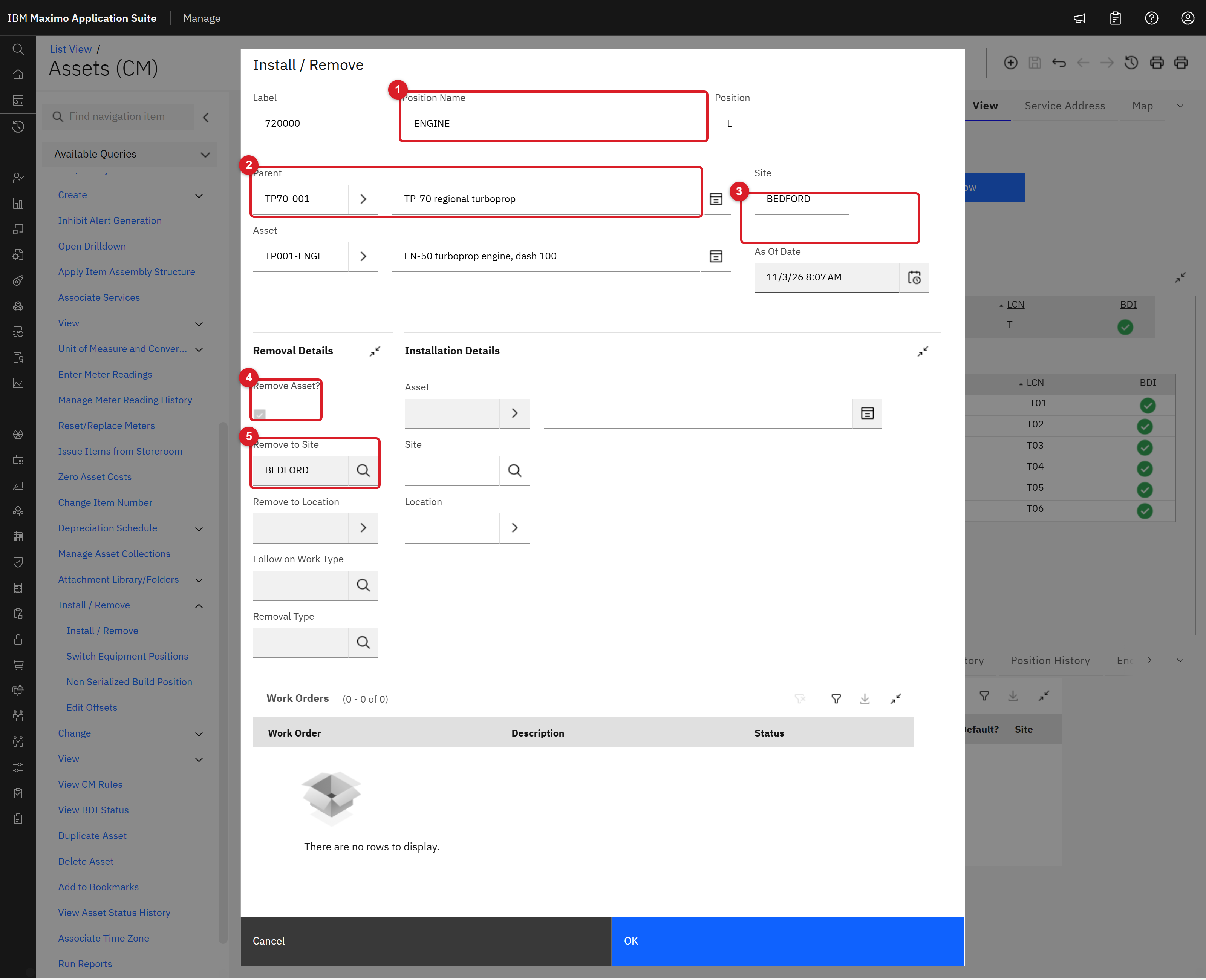
Figure 16. Install / Remove on ENGINE L. (1) Position Name. (2) Parent TP70-001 and the fitted asset TP001-ENGL. (3) As Of Date: back-date it to when the work was done. (4) Remove Asset?. (5) Remove to Site. Follow on Work Type can raise a shop work order; Removal Type records why. The Work Orders table links the change to a work order.
BMXAA0067I Asset TP001-ENGL in site BEDFORD was moved or modified successfully. The engine leaves with its propeller still attached, and it becomes a top asset of its own. Within a second the BDI has validated TP70-001 again:
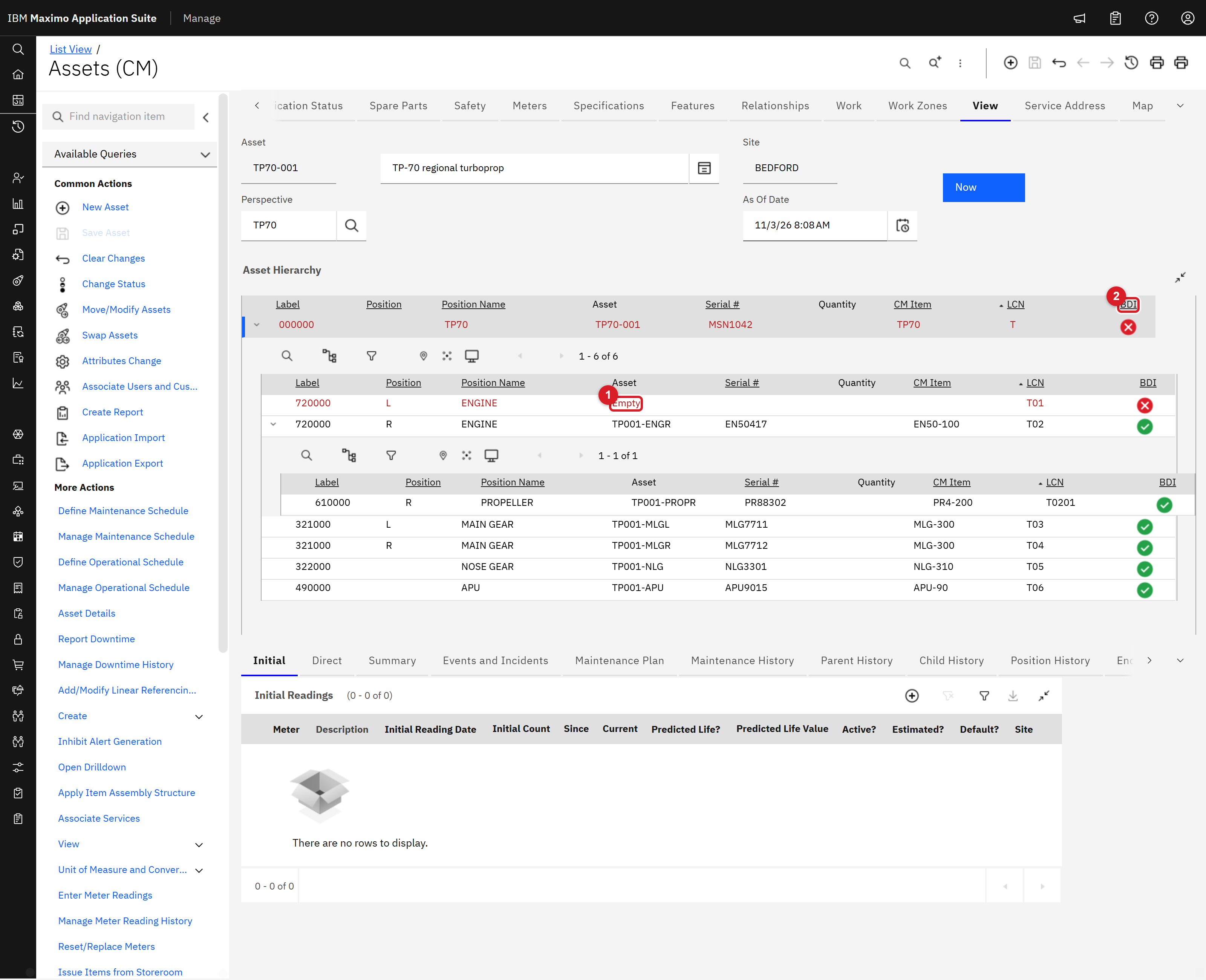
Figure 17. The View tab after the removal. (1) ENGINE L shows Empty. (2) Its BDI icon and the aircraft's are red.
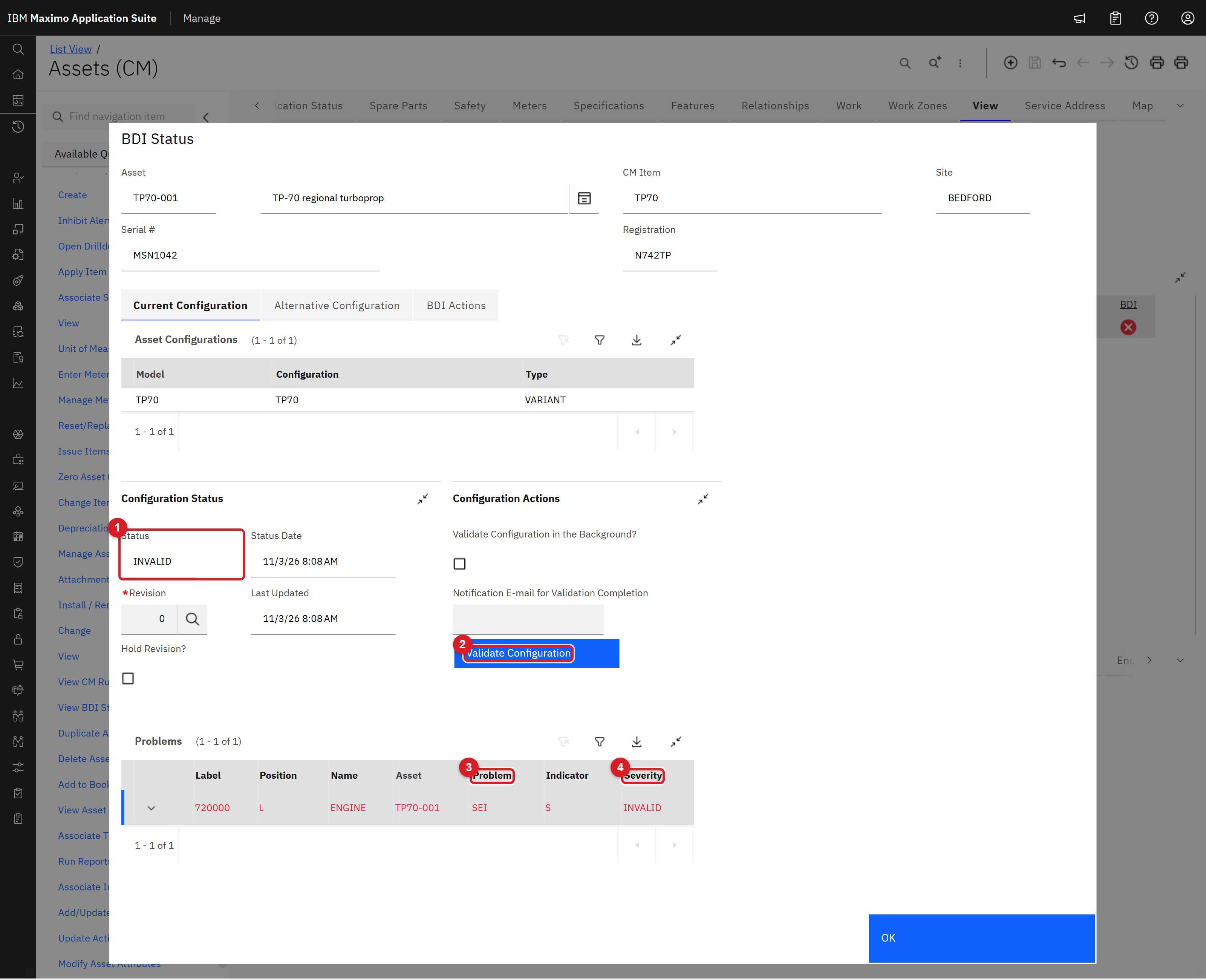
Figure 18. BDI Status after the removal. (1) Status INVALID. (3) Problem SEI, a mandatory position empty, on 720000 L ENGINE. (4) Severity INVALID.
Why not just edit the parent field? Try Move/Modify Assets on a component inside the structure: ACM refuses with BMXAM1357E Cannot execute this action for CM Assets with Parent. Configuration-managed assets change place only through Install / Remove, so every movement is dated and validated.
15Lab 9: fit an approved alternate engine
Problem → benefit The original engine is in the shop, and a spare with a different dash number is available. The question is whether it may be fitted. Because EN50-110 is in the ENGINE build item, ACM accepts it, and the BDI then checks the level below.
- On the View tab, select the Empty ENGINE L row → Install / Remove.
- Installation Details → Asset
SPR-EN51003 (part EN50-110). OK, Save.
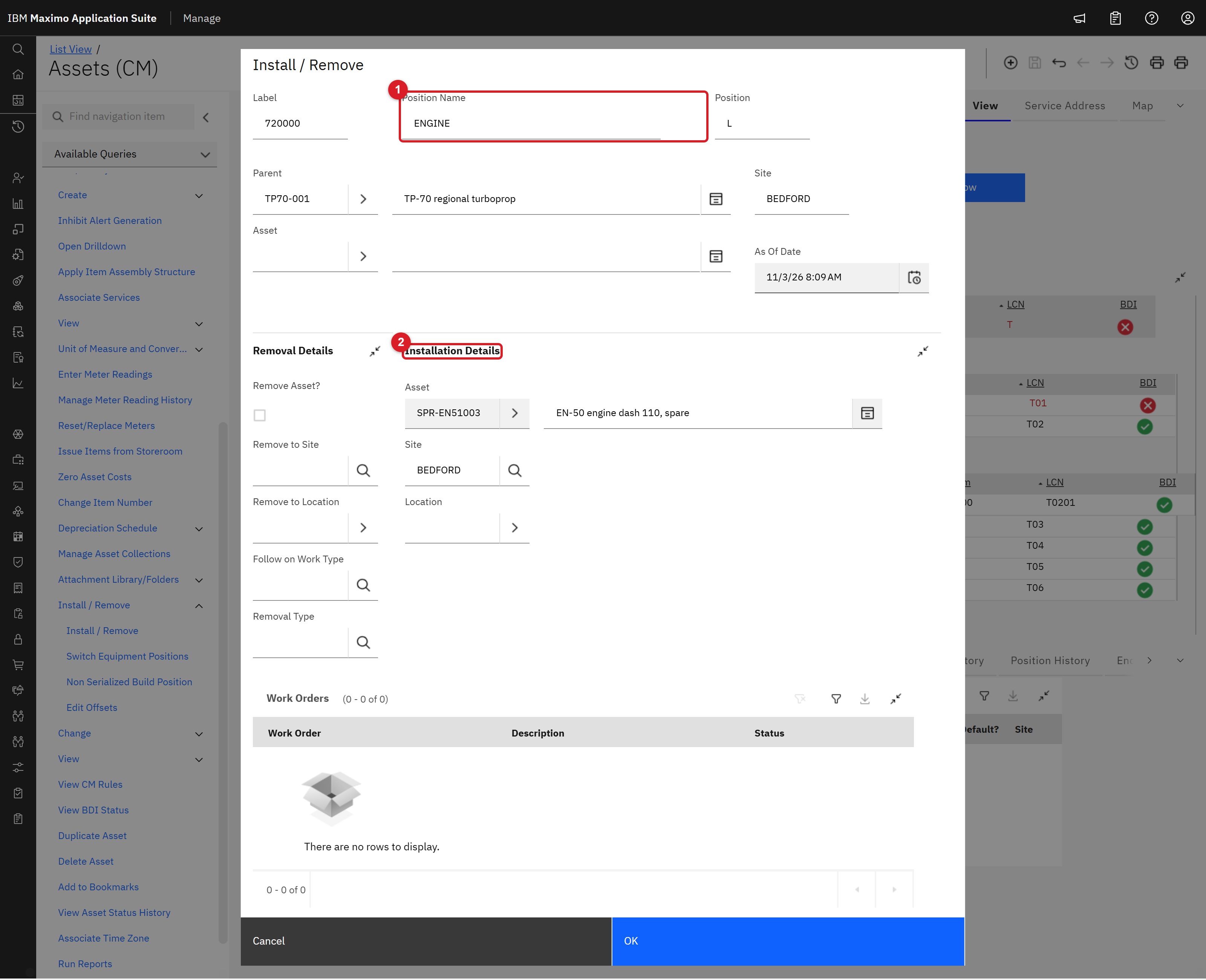
Figure 19. Installing into the empty position. (1) ENGINE L. (2) Installation Details: the spare SPR-EN51003.
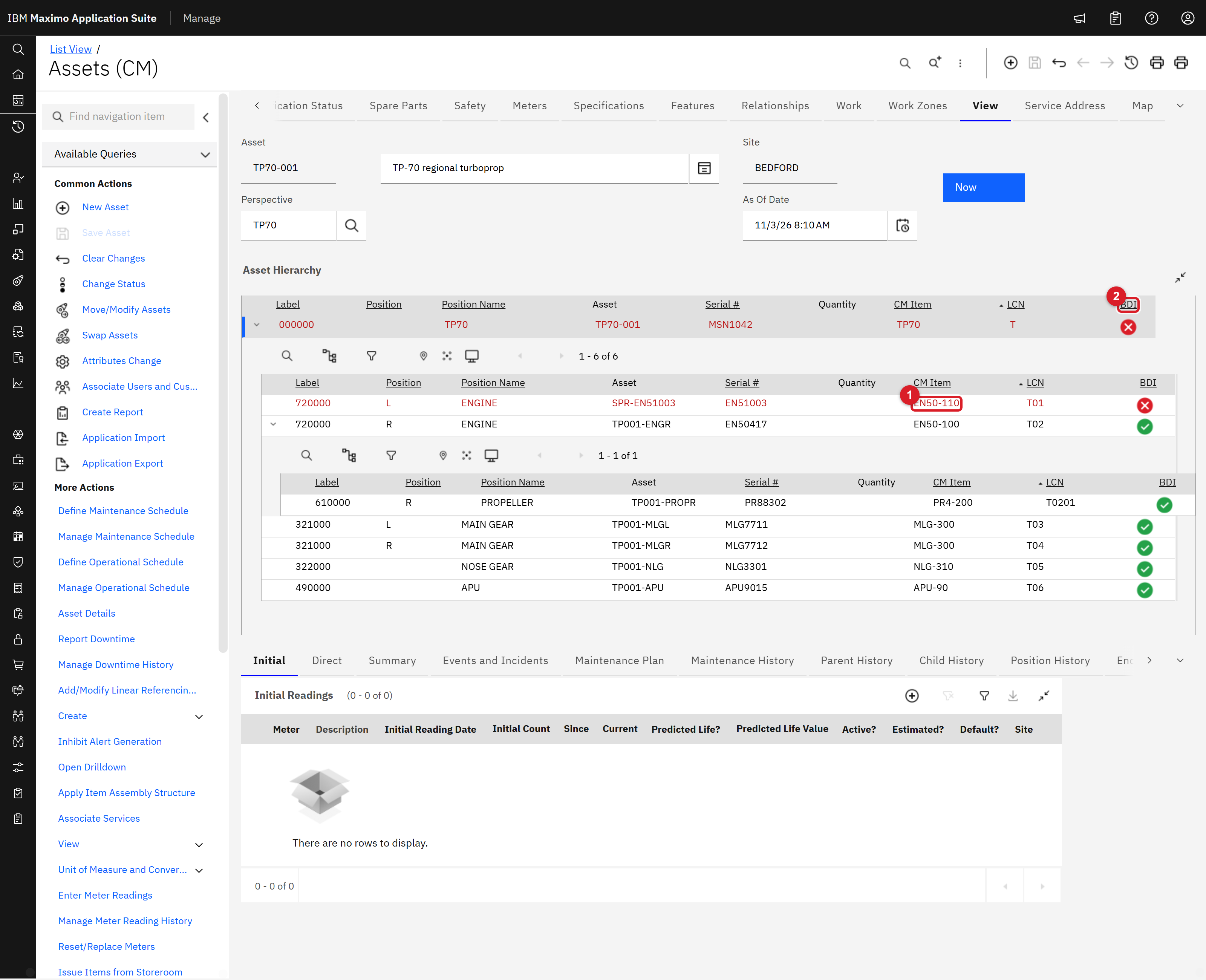
Figure 20. (1) EN50-110 now sits in T01. (2) The engine row and the aircraft are still red.
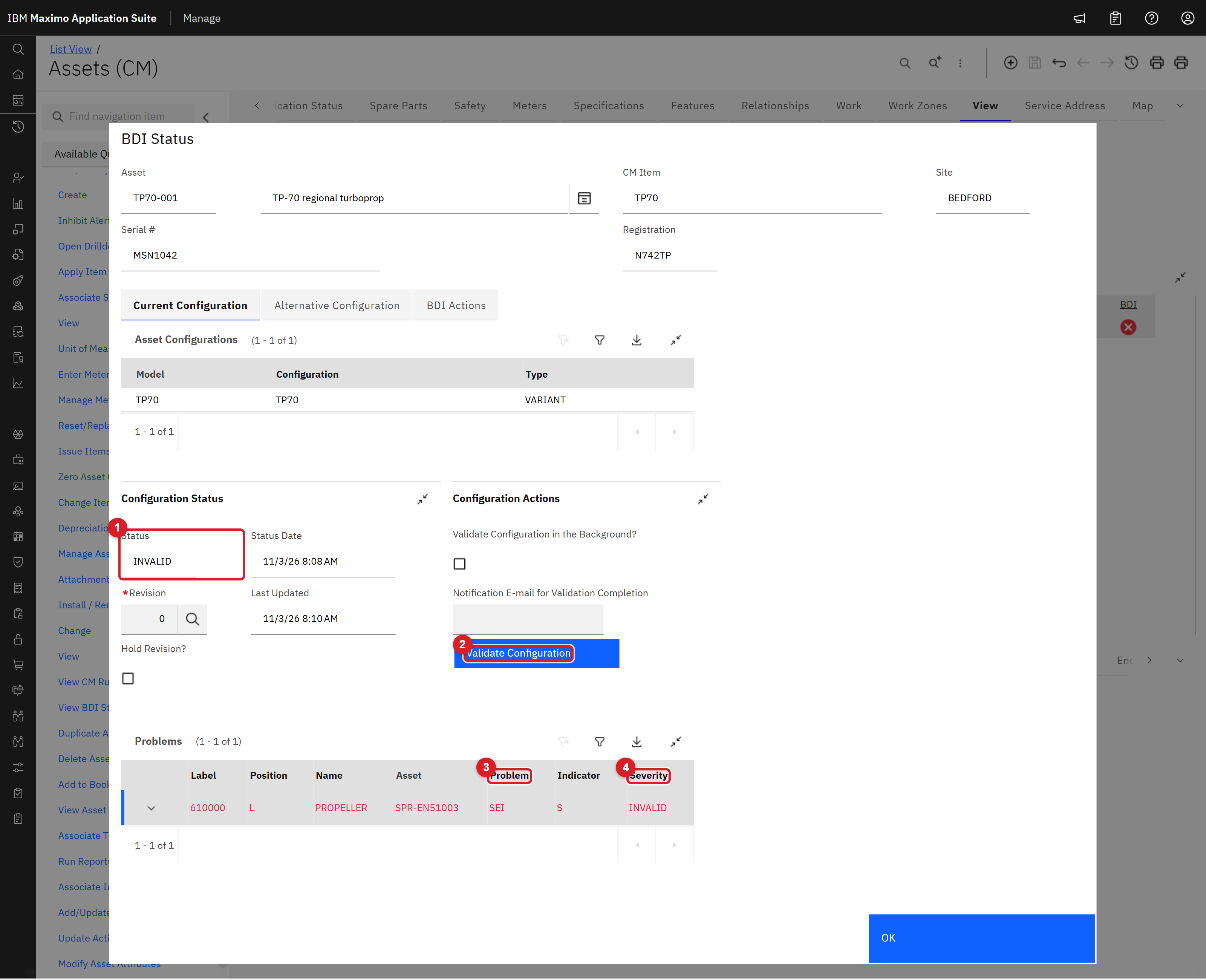
Figure 21. The engine is accepted. The problem has moved one level down: (3) SEI on 610000 L PROPELLER of SPR-EN51003. The spare arrived without a propeller.
Two lessons from this lab:
- Approval is a model decision. EN50-110 went in without any question because it is in the ENGINE build item. APU-95 could not even be entered as a spare: Assets (CM) only offers CM items that some model's build item uses. A part that is not approved is stopped at the source.
- Spares should be built as assemblies. SPR-EN51003 was entered directly in Assets (CM), so it has no record of a propeller position beneath it, and nothing can be fitted to it. ACM keeps a record for each empty slot, created when a component is removed or when an assembly is built from a model. The original engine kept its empty propeller slot when its propeller was taken off. The proper way to hold a spare engine is to give the engine its own installable model (Installable? ticked, with the propeller position below it) and build each spare with New Asset Assemblies. New Asset Assemblies insists on this: a new assembly for CM item EN50-110 cannot be saved without a model and configuration.
16Lab 10: swap back in one action, and read the history
Problem → benefit An engine change is normally one event: one engine off, another on, at the same moment. Recording it as one action keeps the history clean and leaves the aircraft invalid for no time at all.
- The original engine TP001-ENGL is back from the shop with its propeller refitted. Its own View tab still shows the empty PROPELLER slot (T0101), so the propeller goes back in with Install / Remove on that slot.
- On TP70-001, select SPR-EN51003 → Install / Remove. Removal Details remove the spare. Installation Details → Asset
TP001-ENGL. OK, Save.
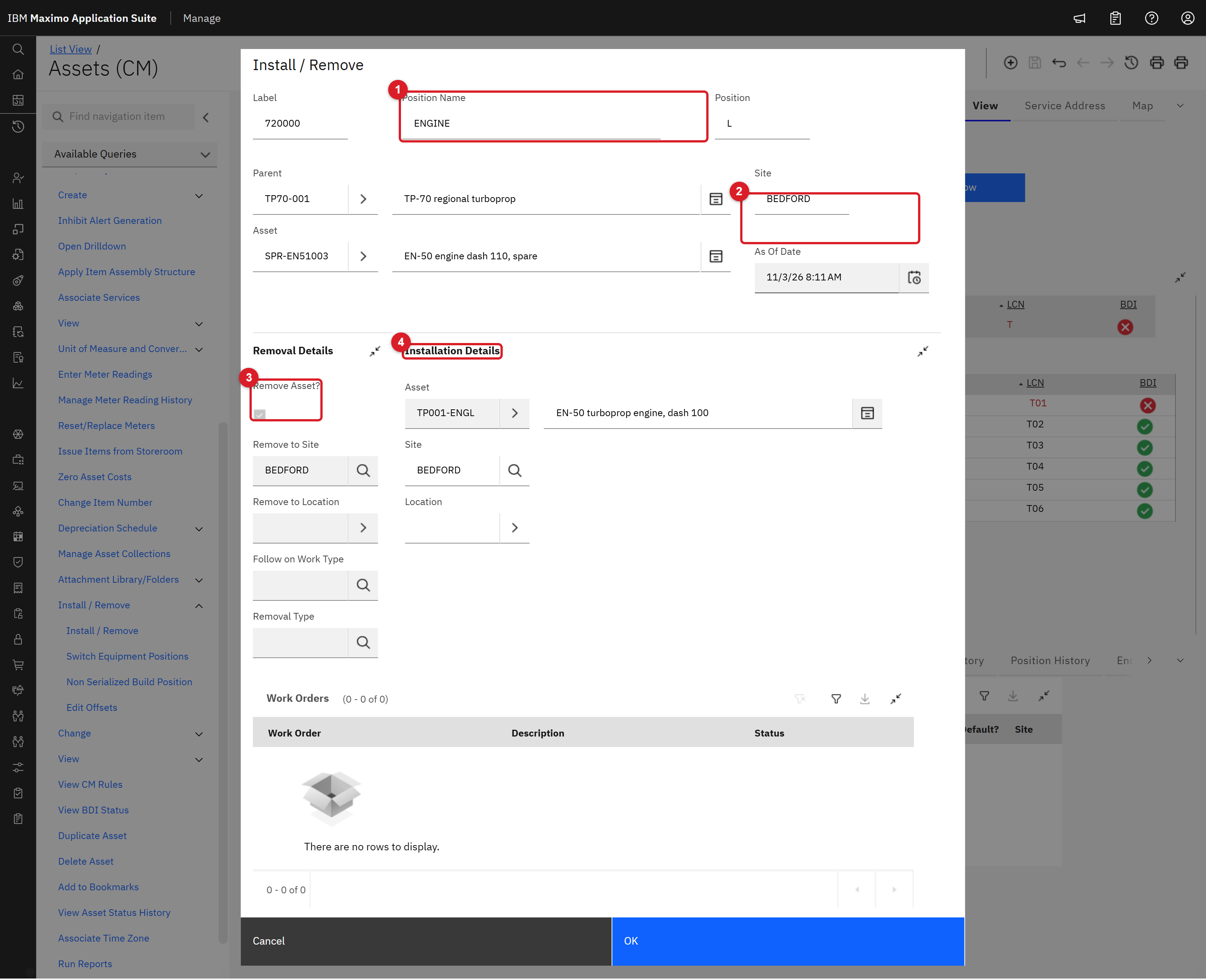
Figure 22. One dialog, both halves of the swap. (1) The position. (2) As Of Date. (3) Remove Asset? takes the spare off. (4) Installation Details fits TP001-ENGL.
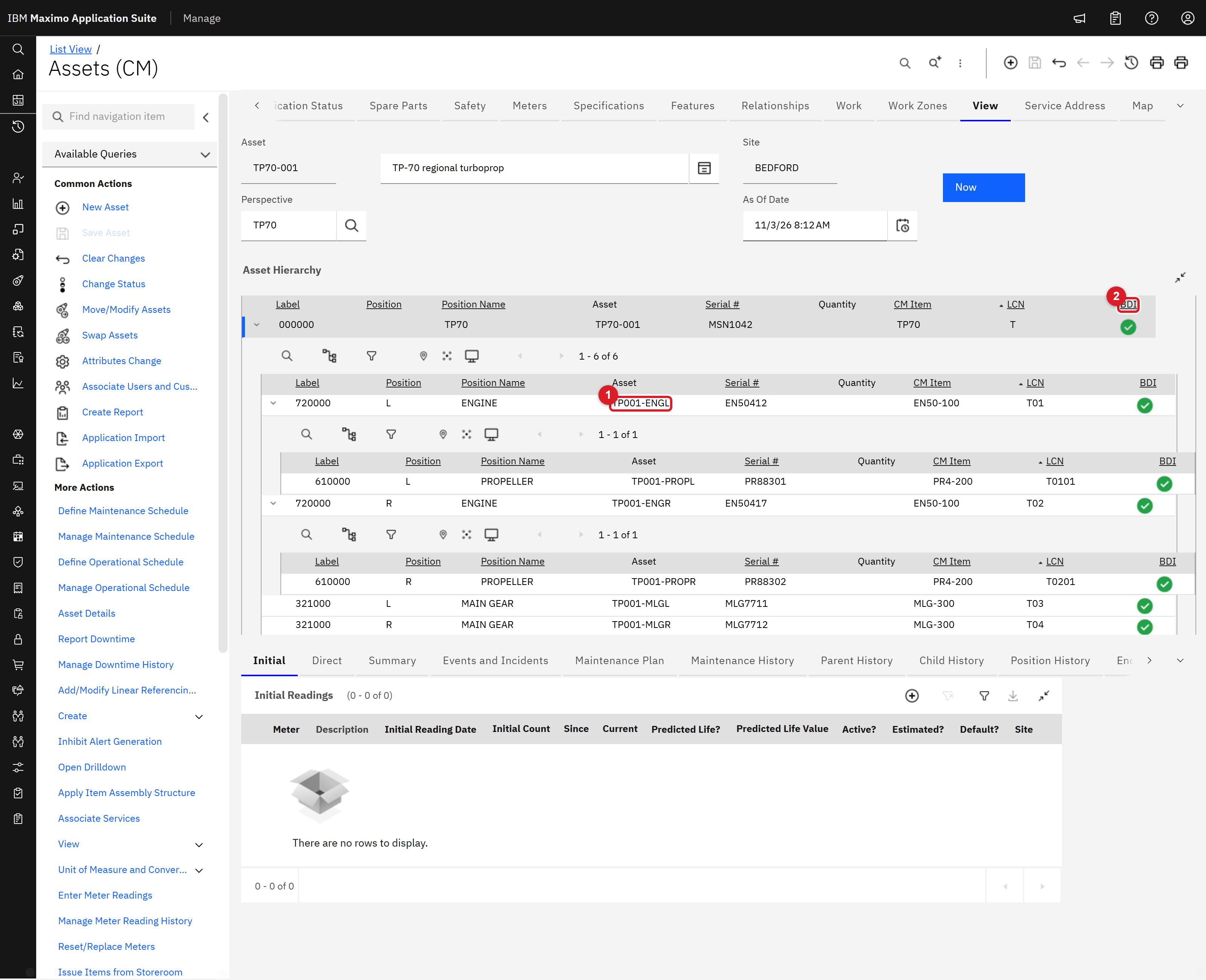
Figure 23. (1) TP001-ENGL is back in ENGINE L with TP001-PROPL below it. (2) Every position is green.
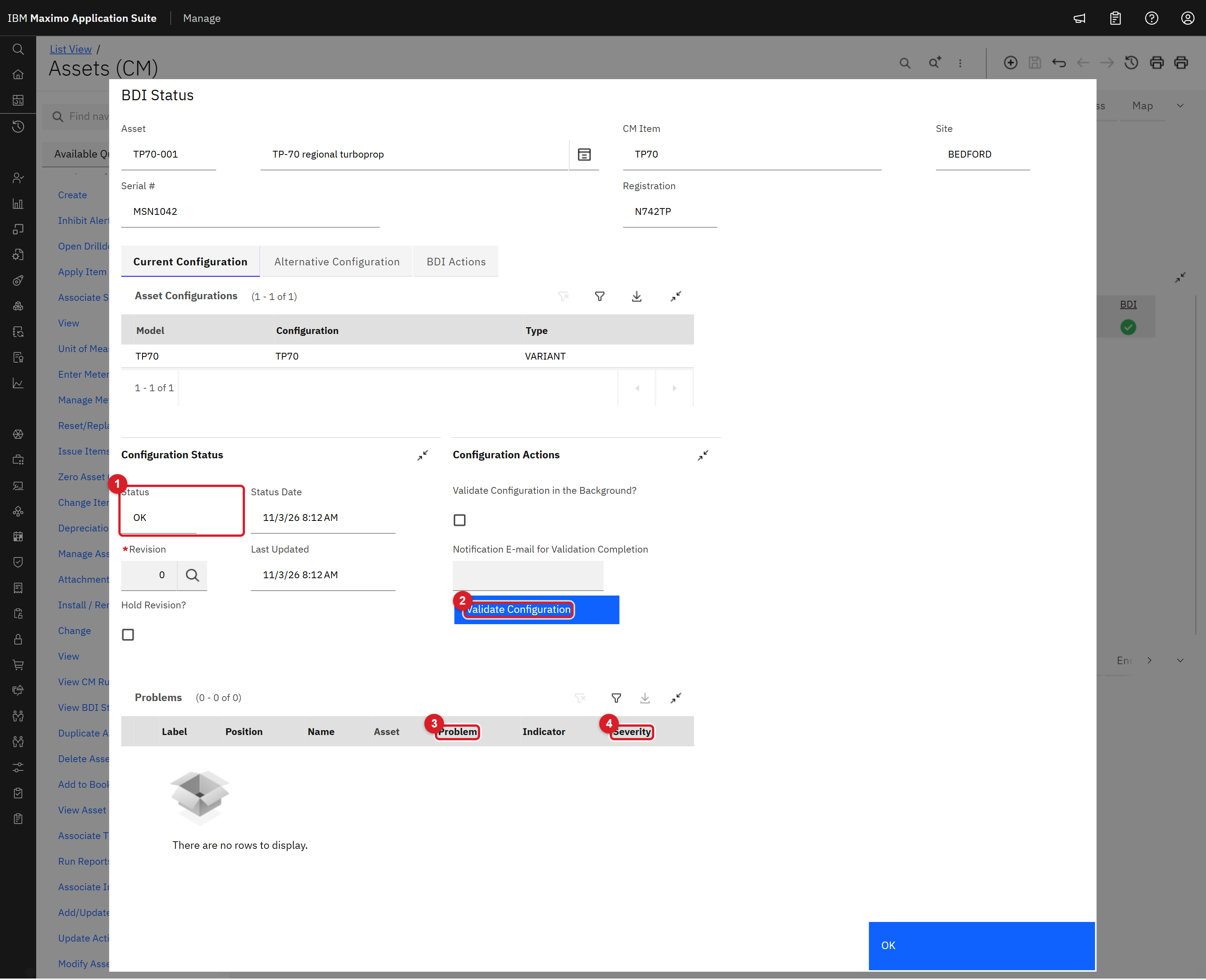
Figure 24. BDI Status OK again; the Problems table is empty.
The history is kept. On the View tab, the Child History subtab lists every install and removal under the aircraft with its on date, off date and serial:
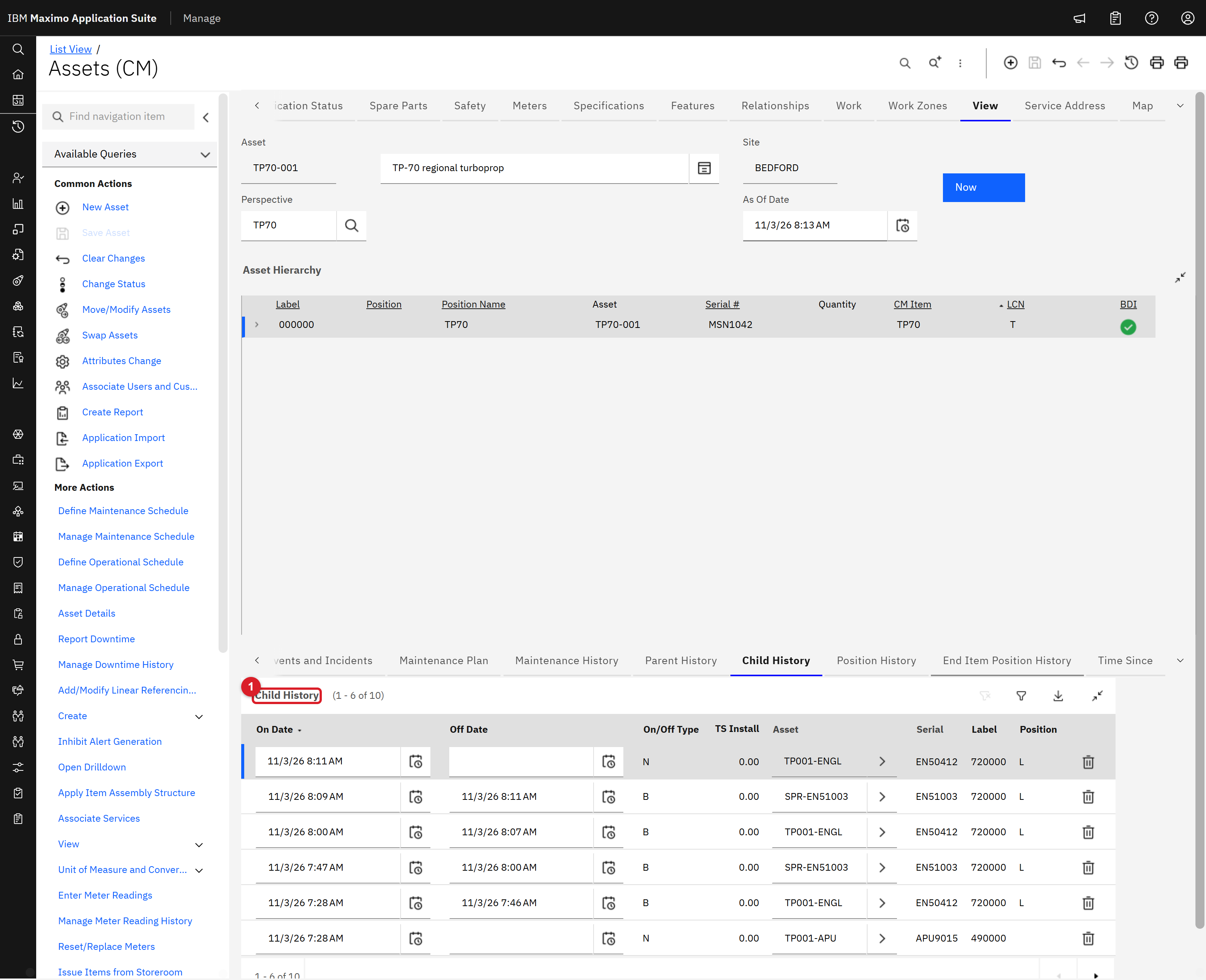
Figure 25. (1) Child History of TP70-001. EN50412 (TP001-ENGL) and EN51003 (SPR-EN51003) alternate in position 720000 L, each with its on and off date. Parent History, Position History and End Item Position History show the same events from the component's side.
Try it Set the View tab's As Of Date to a moment between the removal and the first install. The tree redraws ENGINE L as Empty: the aircraft as it was at that moment.
17Beyond the lab: life tracking, maintenance programmes, technical records, fleets
The labs cover the core: definition, build, change and validation. The same model drives the rest of ACM. These capabilities were not exercised in this lab; the descriptions follow IBM's documentation.
Meters and calculated life
Readings entered on the top asset, such as flight hours and cycles, are inherited by each component only for the periods it was installed. ACM uses the install history above to work out the life of any component on any date, and a back-dated change recalculates at once. A PM's next due count is its active count plus the frequency. For example, a landing gear PM with a 50-hour frequency that was last done at 337 hours is due at 387. On CM assets, meters must not roll down from the asset or location (Accept Rolldown From = NONE), or hours would be counted twice. Completing a work order of type OVHL, REP or INSP resets the matching "time since" meter (overhaul, repair, inspection).
Maintenance programme
Master PMs (CM) are attached to CM items (Figure 4, field 6). When an asset of that part is built, its PMs are generated, and the BDI keeps them in step with the configuration. It creates missing ones, removes ones that no longer apply, and raises EBA (past alert), EBW (past warning) or EBD (overdue) problems. Asset PM generation and the "events inactive" flag on positions decide whether the BDI or the standard PM work order crontask creates the work orders.
Technical Records
Technical Records (CM) hold airworthiness directives, service bulletins and modifications. Each has a compliance type, the models and variations it applies to, the CM item it upgrades and the superseding part, and an inoperative date after which the BDI treats non-compliance as a problem. With Validate Technical Records? on the model (Figure 5), the BDI checks them.
Fleets and logs
Fleet Management (CM) groups end items dynamically by model, variation and attributes, with fleet utilization for forecasting. Fleet Usage Load (CM) enters a spreadsheet of meter readings for a fleet at once. Flight Log Book (CM) records operations and discrepancies. In Maximo Aviation, an undeferred discrepancy can set the aircraft to AOG.
18Messages you will meet, and what they mean
| Message |
Where |
Cause and fix |
| Labels table error, empty Label System, on the first save of a model |
Models (CM) |
Organization option Default Label System is empty. Set it in Organizations (CM) → CM Options. |
| BMXAA4195E … CM Item field on the PLUSACMXCAT object |
Models (CM), build items |
An empty CM Items row on a build item. Fill the row the new build item created. |
| BMXAA4195E … Asset Status field on the PLUSANEWASSET object |
New Asset Assemblies |
Asset Status (the status the new assets get) is required. |
| BMXAA7998E … required fields: Model, configuration |
New Asset Assemblies |
The CM item has no model. Spare sub-assemblies need an installable model of their own. |
| BMXAA8229W Record PLUSANEWSUB … updated by another user |
Sub Assembly Details |
Rows sharing one asset number (prefix only) update each other's parent in the same save. Give unique numbers before the first save. |
| BMXAM1460E The Model … does not have a valid active Revision |
Create Asset |
Revision still draft or without active date. Configurations → Revisions: active date, then Change Status, clear Draft?. |
| BMXAA4195E … Asset field on the ASSET object |
Create Asset |
Seen with the Automatically Add boxes ticked on a model without spare parts, measure points or warranties. Clear the boxes. |
| BMXAM1357E Cannot execute this action for CM Assets with Parent |
Move/Modify Assets |
Configuration-managed assets move only through Install / Remove. |
| BMXAM0030E The selected node must have a parent to perform this action |
Install / Remove on a standalone component |
Start Install / Remove from the parent's tree, on the empty position. |
| BDI Status SEI, INVALID |
Assets (CM) |
A mandatory position is empty. Fit an approved part, or change the rule for that configuration. |
19Exercises
- Take the APU off TP70-001. What does the BDI report, and why is it different from Lab 8? (Hint: Mandatory?.)
- Approve APU-95 for the TP-70 by adding it to the APU build item. Can you now create a spare APU-95 in Assets (CM)?
- Create a child variation "TP70-CARGO" in which the APU is mandatory. Build a second aircraft in that variation and repeat exercise 1.
- Set the View tab's As Of Date of TP70-001 to the time of Lab 9 and read the engine serial in ENGINE L.
- Create an installable model EN50 (Installable? ticked) whose tree holds the propeller position. Build a spare engine with its propeller through New Asset Assemblies, fit it in ENGINE L, and compare the BDI verdict with Lab 9.
20Glossary
| ACM |
Maximo Asset Configuration Manager, a Maximo Manage add-on for configuration management of complex serialized assets. |
| ALERT |
BDI status: the asset is acceptable but has non-critical problems (amber). |
| ALC |
Alternate LCN code, a qualifier of a position's LCN (00 in the lab). |
| AOG |
Aircraft on ground, a Maximo Aviation status set from flight log discrepancies. |
| APU |
Auxiliary power unit: a small turbine that supplies power and air on the ground. |
| As-designed / as-built / as-maintained |
What an asset may be / how it left production / what it is in service today. ACM works mainly on the last, checked against the first. |
| As Of Date |
The moment at which ACM views or changes a structure. |
| ATA chapters |
The air transport industry's numbering of aircraft systems (32 landing gear, 49 APU, 61 propellers, 72 engine), used as labels. |
| BDI |
Build Data Interpreter, the ACM rules engine; a separate service in Maximo Application Suite. |
| BDI end point |
Host, port and SSL setting Maximo uses to call a BDI instance. |
| BDI queue |
The list of top assets waiting for, being, or already validated (BDI Queue Status). |
| Build item |
A named group of interchangeable CM items, with labels, that can fill positions. |
| Build position |
A slot on a model where a component is fitted, identified by its LCN. |
| CM |
Configuration management; also the "(CM)" suffix of ACM application names. |
| CM asset |
An asset under configuration control: it has a CM item and a place in a model's structure. |
| CM item |
A controlled part number in the CM Item Master. |
| Configuration (variation) |
A version of a model's definition; must be non-abstract and ACTIVE to be used. |
| Abstract |
Flag that keeps a configuration as a template that real assets cannot use. |
| Dash number |
The suffix of a part number that tells versions of the same part apart (-100, -110). |
| End item |
The top asset of a structure (indicator E), the unit the BDI validates. |
| Indenture |
Depth of a position in the tree. |
| Indicator |
Kind of position: E, S, I, N or W. |
| Install / Remove |
The dated ACM action that fits or removes components, or both at once. |
| Installable model |
A model, such as an engine, that can itself be fitted into another model's position. |
| INVALID |
BDI status: the asset does not meet its definition (red). |
| Label / label system |
Reference code of a build item and the coding scheme it comes from (ATA, RAIL, UIN). |
| LCN |
Logistics Control Number: the hierarchical key of a position (T, T01, T0101). |
| LCN structure |
Number of characters per level of the LCN (1222). |
| Mandatory position |
A position that must be filled for the asset to be valid. |
| Master PM |
A PM template attached to a CM item; ACM generates asset PMs from it. |
| MEL |
Minimum Equipment List: what may be inoperative while the aircraft still flies; can be defined on the model. |
| Model |
The definition of an allowed build. |
| New asset assembly |
The record that builds real assets and sub-assemblies from a model. |
| OK |
BDI status: valid (green). |
| Problem code |
BDI reason for a status, for example SEI, SIR, SSR, EBD. |
| Registration |
The aircraft's national registration mark (N742TP in the lab). |
| Revision |
A dated version of the model definition; must be released (not draft) with an active date. |
| SEI |
BDI problem: a mandatory position is empty. |
| Serial range / usable-on code |
Effectivity of a part by serial number. |
| Sub-assembly |
A component position below the end item (indicator S), and the asset fitted there. |
| Technical Record |
An airworthiness directive, service bulletin or modification with its compliance rules. |
| Top asset |
The highest asset of a structure; the BDI queues and validates top assets. |
21Appendix: lab records and verification queries
Records the lab created (site BEDFORD, item set SET1): model TP70 with configuration TP70 (ACTIVE) and revision 0; CM items TP70, EN50-100, EN50-110, PR4-200, MLG-300, NLG-310, APU-90, APU-95; build items TP70, ENGINE, PROPELLER, MAIN GEAR, NOSE GEAR, APU; new asset assembly TP70-001; assets TP70-001, TP001-ENGL, TP001-ENGR, TP001-PROPL, TP001-PROPR, TP001-MLGL, TP001-MLGR, TP001-NLG, TP001-APU, SPR-EN51003, SPR-EN50399.
Read-only queries used to confirm each step from the database side (table names are the ACM objects):
SQL
-- the position tree of a model (Lab 4)
select b.lcn, b.indenture, b.indicator, i.name as builditem, b.position, b.label
from plusacmbuild b join plusacmbuilditem i on i.plusacmbuilditemid = b.builditemid
join plusacmmodel m on m.plusacmmodelid = b.modelid
where m.model = 'TP70' order by b.lcn;

-- approved parts per build item (Lab 3)
select i.name, c.part, x.isdefault
from plusacmbuilditem i join plusacmxcat x on x.builditemid = i.plusacmbuilditemid
join plusacacat c on c.plusacacatid = x.catid;

-- configuration and revision gates (Lab 5)
select variation, abstract, status from plusacmconfig;
select revision, draft, activedate from plusacmrevision;

-- the real structure (Labs 6-10)
select assetnum, parent, serialnum, status from asset
where assetnum like 'TP%' or assetnum like 'SPR-%' order by assetnum;

-- every BDI validation (Lab 7)
select assetnum, status, startdate, enddate, timetaken, servername
from plusaantran order by plusaantranid;