IBM Maximo Manage 9.3 · Maximo Asset Configuration Manager 9.3 · Rolling stock · Hands-on guide
A train is a deep structure of serialized parts. The unit has cars, each car has bogies, and each bogie carries wheelsets that are removed, reprofiled, exchanged and refitted many times in a vehicle's life. A motor wheelset with its axle gearbox is not interchangeable with a trailer wheelset, even if both fit the same axlebox. A depot needs to know, for every vehicle and at any date, which serial number is in which slot, and whether that combination is allowed. This guide builds a two-car electric multiple unit in Maximo Asset Configuration Manager (ACM), four levels deep, then takes a wheelset out for reprofiling, tries to fit the wrong one, fits the right one, and shows what ACM records and checks at every step.
Watch first: the whole story in about five minutes, from the train to the wheelset, on the same lab records as the guide.
What you will learn
- How rolling stock maps onto ACM: unit, cars, bogies and wheelsets as models, build items and build positions.
- How the LCN structure sets the depth of a model, and how to plan it before you create a single position.
- How to use a rail label system (RAIL) instead of the aviation ATA chapters.
- How to build a real, serialized unit with New Asset Assemblies, sixteen assets in one pass.
- The two places where ACM protects a configuration: the Install / Remove dialog, which refuses a part that is not approved for the slot, and the Build Data Interpreter (BDI), which judges the whole unit after every change.
- How a wheelset change is recorded with dates, and how to read it back from the Child History.
Every step was run on Maximo Manage 9.3 with the Asset Configuration Manager 9.3 add-on and the standard demo data (organization EAGLENA, site BEDFORD). Record numbers in the screenshots are the ones the lab created. The unit class, part numbers and serial numbers are invented for the lab, and so are the RAIL label codes.
1Why rolling stock needs configuration control
An ordinary Maximo asset hierarchy says what is fitted where today. It does not say what is allowed to be fitted, and it does not stop a planner from moving a part to a slot where it does not belong. For a fleet of trains that gap is expensive:
- Wheelsets move all the time. Wheels wear and are reprofiled on a wheel lathe, and wheelsets are exchanged between vehicles from a pool of spares. Each exchange must be recorded against the right vehicle, slot and date, or the wheelset's history is lost.
- Similar parts are not interchangeable. A motor wheelset carries the axle gearbox and is driven by the traction motor; a trailer wheelset is not. Fitting one in the other's slot is a safety and a reliability problem, even when the part physically fits.
- The structure is deep. The question "what is under this unit?" is really "what is under each car, each bogie and each axle?". Answers have to come from the system, not from a spreadsheet kept at the depot.
- The record must stand up to audit. Rail operators and the organisations that maintain their vehicles are expected to show which components were on which vehicle, when, and that the vehicle was in an approved configuration.
Benefits ACM adds the missing layer: an approved definition of each vehicle type, real serialized assets built from it, dated install and removal records, and an automatic verdict on every vehicle after every change. The same mechanism that IBM built for aircraft works for any fleet of complex, serialized, regulated assets, and trains are one of the best fits.
2From a train to ACM records
ACM separates the definition of a vehicle type (what it may look like) from the real assets (what one vehicle looks like on a given date). For rolling stock the mapping is direct:
| Railway idea |
ACM record |
In the lab |
| Vehicle type or unit class |
Model (Models (CM)) |
RU20, a two-car electric multiple unit |
| A kind of component in the design |
Build item, with a label |
CAR, MOTOR BOGIE, TRAILER BOGIE, MOTOR WHEELSET, TRAILER WHEELSET, PANTOGRAPH |
| Part number |
CM item (CM Item Master) |
RU20-CAR, MB-40, TB-40, WSM-900, WST-800, PG-15 |
| Approved parts for a component |
CM items listed on the build item |
Motor wheelset: WSM-900 only |
| A physical slot on the vehicle |
Build position, keyed by an LCN |
T010101: car A, motor bogie 1, wheelset 1 |
| The approved design baseline |
Configuration and revision |
Configuration RU20, revision 0, ACTIVE |
| A real unit with serial numbers |
Asset tree built by New Asset Assemblies |
RU20-001, serial U2041, and 15 child assets |
| Wheelset exchange |
Install / Remove, with an As Of Date |
RU001-A1W1 out, SPR-WSM9107 in |
| "Is this unit fit to run?" |
BDI status OK, ALERT or INVALID, with problem codes |
INVALID with SEI while a slot is empty |
Compared with an aircraft, a train model is deeper (four levels instead of two), has many identical slots (eight wheelsets that differ only by their place), uses numbered positions (1, 2) and car letters (A, B) rather than left and right, and changes more often, because wheelset exchanges are routine depot work.
3The lab unit: RU-20
The RU-20 is a fictional two-car electric multiple unit. Each car has a motor bogie (bogie 1, under the cab end) and a trailer bogie (bogie 2, at the coupled end). Each bogie has two wheelsets. Car A carries the pantograph. That gives sixteen build positions under four LCN levels:
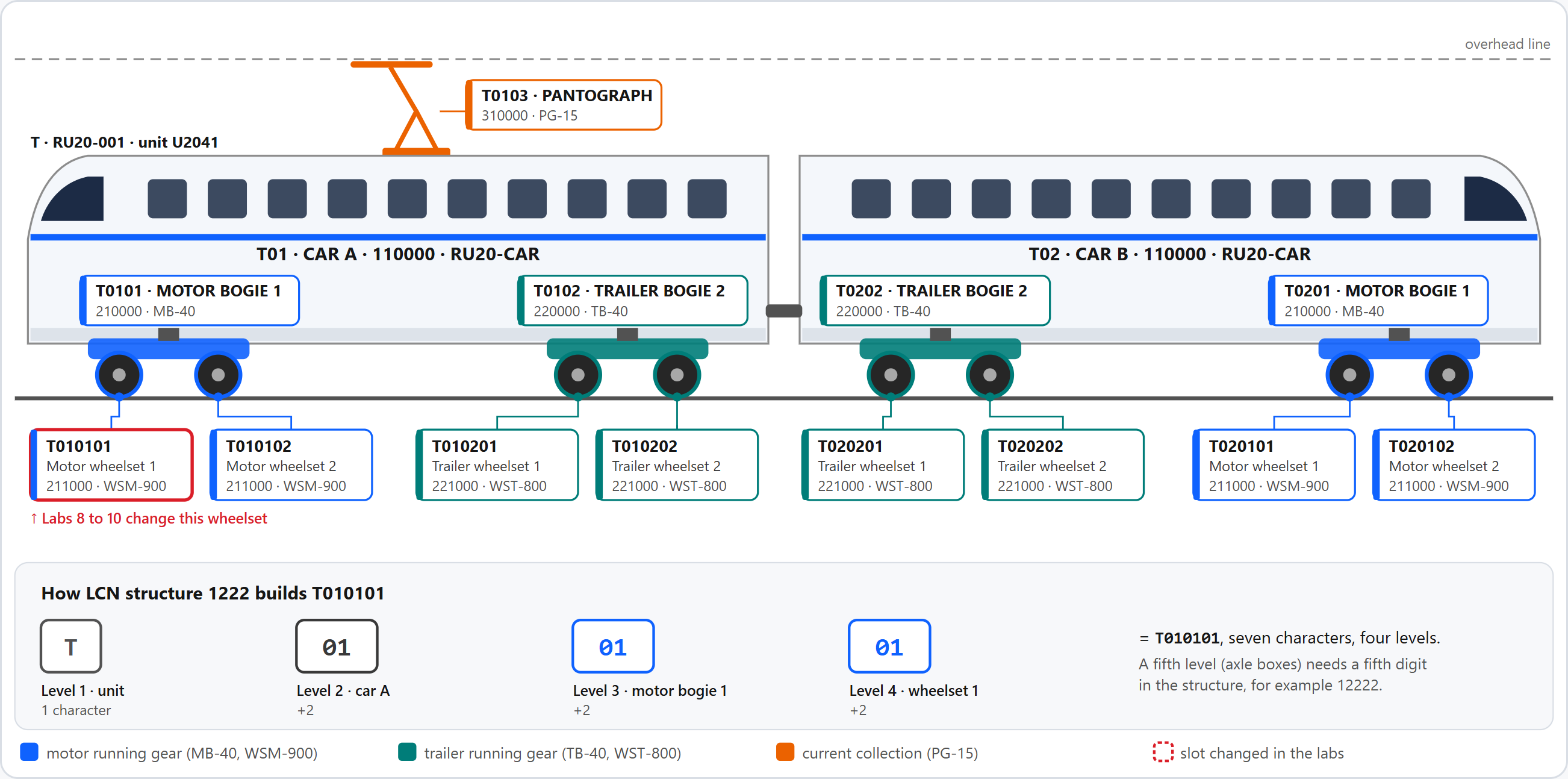
Figure 1. The RU-20 as ACM sees it: every build position at its place on the vehicle, with its LCN, RAIL label and approved part. Motor bogies sit under the cab ends, trailer bogies at the coupled ends. The ruler shows how LCN structure 1222 builds the address of the wheelset the labs change, T010101.
| LCN |
Position |
Build item (RAIL label) |
Approved CM item |
Asset / serial on U2041 |
| T |
unit |
RU20 (000000) |
RU20 |
RU20-001 / U2041 |
| T01, T02 |
A, B |
CAR (110000) |
RU20-CAR |
RU001-A / C20411, RU001-B / C20412 |
| T0101, T0201 |
1 |
MOTOR BOGIE (210000) |
MB-40 |
RU001-A1 / MB4011, RU001-B1 / MB4012 |
| T010101, T010102, T020101, T020102 |
1, 2 |
MOTOR WHEELSET (211000) |
WSM-900 |
RU001-A1W1 … RU001-B1W2 / WSM9001 … WSM9004 |
| T0102, T0202 |
2 |
TRAILER BOGIE (220000) |
TB-40 |
RU001-A2 / TB4011, RU001-B2 / TB4012 |
| T010201, T010202, T020201, T020202 |
1, 2 |
TRAILER WHEELSET (221000) |
WST-800 |
RU001-A2W1 … RU001-B2W2 / WST8001 … WST8004 |
| T0103 |
(none) |
PANTOGRAPH (310000) |
PG-15 |
RU001-APG / PG1501 |
Two depot spares are in stores: SPR-WSM9107 (WSM-900, serial WSM9107), an approved motor wheelset, and SPR-WST8105 (WST-800, serial WST8105), a trailer wheelset. Every position is mandatory.
4Two gates: where ACM checks a configuration
ACM protects a configuration in two different places, and the labs meet both. Knowing which one fires tells you where to look when something is refused or flagged.
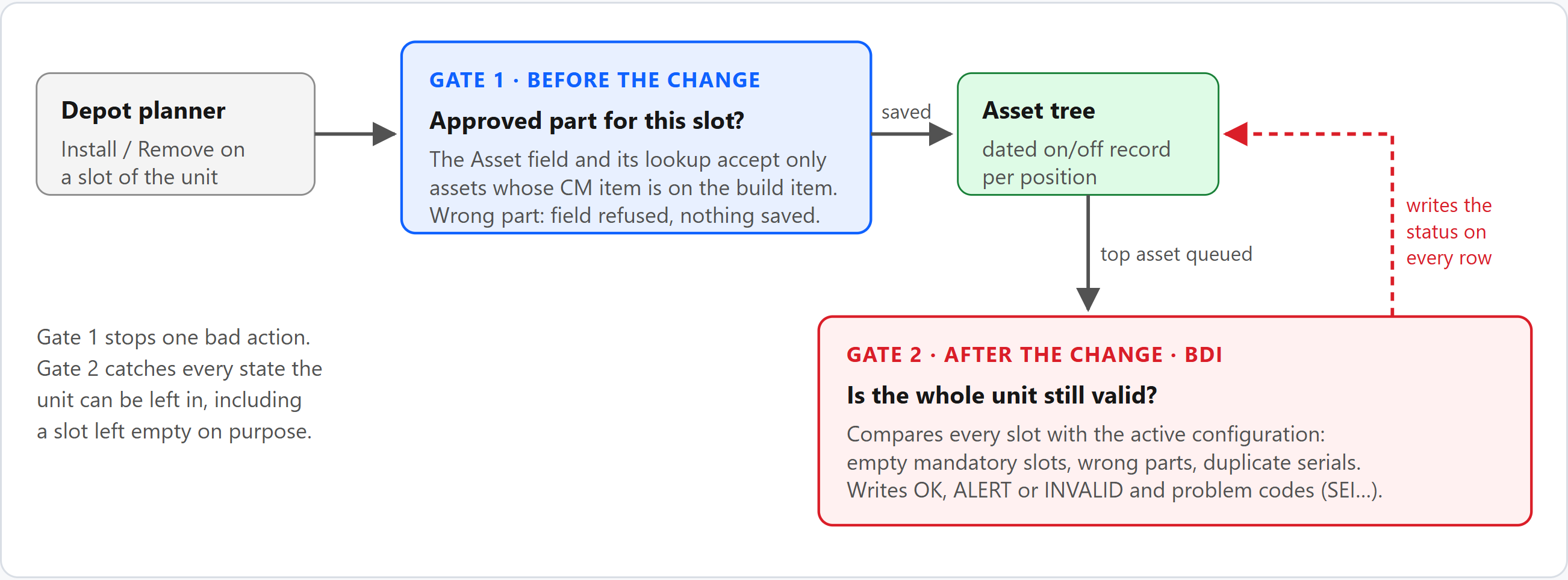
Figure 2. Gate 1 lives in the Install / Remove dialog and works before anything is saved. Gate 2 is the Build Data Interpreter, a separate service that re-validates the unit after each saved change (Lab 7 to Lab 10).
5Before you start
The labs assume a Manage 9.3 system with the ACM add-on, a running BDI with its end point registered in BDI Queue Status (CM) → More Actions → Manage BDI End Points (how to set it up, below), and these settings:
- Organizations (CM) → EAGLENA → More Actions → CM Options → Default Label System filled (it was set to
ATA on this system). With it empty, no model can be saved.
- The label system RAIL exists. It ships as a value of the
PLUSACMLABEL domain next to ATA and UIN, so nothing has to be created.
- The BDI crontask instances are active, so queued validations are processed.
Same system as an aircraft model A rail model and an aviation model live side by side in one ACM installation. Each model carries its own label system, LCN structure and position tree; only the organisation's default label system is shared.
Set up the BDI server
ACM does not validate anything by itself. The checks run in the Build Data Interpreter (BDI), a separate Java service. Maximo sends it the top asset of each changed configuration, the BDI reads the model and the asset tree straight from the Manage database, and it writes the verdict back to the same database. Maximo finds the BDI through a BDI end point: a host name, a port and an SSL flag stored in the database. If no BDI is running, or the end point is wrong, ACM still lets you build and change assets, but no verdict ever comes back: BDI Queue Status stays empty or the requests never reach COMPLETE.
Problem → benefit The BDI is the part of ACM that is easiest to miss: nothing in the Assets (CM) screens says it is missing, validation just never happens. With the server up and the end point checked once, every Install / Remove is validated within seconds, for every unit in the fleet, with no manual step.
Option A: Maximo Application Suite on OpenShift
In MAS you do not install the BDI yourself. When ACM or Aviation is activated as a component of Manage in a MAS workspace, the Manage operator deploys one BDI instance with default settings, as its own pod next to the Manage server pods. What to do:
- In the MAS administration UI, open the workspace → Manage → the activation (update) page, and select Asset Configuration Manager (or Aviation) as a component.
- In the BDI section of the same page, click View on the instance to review its settings: Name (keep the default), Max memory (the Java heap,
-Xmx), ACM and Aviation Options (codes that switch BDI features on or off), cache, monitor, VREX (scheduled re-validation of all assets) and async-job settings. The settings are stored in the bdiConfigurations array of the ManageWorkspace custom resource.
- Apply the change and wait until Manage is Ready. In the OpenShift console, project
mas-<instance>-manage, a BDI pod is now Running.
- Check the end point (below). In MAS the service host has the form
<instanceId>-<workspaceId>-<bdi name>.mas-<instanceId>-manage.svc, port 9443, SSL on.
One instance serves a normal fleet. If validation cannot keep up, IBM's advice is to tune the cache settings first, then add a second instance on the same page and give it its own end point (below).
Option B: run the BDI image yourself
On a Manage server that the MAS operator does not manage, for example a test or development system, run the BDI from IBM's image yourself. It is the same Liberty application the operator deploys.
- Get the image. It is
cp.icr.io/cp/manage/bdi in the IBM Entitled Registry. Log in with user cp and your entitlement key (the key from My IBM that also pulls the Manage images). Pick the newest 9.3 build tag, for example 9.3.17_11050-amd64.
- Start it only after Manage is installed with ACM. On start the BDI checks and updates ACM tables in the Manage database. Start it once the database update and the ACM package install have finished, not on an empty database.
- Set the environment variables in the table below. They tell the BDI which database to use and who it is.
- Choose its ports. The image listens on 9080 (HTTP) and 9443 (HTTPS), the same ports as a Manage server. If the BDI runs on the same host as Manage, move it with a Liberty override file (shown below) to 9180 and 9543.
- Register the end point in Maximo (next section) and check it.
| Variable |
What it does, with an example |
BDI_XDB_CONNECT |
JDBC URL of the Manage database. Db2: jdbc:db2://dbhost:50000/BLUDB. Oracle: jdbc:oracle:thin:@//dbhost:1521/MAXPDB. SQL Server: jdbc:sqlserver://dbhost:1433;databaseName=MAXDB;encrypt=false;trustServerCertificate=true. The three drivers are in the image. |
BDI_XDB_USER
BDI_XDB_PASSWORD |
The Maximo schema owner and its password, the same user Manage connects with, for example maximo. |
INSTANCE_ID |
A short name for the Maximo instance, for example prod. |
WORKSPACE_ID |
A short name for the workspace, for example main. |
BDI_INSTANCE_NAME |
The BDI's own name. It must be <INSTANCE_ID>-<WORKSPACE_ID>-<name>, for example prod-main-bdi. It appears as Server Name in BDI Queue Status. |
SERVICE_HOST_NAME |
The host name the BDI registers for itself, for example prod-bdi. Use a name of its own, not localhost (see the traps below). |
The port override is a Liberty configDropins file: an XML fragment Liberty reads at start and lays over its server configuration. Mount it at /opt/was/liberty/wlp/usr/servers/default/configDropins/overrides/ports.xml:
XML
<server>
  <!-- Manage owns 9080/9443 on this host, so the BDI listens on 9180/9543 -->
  <httpEndpoint id="defaultHttpEndpoint" host="*" httpPort="9180" httpsPort="9543"
                sslOptionsRef="endpointSSLOptions"/>
</server>
A complete start command, with Docker or Podman:
Shell
echo "$ENTITLEMENT_KEY" | docker login cp.icr.io -u cp --password-stdin
docker run -d --name prod-bdi --restart unless-stopped \
  -p 9543:9543 \
  -v "$PWD/ports.xml:/opt/was/liberty/wlp/usr/servers/default/configDropins/overrides/ports.xml:ro" \
  -e BDI_XDB_CONNECT='jdbc:db2://dbhost:50000/BLUDB' \
  -e BDI_XDB_USER=maximo -e BDI_XDB_PASSWORD="$MAXIMO_DB_PASSWORD" \
  -e INSTANCE_ID=prod -e WORKSPACE_ID=main \
  -e BDI_INSTANCE_NAME=prod-main-bdi -e SERVICE_HOST_NAME=prod-bdi \
  cp.icr.io/cp/manage/bdi:9.3.17_11050-amd64
The BDI is ready when its log shows CWWKZ0001I: Application bdi started, and https://<bdi host>:9543/ answers.
Register and check the end point
Maximo calls the BDI at the address in BDI Queue Status (CM) → More Actions → Manage BDI End Points. When the list is empty, the BDI adds a default row the first time it starts.
- Open BDI Queue Status (CM) → More Actions → Manage BDI End Points.
- Make sure one row points at the BDI: Server Host = the BDI's host as Manage reaches it, Port = its HTTPS port (9443 in MAS, 9543 with the override above), SSL? checked. Delete rows that point anywhere else, such as the Manage server itself or a host Manage cannot resolve.
- Optional: fill Item Set, Organization or Site on a row to send only those assets to that BDI instance. This is how two instances share the load.
- OK, then change any configuration-managed asset (for example the wheelset removal in Lab 8). Within seconds BDI Queue Status shows the top asset with status COMPLETE and your
BDI_INSTANCE_NAME as Server Name.
The end point is ordinary data in table PLUSABDILISTENERS (server host, port, SSL). On a system you rebuild often, ship it as a DBC script with a guarded insert, so every new environment gets the same row:
XML
<freeform description="BDI end point">
  <sql target="sqlserver"><![CDATA[insert into plusabdilisteners (serverhost, listenerport, usessl, plusabdilistenersid)
    select 'prod-bdi.example.com', 9543, 1, next value for plusabdilistenersseq
    where not exists (select 1 from plusabdilisteners where serverhost = 'prod-bdi.example.com')]]></sql>
</freeform>
A DBC sql statement names its database. Add a target="db2" line with nextval for plusabdilistenersseq and from sysibm.sysdummy1, and a target="oracle" line with plusabdilistenersseq.nextval and from dual, so the same script runs on all three.
Traps
- Wrong instance name. If
BDI_INSTANCE_NAME does not start with <INSTANCE_ID>-<WORKSPACE_ID>-, the BDI fails at start in its end point manager with a StringIndexOutOfBoundsException.
SERVICE_HOST_NAME = localhost. On every start the BDI resets end points that use its own host name to port 9443 with SSL, the MAS default. With localhost and a BDI on 9543, it rewrites your end point to localhost:9443, which is the Manage server, and validation stops after the next BDI restart.- Started on an empty database. Started before Manage and ACM are installed, the BDI logs SQL errors and its table updates can collide with the install. Start it afterwards.
- BDI stopped, Maximo running. Nothing warns you. If BDI Queue Status stops showing new COMPLETE rows, check the BDI first. Give it a restart policy (
--restart unless-stopped) and start it with Manage.
- Testing with a plain asset. Only assets in an ACM configuration (with a model) are queued. Changing an ordinary asset never shows up in BDI Queue Status, even when the BDI works.
6Lab 1: the part catalogue
Problem → benefit Without a controlled part catalogue, "motor wheelset" means whatever someone typed. CM items give every approved part one number, one description and its own serial rules, so a wheelset is identified the same way in stores, at the lathe and on the vehicle.
In CM Item Master (CM) create one record per part number, item set SET1:
| CM item |
Description |
| RU20-CAR |
RU-20 car body, driving motor car |
| MB-40 |
MB-40 motor bogie |
| TB-40 |
TB-40 trailer bogie |
| WSM-900 |
WSM-900 motor wheelset with axle gearbox |
| WST-800 |
WST-800 trailer wheelset |
| PG-15 |
PG-15 single-arm pantograph |
The CM item for the whole unit, RU20, does not have to be created: ACM creates it with the model in Lab 2.
7Lab 2: the model and its label system
Problem → benefit The model is the one place where the unit class is defined. Every RU-20 built later inherits its structure and its rules, so a design change is made once, not on every vehicle.
- Open Models (CM) → New Model. Model
RU20, description RU-20 two-car electric multiple unit.
- Label System
RAIL. LCN Structure 1222. Top LCN T. Leave Installable? off: the unit is a top asset.
- Save.
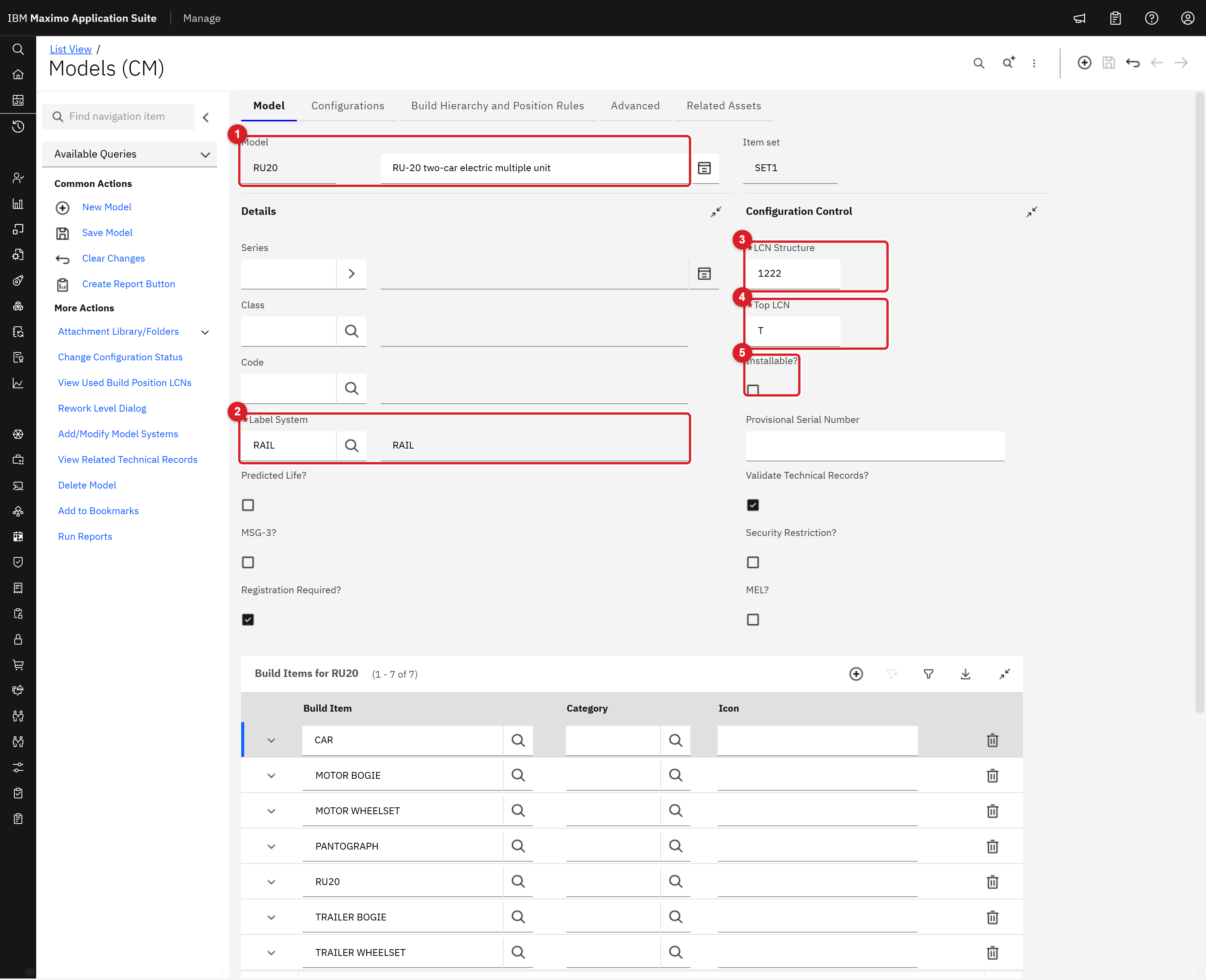
Figure 3. The RU20 model. (1) Model. (2) Label System RAIL. (3) LCN Structure 1222. (4) Top LCN T. (5) Installable? off. The Build Items table below already holds the top build item RU20.
How the LCN structure sets the depth Each digit of the LCN structure is the number of characters one level adds. 1222 means one character for the unit (T), then two for a car (T01), two for a bogie (T0101) and two for a wheelset (T010101): four levels, seven characters. If you later want axle boxes or brake units under each wheelset as a fifth level, the structure needs a fifth digit, so decide the depth before you create the first position.
Trap: the top label comes from the organisation The top build item RU20 received its label row from the organisation's Default Label System, so it shows ATA 000000 although the model is RAIL. It does no harm in the lab. On a rail-only organisation, set the Default Label System to RAIL before creating models.
8Lab 3: build items and approved parts
Problem → benefit This is where "a motor wheelset is a WSM-900" is written down. Everything later, the lookup that refuses the trailer wheelset and the BDI verdict, reads this list.
On the Model tab, add one row to Build Items for RU20 per kind of component. For each, fill Labels for … with label system RAIL and the code, and CM Items for … with the approved part:
| Build item |
RAIL label |
Approved CM item |
| CAR |
110000 |
RU20-CAR |
| MOTOR BOGIE |
210000 |
MB-40 |
| TRAILER BOGIE |
220000 |
TB-40 |
| MOTOR WHEELSET |
211000 |
WSM-900 |
| TRAILER WHEELSET |
221000 |
WST-800 |
| PANTOGRAPH |
310000 |
PG-15 |
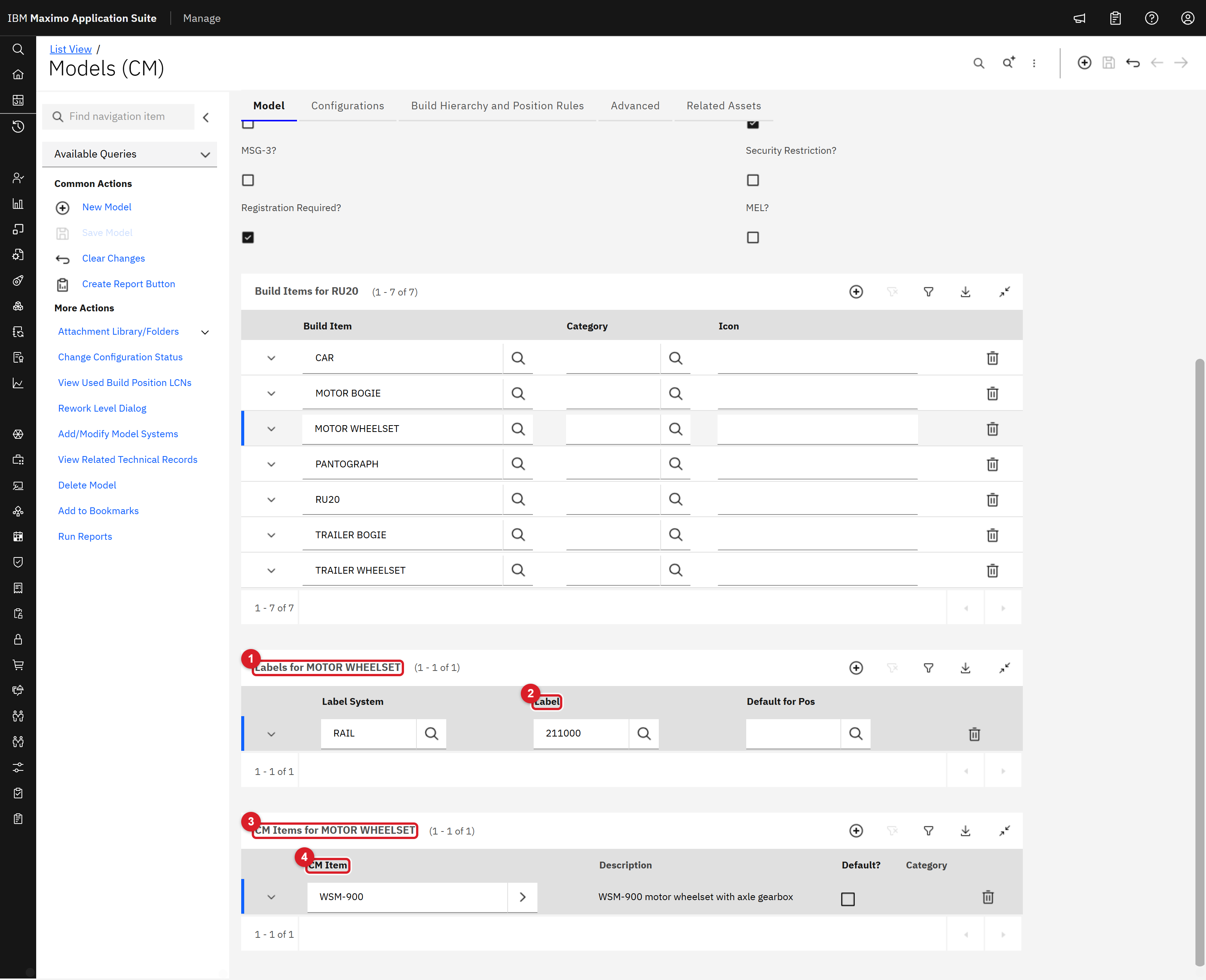
Figure 4. MOTOR WHEELSET selected. (1) Labels for MOTOR WHEELSET and (2) its label 211000 in system RAIL. (3) CM Items for MOTOR WHEELSET and (4) the only approved part, WSM-900.
Why separate motor and trailer build items Approved parts are listed per build item, not per position. A single "WHEELSET" build item with WSM-900 and WST-800 would let either part into any wheelset slot. Two build items, each with its own part, is what makes the wrong wheelset impossible to fit in Lab 9.
The RAIL codes here are the lab's own scheme: the first digit groups the system (1 car body, 2 running gear, 3 current collection), the next ones the sub-assembly. Use your operator's coding (for example its vehicle breakdown or maintenance-manual chapters) in a real project.
9Lab 4: a four-level position tree
Problem → benefit The position tree says where every component sits, so "wheelset 1 of the motor bogie of car A" becomes one record, T010101, that keeps its identity while the wheelsets in it come and go.
On the Build Hierarchy and Position Rules tab, select a row, then More Actions → New Child (Indicator S, the build item, the position). Build from the top down:
- Under T: CAR position A (T01), CAR position B (T02).
- Under T01: MOTOR BOGIE 1 (T0101), TRAILER BOGIE 2 (T0102), PANTOGRAPH (T0103). Under T02: MOTOR BOGIE 1 (T0201), TRAILER BOGIE 2 (T0202).
- Under each motor bogie: MOTOR WHEELSET 1 and 2. Under each trailer bogie: TRAILER WHEELSET 1 and 2.
- Select each position and tick Mandatory? in Position Rules. Save.
ACM assigns the LCN from the parent's LCN plus a two-character suffix. Fifteen New Child actions give the sixteen positions of Figure 1.
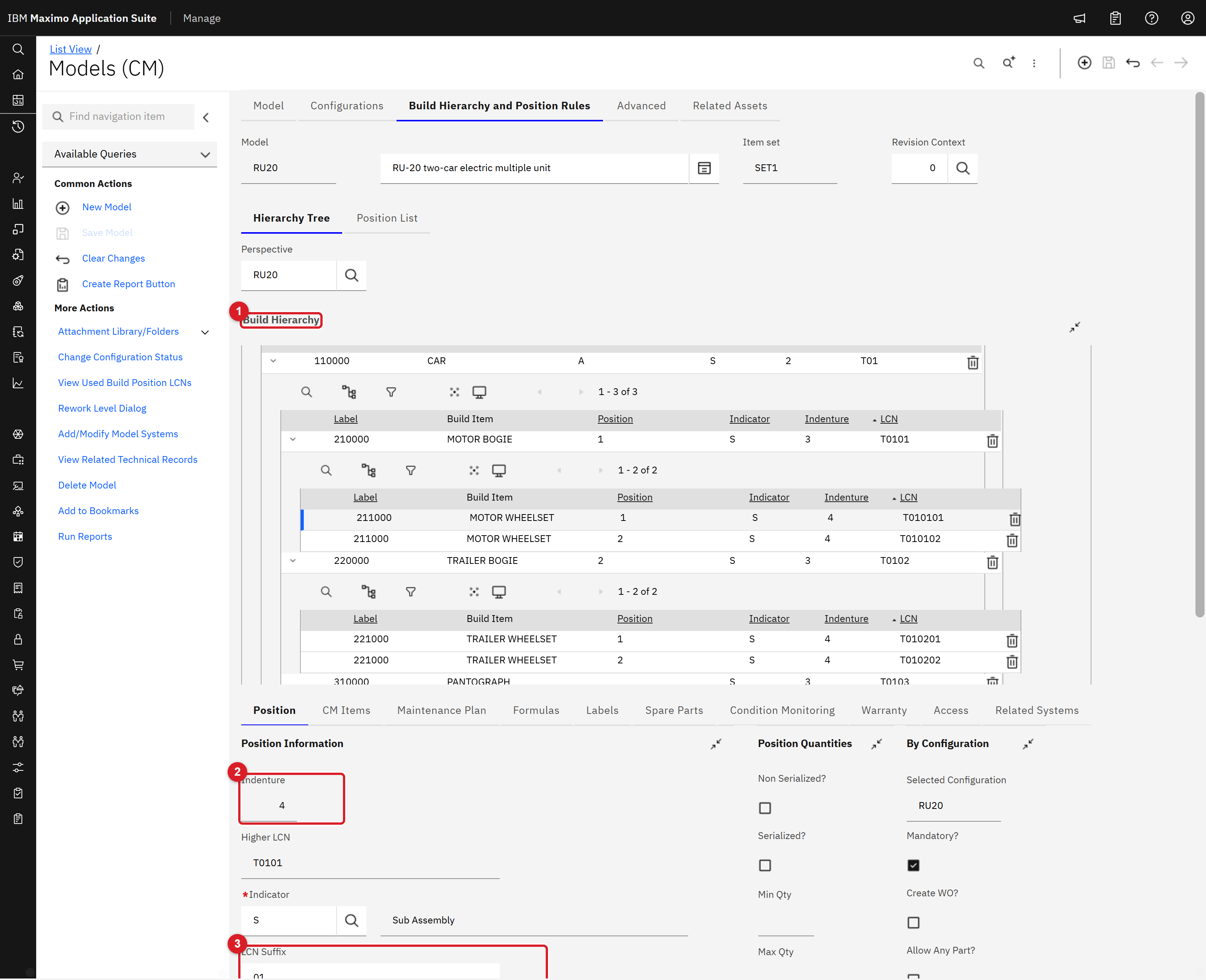
Figure 5. The build hierarchy, expanded down to car A's bogies. Each level is a nested table. (1) The hierarchy. (2) Indenture 4: the selected wheelset is four levels down. (3) LCN Suffix 01 of T010101.
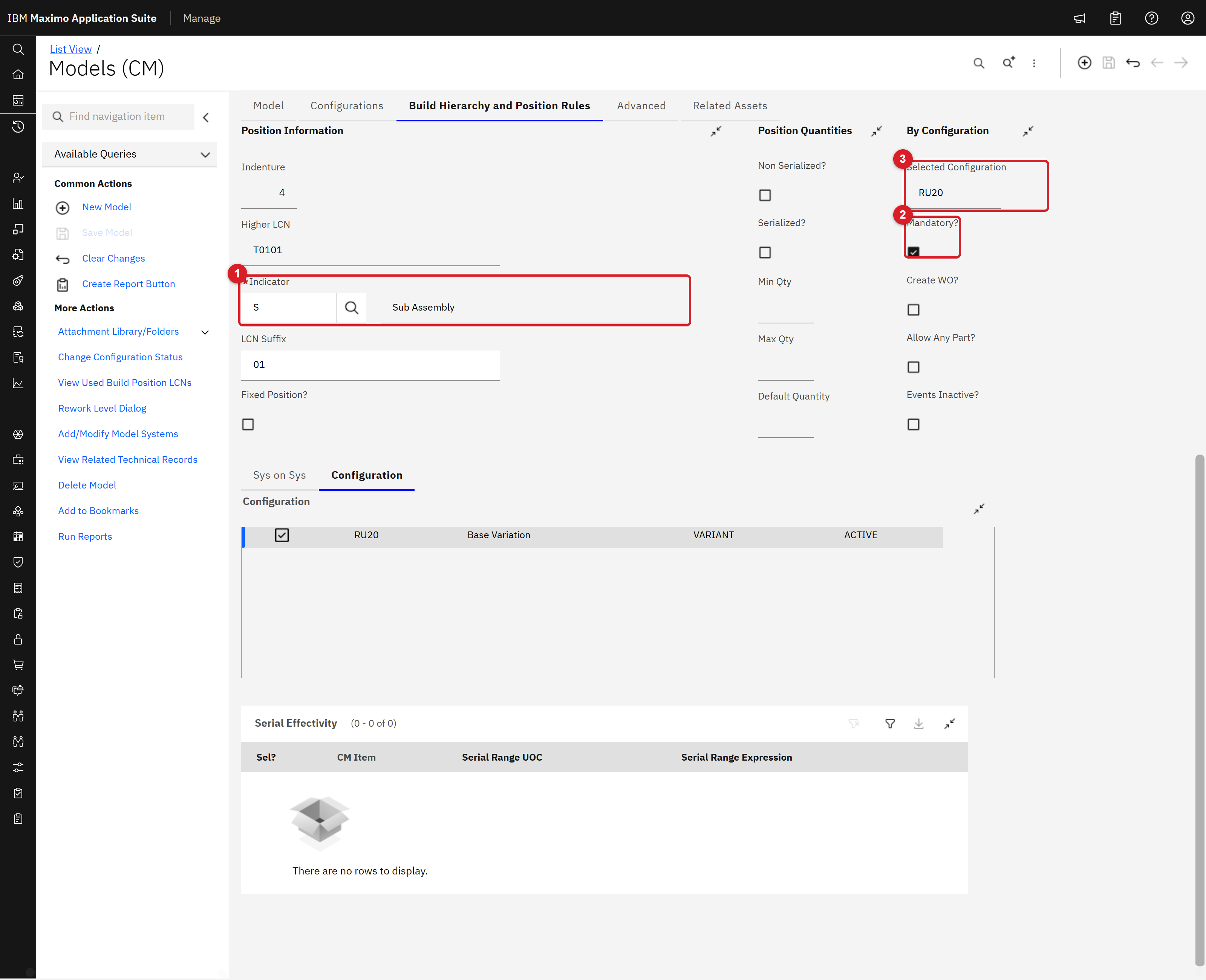
Figure 6. Position rules of T010101. (1) Indicator S, sub assembly; Higher LCN T0101 is its bogie. (2) Mandatory? ticked, (3) for the selected configuration RU20. Mandatory is a configuration rule, so another configuration of the same model could make the slot optional.
What you should see More Actions → View Used Build Position LCNs lists T, T01, T0101, T010101, T010102, T0102, T010201, T010202, T0103, T02, T0201, T020101, T020102, T0202, T020201, T020202.
10Lab 5: release the configuration
Problem → benefit Nothing can be built from an unreleased design. The configuration and revision are the approval step: until they are active, ACM refuses to create a unit.
- Configurations tab: in Configuration Node, clear Abstract? on the base variation RU20. Save.
- More Actions → Change Configuration Status → ACTIVE.
- Revisions: give revision 0 an Active Date, then the row's Change Status icon → clear Draft?. Save.
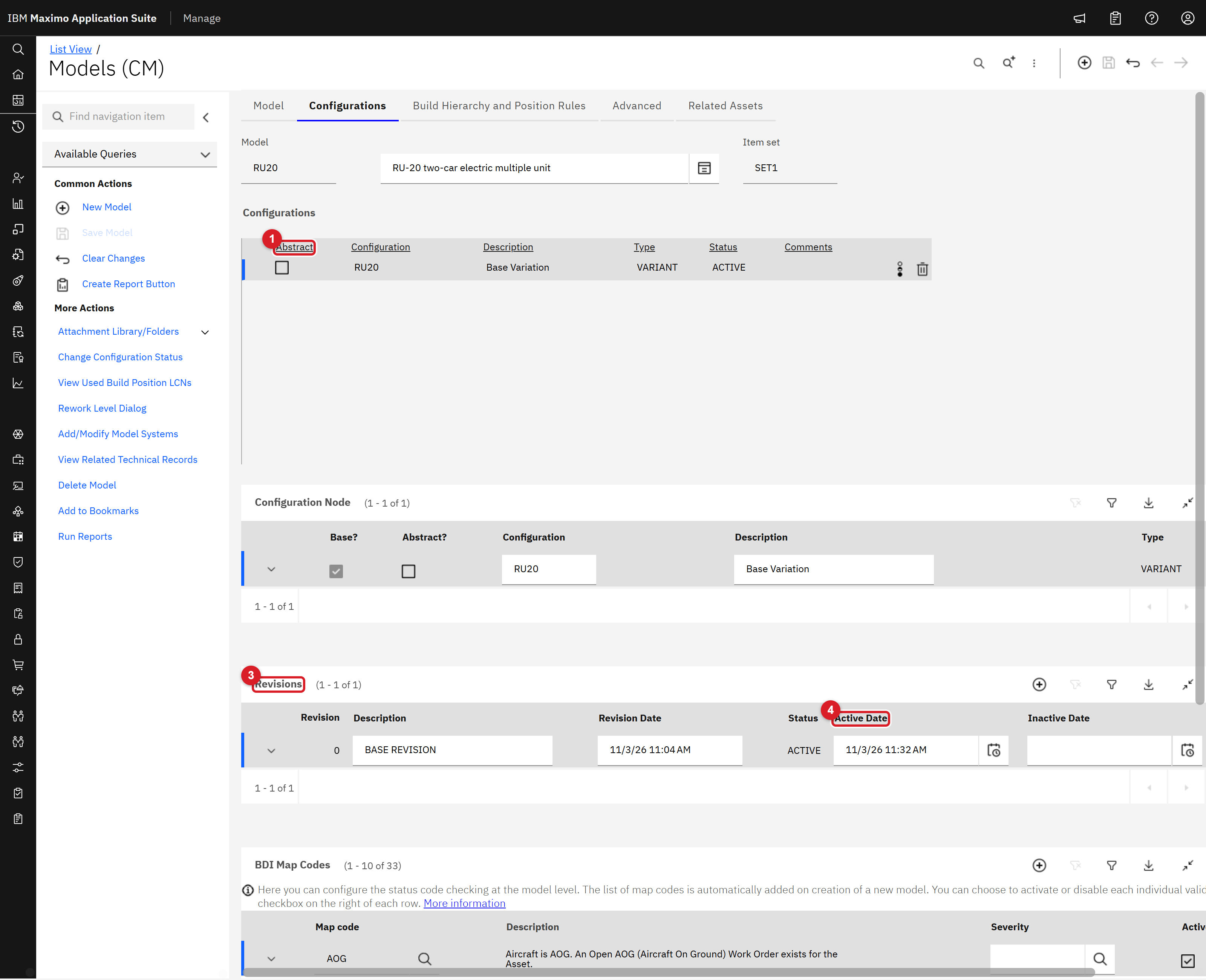
Figure 7. The released design. (1) Abstract? cleared on configuration RU20, status ACTIVE. (3) Revisions: revision 0 ACTIVE, (4) with its Active Date. The BDI Map Codes table below sets how each problem code is mapped to a status for this model.
Trap: the active date is server time The first Create Asset failed with BMXAM1460E The Model RU20 does not have a valid active Revision. The active date had been typed from a workstation clock three hours ahead of the server, so the revision was not active yet. Enter dates in the time zone the Maximo UI shows (here the server's).
11Lab 6: build the unit
Problem → benefit New Asset Assemblies turns the definition into a real unit in one pass: sixteen assets, each with its serial number, each in the right parent, each tied to its position. No hand-built hierarchy, no missing wheelset.
- New Asset Assemblies (CM) → New. New Asset
RU20-001, CM Item RU20, Model RU20 (the configuration RU20 fills in), Serial U2041, Registration RU-2041, Asset Status OPERATING. Clear the three Automatically Add boxes (Spare Parts?, Measure Points?, Warranty Contracts?). Save.
- More Actions → Create Sub Assemblies from CM Build: BMXAM0226I New asset sub assemblies and their meters created successfully.
- Sub Assembly Details tab: fill a unique Asset and Serial on all fifteen rows (table in section 3), then Save.
- Common Actions → Change Status → ACTIVE.
- More Actions → Create Asset → OK: BMXAM0224I Asset created successfully.
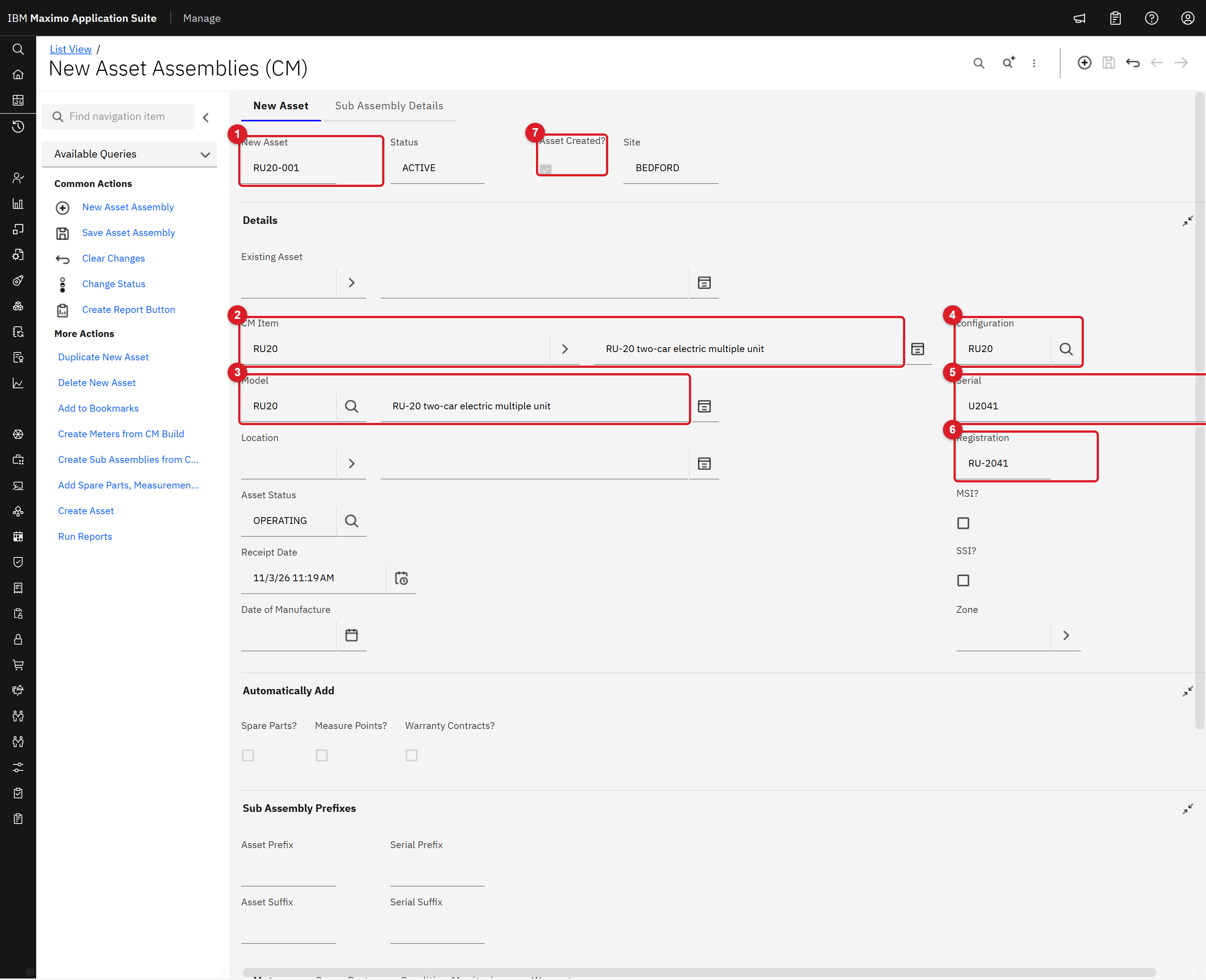
Figure 8. The new asset assembly. (1) New Asset RU20-001, status ACTIVE. (2) CM Item and (3) Model RU20. (4) Configuration RU20. (5) Serial U2041. (6) Registration RU-2041. (7) Asset Created? ticks once Create Asset has run.
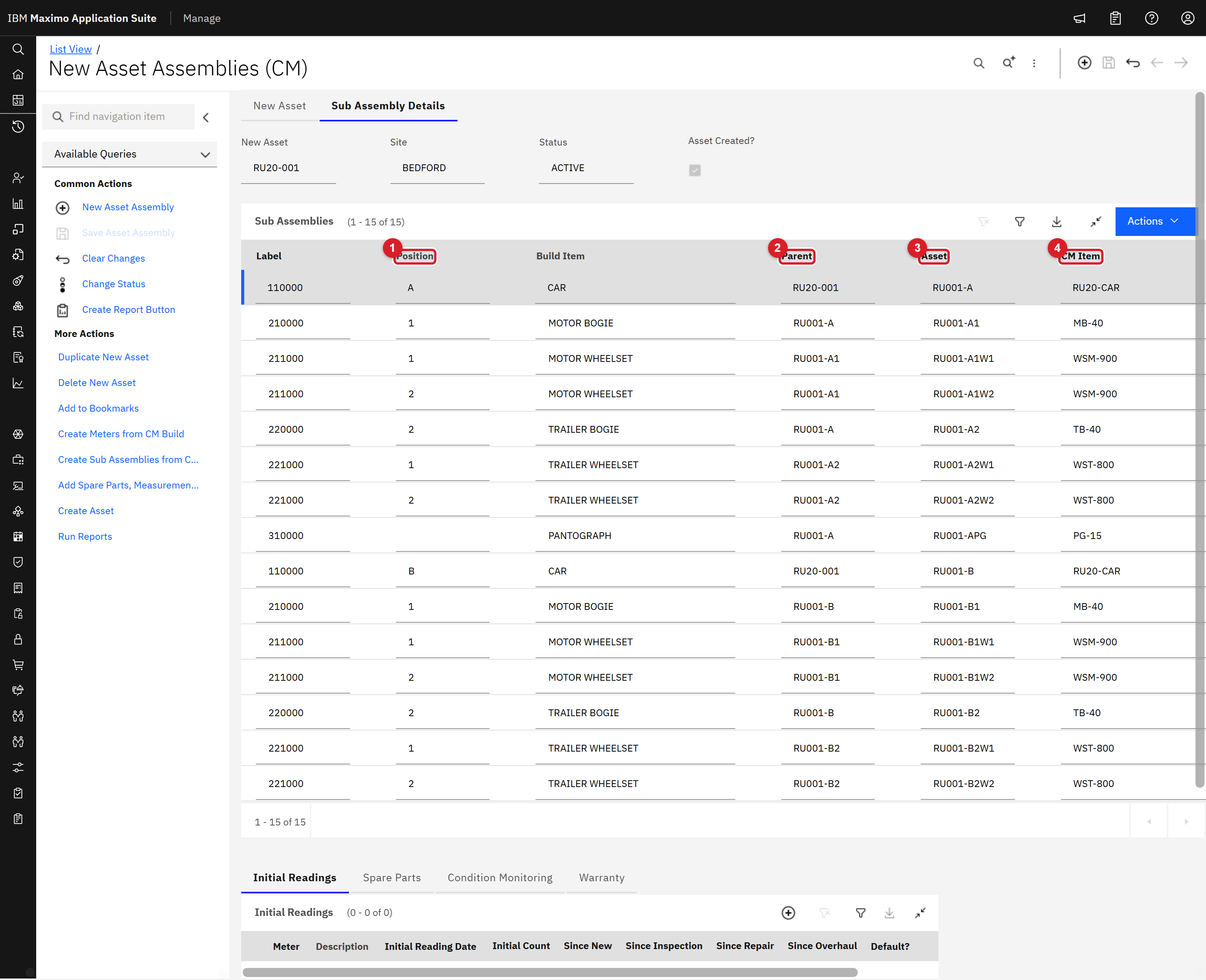
Figure 9. Sub Assembly Details, fifteen rows in tree order. (1) Position. (2) Parent: filled from the asset number of the row above it in the tree, which is why the unique numbers must go in first. (3) Asset. (4) CM Item, the build item's default part. Serial numbers are in the column to the right.
Traps met in this lab BMXAA4195E A value is required for the Asset field on the PLUSANEWSUB object: one row was left without an asset number; fill every row before saving. BMXAM0213E New Asset must be on ACTIVE status: Create Asset needs the assembly record ACTIVE, which is a separate status from the Asset Status of the unit. And the sub-assemblies only exist once saved: running Create Sub Assemblies and leaving the record discards them.
12Lab 7: the first verdict
Problem → benefit A tree of sixteen assets looks complete whether or not it is valid. The BDI gives the unit a verdict within seconds of its creation, and the same verdict appears on every row, so a depot sees at once which branch is wrong.
Create Asset put RU20-001 on the BDI queue; the BDI took 0.30 seconds to validate it. Open Assets (CM) → RU20-001 → View tab and expand the unit, car A and motor bogie 1:
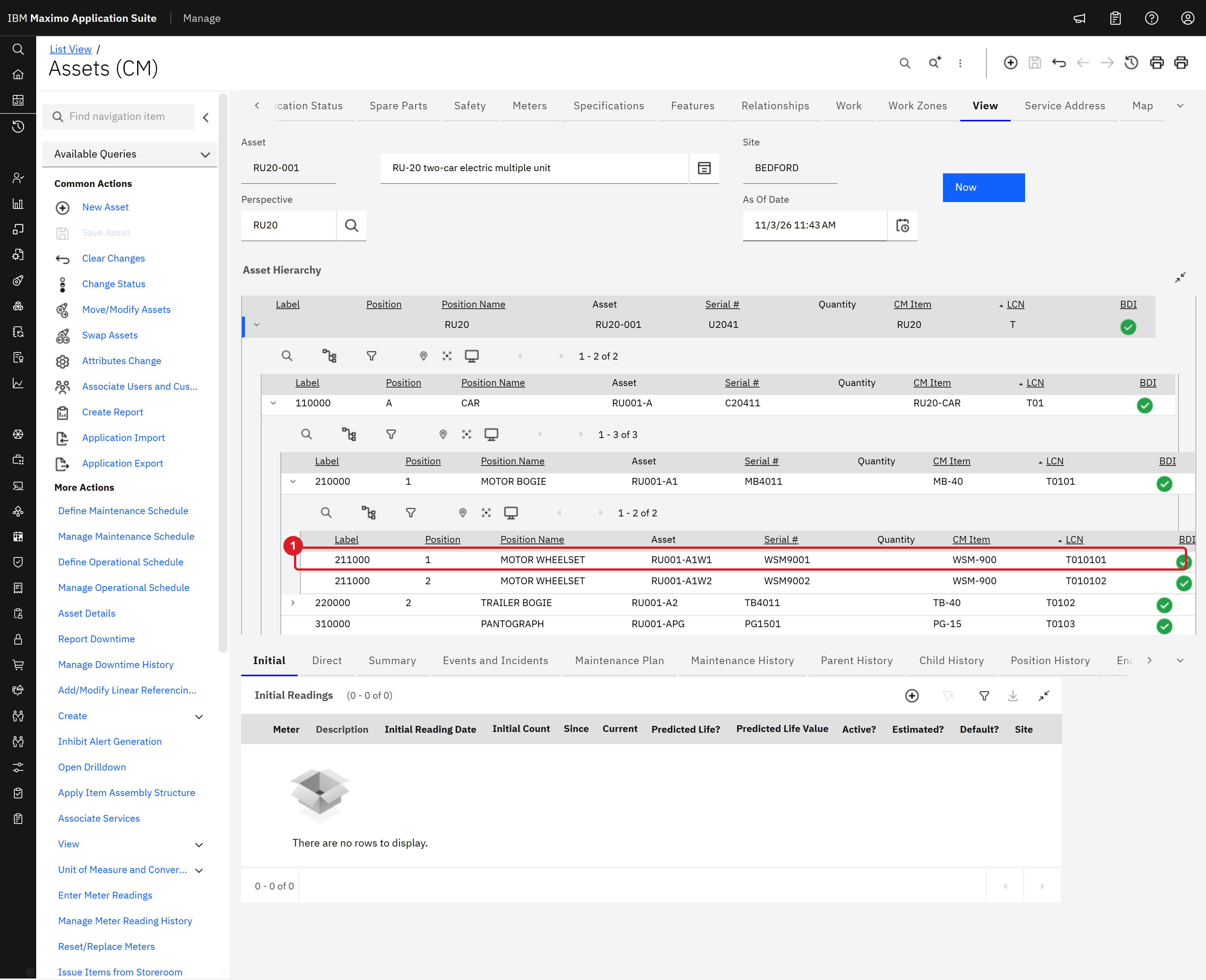
Figure 10. The View tab: one nested table per level, each with Label, Position, Position Name, Asset, Serial #, CM Item, LCN and BDI. (1) Wheelset RU001-A1W1, serial WSM9001, in T010101. Every BDI icon is green.
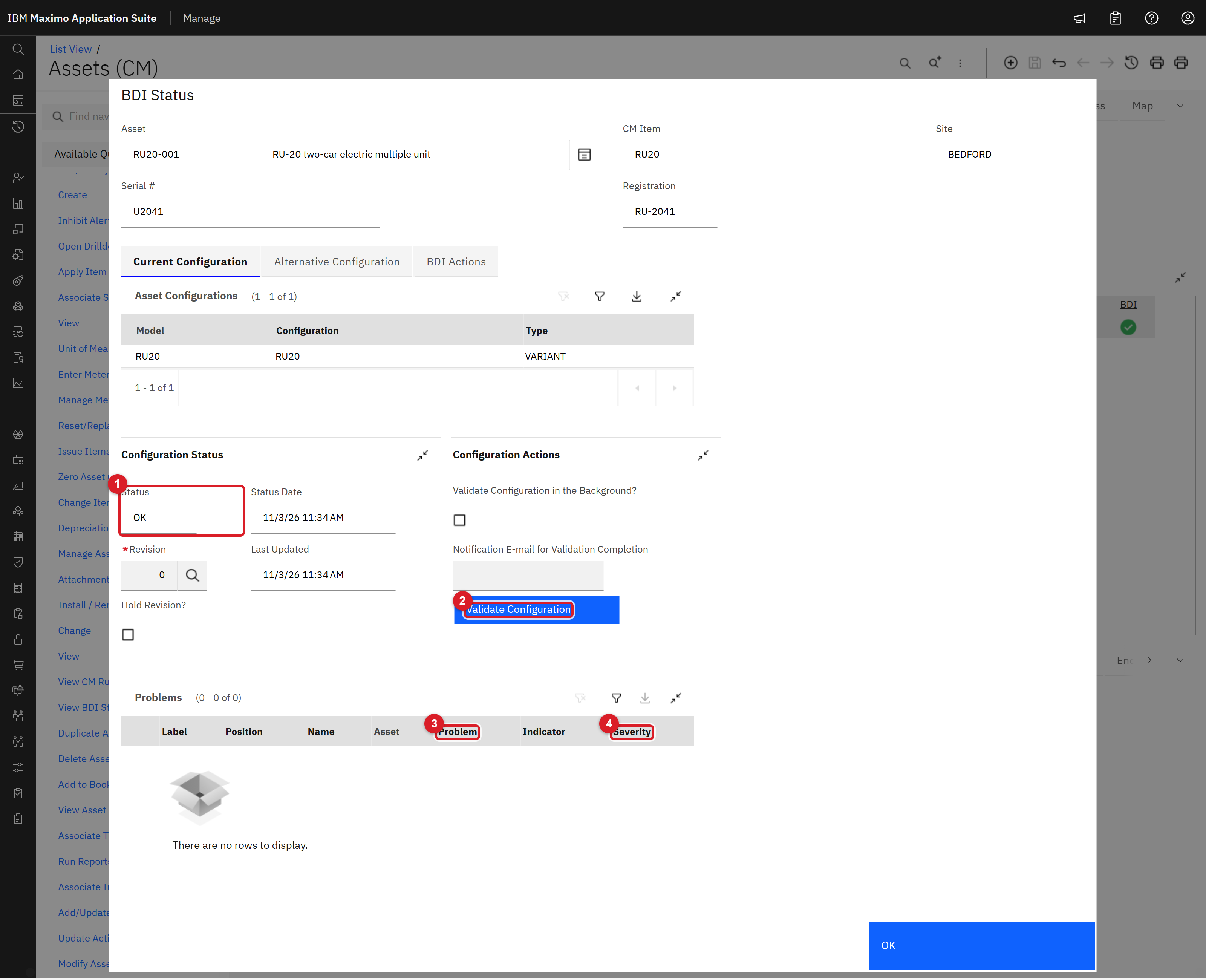
Figure 11. More Actions → View BDI Status. (1) Status OK for configuration RU20, revision 0. (2) Validate Configuration runs the BDI on demand. (3) Problem and (4) Severity: no rows.
13Lab 8: a wheelset goes for reprofiling
Problem → benefit Wheelset RU001-A1W1 has worn flanges and goes to the wheel lathe. The record must show when it left and must not let the unit look fit to run with an empty axle. Install / Remove does both.
- On the View tab, select RU001-A1W1.
- More Actions → Install / Remove → Install / Remove.
- Leave Installation Details empty. Remove Asset? is set because a component is fitted. Remove to Site BEDFORD. OK.
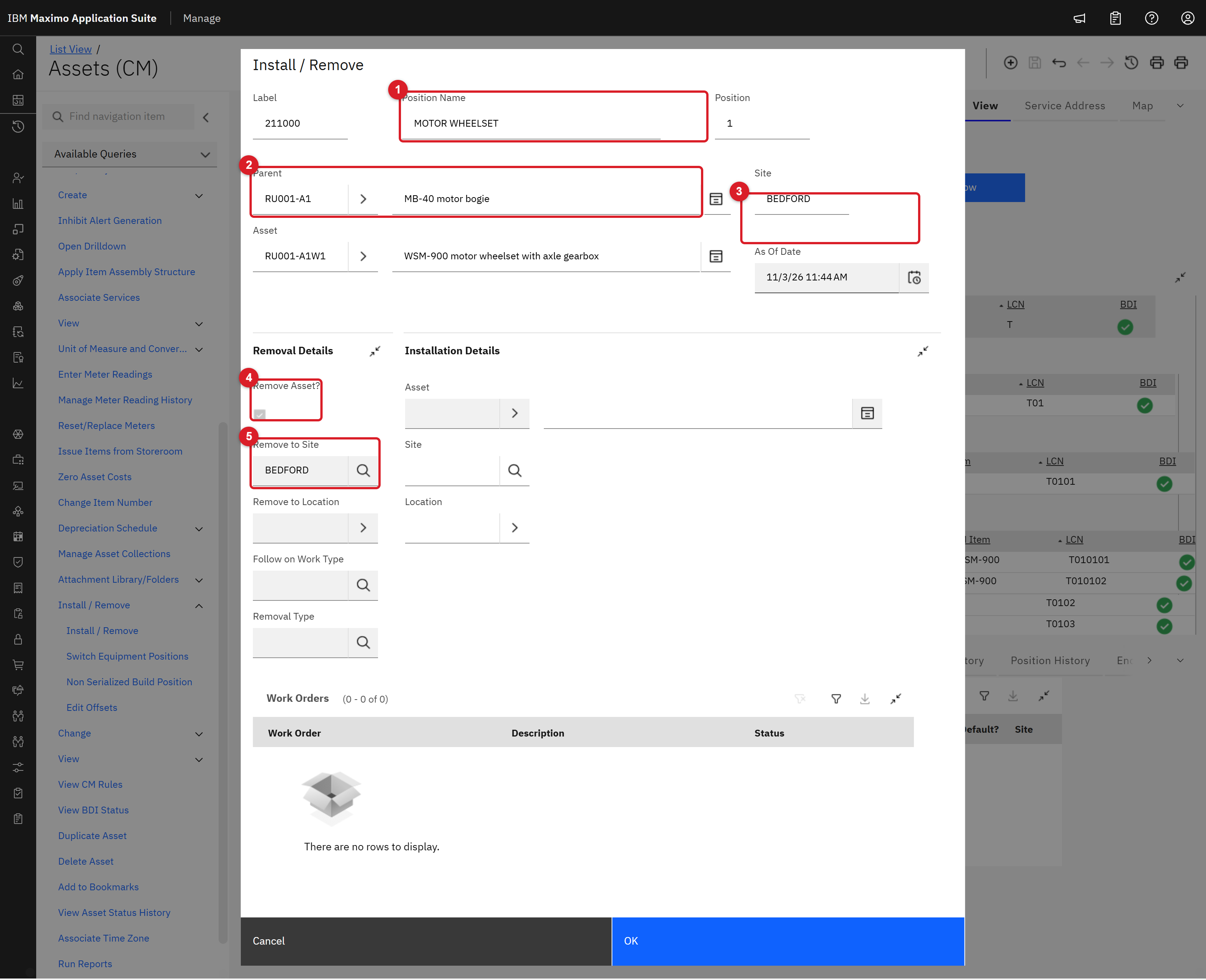
Figure 12. Install / Remove on T010101. (1) Position Name MOTOR WHEELSET, position 1. (2) Parent RU001-A1, the motor bogie, and the fitted asset RU001-A1W1 below it. (3) Site; the As Of Date under it can be back-dated to when the work was done. (4) Remove Asset?. (5) Remove to Site BEDFORD. Removal Type records why; the Work Orders table links the change to the depot work order.
BMXAA0067I Asset RU001-A1W1 in site BEDFORD was moved or modified successfully. The wheelset is now a top asset of its own in BEDFORD, ready for its shop work order. The BDI re-validated the unit in 0.10 seconds:
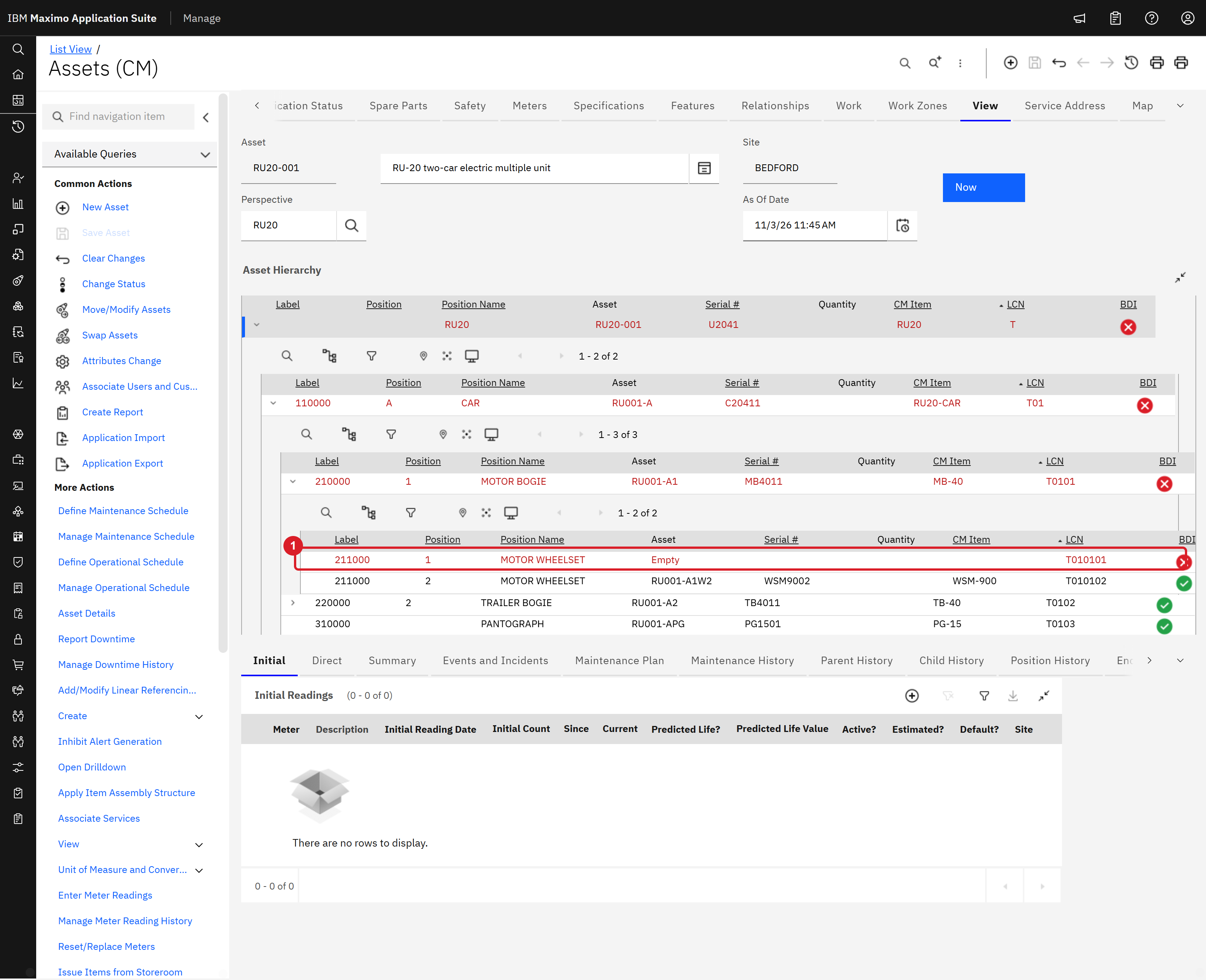
Figure 13. (1) T010101 shows Empty. The red status climbs the branch: the slot, motor bogie 1, car A and the unit are all red, while the trailer bogie and the pantograph stay green. A depot reads the problem's location straight from the tree.
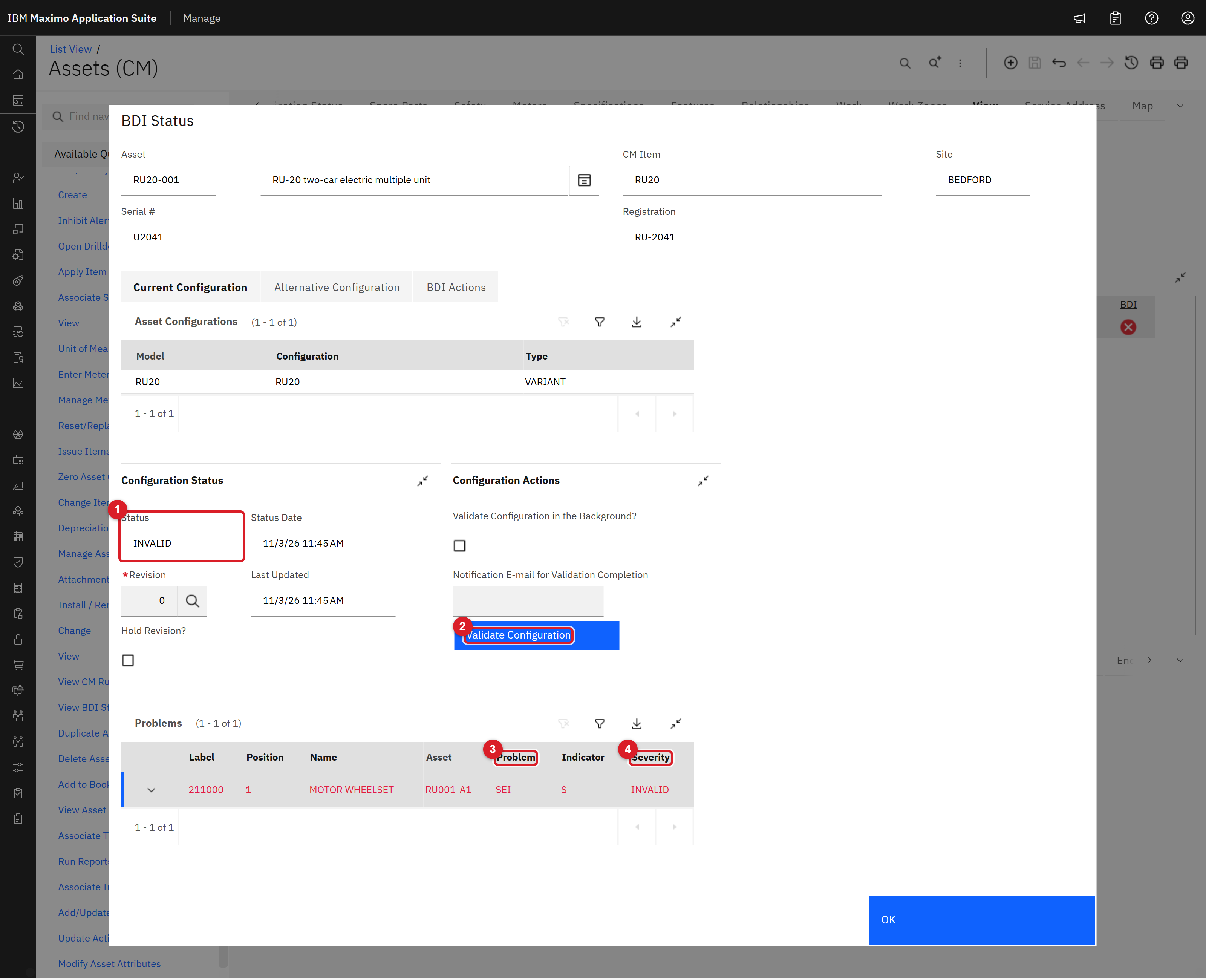
Figure 14. (1) Status INVALID. (3) Problem SEI, a mandatory position empty, on label 211000 position 1, MOTOR WHEELSET, under asset RU001-A1. (4) Severity INVALID.
14Lab 9: the wrong wheelset is refused
Problem → benefit The only wheelset on the shelf is a trailer wheelset. Under time pressure someone tries to fit it. ACM refuses it in the dialog, before anything is saved, so the wrong part never reaches the vehicle record.
- On the View tab, select the Empty row T010101, then More Actions → Install / Remove → Install / Remove.
- In Installation Details, type
SPR-WST8105 in Asset and press Tab.
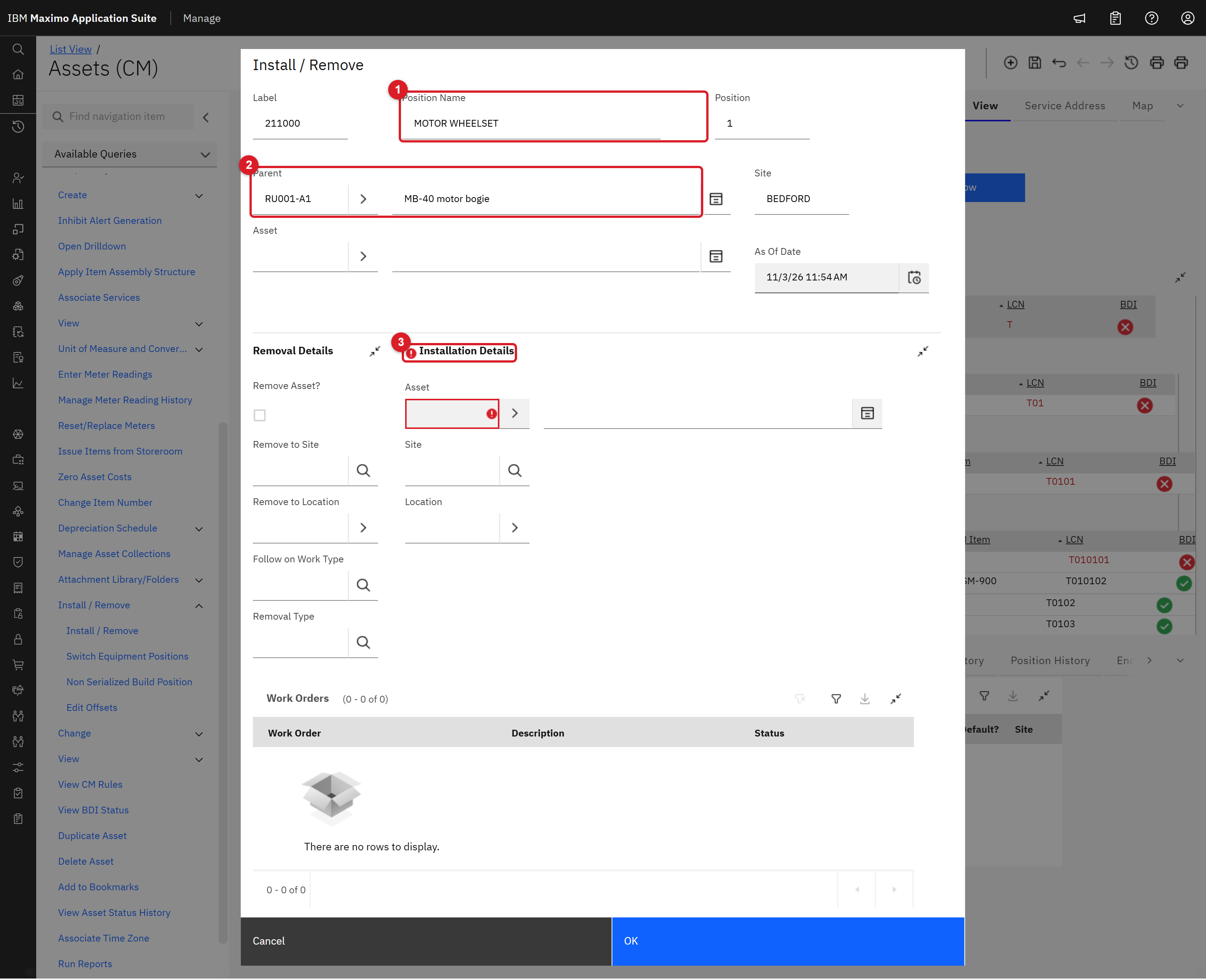
Figure 15. (1) The slot is MOTOR WHEELSET 1, (2) under motor bogie RU001-A1. (3) Installation Details: the Asset field cleared itself and carries an error mark. SPR-WST8105 is a WST-800, which is not an approved CM item of the MOTOR WHEELSET build item.
Open the Asset field's menu → Select Value to see what the slot accepts:
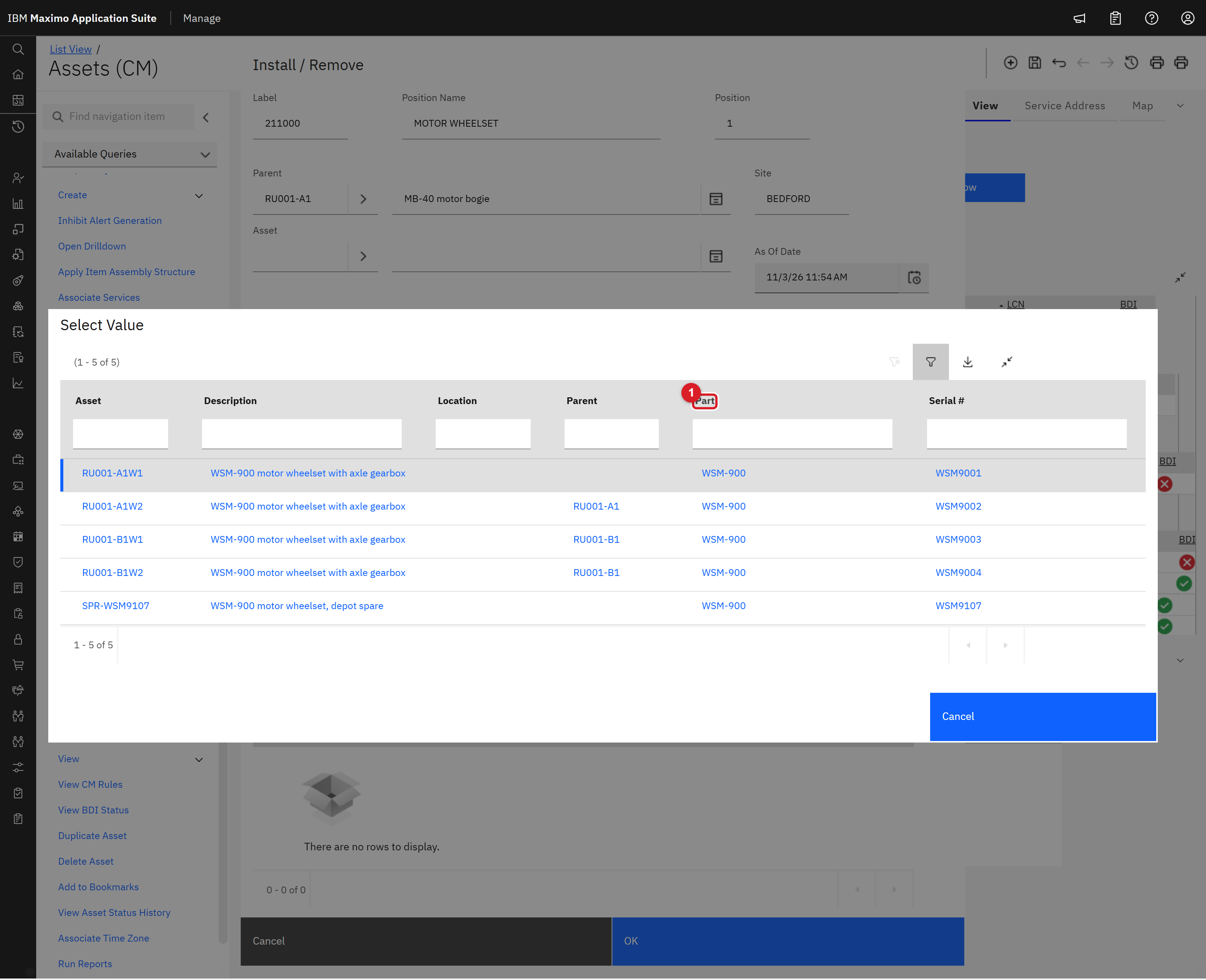
Figure 16. The lookup lists only assets of an approved part: (1) every row is a WSM-900. The trailer wheelset is not offered. Wheelsets already fitted elsewhere appear too, with their Parent filled, so check Parent before you pick one: choosing a fitted wheelset means taking it from another bogie.
What gate 1 does and does not do The dialog checks the part against the slot's build item. It does not check whether the rest of the unit is complete, and it cannot stop a slot from being left empty. That is gate 2, the BDI, as Lab 8 showed. Use both: approved-part lists keep wrong parts out, mandatory positions and the BDI keep incomplete units from looking serviceable.
15Lab 10: fit the approved spare
Problem → benefit The approved spare goes in, the unit returns to OK, and the exchange is on record with its date. The reprofiled wheelset can return to the pool and be fitted to any motor bogie later.
- In the same dialog, type
SPR-WSM9107 in Installation Details → Asset. It is accepted.
- OK: BMXAA0067I Asset SPR-WSM9107 in site BEDFORD was moved or modified successfully.
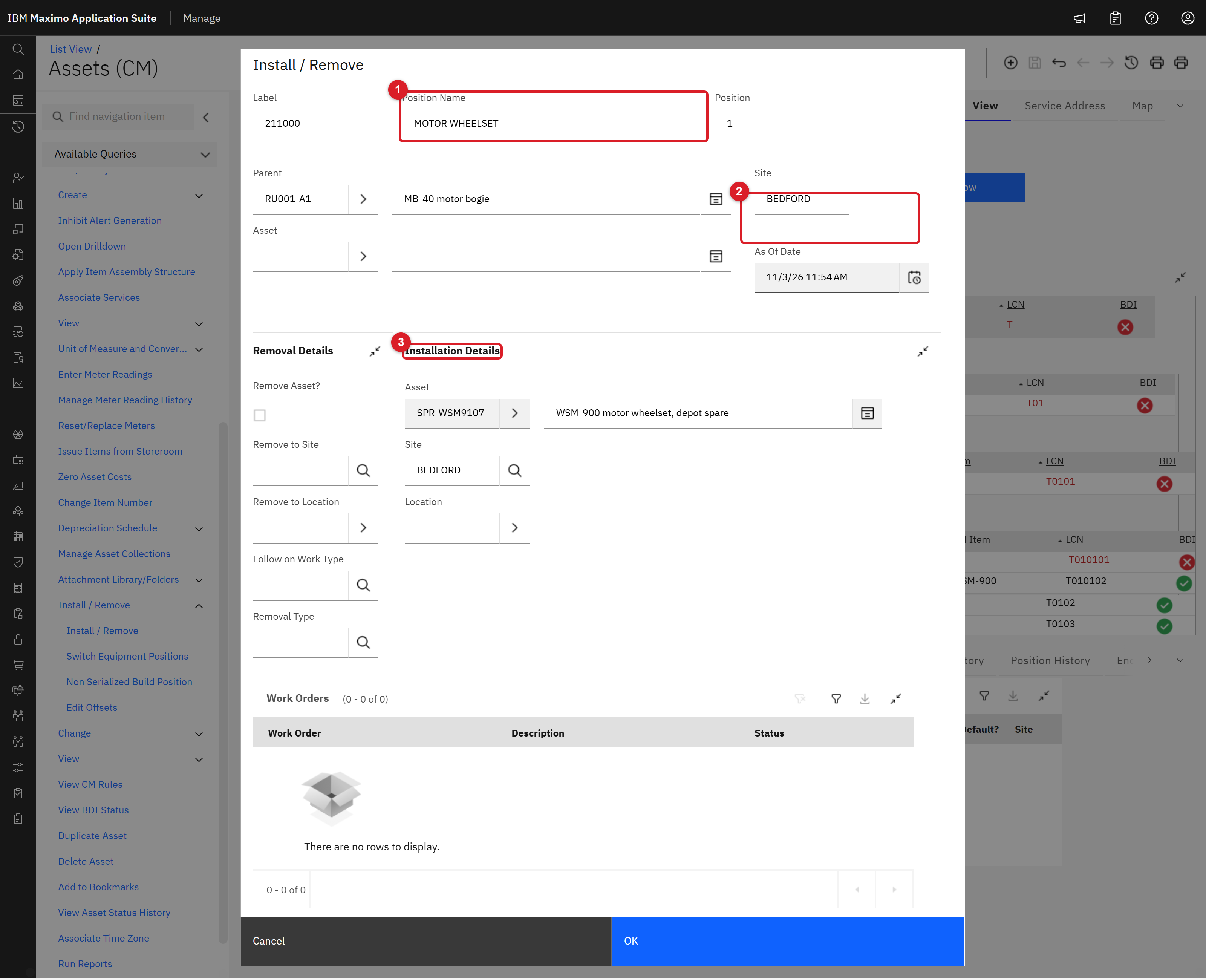
Figure 17. (1) MOTOR WHEELSET 1. (2) Site BEDFORD; As Of Date below it. (3) Installation Details: Asset SPR-WSM9107, WSM-900 motor wheelset, depot spare, accepted.
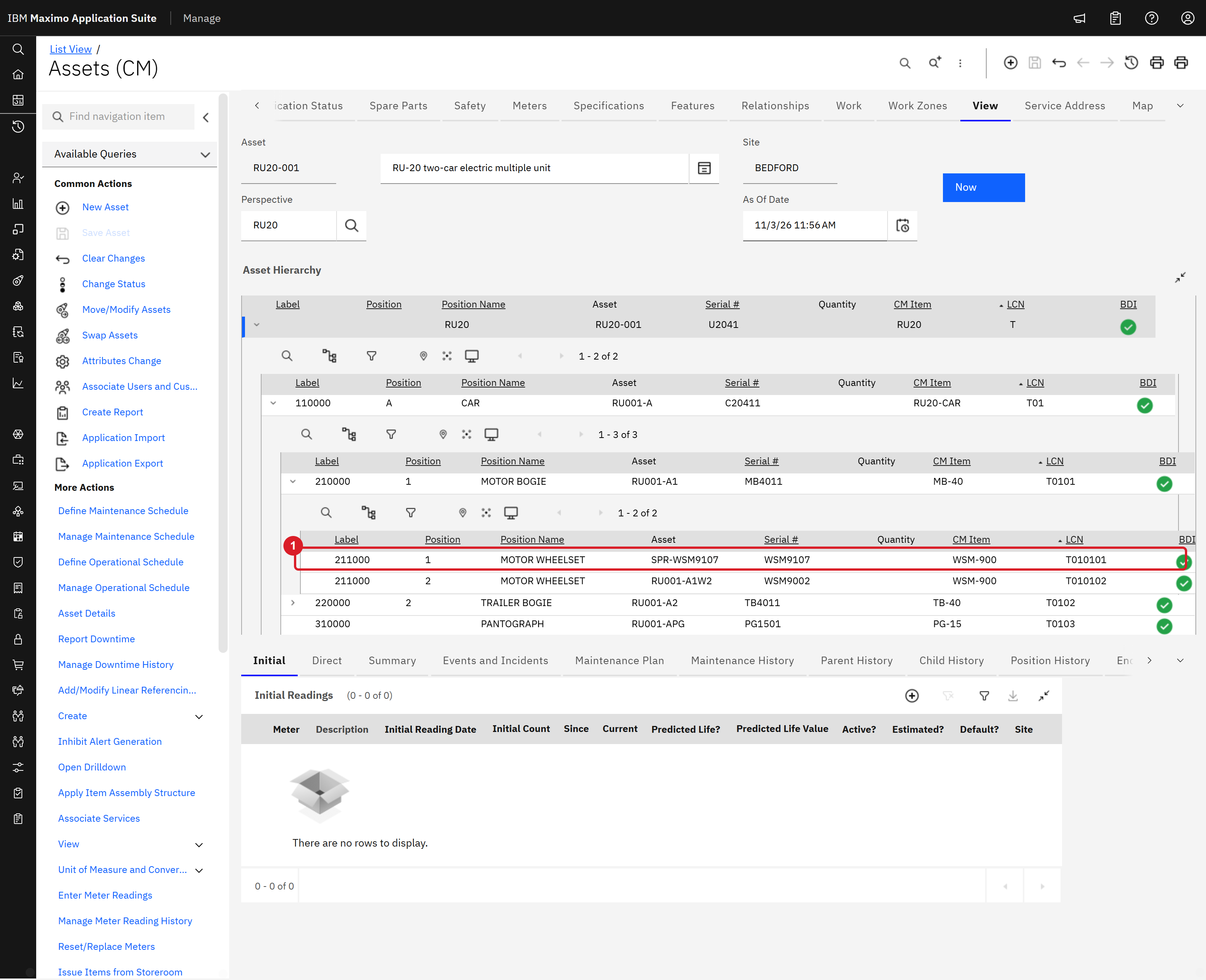
Figure 18. (1) T010101 now holds SPR-WSM9107, serial WSM9107, CM item WSM-900. Every icon along the branch is green again.
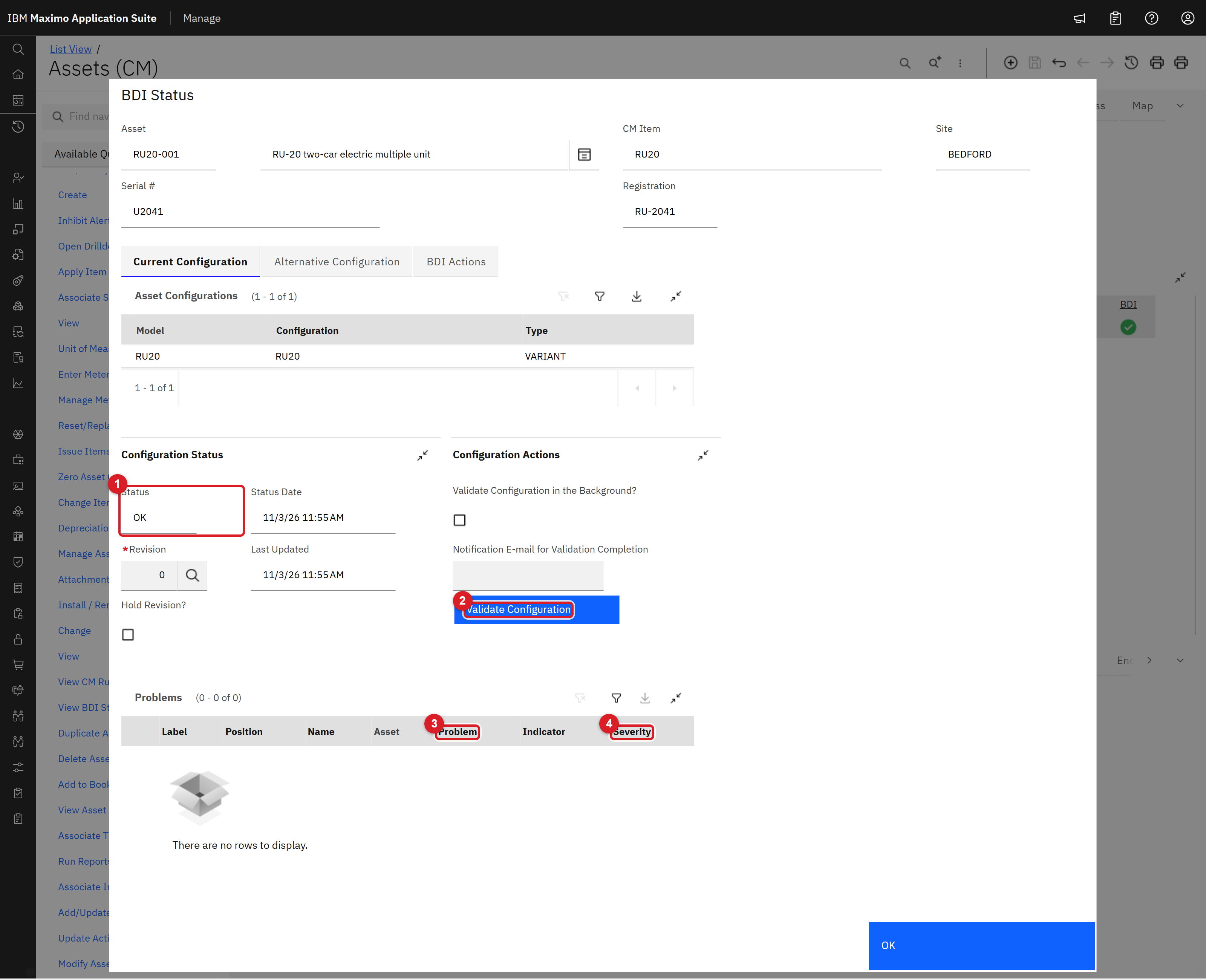
Figure 19. BDI Status after the exchange: (1) OK, no problems. The validation took 0.09 seconds.
Trap: the spare keeps its own status SPR-WSM9107 was created in Assets (CM) and still has status NOT READY after the installation. ACM does not change an asset's status when it is fitted. Set it to OPERATING with Change Status as part of the depot procedure, or create spares through New Asset Assemblies with the right Asset Status.
16Lab 11: history and the validation queue
Problem → benefit An audit asks which wheelsets ran on motor bogie RU001-A1 and when. The answer is one tab, not a search through work orders.
Open Assets (CM) → RU001-A1 → View tab → Child History:
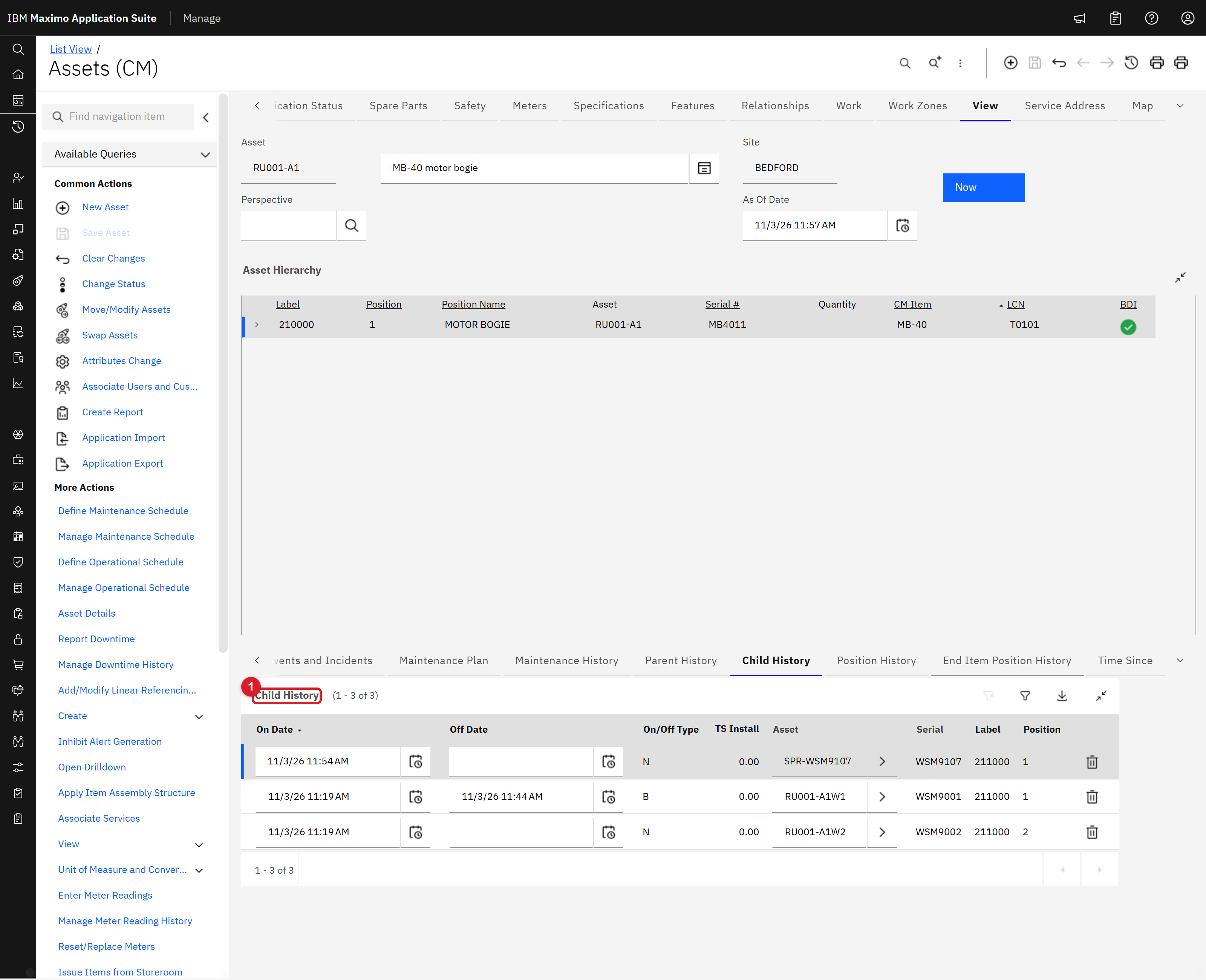
Figure 20. (1) Child History of motor bogie RU001-A1: RU001-A1W1 (WSM9001) on at 11:19 and off at 11:44 in 211000 position 1, SPR-WSM9107 (WSM9107) on at 11:54 in the same position, RU001-A1W2 (WSM9002) on since 11:19 in position 2. Each row has its On/Off Type and the asset's TS Install value.
BDI Queue Status (CM) lists every validation request, its status, timings and the BDI instance that ran it:
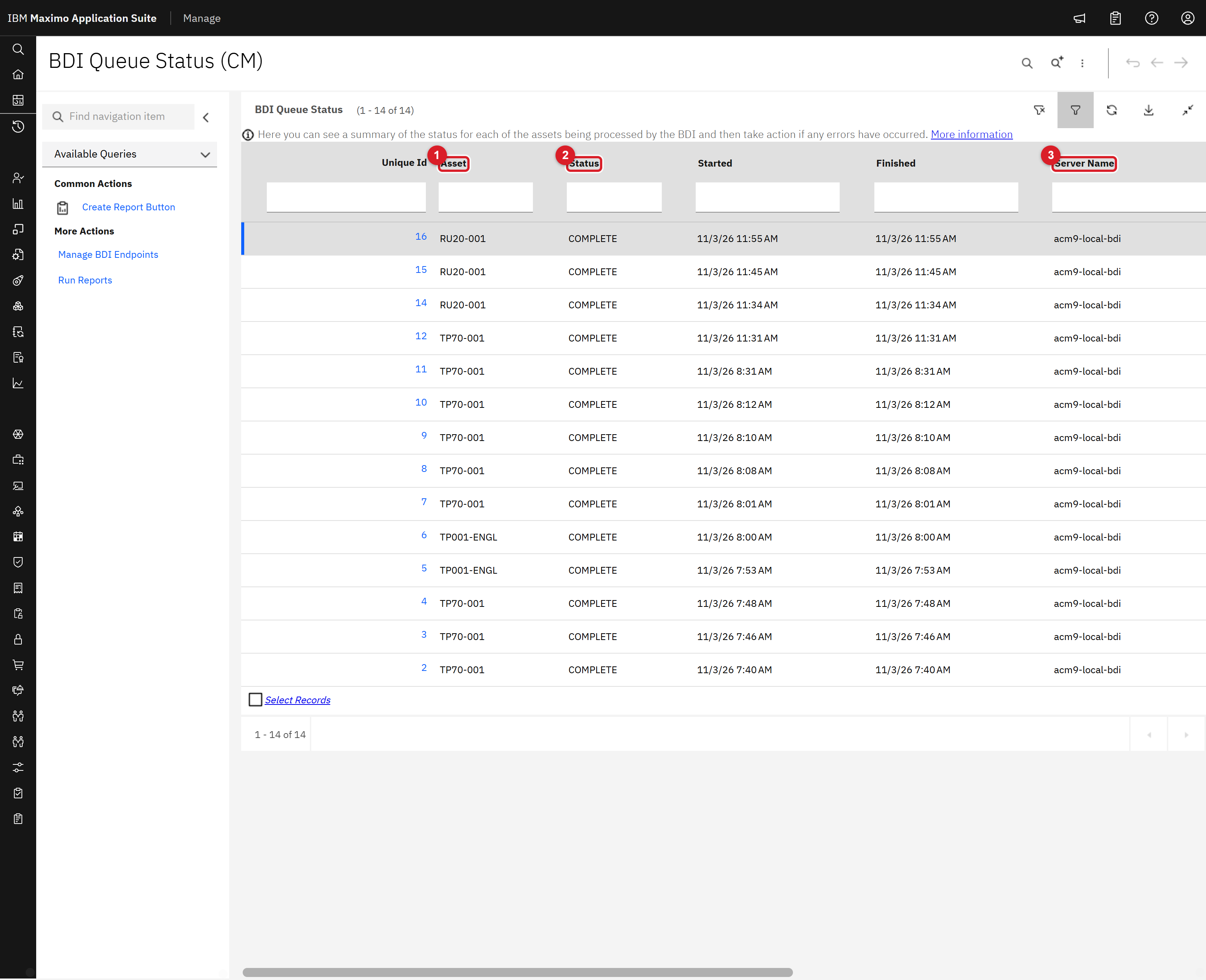
Figure 21. (1) Asset: RU20-001 was validated three times, at creation, after the removal and after the installation. (2) Status COMPLETE. (3) Server Name of the BDI instance. Older rows belong to another model on the same system.
Try it On RU20-001's View tab, set As Of Date to a moment between 11:44 and 11:54 and expand car A: T010101 shows Empty, as it was on that date. The tree is a dated record, not only today's state.
17Designing ACM for a real fleet
The lab keeps everything in one model to stay readable. These are the choices to make for a production fleet, with the option I would recommend first.
Make exchangeable assemblies installable models
Bogies are exchanged as complete units with their wheelsets. Model a bogie as its own installable model (MB40 with two wheelset positions) and fit it into the unit's bogie position, instead of repeating bogie and wheelset positions in every unit model. A spare bogie built with New Asset Assemblies then carries its own child slots, and a bogie exchange is one Install / Remove. The same applies to traction motors, gearboxes and pantographs if they are pooled.
Plan the LCN structure and position codes once
Fix the depth (unit, car, bogie, wheelset, and any lower level such as axle boxes) and give the LCN structure enough digits from the start. Use the position codes depot staff already use: car letters or numbers, bogie and axle numbers counted from a fixed end of the vehicle. A position code that differs from the label painted on the bogie causes wrong removals.
Approved parts per build item, alternates as additional CM items
Keep motor and trailer components as different build items. When engineering approves an alternate (a new wheelset drawing, a different gearbox supplier), add it as another CM item on the build item, through a new configuration revision when the change needs approval, rather than editing assets.
Track wheel life with meters
Wheelset maintenance is driven by distance and by measured wear: flange height and thickness, rim thickness, wheel diameter. Put a distance meter and wear measurement points on the wheelset CM item and model, so readings follow the wheelset from vehicle to vehicle, and drive reprofiling and the final scrap decision from them.
Link every exchange to a work order
Raise wheelset exchanges from a depot work order and link it in the Install / Remove dialog's Work Orders table. The child history then explains every on and off with the job that caused it.
The rule of thumb Put in ACM what must be controlled and validated (structure, approved parts, mandatory slots, serial numbers) and keep in ordinary Manage what only needs recording (non-serialized consumables, fixings). A model that tries to configuration-control every bolt is never kept up to date.
18Messages you will meet
| Message |
Where |
Meaning and fix |
| BMXAM0226I New asset sub assemblies and their meters created successfully |
New Asset Assemblies |
Rows created from the build. Fill assets and serials, then Save, or they are lost. |
| BMXAA4195E A value is required for the Asset field on the PLUSANEWSUB object |
New Asset Assemblies, Save |
A sub-assembly row has no asset number. Fill every row. |
| BMXAM0213E New Asset must be on ACTIVE status |
Create Asset |
Change Status of the assembly record to ACTIVE first. |
| BMXAM1460E The Model RU20 does not have a valid active Revision |
Create Asset |
Revision still draft, or its Active Date is in the future in server time. |
| BMXAM0224I Asset created successfully |
Create Asset |
The unit and its children exist; the BDI queue gets a request. |
| BMXAA0067I Asset … was moved or modified successfully |
Install / Remove |
The change is saved and dated; the top asset is queued for the BDI. |
| Asset field cleared, error mark |
Install / Remove, Installation Details |
The asset's CM item is not approved for the slot's build item. |
| BDI problem SEI, severity INVALID |
View BDI Status |
A mandatory position is empty. |
19Exercises
- Remove RU001-B2W1 (a trailer wheelset) and check which rows turn red, and which problem the BDI reports.
- Try to fit SPR-WSM9107 (a motor wheelset) into a trailer wheelset slot. Which assets does the lookup offer?
- Make T0103 PANTOGRAPH optional for configuration RU20, remove RU001-APG and compare the verdict with Lab 8.
- Create a second unit, RU20-002, with New Asset Assemblies. Exchange a wheelset between the two units and read both bogies' Child History.
- Add a fifth level to a copy of the model (an axle box under each wheelset). What LCN structure does it need?
20Glossary
| ACM |
Maximo Asset Configuration Manager, a Maximo Manage add-on for configuration management of complex serialized assets. |
| Unit, car, bogie, wheelset |
A multiple unit is a fixed set of cars; each car rides on bogies (trucks); each bogie carries wheelsets, an axle with two wheels pressed on. |
| Motor / trailer |
A motor bogie has traction motors and its wheelsets carry the axle gearbox; a trailer bogie is unpowered. |
| Reprofiling |
Turning worn wheels on a wheel lathe to restore the tread and flange profile. |
| CM item |
A controlled part number in the CM Item Master, with its own serial and life rules. |
| Model |
The definition of an allowed vehicle type: build items, labels, position tree, rules, configurations and revisions. |
| Build item |
A kind of component in a model, with its label and its list of approved CM items. |
| Label system |
The coding scheme for build items: ATA for aircraft, RAIL or UIN for other fleets. |
| Build position, LCN |
A slot on the model, keyed by a Logistics Control Number built level by level from the LCN structure. |
| Configuration, revision |
The approved baseline of a model. Assets can only be built from an active configuration with an active, non-draft revision. |
| New Asset Assemblies |
The application that creates a real asset tree, with serial numbers, from a model. |
| Install / Remove |
The only way to move a configuration-managed component; every action is dated. |
| BDI |
Build Data Interpreter, the rules engine that validates a top asset after each change and writes its status. |
| BDI status |
OK (valid), ALERT (acceptable, with non-critical problems), INVALID (must be corrected). |
| SEI |
BDI problem code: a mandatory position is empty. |
21Appendix: lab records and queries
Records the lab created (site BEDFORD, item set SET1): CM items RU20, RU20-CAR, MB-40, TB-40, WSM-900, WST-800, PG-15; model RU20 (RAIL, LCN structure 1222, top LCN T) with configuration RU20 (ACTIVE) and revision 0; new asset assembly RU20-001; assets RU20-001, RU001-A, RU001-A1, RU001-A1W1, RU001-A1W2, RU001-A2, RU001-A2W1, RU001-A2W2, RU001-APG, RU001-B, RU001-B1, RU001-B1W1, RU001-B1W2, RU001-B2, RU001-B2W1, RU001-B2W2; spares SPR-WSM9107, SPR-WST8105.
Read-only queries used to confirm each step from the database side:
SQL
-- the position tree of the model (Lab 4)
select b.lcn, i.name as builditem, b.position
from plusacmbuild b join plusacmbuilditem i on i.plusacmbuilditemid = b.builditemid
join plusacmmodel m on m.plusacmmodelid = b.modelid
where m.model = 'RU20' order by b.lcn;

-- labels and approved parts per build item (Lab 3)
select i.name, l.labelsystem, l.label, c.part
from plusacmbuilditem i join plusacmmodel m on m.plusacmmodelid = i.modelid
left join plusacmlabel l on l.builditemid = i.plusacmbuilditemid
left join plusacmxcat x on x.builditemid = i.plusacmbuilditemid
left join plusacacat c on c.plusacacatid = x.catid
where m.model = 'RU20';

-- the real unit (Lab 6, Lab 10)
select assetnum, parent, serialnum, status from asset where assetnum like 'RU%' order by assetnum;

-- BDI validations of the unit (Lab 7 to Lab 11)
select assetnum, status, createddate, enddate, timetaken, servername
from plusaantran where topassetnum = 'RU20-001' order by plusaantranid;