IBM Maximo Real Estate and Facilities · Maintenance · A guide for Maximo people
If you come from Maximo Manage, maintenance in Maximo Real Estate and Facilities (MREF, the former TRIRIGA) will feel familiar and slightly renamed. A work order is a work task. A PM is a job plan with PM schedules. A job plan's task list is a procedure. This guide follows one real fault from the employee who reports it, through the supervisor who assigns it, to the technician who fixes it. Then it opens the planned side: the job plan that generates the routine work. Every screen is from that person's own sign-in.
Watch first: one cold room and three people, in under six minutes, on the same records as the guide.
What you will learn
- The maintenance objects and how they chain: request, work task, job plan, PM schedule, procedure.
- Pat Problem, employee: reporting a cold room in four fields.
- Sam Supervisor: finding the new task in Work Planner and assigning it by capacity.
- Ben Working, technician: the Work Task app: timer, comment, complete.
- The planned side: a job plan for 12 air handling units, its schedules, its 168 tasks, and a procedure with costs.
- Four things that are different from Maximo.
Reading time: about 15 minutes. System: MREF on Maximo Application Suite 9.2, sample data.
Contents
- The chain of objects
- Pat Problem reports a cold room
- Sam Supervisor assigns it
- The work task behind the card
- Ben Working fixes it
- The planned side: a job plan
- A preventive task and its procedure
- Four differences from Maximo
- Check yourself
In Maximo terms · the translation table
| You know (Maximo Manage) |
In MREF |
| Service request |
Request, raised from Request Central |
| Work order |
Work task |
| Work type PM / CM |
Task type Preventive / Corrective |
| Preventive Maintenance (PM) record |
Job plan with one or more PM schedules |
| PM frequency, meter-based PM |
PM schedule of type Schedule-Based or Reading-Based |
| Job plan (tasks, labour, materials) |
Procedure with procedure steps, materials, equipment, qualifications |
| Assignment Manager, Graphical Assignment |
Work Planner |
| Maximo Mobile (Technician) |
The Work Task app |
| Person group, crew |
Workgroup, as responsible organisation and service provider |
Agenda: click a section to jump to it
1. The chain of objects
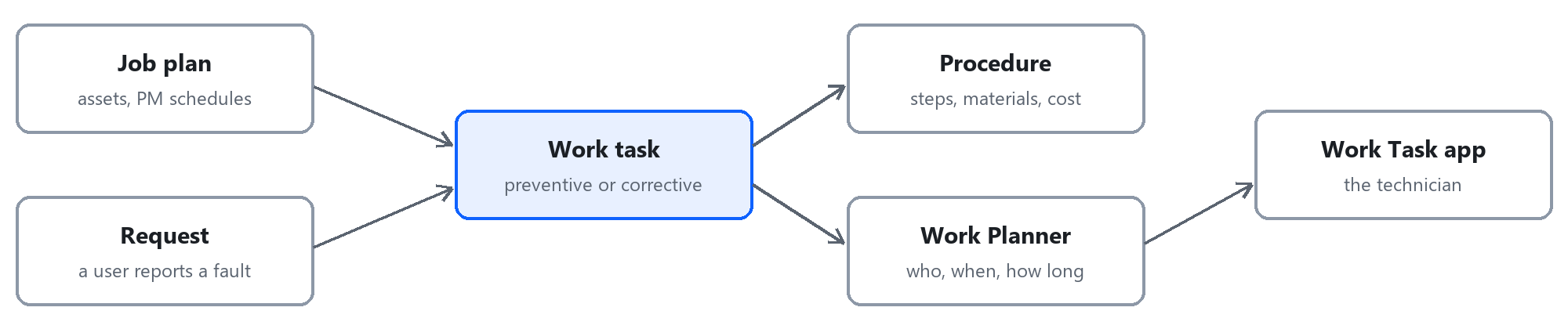
Work reaches a technician by two roads. Unplanned: somebody raises a request, and the request creates a corrective work task. Planned: a job plan's PM schedule generates preventive work tasks ahead of time. Either way the result is the same object, a work task. Sections 2 to 5 follow the first road with one real fault; sections 6 and 7 open the second.
↑ Back to the agenda
2. Pat Problem reports a cold room
Pat is an ordinary employee. Her home page has no maintenance menu at all, only Request Central and the list of her own requests.
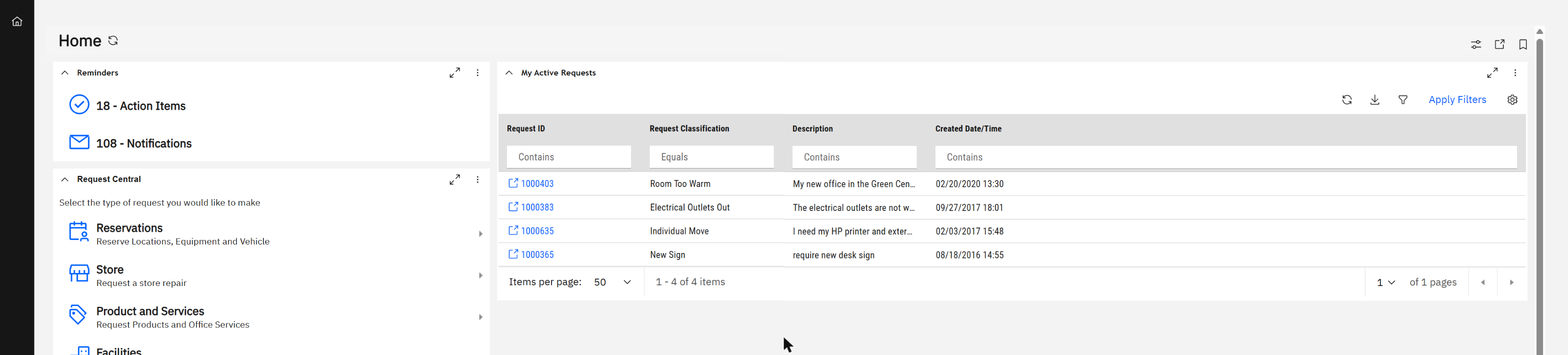
The self-service home page: Request Central on the left, My Active Requests on the right.
Under Facilities she picks the kind of problem.
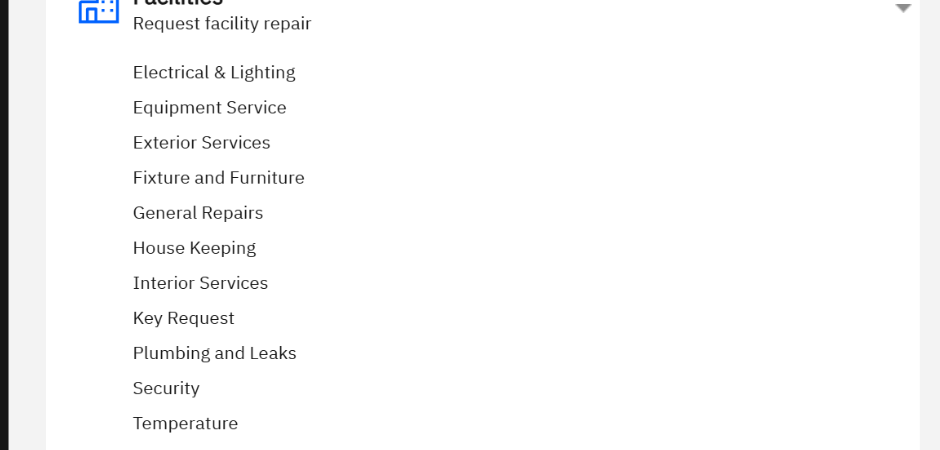
Facilities request types, from Electrical & Lighting to Temperature.
Temperature opens a short form. The building, floor, room and organisation are already filled in from her profile.
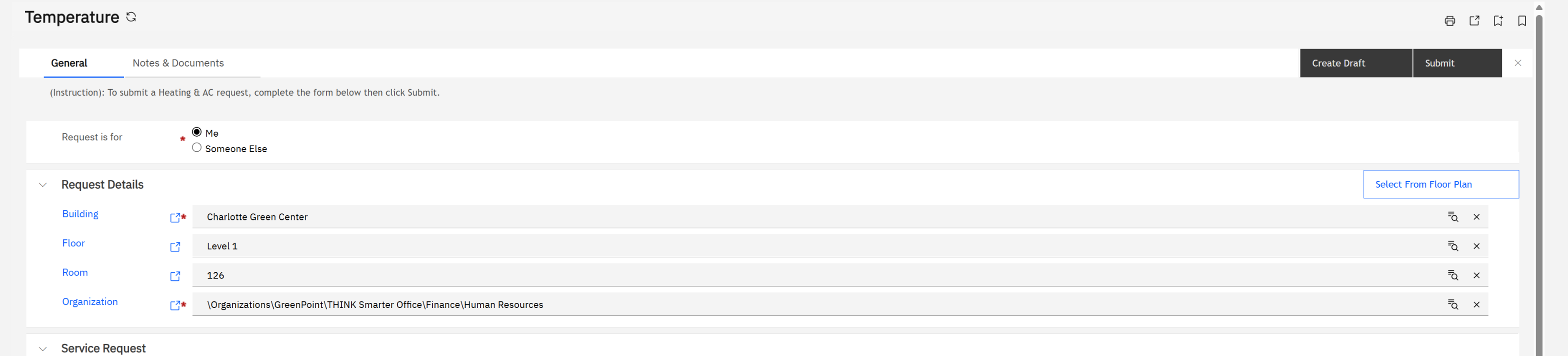
The request form: for me or for someone else, where (Charlotte Green Center, Level 1, room 126), and a button to pick the room from a floor plan instead.
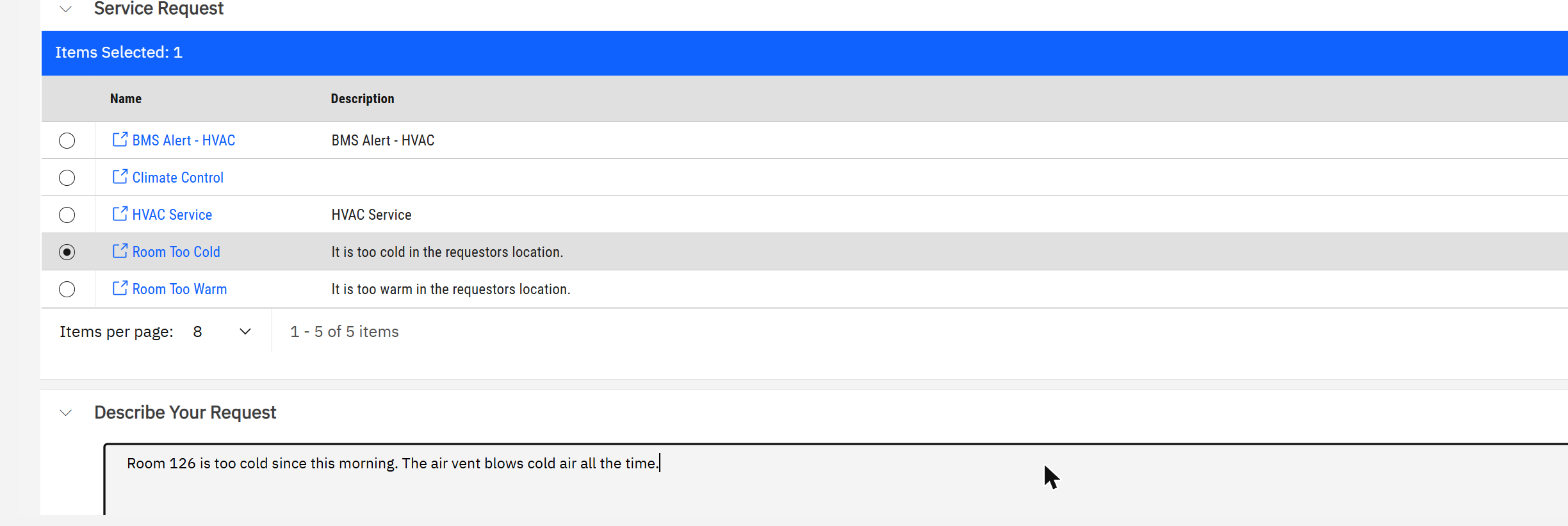
She chooses "Room Too Cold", writes one sentence, and presses Submit.
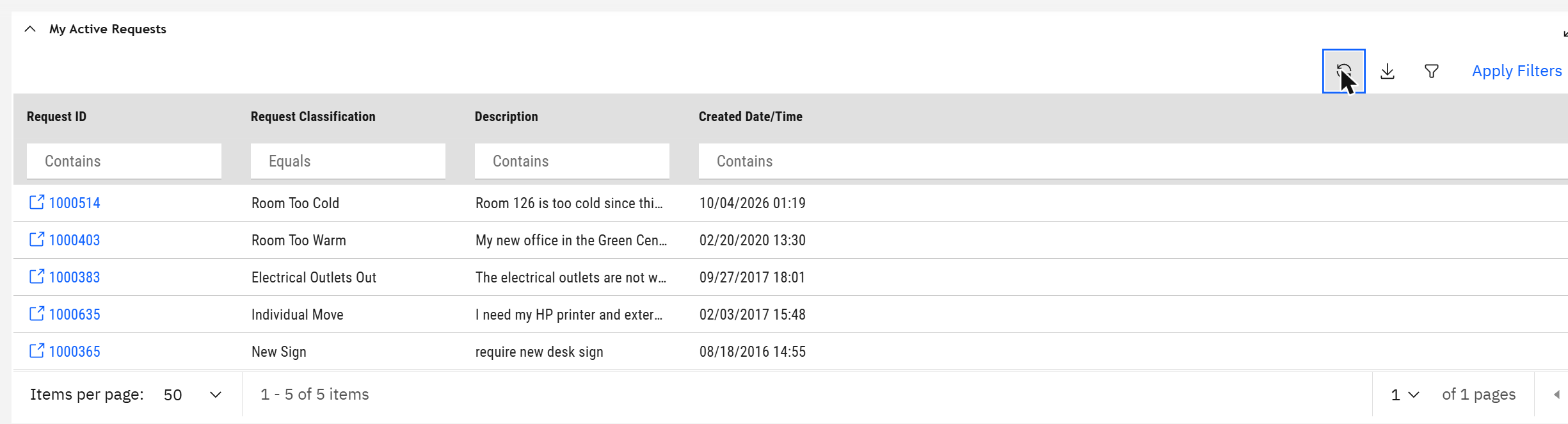
Request 1000514 now heads her list.
What the requester never sees: priority, workgroup, task type, cost. The choice "Room Too Cold" carries all of that. Designing those request types well is the real configuration work of a help desk.
↑ Back to the agenda
3. Sam Supervisor assigns it
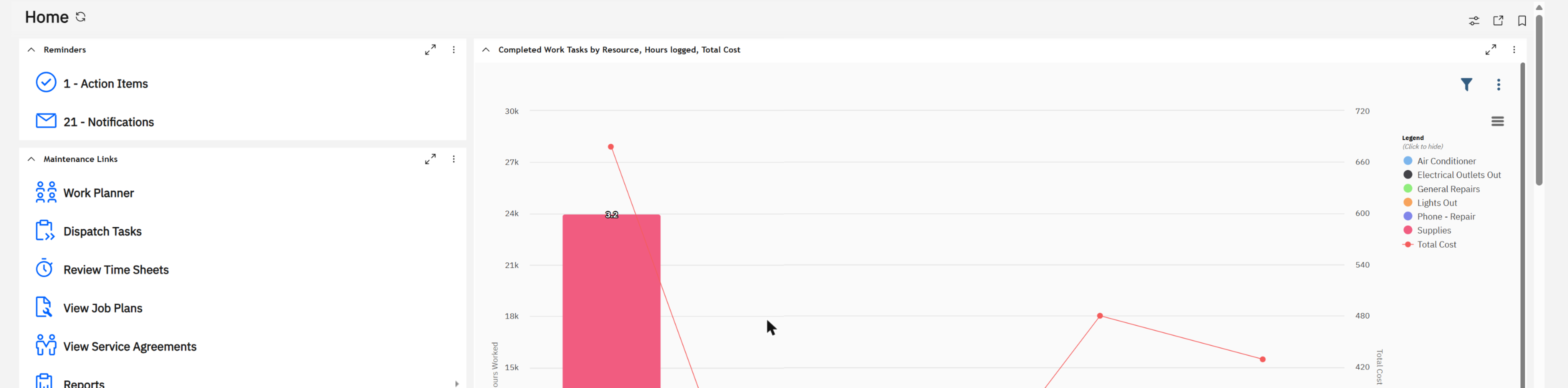
The supervisor's home page: Work Planner, Dispatch Tasks, Review Time Sheets, View Job Plans, View Service Agreements, and a chart of completed work by technician.
In Work Planner, under the workgroup Maintenance Services, a new card is waiting. Nobody created it by hand: it came from Pat's request, already marked Corrective, High priority, with her sentence and her room.
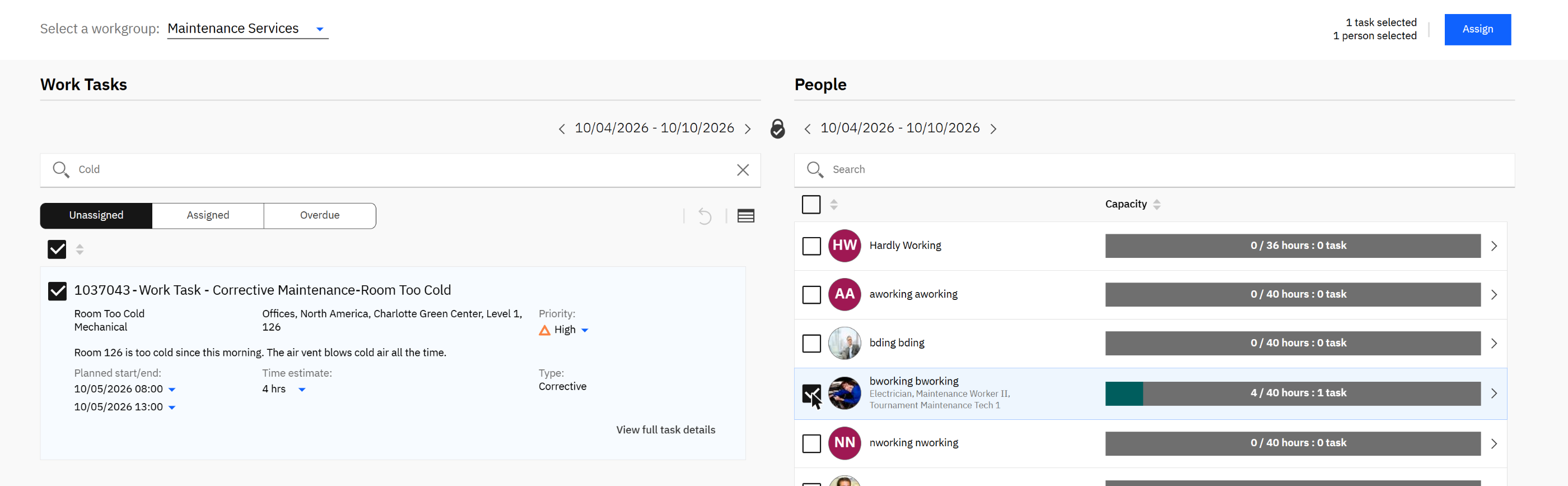
Left: task 1037043, unassigned, planned for tomorrow morning, 4 hours. Right: the people of the workgroup with hours assigned against capacity. Task and technician are ticked; Assign is live.
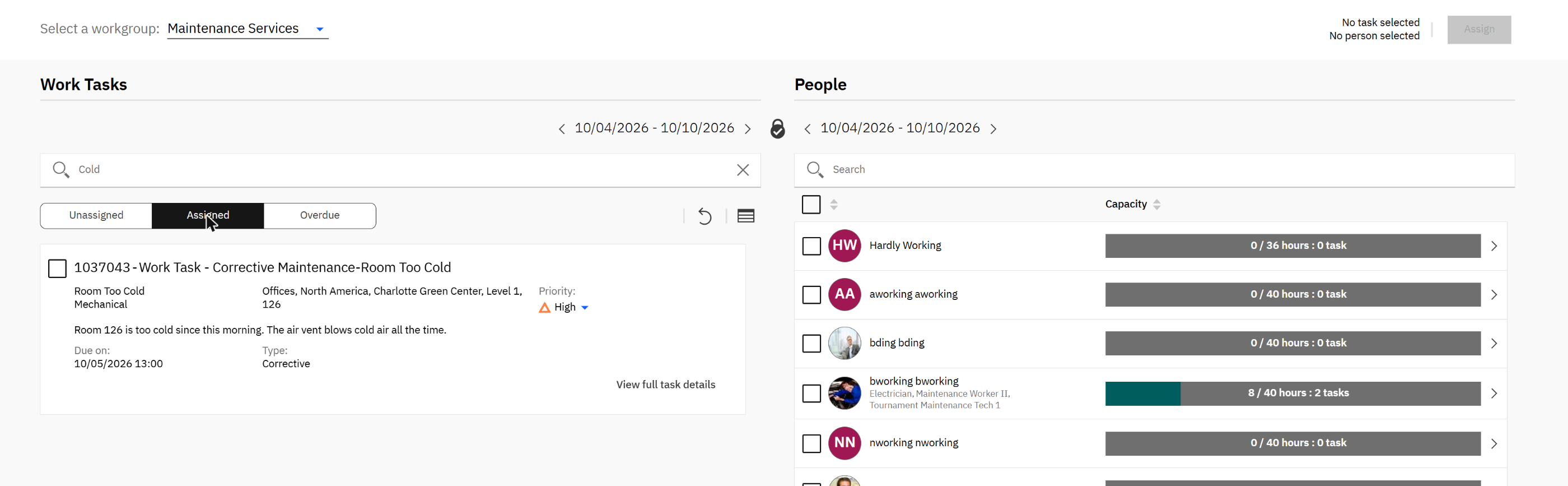
After Assign: the task sits under Assigned, and Ben Working's bar has moved from 4 to 8 of 40 hours, 2 tasks.
Capacity is the point. The right-hand column is hours assigned out of hours available for the week. A planner who watches that bar does not need a separate workload report.
↑ Back to the agenda
4. The work task behind the card
"View full task details" opens the complete record.
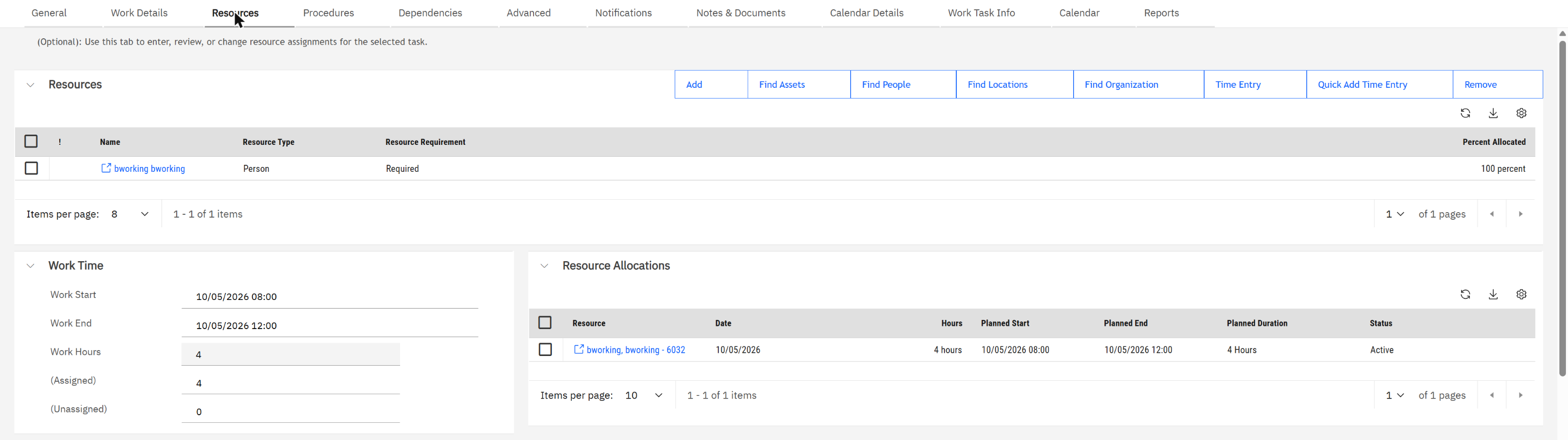
Resources: Ben Working at 100 percent, allocated 4 hours on 5 October. This row was written by the Assign button in Work Planner.
The planner and the form are two views of one record. Nothing is typed twice.
Here is the same record's General tab, taken after the work was done:
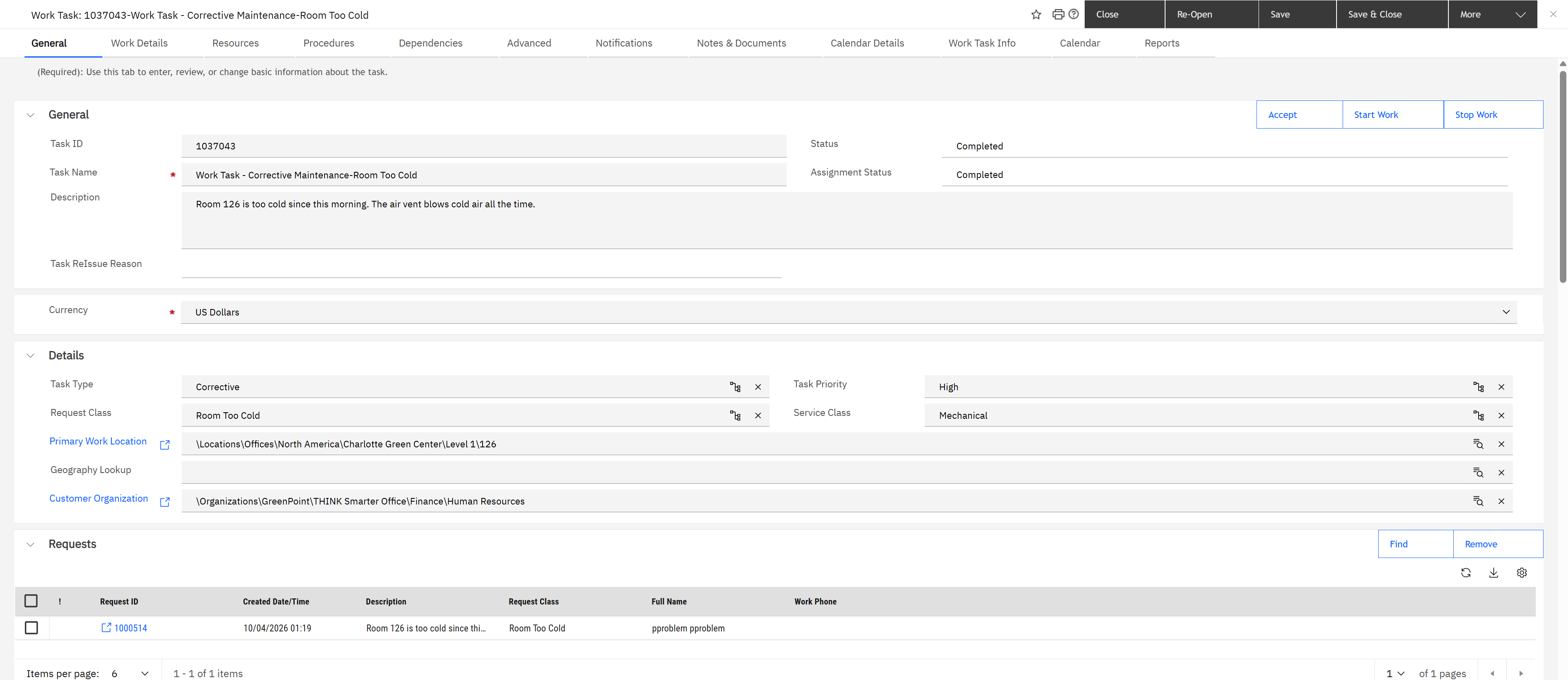
The task record, captured at the end of the story, so its status reads Completed. Task type Corrective, request class Room Too Cold, high priority, the full location path down to room 126, and under Requests the link back to request 1000514 from Pat.
↑ Back to the agenda
5. Ben Working fixes it
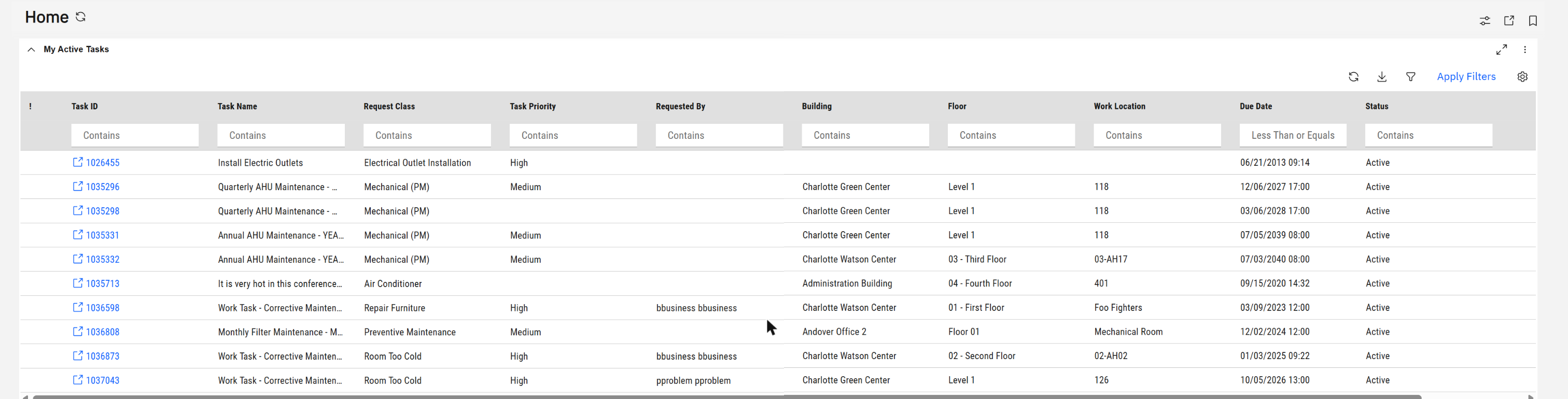
The technician's home page is one list, My Active Tasks. The last row is the new one: 1037043, Room Too Cold, High, requested by Pat, room 126.
Ben's real tool is the Work Task app, built for a phone or tablet.
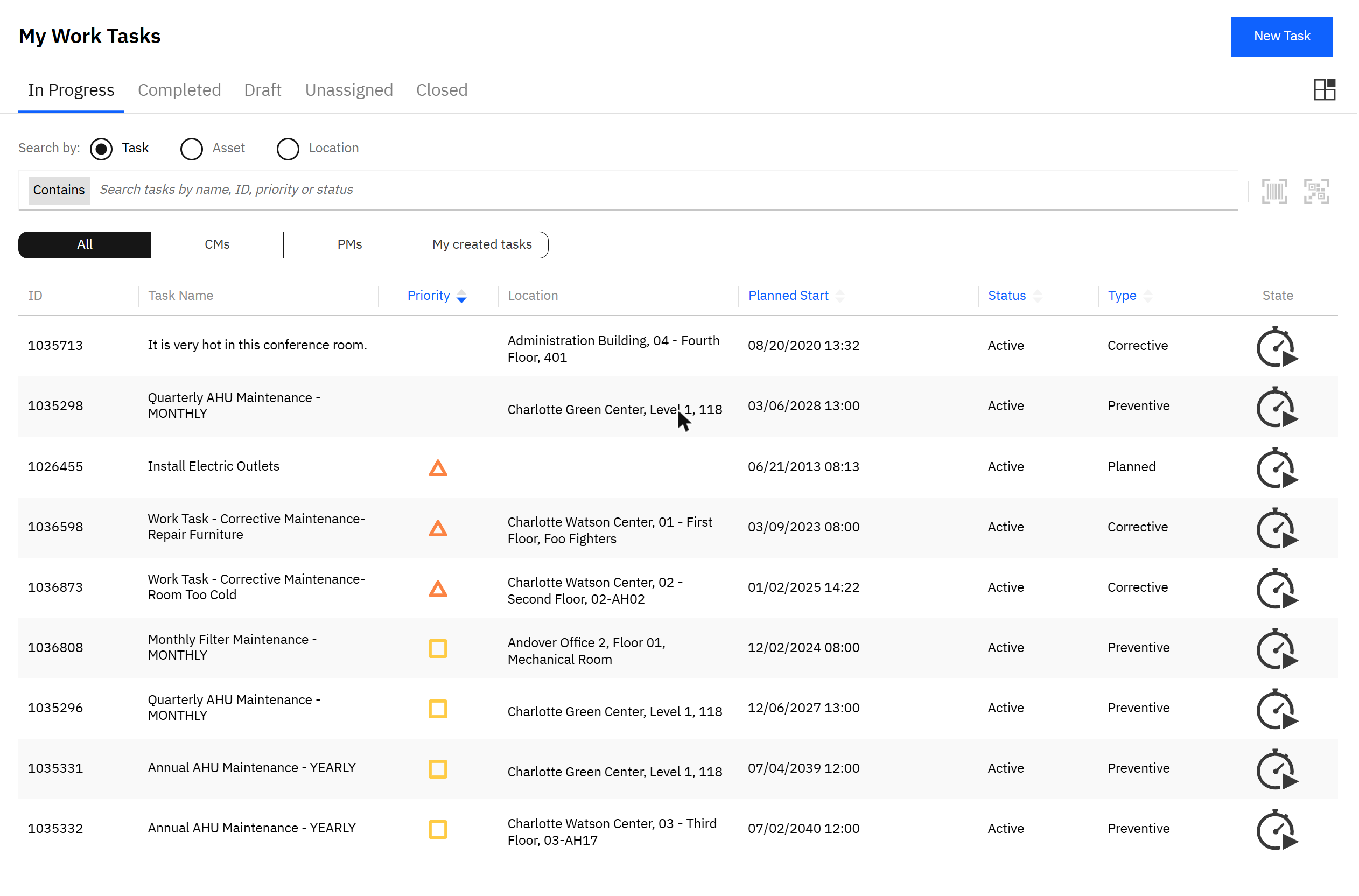
My Work Tasks: tabs by state, a filter for corrective (CMs) and preventive (PMs), search by task, asset or location, barcode and QR scanning. Triangles are high priority. The yellow bar is the app downloading tasks for offline use.
Opening the new task shows where it is, what is wrong in Pat's own words, and who asked. I then did the job as Ben, in four taps:
- Start timer. The button turns into Stop timer.
- Comment. Under Comments and Photos, a note on what was found.
- Stop timer. The duration is written to the task.
- Complete. The app asks for a resolution summary, then closes the work.

The comment, stamped with the technician's name and time. A photo can be attached the same way.
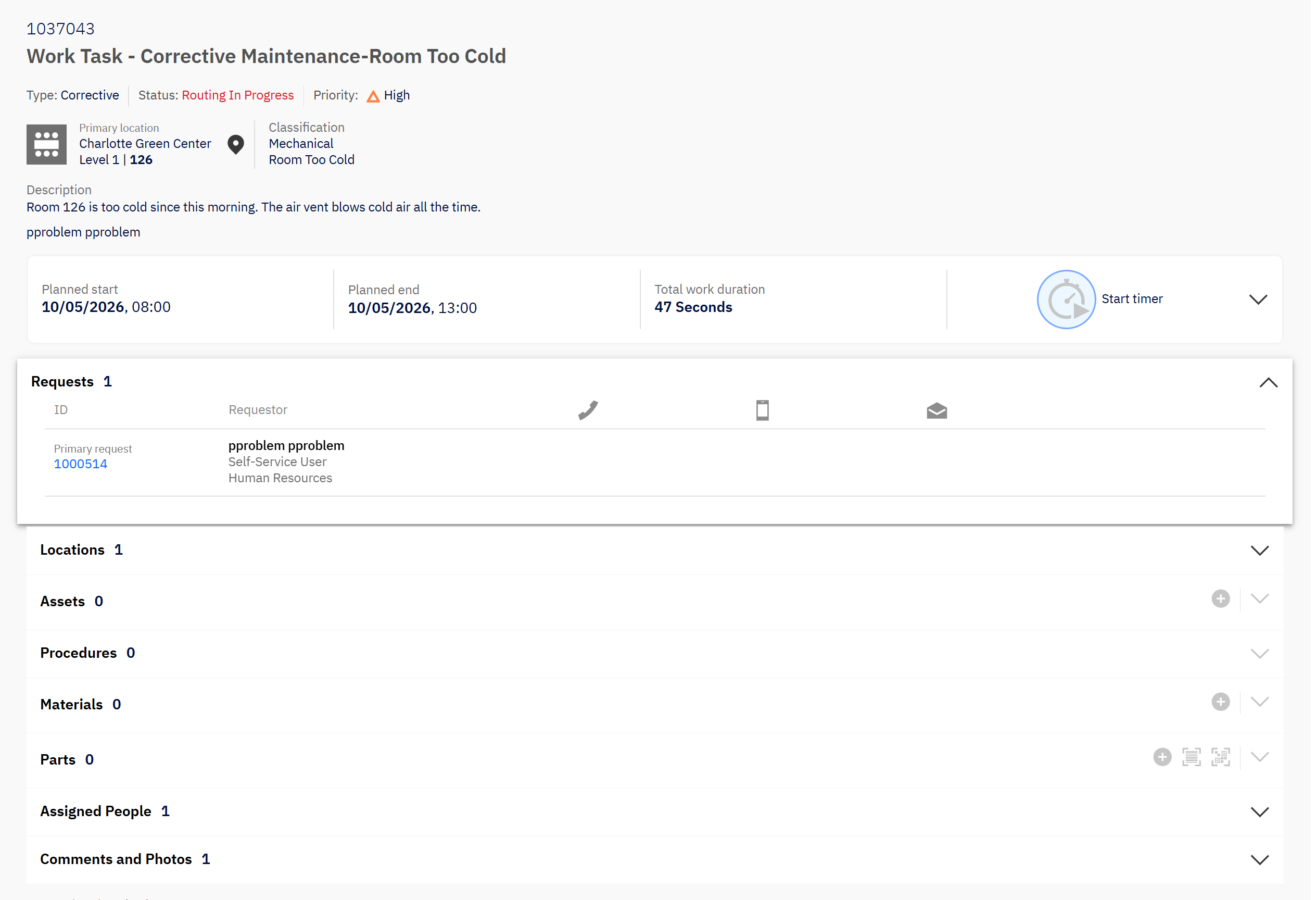
The task after Complete: status "Routing In Progress", Pat's own words, total work duration 47 seconds from the timer, and under Requests who asked, with buttons to call or mail her. The add buttons are greyed out: the task can no longer be edited.
"Routing In Progress" means the task has left the technician and is moving through its completion workflow. I stopped there; I did not follow it to the closed state or check what Pat is told.
From report to completion, nobody retyped anything. Pat's sentence was on the supervisor's card and on the technician's phone. The room came from her profile. The time came from a timer.
↑ Back to the agenda
6. The planned side: a job plan
Most of a maintenance team's week is not faults. It is routine work that a job plan generates. Sam's View Job Plans lists nine.
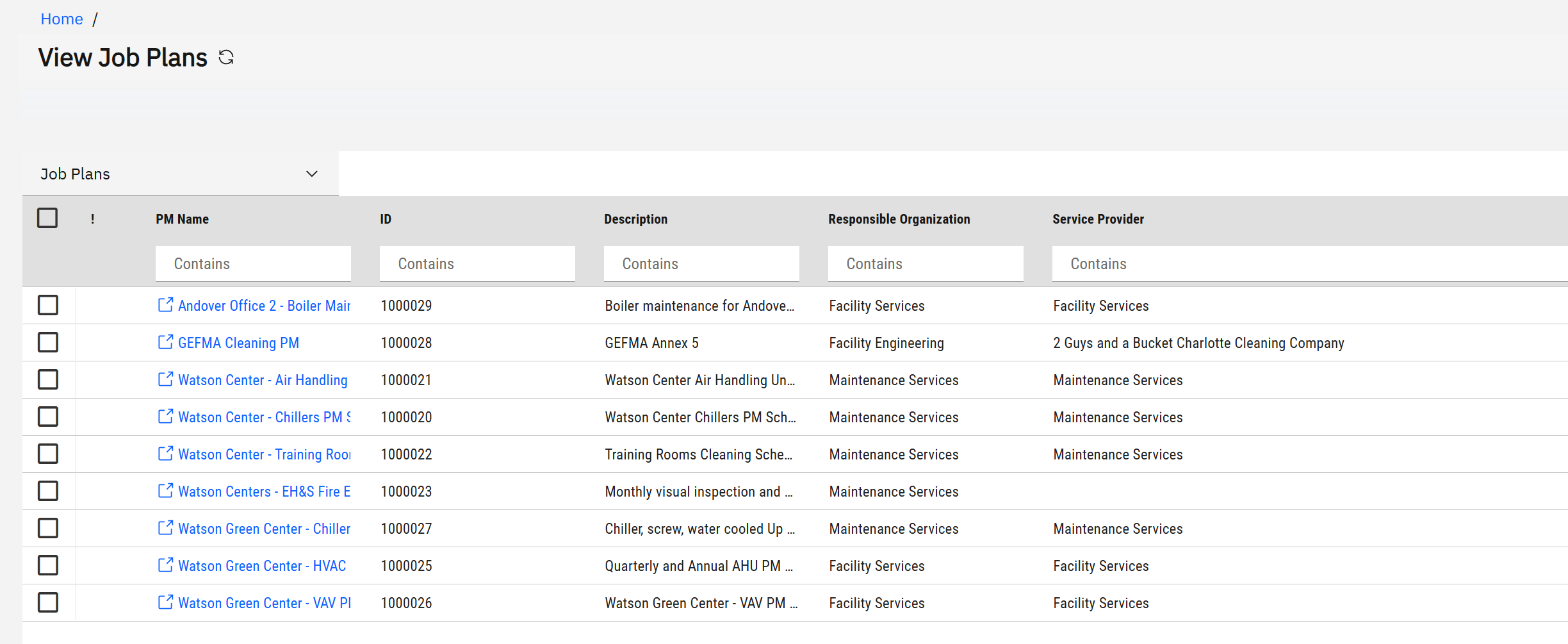
Job plans for boilers, chillers, air handling units, fire extinguishers and cleaning, each with a responsible organisation and a service provider.
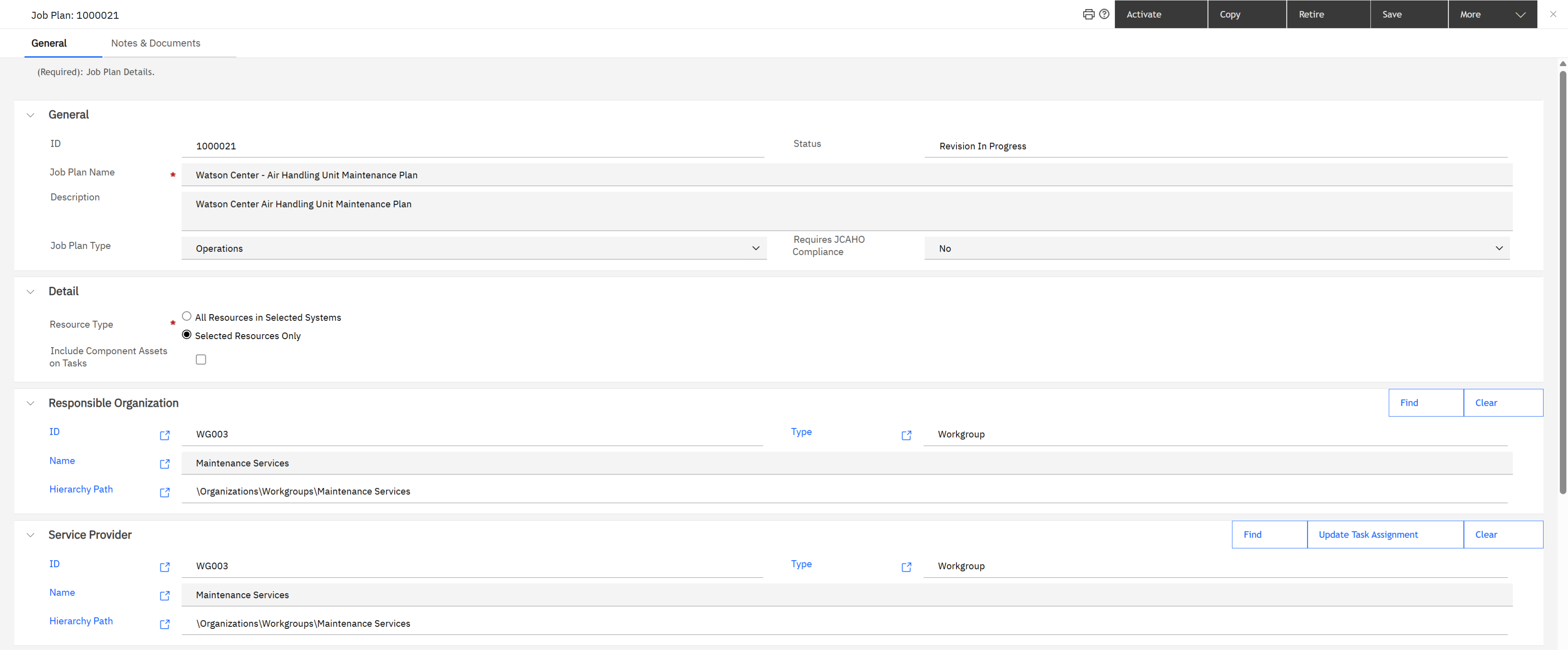
Watson Center - Air Handling Unit Maintenance Plan: type Operations, status Revision In Progress; responsible organisation and service provider are both the workgroup Maintenance Services.
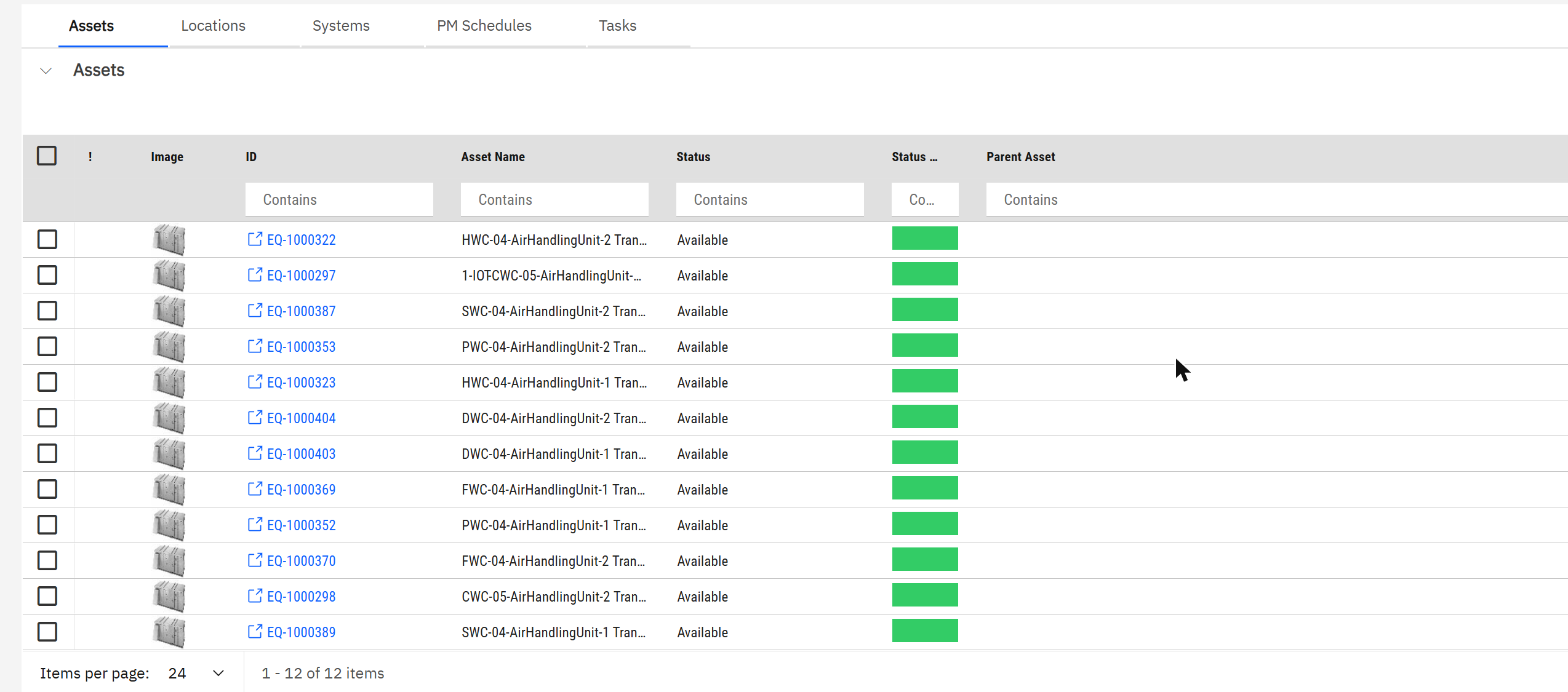
Assets: the 12 air handling units this one plan maintains.
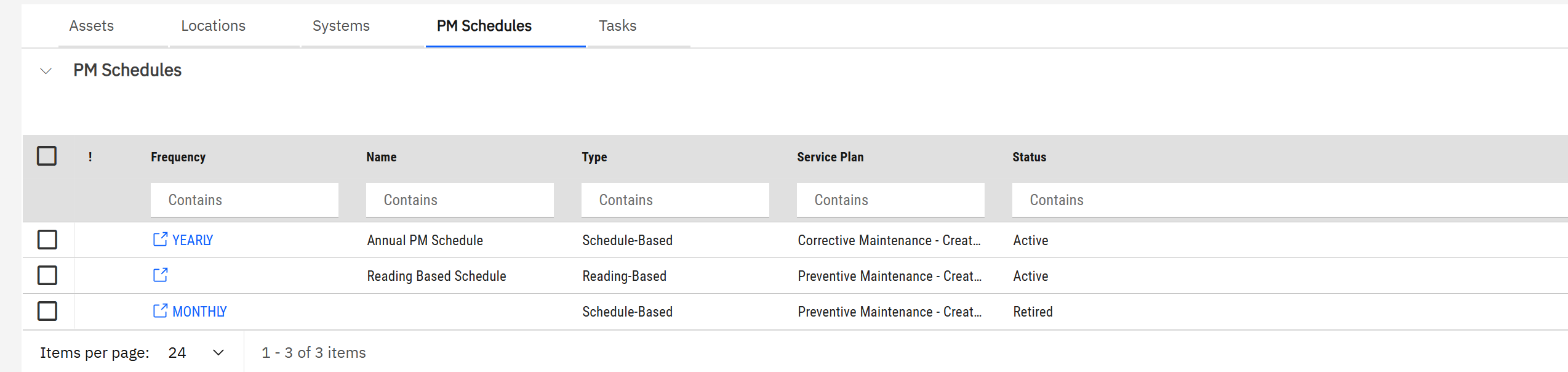
PM Schedules: a yearly schedule, a reading-based one, and a retired monthly one.
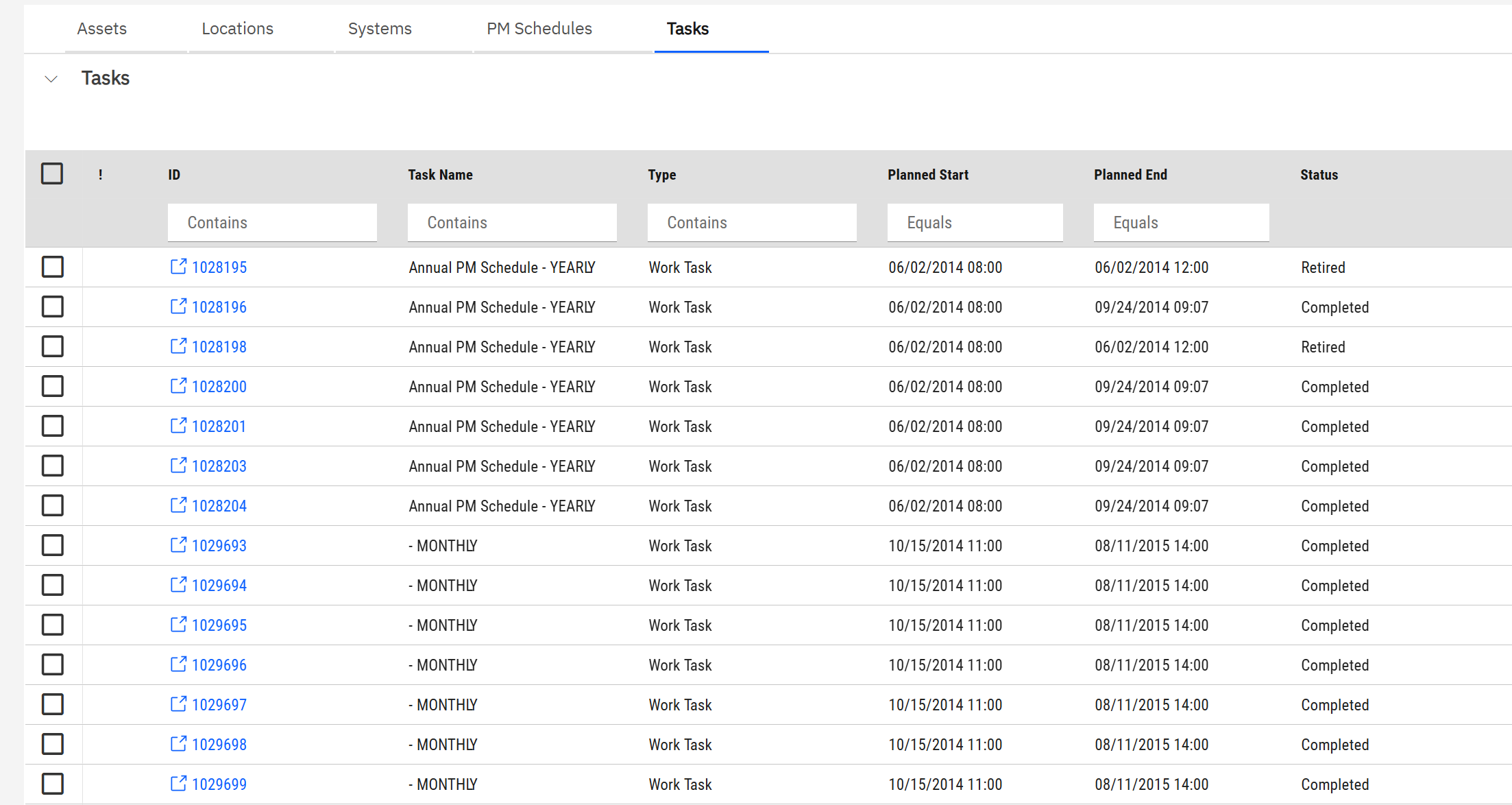
Tasks: the first rows of the 168 work tasks this plan has generated, yearly and monthly, with planned dates and status.
| Tab |
What it holds |
| Assets, Locations, Systems |
What is maintained: single assets, whole locations, or building systems |
| PM Schedules |
When: schedule-based (every month, every year) or reading-based (when a meter reaches a value) |
| Tasks |
The result: every work task the plan has generated |
One job plan, twelve assets, two active schedules, 168 tasks. In Maximo that would be a PM hierarchy or a route.
↑ Back to the agenda
7. A preventive task and its procedure
Generated tasks land in Work Planner exactly like Pat's did, and are assigned the same way. I gave Ben one of this week's, task 1031401 "Quarterly Climate Changer Maintenance". Its Resources tab is fuller than a corrective task's:
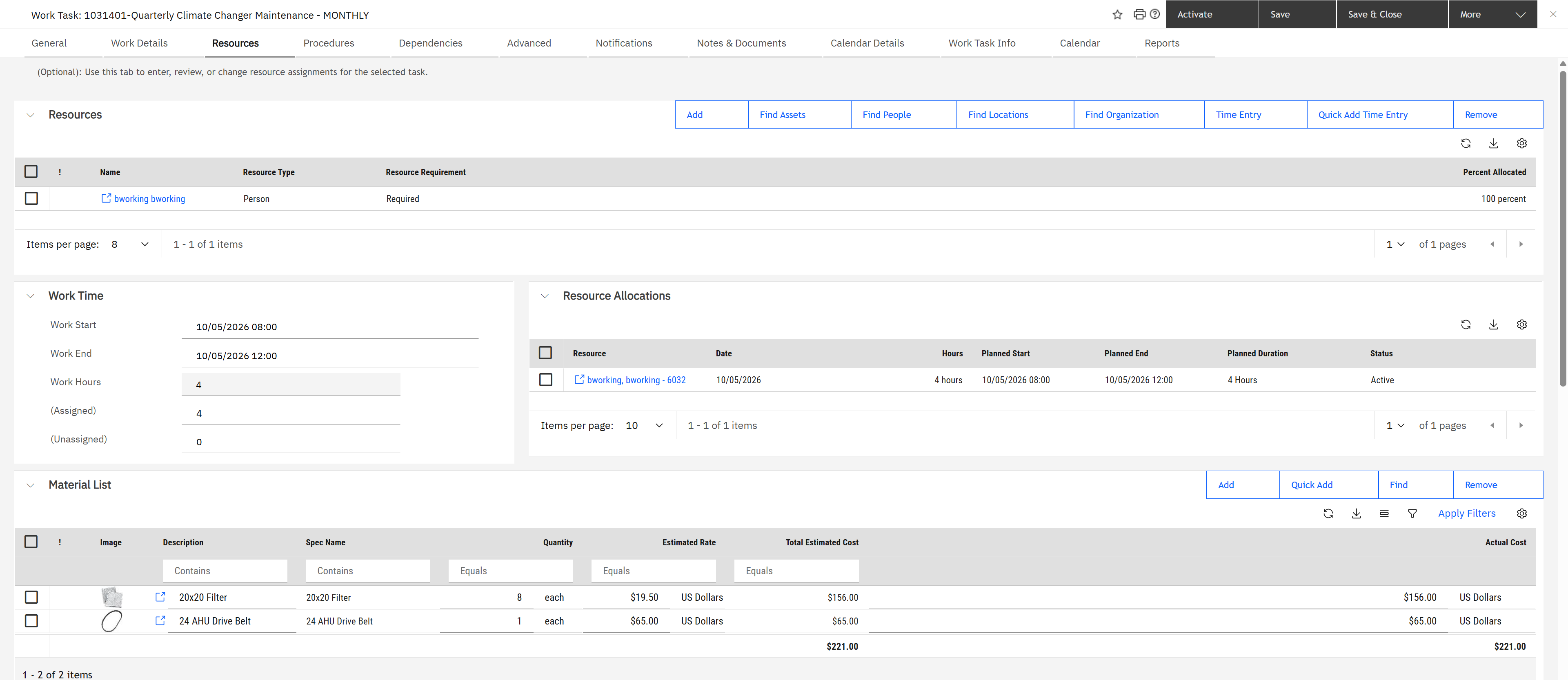
The technician, his 4-hour allocation, and a material list: eight 20x20 filters and one drive belt, 221 dollars.

Its Procedures tab: one work procedure, 2 hours, 52.50 dollars of labour, 221 of material, 273.50 in total.
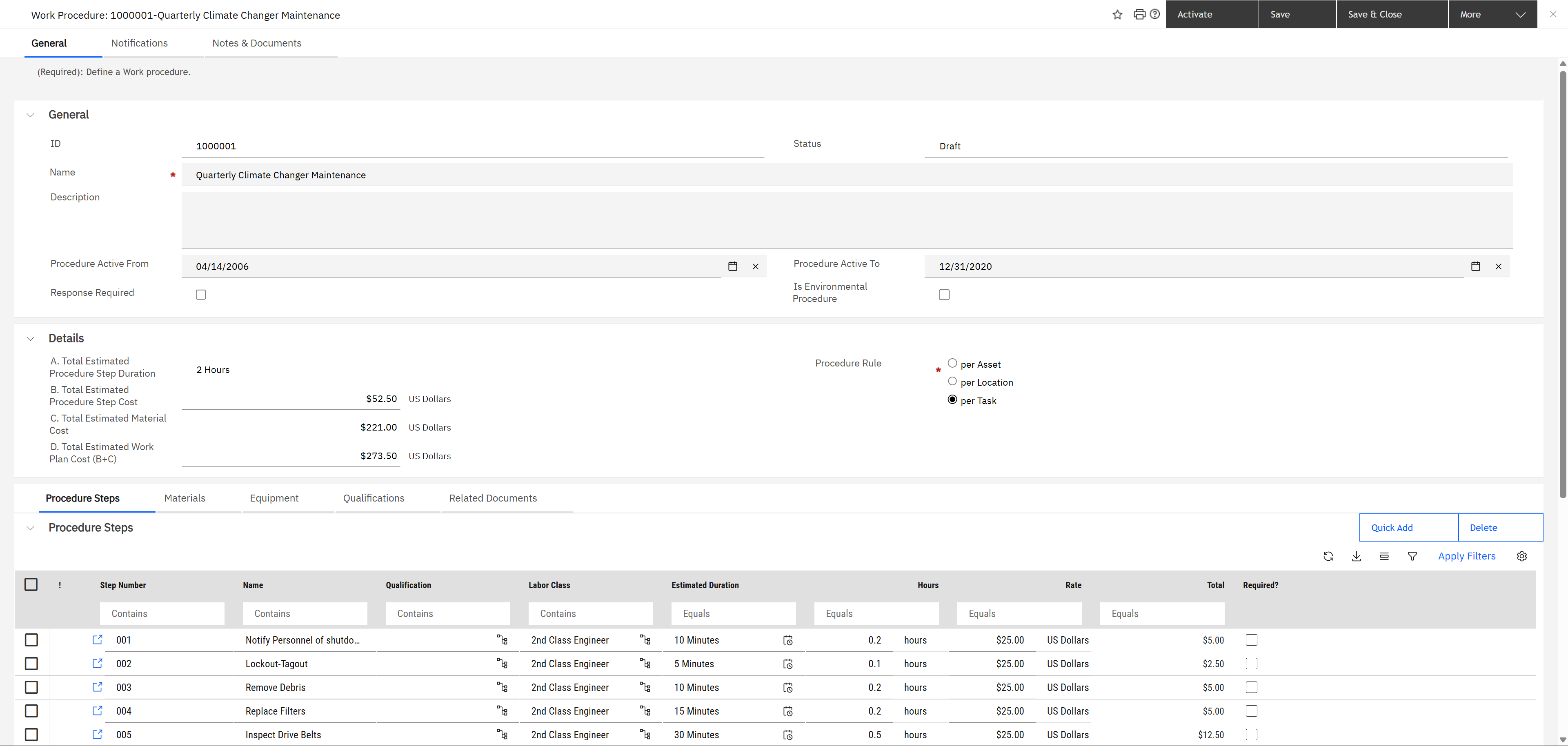
The procedure record: status and active dates, totals, the rule (per asset, per location or per task), and the steps: notify personnel, lockout-tagout, remove debris, replace filters, inspect drive belts. Each step has a labour class, a duration and a rate; the totals are their sum.
A procedure is the reusable "how". It is what makes a preventive task more than a reminder: the materials and the expected cost arrive with the task. Compare with Pat's corrective task, where Procedures, Materials and Parts all read zero, because nobody knows in advance what a cold room needs.
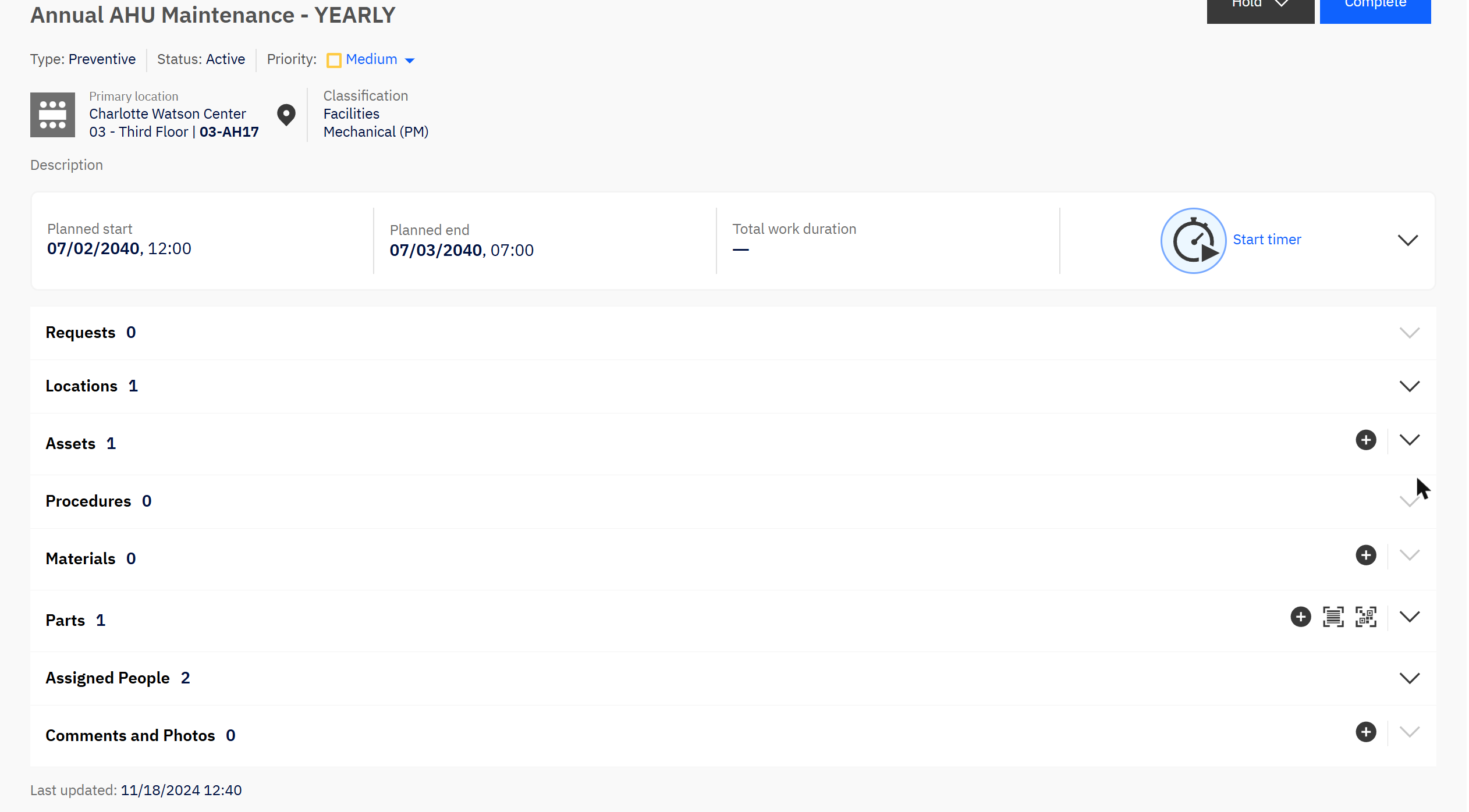
A preventive task in Ben's app: the asset with its building, floor and room, one part, two assigned people.
Read the status and the dates. This procedure is in Draft and its "active to" date is in 2020, yet the demo data still attaches it to tasks. On the tasks I opened, the list of active procedure steps was empty. On a real system, a procedure that is not active inside its date range is the first thing to check when steps do not appear.
↑ Back to the agenda
8. Four differences from Maximo
1. The words swap. In MREF the job plan is the schedule container (Maximo's PM), and the procedure is the task list (Maximo's job plan). Say "procedure" when you mean steps.
2. One plan, many assets. A job plan targets a list of assets, locations or systems directly. You do not build one PM per asset.
3. Location comes first. Pat's request had no asset at all, only a room. Every task carries a full location path, and that is enough to route and do the work.
4. Three interfaces, one record. The request form, the classic task form and the Work Task app all show the same task. Train each role on its own screen.
↑ Back to the agenda
Business value: who gains what
A cold room is a small fault. How it is handled is the service the whole building judges.
| Who |
What changes for them |
How you would measure it |
| Occupants |
Reporting a fault is simple and the progress is visible. |
Time to acknowledge a request; repeat requests for one fault. |
| Technicians |
A task arrives with its procedure and its location. |
First-time fix rate. |
| Facility managers |
Planned maintenance is scheduled and its completion measured. |
Planned maintenance completed on time; planned against reactive ratio. |
| Finance |
Maintenance cost is known per building and per asset. |
Cost per square metre; cost of repeat faults. |
No figures are promised here. Record your own baseline for each measure before the change, and compare after one quarter.
↑ Back to the agenda
9. Check yourself
A user reports a broken light. Which object do they create?
Answer: A request. The corrective work task is created from it.
Where does the supervisor see a brand-new corrective task?
Answer: In Work Planner, under Unassigned, in the workgroup the request type routes to.
How does the supervisor know a technician is overloaded?
Answer: From the hours-assigned-of-capacity bar next to each person in Work Planner.
Where do you set how often an air handling unit is serviced?
Answer: On a PM schedule inside the job plan that lists the unit.
A preventive task has no steps. Where do you look?
Answer: On the task's Procedures tab, then on the procedure: its status, its active dates and its rule.
↑ Back to the agenda