Overview
In modern network environments, IPv6 adoption continues to grow, making it essential for security information and event management (SIEM) systems to properly parse and analyze IPv6 addresses. This guide demonstrates how to enable IPv6 parsing from syslog headers in IBM QRadar SIEM, ensuring comprehensive visibility into your IPv6 network traffic.
Understanding the Challenge
By default, QRadar does not parse IPv6 addresses from syslog headers. This limitation can result in incomplete network visibility and potential security blind spots in IPv6-enabled environments. The solution involves configuring a specific parameter in QRadar's configuration file to enable this functionality.
Prerequisites
Before proceeding with the configuration changes, ensure you have:
- Root SSH access to your QRadar Console appliance
- QRadar version 7.5.0 Update Pack 10 or later
- Administrative privileges to deploy configuration changes
- A backup strategy for configuration files
Configuration Steps
Step 1: Access the QRadar Console
Connect to your QRadar Console appliance via SSH using root credentials:
ssh root@<qradar-console-ip>
Step 2: Backup the Configuration File
CRITICAL: Always create a backup before modifying configuration files. This allows for quick recovery if issues arise.
Create a backup directory (if it doesn't exist):
mkdir -p /store/IBM
Backup the current nva.conf file:
cp /opt/qradar/conf/nva.conf /store/IBM/nva.conf
Step 3: Check for flag available or not
grep "IPV6ENABLED" /store/configservices/staging/globalconfig/nva.conf

Step 4: Edit the Configuration File
Open the staging configuration file for editing:
vi /store/configservices/staging/globalconfig/nva.conf
Step 5: Configure the IPv6 Parameter
Locate the IPV6ENABLED parameter in the file. If it doesn't exist, add it. Set the value to enable IPv6 parsing:
IPV6ENABLED=true
Configuration Options:
true - Parse IPv6 addresses from syslog payload headers
false - Do not parse IPv6 addresses (default behavior)
Save the file and exit the editor.
Step 6: Verify the IPv6 Parameter is exists in file
grep "IPV6ENABLED" /store/configservices/staging/globalconfig/nva.conf

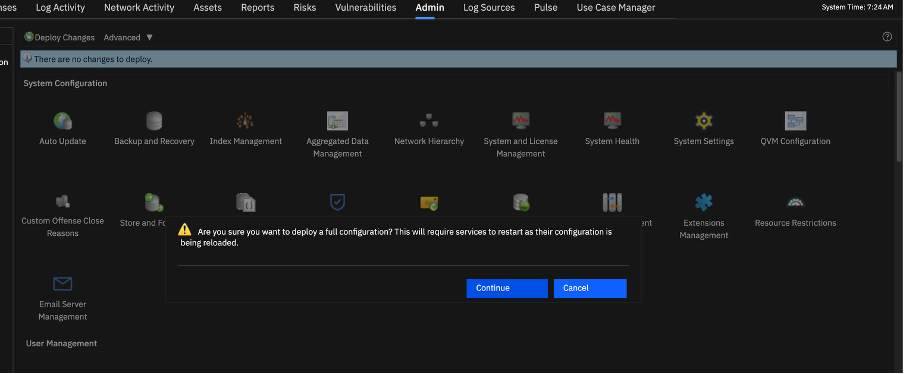
Step 7: Deploy the Configuration
Log in to the QRadar Console web interface
Navigate to: Admin → Advanced → Deploy Full Configuration
Confirm and initiate the deployment
Wait for the deployment to complete successfully

Verification
After deploying the configuration:
- Monitor incoming syslog events with IPv6 addresses
- Verify that IPv6 addresses are being correctly parsed
- Check the Log Activity tab to confirm IPv6 source and destination addresses are populated
Example of Logsource with IPV6PARSING disabled


Example of Logsource with IPV6PARSING enabled

Troubleshooting
If IPv6 addresses are not being parsed after configuration:
- Verify the parameter is correctly set in the configuration file at path </opt/qradar/conf/nva.conf>
- Ensure the full configuration deployment completed without errors
- Check QRadar system logs for any related error messages </var/logs/qradar.error & qradar.log>
- Contact IBM Support if issues persist
Conclusion
Enabling IPv6 parsing in QRadar is a straightforward process that significantly enhances your SIEM's capability to monitor and analyze IPv6 network traffic. By following this guide, you ensure comprehensive visibility across both IPv4 and IPv6 network segments, strengthening your overall security posture.
-------------------------------------------------------------------------------------------------------------------------------------
-------------------------------------------------------------------------------------------------------------------------------------
About the Author
This blog post provides a comprehensive, professional guide to enabling IPv6 parsing in QRadar, with clear steps, best practices, and troubleshooting guidance. The structure includes an overview, detailed steps, configuration reference, and practical advice for implementation.
Written by: Mansukh Varsakhiya (@Mansukh Varsakhiya)
Reviewed by: Lakhaman Odedra (@Lakhaman Odedra)
For any queries, feel free to reach out to us at Mansukh.varsakhiya@ibm.com or Lakhamanbhai.Odedra@ibm.com