This 3-part series demonstrates implementing High Availability for SAP HANA on Linux running on IBM Power Systems.
High Availability (HA) is critical for SAP HANA databases in production environments. This guide demonstrates a complete HA implementation tested on IBM Power10 and Power11 systems, achieving failover quickly with zero data loss.
Infrastructure: [Example, from the isst-rws tests]
-
Primary Node (Node-1): IBM Power11 (FW1120) - LPAR ID x
-
Secondary Node (Node-2): IBM Power10 (FW1060) - LPAR ID y
-
HMC: Version 11 R2 SP1120
-
OS: Red Hat Enterprise Linux 9.8 / SLES 16.0
-
SAP HANA: Version 2.00.088.00
-
Replication: SYNC mode with logreplay operation
Part A: Foundation Setup
Prerequisites
Hardware Requirements:
-
2 IBM Power Systems (In our example - Power10 and Power11)
-
96 GB RAM per node minimum / workload-specific
-
Sufficient storage for HANA data and log volumes
-
Dedicated network interfaces
Step 1: Initial System Configuration
Configure /etc/hosts (on both nodes):
cat  /etc/hosts
192.168.xx.xx   primary   primary.example.com
192.168.xx.xx   secondary   secondary.example.com
Verify Network Connectivity:
# Test from both nodes
ping -c 3 primary.example.com
ping -c 3 secondary.example.com
# Check latency (should be < 1ms for local network)
ping -c 100 secondary.example.com | tail -1
Step 2: Firewall Configuration
Option 1: Disable for Testing
systemctl stop firewalld
systemctl disable firewalld
Option 2: Configure Rules for Production
# Allow required HANA ports as per the workload requirements
Step 3: SSH Key Exchange
# On both nodes, generate SSH keys
ssh-keygen -t rsa -b 4096 -N "" -f ~/.ssh/id_rsa
# Exchange keys
ssh-copy-id root@node-1.example.com
ssh-copy-id root@node-2.example.com
# Test passwordless SSH
ssh primary hostname
ssh secondary hostnam
Step 4: Time Synchronization
# Install and configure chrony
yum install -y chrony
systemctl enable chronyd
systemctl start chronyd

# Verify time sync
chronyc tracking
date  # Check on both nodes
Part B: SAP HANA Installation
Step 1: Storage Preparation
On both nodes: Have XFS configured with enough memory for the workload [BWH workload 12TB, HSR backup 12TB ]

# Verify
ls -la /hana/
Step 2: Install HANA on Primary Node
Launch Installer:
cd /hana/SRC/SAP_HANA_DATABASE
./hdblcm - # Add the input params as per the user / workload requirements
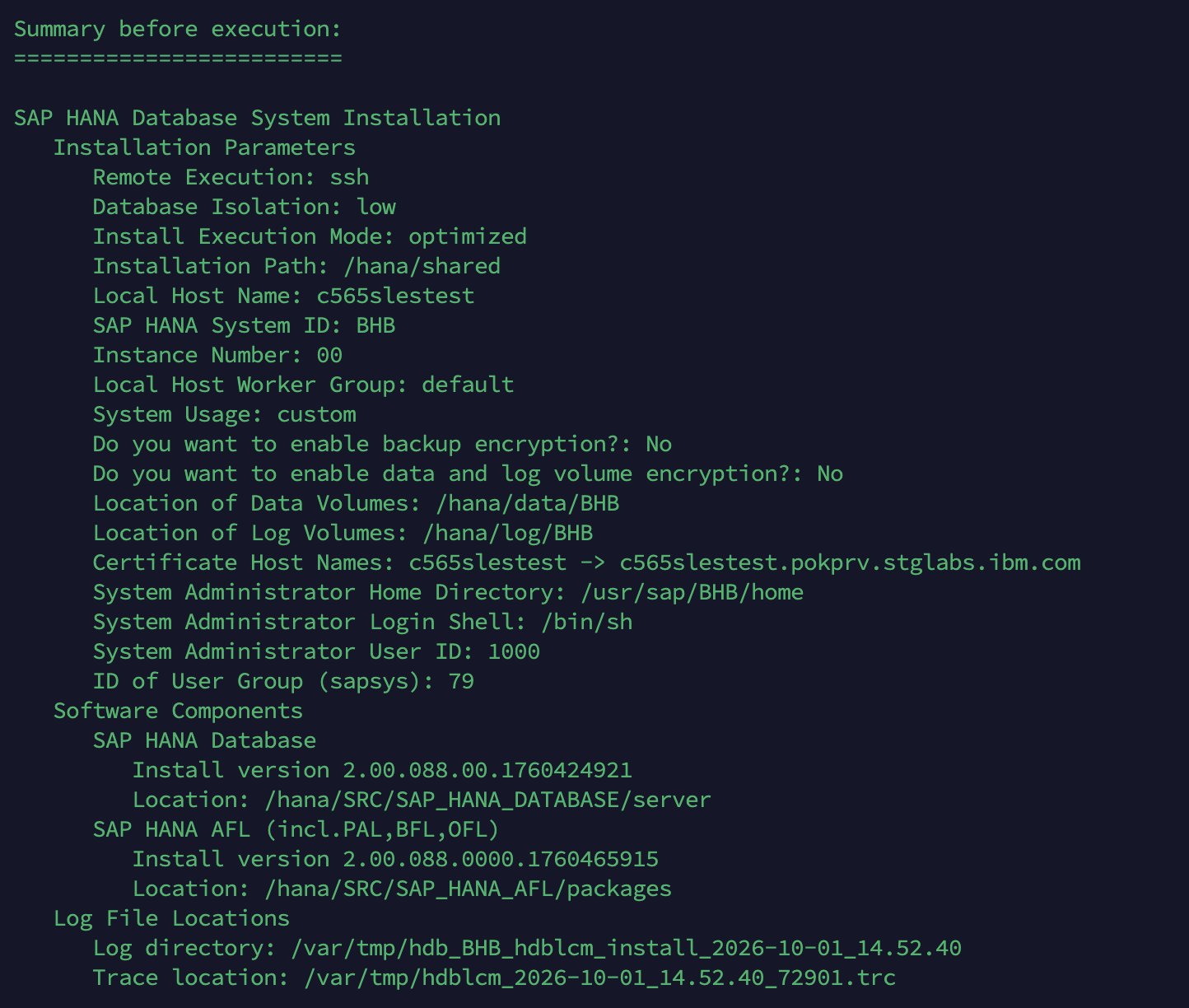
# SID and Instance Number of Primary and Secondary should match.
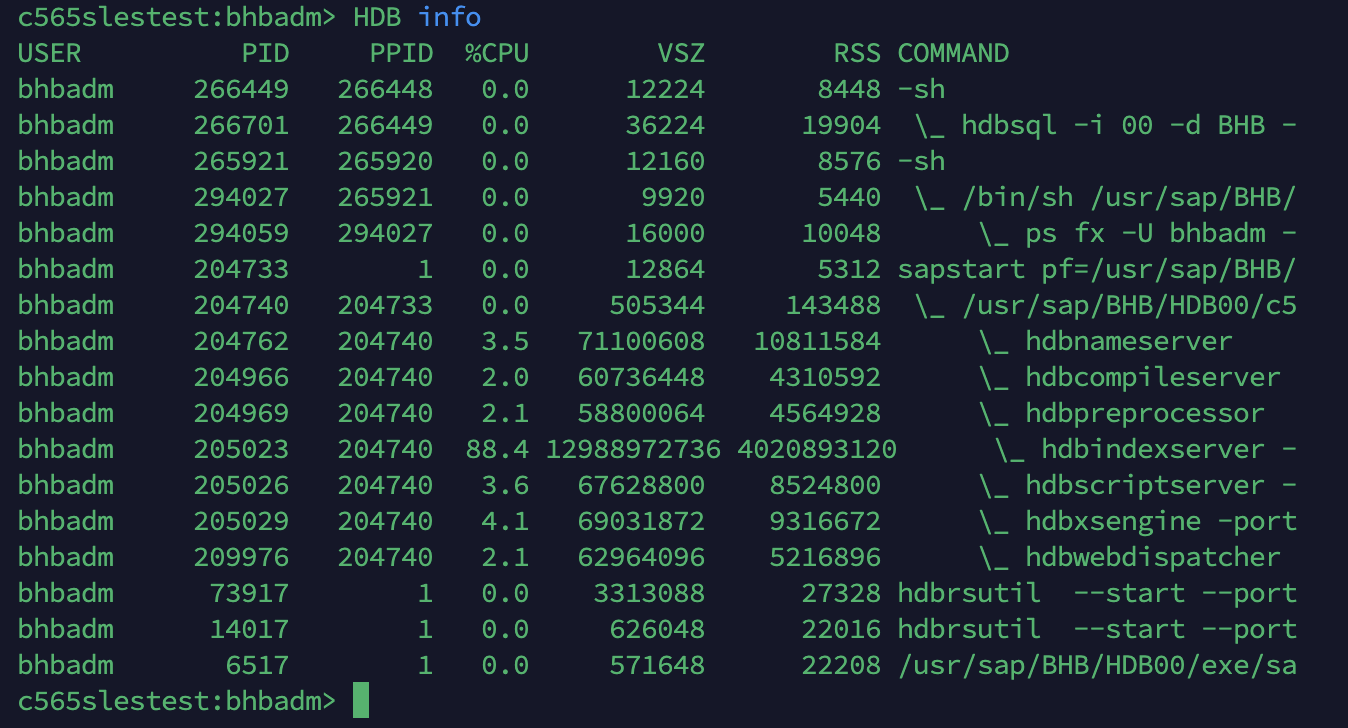
Verify Installation:
su - bhbadm
HDB info

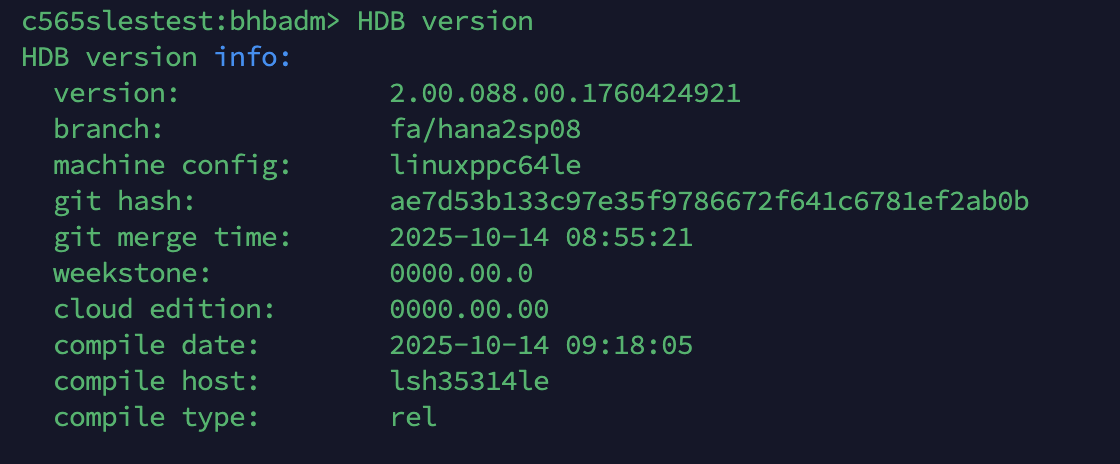
# Check version
HDB version

Output: version: 2.00.088.00.1760424921

# Check resources
free -h
Should show adequate memory available
Step 3: Install HANA on Secondary Node
Repeat the installation with identical parameters except:
Verify Installation:
su - bhbadm
HDB info
HDB version
Step 4: Post-Installation Verification
On both nodes:
su - bhbadm

# Check HANA processes
HDB info

# Test database connectivity
hdbsql -i 00 -d SYSTEMDB -u SYSTEM -p <password> "SELECT * FROM DUMMY"

 Expected output:
 DUMMY
 "X"
 1 row selected

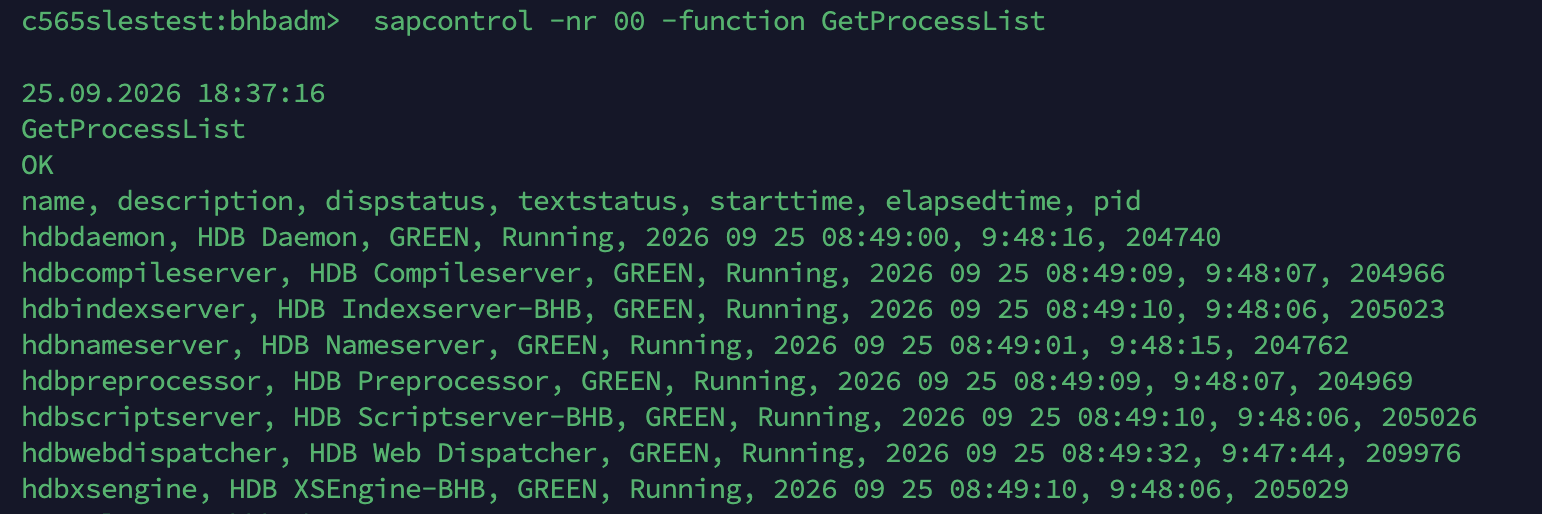
# Check service status
sapcontrol -nr 00 -function GetProcessList
# All services should show GREEN status
Part C: HANA System Replication Configuration
Understanding Replication Modes
| Mode |
Description |
Data Loss Risk |
Use Case |
| SYNC |
Synchronous |
None |
Production HA ✓ |
| SYNCMEM |
Sync in-memory |
Minimal |
High-performance |
| ASYNC |
Asynchronous |
Possible |
Disaster Recovery |

Our Configuration:
Step 1: Configure Primary Node
Set Log Mode to Normal:
# Set log mode
hdbsql -jU SYSTEMDB "ALTER SYSTEM ALTER CONFIGURATION ('global.ini','SYSTEM') \
  SET ('persistence','log_mode') = 'normal' WITH RECONFIGURE;"

# Verify
hdbsql -jU SYSTEMDB "SELECT VALUE FROM M_INIFILE_CONTENTS \
  WHERE FILE_NAME='global.ini' AND SECTION='persistence' AND KEY='log_mode';"

 Expected output:
 VALUE
 "normal"
 "normal"
Step 2: Enable Replication on Primary
# Enable system replication
hdbnsutil -sr_enable --name=SITE_A

 Expected output:
 nameserver is active, proceeding ...
 successfully enabled system as system replication source site done.

# Verify
hdbnsutil -sr_state

 Should show:
 mode: primary
 site name: SITE_A
 is source system: true
Step 3: Synchronize SSFS Security Files
Copy from Primary to Secondary:
# On primary node
su - bhbadm

# Copy SSFS files
  scp /usr/sap/BHB/SYS/global/security/rsecssfs/data/SSFS_BHB.DAT \
  bhbadm@secondaryNode.example.com:/usr/sap/BHB/SYS/global/security/rsecssfs/data/

  scp /usr/sap/BHB/SYS/global/security/rsecssfs/key/SSFS_BHB.KEY \
  bhbadm@secondaryNode.example.com:/usr/sap/BHB/SYS/global/security/rsecssfs/key/
Set Permissions on Secondary:
# Set ownership and permissions
chown bhbadm:sapsys /usr/sap/BHB/SYS/global/security/rsecssfs/data/SSFS_BHB.DAT
chown bhbadm:sapsys /usr/sap/BHB/SYS/global/security/rsecssfs/key/SSFS_BHB.KEY
chmod 600 /usr/sap/BHB/SYS/global/security/rsecssfs/data/SSFS_BHB.DAT
chmod 600 /usr/sap/BHB/SYS/global/security/rsecssfs/key/SSFS_BHB.KEY

# Restart HANA
HDB stop
HDB start
Step 5: Register Secondary Node
# Stop HANA
HDB stop

# Register as secondary
hdbnsutil -sr_register \
  --remoteHost=rws-ha-1 \
  --remoteInstance=00 \
  --replicationMode=sync \
  --name=SITE_B \
  --operationMode=logreplay

 Expected output:
 adding site ...
 collecting information ...
 updating local ini files ...
 done.
Parameters Explained:
-
--remoteHost=rws-ha-1: Primary node hostname
-
--remoteInstance=00: HANA instance number
-
--replicationMode=sync: Synchronous replication (zero data loss)
-
--name=SITE_B: Secondary site name
-
--operationMode=logreplay: Log replay mode (best performance)
Step 6: Perform Initial Backup
# Take full backup
hdbsql -U SYSTEMDB "BACKUP DATA USING FILE ('initial_backup')"

# Verify backup
hdbsql -U SYSTEMDB "SELECT * FROM M_BACKUP_CATALOG \
  WHERE ENTRY_TYPE_NAME='complete data backup' \
  ORDER BY UTC_START_TIME DESC;"

# Check STATE_NAME='successful' and MESSAGE='<ok>'
Perform initial backup for all tenant databases. [hdbsql -i 00 -d BHB -u SYSTEM -p <password> "BACKUP DATA USING FILE ('tenant_backup_bhb')"]
Snapshot shows BHB tenant backup in progress
Note : Backup must be completed on the primary before enabling the HANA system replication.
Step 6: Start Secondary in Replication Mode
# Start HANA
HDB start

# Wait for services to start
sleep 60

# Verify replication state
hdbnsutil -sr_state
Expected Output:
System Replication State
~~~~~~~~~~~~~~~~~~~~~~~~

online: true
mode: sync
operation mode: logreplay
site id: 2
site name: SITE_B

is source system: false
is secondary/consumer system: true
has secondaries/consumers attached: false
is a takeover active: false
is primary suspended: false
replay mode: auto
active primary site: 1

primary masters: rws-ha-1

Site Mappings:
~~~~~~~~~~~~~~
SITE_A (primary/primary)
    |---SITE_B (sync/logreplay)
Step 7: Verify Replication on Primary
hdbnsutil -sr_state

 Should show:
 has secondaries/consumers attached: true
 Site Mappings: SITE_A → SITE_B
Step 8: Verify Replication Health
Use Python Status Script:
# On primary node:
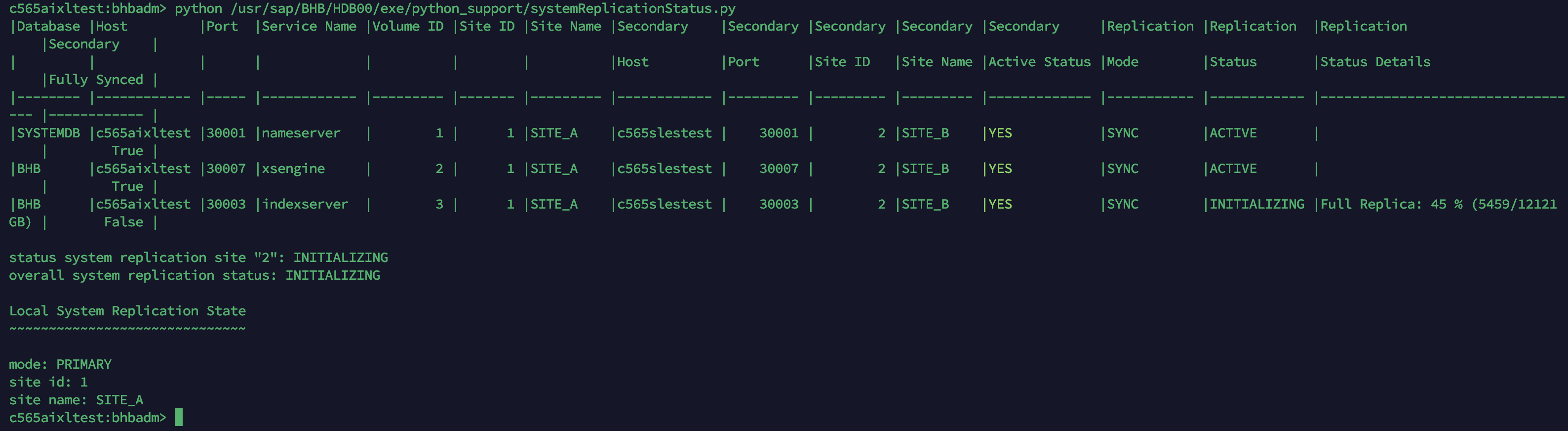
python /usr/sap/BHB/HDB00/exe/python_support/systemReplicationStatus.py
Output: SYSTEMDB backup completed and replication status ACTIVE, tenant backup in progress hence in INITIALIZING state.

Critical Indicators:
-
Secondary Active Status: YES
-
Replication Status: ACTIVE
-
Secondary Fully Synced: True
-
overall system replication status: ACTIVE
Part D: Manual Takeover and Failback
Manual Takeover to Secondary
Scenario: Primary node fails, need to promote secondary.
Step 1: Perform Takeover
# Perform takeover from current secondary and Verify the New Primary and workload status
hdbnsutil -sr_takeover

 Expected output:
 done.
Note: You may see warnings about tenant databases not initialized via replication. This is normal if tenant databases weren't backed up before replication setup.
Step 2: Verify New Primary
# Check replication state
hdbnsutil -sr_state

 Should show:
 mode: primary
 site id: 2
 site name: SITE_B
 is source system: true
Step 3: Verify Data Integrity
# Test database connectivity
hdbsql -U SYSTEMDB "SELECT * FROM DUMMY"

# Check any test data created earlier
hdbsql -U SYSTEMDB "SELECT * FROM TEST_REPLICATION"
Re-register Original Primary as Secondary
Scenario: Original primary is back online, need to re-register as secondary.
Step 1: Stop HANA on Original Primary
# On rws-ha-1
su - bhbadm

# Stop HANA
HDB stop
Step 2: Register as Secondary
# Register with new primary (rws-ha-2)
hdbnsutil -sr_register \
  --remoteHost=rws-ha-2 \
  --remoteInstance=00 \
  --replicationMode=sync \
  --name=SITE_A \
  --operationMode=logreplay

 Expected output:
 adding site ...
 collecting information ...
 updating local ini files ...
 done.
Step 3: Start HANA
# Start HANA in secondary mode
HDB start

# Wait for services
sleep 60

# Verify replication state
hdbnsutil -sr_state

 Should show:
 mode: sync
 operation mode: logreplay
 is secondary/consumer system: true
 primary masters: rws-ha-2
Step 4: Verify Replication Restored
# On new primary (rws-ha-2)
python /usr/sap/BHB/HDB00/exe/python_support/systemReplicationStatus.py

 Should show:
 overall system replication status: ACTIVE
Troubleshooting Common Issues
Issue 1: Replication Status Shows ERROR
Symptoms:
Replication Status: ERROR
Secondary Fully Synced: False
Solution - Missing Tenant Backup:
# On primary, backup tenant databases
hdbsql -i 00 -d BHB -u SYSTEM -p <password> "BACKUP DATA USING FILE ('tenant_backup')"

# Wait for replication to sync
python /usr/sap/BHB/HDB00/exe/python_support/systemReplicationStatus.py
Issue 2: Secondary Won't Start After Registration
Symptoms:
Error: Cannot start HANA after sr_register
Solution:
# Check nameserver trace
su - bhbadm
cdtrace
tail -f nameserver_*.trc

# Verify SSFS files
ls -l /usr/sap/BHB/SYS/global/security/rsecssfs/data/
ls -l /usr/sap/BHB/SYS/global/security/rsecssfs/key/

# Check permissions (should be 600, owned by bhbadm:sapsys)
Issue 3: Hostname Resolution Problems [ as stored in the HANA DB]
Symptoms:
Error: Cannot resolve hostname
Solution:
# Verify /etc/hosts
cat /etc/hosts | grep rws-ha

# Test resolution
nslookup rws-ha-1
ping -c 3 rws-ha-1

# Ensure HANA uses short hostname
hdbsql -U SYSTEMDB "SELECT HOST FROM M_DATABASE"
 Should return short hostname (rws-ha-1, not FQDN)
Issue 4: Replication Lag Increasing
Symptoms: Replication lag growing over time
Solution:
# Check network bandwidth
iperf3 -s  # On one node
iperf3 -c rws-ha-1  # On other node

# Check HANA logs
cdtrace
grep -i "replication" nameserver_*.trc

# Monitor replication statistics
hdbsql -U SYSTEMDB "SELECT * FROM M_SERVICE_REPLICATION"
Monitoring Replication Health
Key Metrics to Monitor
# 1. Overall replication status
python /usr/sap/BHB/HDB00/exe/python_support/systemReplicationStatus.py

# 2. Replication state
hdbnsutil -sr_state

# 3. Replication lag
hdbsql -U SYSTEMDB "SELECT * FROM M_SERVICE_REPLICATION"

# 4. Log shipping status
hdbsql -U SYSTEMDB "SELECT * FROM M_LOG_SHIPPING_STATUS"
Key Takeaways
Infrastructure Configured: Two IBM Power Systems with RHEL 9.8
SAP HANA Installed: Version 2.00.088 on both nodes
System Replication Active: SYNC mode with logreplay operation
Manual Takeover Tested: Failover and failback procedures validated
Monitoring Established: Health checks in place
Co-Author: Sowmya Indranna (sowmya.indranna@ibm.com)
Mentored By: Chethan Jain (chetjain@in.ibm.com)
Reviewed By: Andreas Schauberer(andreas.schauberer@de.ibm.com), Edmund Häfele (edmund.haefele@de.ibm.com)
----------------------------------------------------------------------------------------------------------------
Document Version: 1.0
Last Updated: Sep 2026
Target Audience: Linux System Administrators
Environment: Linux [RHEL / SLES ], SAP HANA 2.00.088, IBM Power Systems