Transaction recovery is one of the most critical functions of IBM WebSphere Application Server (WAS) and IBM WebSphere Liberty. When it works, it goes unnoticed. When it fails, servers can fail to start, databases can retain stale locks, and in-flight business data can be left unresolved. This article consolidates the transaction recovery problems that are most commonly observed, explains why they occur, and describes the recommended troubleshooting steps and solutions.
Quick Refresher: How the WebSphere Transaction Manager Manages Transactions
A transaction is a unit of work in which updates to one or more resources are either committed or rolled back together — all or nothing. If any part of the transactional work fails, the entire transaction is rolled back. WebSphere Application Server implements the Java Transaction API (JTA) and Java Transaction Service (JTS), and acts as the transaction manager (TM) that coordinates work across multiple resource managers (RMs), such as:
• Relational databases accessed through JDBC data sources
• JMS messaging providers (the SIB resource adapter, WebSphere MQ, or third-party JMS resource adapters)
• JCA resource adapters connecting to Enterprise Information Systems (EIS), including third-party adapters
• Enterprise JavaBeans (EJB) components that run in multiple application servers
If only a single resource manager participates in a transaction, the work runs as a resource manager local transaction (you will see LTC — Local Transaction Containment — in logs and traces). When two or more resource managers participate in a transaction, the work becomes a global transaction and the WAS transaction manager coordinates all participants through the XAResource interface.
Two-Phase Transactions in a Nutshell
A global transaction — also called a distributed, XA, or two-phase commit (2PC) transaction — completes in two phases. In Phase 1 (Prepare), the transaction manager asks every resource manager to confirm it is ready and able to perform its part of the work. In Phase 2 (Commit or Rollback), once all participants have voted ready-to-commit, the transaction manager instructs each of them to commit; on receipt of the commit flow the resource manager finalizes its updates and releases any locks it holds. If any participant fails to respond successfully during the prepare phase, the transaction manager rolls the entire transaction back to preserve integrity across every resource manager in the unit of work.
A resource adapter declares its transactional capability in its deployment descriptor (ra.xml). A one-phase (non-XA) adapter can participate only in transactions local to that single resource manager, while a two-phase (XA) adapter can participate fully in two-phase commit and influence the outcome of a global transaction.
Understanding Two-Phase Commit and XA Exceptions
A two-phase commit (2PC) transaction involves two or more resource managers participating in a single global transaction, coordinated by the transaction manager (TM). The protocol completes in two phases:
Phase 1 — Prepare: The transaction manager sends a prepare ("get ready") request to every resource manager enlisted in the transaction. Each resource manager verifies that it is able to complete its portion of the work and responds to the transaction manager with its vote.
Phase 2 — Commit or Rollback: Only when all resource managers have responded successfully does the transaction manager proceed to commit the transaction and drive it to completion. If any resource manager fails to respond successfully — whether due to an error, a timeout, or any other reason — the transaction manager marks the transaction as failed and invokes rollback() on all participants, ensuring that no partial updates are left behind and data integrity is preserved across every resource.
When transactions fail in this way, the logs frequently contain XA exceptions accompanied by numeric error codes (for example, XAER_RMERR, XAER_RMFAIL, or XA_RBROLLBACK in their numeric form). Translating these numeric codes into their corresponding XA error names is often the first step in diagnosing the failure. IBM provides a helpful reference for this purpose:
How to determine the XA error name from the numeric errorCode displayed in XA exceptions
Although the above document is published under IBM MQ, the XA error codes are defined by the XA specification and are therefore equally applicable when interpreting XA exceptions in WebSphere Application Server logs.
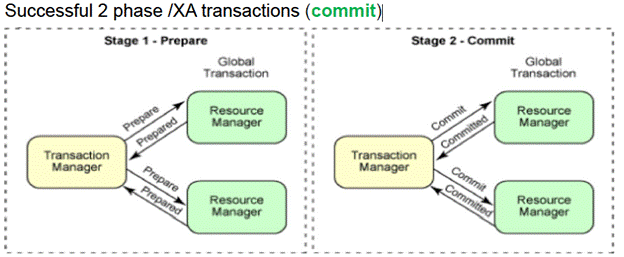
In the preceding example, the transaction manager coordinates two resource managers in a two-phase commit transaction.
In step 1, the transaction manager sends the prepare call, and both resource managers return a ready-to-commit response.
In step 2, the transaction manager sends the commit call, and the resource managers confirm that the transaction was committed successfully. Upon receipt of the commit flow, each resource manager finalizes its updates and releases any locks that it holds on resources or open files.
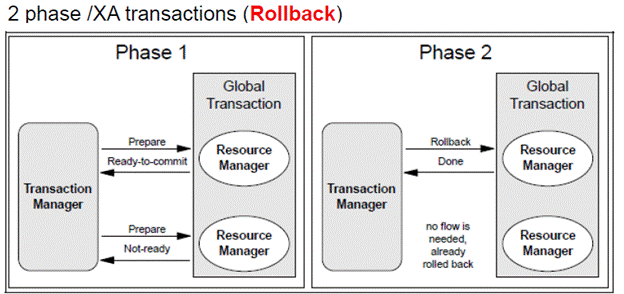
In the preceding example, the transaction manager coordinates two resource managers in a two-phase commit transaction.
In step 1, the transaction manager sends the prepare call to both resource managers, and one resource manager fails to prepare for the commit. An unsuccessful response from any resource manager, or a response that is not received within the timeout period, causes the transaction to be rolled back.
In step 2, the transaction manager does not send a commit request to any resource manager that returned a not-ready or negative response.
How a mix of one-phase and two-phase XA resources works
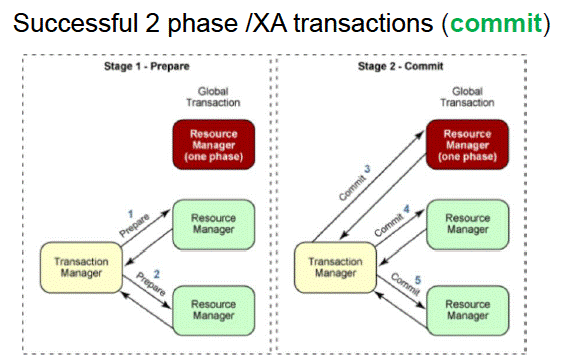
To ensure accurate heuristic reporting during recovery, an additional log entry can be written before a one-phase commit resource is committed. Enable this option in the administrative console by navigating to All Servers => <Server_name> => Container Services ➔ Transaction Service, and then select the Enable logging for heuristic reporting check box.
The Recovery Logs: tranlog and partnerlog
To guarantee atomicity across failures, the transaction service writes information to recovery logs for every global transaction that involves two or more resources, or that is distributed across multiple servers. The default location is:
profile_root/tranlog/cell_name/node_name/server_name/transaction
Two subdirectories:
• tranlog records the state transitions of transactions managed by WebSphere. The two files inside (tranlog.1 and tranlog.2) are used in a flip-flop rotation.
• partnerlog records the details of the resources that are involved in transactions, which allows the transaction service to re-create those resources when recovery takes place during a server restart.
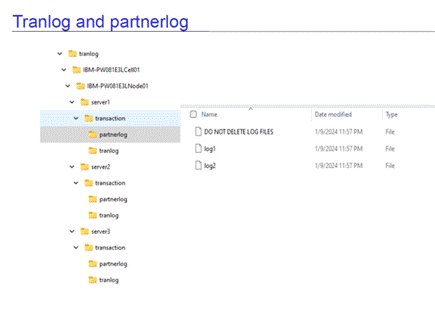
Important note: Never delete these directories in a production environment. If the log files are deleted, outstanding transactions might never complete, pending transactions might remain unresolved, and serious data integrity problems, including data corruption, can occur.
Also note that recovery log files do not shrink when in-doubt transactions complete. The space is freed internally and reused — so a large-looking log file is not by itself a problem.
Corrupted transaction log files often go undetected until a restart, because the files are only read during recovery, not during normal running. Corrupted logs prevent the server from restarting and typically surface as XA recovery errors in the JVM logs.
If you plan to use a file system for the transaction and partner logs, review the following resources for compliance:
IBM File System Locking Protocol Test for WebSphere Application Server
Network File System (NFS) Recommendations for WebSphere Application Server to avoid data loss
If you are using a database for the transaction logs, then before you enable high availability, the transaction log location and the compensation log location must be configured for each server in the cluster. These locations are specified by setting the TransactionLogDirectory and CompensationLogDirectory attributes on each server.
Storing and restoring transaction and compensation logs for high availability
How Recovery Works — and How It Fails
During server startup, the transaction manager checks the recovery logs for any active (in-flight/pending) transactions. During a normal, graceful shutdown, WAS resolves all in-flight transactions, so there is nothing to recover. But when a server stops ungracefully — a crash, a "kill -9", a power outage — in-flight transactions cannot be resolved, and the transaction service must use the recovery logs to complete them at the next startup.
If recovery succeeds, the server starts normally. If the transaction manager cannot resolve the pending transactions logged in the tranlog and partnerlog, it throws the appropriate messages in the JVM logs, and the server may fail to start. You will know a startup problem is recovery-related when you see com.ibm.ws.Transaction.JTA.RecoveryManager (or com.ibm.tx.jta.impl.RecoveryManager) in the stack trace. WTRN* and CWRLS* warning or exception messages indicate that recovery issues occurred during server startup. The transaction manager checks the transaction logs for any active transactions. When an application server instance that has active transactions in progress restarts after a failure, the transaction service uses the recovery logs to complete the recovery process.
If the transaction manager is unable to resolve the pending transactions that are recorded in the recovery logs (tranlog and partnerlog) for any reason, it writes the corresponding messages and FFDC records to the JVM logs, which can lead to server startup issues.
Transaction Peer Recovery (Applicable to traditional WebSphere Application Server in a clustered environment only)
In a cluster, the transaction manager supports peer recovery. The standard recovery process requires a server restart to complete the pending transactions. WebSphere Application Server provides a high availability strategy known as transaction peer recovery to avoid server restart in the event of server failure. Peer recovery is provided within a server cluster. A peer server (another cluster member) can process the recovery logs of a failed server while the peer continues to manage its own transactional workload.
To enable transaction peer recovery in the cluster configuration, complete the following steps:
1) Select the Enable failover of transaction log recovery check box, as shown in the following image.
2) Configure the transaction log directory and the recovery log directory for each server in the cluster.
3) Select the Enable service at server startup check box.
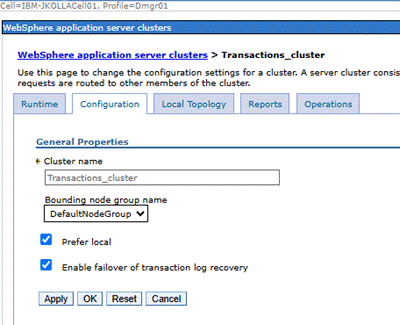
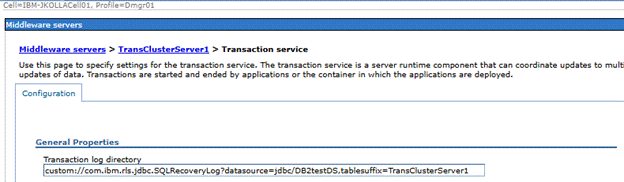
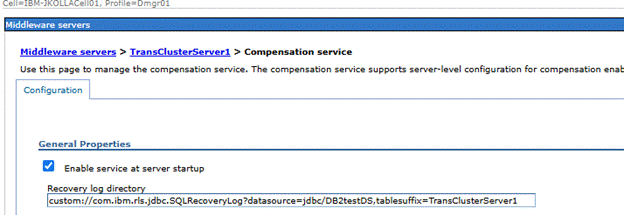
WebSphere Application Server Compensation service settings
In this example, the table suffixes are set as follows:
TransClusterServer1
TransClusterServer2
The database tables with the following names are created:
WAS_TRAN_LOGTransClusterServer1
WAS_TRAN_LOGTransClusterServer2
WAS_PARTNER_LOGTransClusterServer1
WAS_PARTNER_LOGTransClusterServer2
WAS_COMP_LOGTransClusterServer1
WAS_COMP_LOGTransClusterServer2
Automated peer recovery
This style is the default for peer recovery initiation. If an application server fails, WebSphere Application Server automatically selects a server to undertake peer recovery processing on its behalf, and passes recovery back to the failed server when it restarts. To use this model, enable transaction log recovery and configure the recovery log location for each cluster member.
Manual peer recovery
You must explicitly configure this style of peer recovery. If an application server fails, you use the administrative console to select a server to perform recovery processing on its behalf. You need to define the transaction Manager policy in the Core group settings.
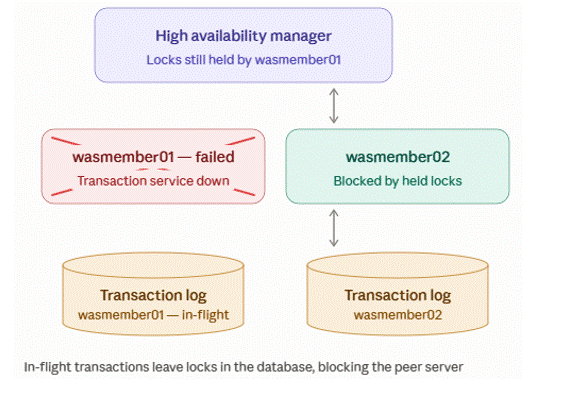
When two application servers perform two-phase commit (2PC) transactions, they place table or row locks in the database.
When two application servers perform two-phase commit (2PC) transactions, they place table or row locks in the database.
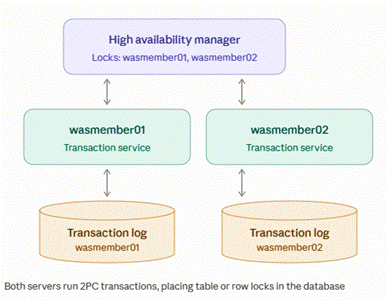
One server has issues and failed to start.
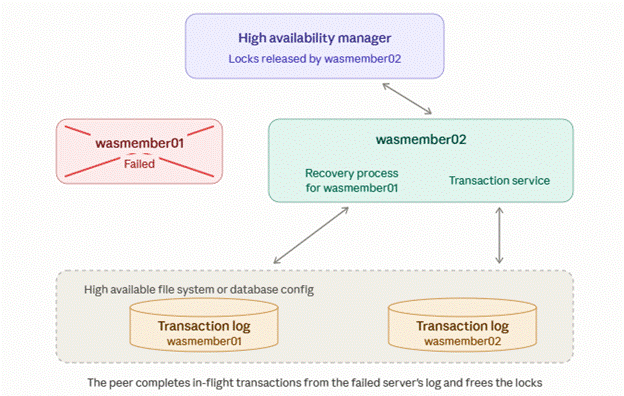
With HAManager support, a highly available file system and a lease-based locking protocol, a peer recovery process is started on a peer member of the cluster. The recovery locks are released, and the in-flight transactions are committed.
The following sections describe the most common transaction recovery issues, their root causes, and their solutions.
Problem 1: Recovery Fails During Startup — XAER_RMERR from the Database
Symptom: An authentication alias change, or an incorrect user ID or password.
The following messages are logged in the JVM logs:
WTRN0134I: Recovering X XA resource manager(s) from the transaction partner logs
WTRN0151I: Preparing to call xa recover on XAResource: <dataSource>
J2CA0215W: Component-managed authentication alias testAuth_alias for ConnectionFactory or DataSource jdbc/<testDataSource> is invalid. It may be necessary to re-start the server for previous configuration changes to take effect.
SECJ4062W: Cannot find the credential information.
<FFDC> com.ibm.ejs.j2c.PrivExAction.run 810
J2CA0044E: The Connection Manager failed to get a Subject from the security service associated with ConnectionFactory jdbc/ <testDdataSource>. Received exception javax.security.auth.login.LoginException: Incorrect authDataEntry and alias is: <testAuthAlias>
at com.ibm.ws.security.auth.j2c.WSDefaultPrincipalMapping.getSubject(WSDefaultPrincipalMapping.java:897)
at com.ibm.ejs.j2c.PrivExAction.run(PrivExAction.java:136)
at com.ibm.ws.security.util.AccessController.doPrivileged(AccessController.java:118)
at com.ibm.ejs.j2c.J2CXAResourceFactory$1.run(J2CXAResourceFactory.java:402)
at com.ibm.ws.security.util.AccessController.doPrivileged(AccessController.java:118)
at com.ibm.ejs.j2c.J2CXAResourceFactory.getXAResource(J2CXAResourceFactory.java:222)
at com.ibm.ws.Transaction.JTA.XARecoveryData.getXARminst(XARecoveryData.java:517)
at com.ibm.ws.Transaction.JTA.XARecoveryData.recover(XARecoveryData.java:718)
at com.ibm.tx.jta.impl.PartnerLogTable.recover(PartnerLogTable.java:433)
at com.ibm.tx.jta.impl.RecoveryManager.resync(RecoveryManager.java:1586)
at com.ibm.tx.jta.impl.RecoveryManager.performResync(RecoveryManager.java:2348)
at com.ibm.ws.tx.jta.RecoveryManager.performResync(RecoveryManager.java:119)
at com.ibm.tx.jta.impl.RecoveryManager.run(RecoveryManager.java:2301)
at java.lang.Thread.run(Thread.java:825)
Ensure that the correct authentication alias is configured for the data source, and that the correct user ID and password are specified.
If recovery worked previously and now fails with messages like above, check whether anything has changed around the authentication data: User ID or password change on the backend, a renamed or deleted J2C authentication alias, or the wrong alias configured on the data source or connection factory. Correct the alias and credentials, save and synchronize the configuration, and restart the server. As J2CA0215W hints, a restart may be necessary for configuration changes to take effect.
Verify the following configuration:
Administrative console —> Data sources —> <dataSource> —> Security settings: ensure that the correct J2C authentication alias is selected.
Administrative console —> Global security ==> Java Authentication and Authorization Service ==> J2C authentication data: ensure that the correct user ID and password combination is defined for the authentication alias that is used by the data source.
Problem 2: Insufficient Recovery Permissions on the Oracle Server
[9/17/21 1:30:54:546 HKT] 00000094 WSRdbXaResour E DSRA0304E: XAException occurred. XAException contents and details are: "".
[9/17/21 1:30:54:546 HKT] 00000094 WSRdbXaResour E DSRA0302E: XAException occurred. Error code is: XAER_RMERR (-3). Exception is: <null>
[9/17/21 1:30:54:546 HKT] 00000094 XARminst E WTRN0037W: The transaction service encountered an error on an xa_recover operation. The resource was com.ibm.ws.rsadapter.spi.WSRdbXaResourceImpl@7869f11f. The error code was XAER_RMERR. The exception stack trace follows: javax.transaction.xa.XAException
at oracle.jdbc.xa.OracleXAResource.recover(OracleXAResource.java:730)
at com.ibm.ws.rsadapter.spi.WSRdbXaResourceImpl.recover(WSRdbXaResourceImpl.java:1111)
at com.ibm.ws.Transaction.JTA.XARminst.recover(XARminst.java:141)
at com.ibm.ws.Transaction.JTA.XARecoveryData.recover(XARecoveryData.java:774)
at com.ibm.tx.jta.impl.PartnerLogTable.recover(PartnerLogTable.java:432)
at com.ibm.tx.jta.impl.RecoveryManager.resync(RecoveryManager.java:1586)
at com.ibm.tx.jta.impl.RecoveryManager.performResync(RecoveryManager.java:2348)
at com.ibm.ws.tx.jta.RecoveryManager.performResync(RecoveryManager.java:119)
at com.ibm.tx.jta.impl.RecoveryManager.run(RecoveryManager.java:2301)
at java.lang.Thread.run(Thread.java:798)
Here the transaction manager successfully obtained an XAResource and connected it to the database, but the xa_recover call itself failed. When the backend is Oracle, the usual root cause is missing recovery privileges: Oracle grants no user these privileges by default. The user ID that WAS uses for recovery must be granted the required permissions, which typically include SELECT on the pending transaction views and EXECUTE on the DBMS_XA package. For more information, see the IBM support document “Exception occurs during recovery of Oracle database transactions”. Ask your database administrator to grant the required permissions, and then restart the server.
Note that XA errors such as XAER_RMERR originate in the JDBC driver or JMS provider code, not in WebSphere itself — WAS is reporting the failure, not causing it. IBM provides a reference for translating the numeric errorCode values in XAExceptions into XA error names. Although the reference is documented for IBM MQ, it applies equally to WebSphere Application Server and WebSphere Liberty.
Grant permissions to the Oracle server
Problem 3: Recovery Fails Because of a Kerberos Authentication Issue
When Kerberos is used for authentication, recovery can also fail before the request reaches the database, because the credentials that are used to re-create the XAResource are no longer valid:
J2CA0215W: Component-managed authentication alias TEST_alias for ConnectionFactory or
DataSource jdbc/<testDataSource> is invalid.
SECJ4062W: Cannot find the credential information.
J2CA0044E: The Connection Manager failed to get a Subject from the security service
associated with ConnectionFactory jdbc/<testDataSource>. Received exception
javax.security.auth.login.LoginException: Incorrect authDataEntry and alias is: TEST_alias
at com.ibm.ws.Transaction.JTA.XARecoveryData.getXARminst(XARecoveryData.java:517)
at com.ibm.tx.jta.impl.RecoveryManager.resync(RecoveryManager.java:1586)
These exceptions occur when Kerberos authentication is configured for IBM Db2 data sources. The data source test connection completes successfully, and the application can call the database without error. However, when transaction recovery is performed, the preceding login exceptions are reported by the connection factory or the resource adapter.
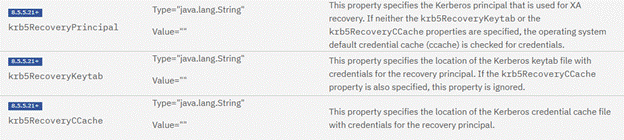
You can use Kerberos credentials to authenticate with DB2 data sources for XA recovery by specifying the Krb5RecoveryPrincipal custom property in your data source configuration.
To use Kerberos credentials for XA recovery with Db2 data sources, set the following custom properties in the data source configuration.
Problem 4: CWRLS0008E / CWRLS0009E — Recovery Log Marked as Failed
This pair of messages is reported frequently. These two Recovery Log Service messages nearly always appear together, and in some scenarios the server fails to start. CWRLS0008E indicates that the recovery log is being marked as failed and includes the associated transaction information. CWRLS0009E provides the details of the recovery log failure. The key to resolving the issue is to review the detail that is provided in CWRLS0009E, because the same message pair can have several distinct root causes.
Scenario A: Transaction Logs on NFS in a Clustered or High Availability Environment
CWRLS0009E: Details of recovery log failure:
com.ibm.ws.recoverylog.spi.InternalLogException:
java.io.IOException: Missing file or filesystem
at com.ibm.ws.recoverylog.spi.LogFileHandle.force(...)
Check the logs for networking or communication problems and any other CWRLS* messages from the same timestamp. In one reported case, the AIX kernel log revealed NFS client recovery events: the NFS server had stopped recognizing the client ID, which forced the client through a recovery cycle and briefly broke the file handle beneath the recovery log service.
Solution. By default, WAS recovery logs are memory-mapped flat files, and there are known problems with memory-mapped files on NFS — particularly in HA topologies where the logs live on a remote file system. Disable memory mapping on every server that accesses recovery log files by setting the JVM custom property:
https://www.ibm.com/docs/en/was-nd/9.0.5?topic=jvm-java-virtual-machine-custom-properties#com.ibm.ws.recoverylog.spi.NoMemoryMappedFiles__title__1
com.ibm.ws.recoverylog.spi.NoMemoryMappedFiles = true
(The default is false.) In the administrative console: Servers > Application Servers > server_name > Java and Process Management > Process Definition > Java Virtual Machine > Custom Properties > New. Add the property, save, synchronize, and restart. This setting also helps avoid problems during application server shutdown when the tranlogs are on NFS.
Scenario B: Database-Hosted Logs — "Another Server Has Locked the HA Lock Row", and Identical tablesuffix Values Configured for the compensationLogDirectory on Multiple Servers
From WAS 8.5 onward, transaction and compensation logs can be stored in a relational database instead of on the file system. With that configuration, you might see the following messages:
WTRN0100E: Another server owns the log cannot force SQL RecoveryLog logs for server <Cell>\<Node>\AppCluster.testServer
CWRLS0008E: Recovery log is being marked as failed. [ 3 compensation ]
CWRLS0009E: Details of recovery log failure: Another server has locked the HA lock row, com.ibm.ws.recoverylog.spi.InternalLogException: Another server has locked the HA lock row at com.ibm.ws.recoverylog.custom.jdbc.impl.SQLMultiScopeRecoveryLog.takeHADBLock(SQLMultiScopeRecoveryLog.java:2772)
CWRLS0029W: Unable to perform recovery processing for local WebSphere server - server being terminated
WTRN0107W: Caught non-SQLException Throwable when forcing SQL RecoveryLog logs for server <Cell>\<Node>\AppCluster.testServer Throwable: Another server has locked the HA lock row, com.ibm.ws.recoverylog.spi. InternalLogException: Another server has locked the HA lock row
WTRN0100E: Cannot recover from SQLException when forcing SQL RecoveryLog logs for server <Cell>\<Node>\AppCluster.testServer Exception: Another server has locked the HA lock row, com.ibm.ws.recoverylog.spi.InternalLogException: Another server has locked the HA lock row .....
CWRLS0028W: Common compensation log directory custom:/com.ibm.rls.jdbc.SQLRecoveryLog?datasource=jdbc/tranDS,tablesuffix=AppCluster.testserver2 has been defined for servers <Cell>\<Node>\AppCluster.testServer and <Cell>\<Node>\\AppCluster.testserver2.
In this configuration, the tablesuffix values for the compensationLogDirectory are identical. As with the tablesuffix for the transactionLogDirectory, these values must be unique for each server in the cluster.
CWRLS0028W indicates that a common compensation log directory has been defined for multiple servers, which may cause recovery lock contention or data integrity failures. The recommended action is to configure separate log directory paths for each server. CWRLS0008E indicates that the recovery log has failed and there is no further access to it. The recommended action is to restart the server so the log can be repaired and to address any conditions indicated by the exception. CWRLS0009E is issued alongside CWRLS0008E to provide details of the recovery log failure. These issues commonly occur in multi-node environments. The root cause is often a configuration issue where multiple servers are attempting to use the same transaction or compensation log directory, resulting in lock contention where another server has locked the HA lock row.
https://www.ibm.com/mysupport/s/forumsquestion?language=en_US&id=0D50z000062kmjqCAA
Scenario C: Cascading Server Restarts Caused by Peer Recovery Lock Contention
SQLMultiScope A CWRLS0008E: Recovery log is being marked as failed. [ 1 transaction ]
SQLMultiScope I CWRLS0009E: Details of recovery log failure: Another server has locked the HA lock row, com.ibm.ws.recoverylog.spi.InternalLogException: Another server has locked the HA lock row
at com.ibm.ws.recoverylog.custom.jdbc.impl.SQLMultiScopeRecoveryLog.takeHADBLock(SQLMultiScopeRecoveryLog.java:2649)
at com.ibm.ws.recoverylog.custom.jdbc.impl.SQLMultiScopeRecoveryLog.internalForceSections(SQLMultiScopeRecoveryLog.java:2011)
...
RLSHAGroupCal W CWRLS0029W: Unable to perform recovery processing for local WebSphere server - server being terminated
<FFDC> com.ibm.ws.recoverylog.custom.jdbc.impl.SQLMultiScopeRecoveryLog.provideServiceability 3624
<FFDC> com.ibm.ws.recoverylog.custom.jdbc.impl.SQLMultiScopeRecoveryLog.provideServiceability 3628
000002b1 SQLMultiScope A WTRN0107W: Caught non-SQLException Throwable when forcing SQL RecoveryLog tranlog for <cell_name>\<node_name>\<server_name> Throwable: Another server has locked the HA lock row, com.ibm.ws.recoverylog.spi.InternalLogException: Another server has locked the HA lock row
SQLMultiScope A WTRN0100E: Cannot recover from SQLException when forcing SQL RecoveryLog tranlog for server <cell_name>\<node_name>\<server1_name> Exception: Another server has locked the HA lock row, com.ibm.ws.recoverylog.spi.InternalLogException: Another server has locked the HA lock row
<FFDC> com.ibm.ws.recoverylog.spi.SQLMultiScopeRecoveryLog.forceSections 537
<FFDC> com.ibm.ws.recoverylog.spi.SQLRecoverableUnitImpl.forceSections 531
<FFDC>com.ibm.tx.jta.impl.TransactionState.setState 505
<FFDC> com.ibm.ws.Transaction.JTA.TransactionState.setState 506
TransactionSt E WTRN0066W: Encountered exception during transaction logfile write operation. The exception stack trace follows: com.ibm.ws.recoverylog.spi.InternalLogException: com.ibm.ws.recoverylog.spi.InternalLogException: Another server has locked the HA lock row,
After approximately 10 seconds, the following message is reported on the peer server in the cluster, which then attempts the recovery and fails.
RecoveryDirec I CWRLS0011I: Performing recovery processing for a peer WebSphere server (<cell_name>\<node_name>\<server1_name>).
In a WebSphere Application Server Network Deployment environment that uses database-stored transaction logs and automated peer recovery, a high availability manager view split can cause a peer server to claim the recovery logs of a running server. As a result, that server shuts down and restarts repeatedly, and reports WTRN0100E and WTRN0112E errors. APAR PH10643, included in fix packs 8.5.5.19 and 9.0.5.6, resolves this with an enhanced locking algorithm, enabled by setting the Transaction Service custom property ENABLE_DBTXLOG_PEERLOCKING on each server in the cluster.
PH10643: CASCADING SERVER RESTART DUE TO TRANSACTION AUTO PEER RECOVERY LOCKING ISSUE:
https://www.ibm.com/support/pages/apar/PH10643
Set ENABLE_DBTXLOG_PEERLOCKING to true on each server in the cluster.
The fix for this APAR is included in fix packs 8.5.5.19 and 9.0.5.6.
Problem 5: CWRLS0004E — Unable to Create the Recovery Log File
CoordinationL E CWRLS0004E: Unable to create recovery log file /<path_to_tranlog folder>/tranlog/log2.
RecoveryHandl E CWRLS0016E: Unable to obtain an exclusive file lock needed to perform recovery processing for server <cell>\<node>\<server_name>.
RLSHAGroupCal W CWRLS0029W: Unable to perform recovery processing for local WebSphere server - server being terminated
HAGroupImpl I HMGR0130I: The local member of group
GN_PS=<cell>\<node>\<server_name>,IBM_hc=<cluster_name>,type=WAS_TRANSACTIONS has indicated that is it not alive. The JVM will be terminated.
Verify that the tranlog directory is mounted and that it is writable by the user ID under which the application server runs. If the lock error persists in a cluster, assign each cluster member a unique log location on a compliant file system, and set com.ibm.ws.recoverylog.spi.NoMemoryMappedFiles=true.
Problem 6: WTRN0000E, WTRN0005W, WTRN0025E, and WTRN0045W — XAResource Cannot Be Re-created, or an Invalid Xid or recoveryId in the JVM Log/FFDC’s
The following errors share the same root cause. When an Invalid Xid or recoveryId error is logged, you might see one or more of these messages.
WTRN0000E: An internal error occurred in method reconstruct in class com.ibm.ws.tx.jta.RegisteredResources; the exception stack trace follows: java.lang.Exception: Invalid Xid/recoveryId in transaction log
WTRN0025E: Recovery of Transaction failed javax.transaction.SystemException: java.lang.Exception: Invalid Xid/recoveryId in transaction log
WTRN0005W: The XAResource for a transaction participant could not be recreated and transaction recovery may not be able to complete properly. The resource was <XYZ>
FFDC1015I: An FFDC Incident has been created: "java.lang.Exception: Invalid Xid/recoveryId in transaction log com.ibm.tx.jta.embeddable.impl.EmbeddableRegisteredResources.reconstruct 843" at ffdc_***.log
com.ibm.tx.jta.embeddable.impl.EmbeddableRegisteredResources E WTRN0045W: The transaction service cannot recover resource 0000000000000000000000020001. The exception stack trace follows: java.lang.Exception: Invalid Xid/recoveryId in transaction log
This error occurs when the transaction manager finds an entry in the partner log but can no longer reconstruct the corresponding XAResource. It typically occurs after a data source or a messaging engine has been re-created, or after queues or other resources have changed since the entry was written to the logs.
In this situation, the transaction service typically generates an FFDC record, which contains essential information about the recovery ID that cannot be recovered.
Key information in FFDC:
Stack Dump = java.lang.Exception: Invalid Xid/recoveryId in transaction log
recoverableUnitIdentity = 5
The FFDC record also contains the table names and the associated suffix details.
If an FFDC record is not available, review the transaction traces for recoveryID=* and recovered=false.
If an FFDC record is available, you do not need to enable tracing to identify the recovery ID in question. For Liberty, run the following statement against the transaction log database tables.
To fix the error, delete the RUID from the transaction logs using the following query:
DELETE FROM <WAS_TRAN_LOG_suffix> WHERE RU_ID=5
After this record has been deleted from the tranlog database table, the server should start as expected.
1. For traditional WebSphere Application Server, use the following procedure to delete the recovery ID in question. On the affected server, create the Transaction Service custom property REMOVE_PARTNER_LOG_ENTRY (Application servers > server > Transaction service > Custom properties) with the failing recovery IDs as comma-separated values, for example "2,4,6". The default is null. (See APAR PM62977 for background.)
Note: Do not delete RU ID 1 or -1, because these entries contain metadata.
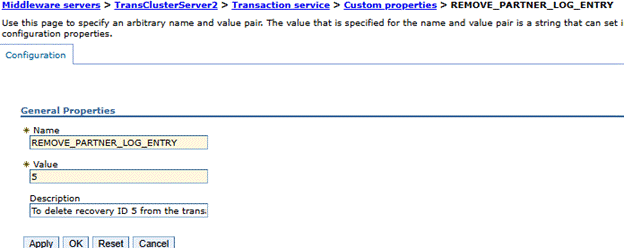
2. Start the application server in recovery mode: startServer.bat|sh server1 -recovery (from the profile bin directory).
3. After recovery completes successfully, remove the REMOVE_PARTNER_LOG_ENTRY property, save the configuration, and start the server normally.
After you delete the affected RU IDs, confirm the result by checking for the following messages in the JVM logs:
WTRN0135I: Transaction service recovering no transactions
WTRN0134I: Recovering 0 XA resource manager(s) from the transaction partner logs
WTRN0133I: Transaction recovery processing for this server is complete. This message is issued only when the server is started with the -recovery option.
Starting a Server in Recovery Mode
Several of the preceding solutions rely on recovery mode, so it is described separately in this section. From the profile_root/bin directory of the server, run the following command:
startServer <server_name> -recovery
When a server starts in recovery mode:
· The -recovery option causes the server to start, perform transaction recovery only, and then shut down again.
• When the application server is started in recovery-only mode, it continues to retry indefinitely until recovery has completed successfully for all resources.
• Transactional resources complete the actions recorded in the recovery logs, and the server then shuts down automatically. During the recovery period, only the subset of application server functions necessary for transactional recovery is available.
• The server does not accept new work while recovery is in progress.
This is the safest way to drain pending transactions from a server — for example, before maintenance, or when normal startup keeps failing on recovery — without exposing the server to new traffic.
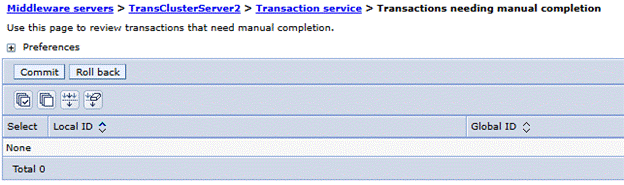
After the server restarts in normal mode, check whether any in-doubt transactions remain. Navigate to Servers > Application Servers > serverName > Container Services > Transaction service > Runtime tab
If any in-doubt transactions are listed, select all of them and initiate a rollback.
Problem 7: WTRN0062E / WTRN0063E — One-Phase Resources in Global Transactions
These two errors indicate configuration or application design issues rather than recovery issues, but they routinely surface during recovery investigations.
WTRN0062E — "An illegal attempt to use multiple resources that have only one-phase capability has occurred within a global transaction." Only a single one-phase-capable (non-XA) resource can be enlisted in a global transaction, and only with Last Participant Support. The most common root cause is a non-XA JDBC driver mixed into a global transaction alongside XA resources.
There can be only a single resource that is limited to one-phase capability enlisted in a global transaction. This error occurs if multiple resource managers that are only one-phase capable are used in a global transaction, or if multiple unshared connections from a single such resource manager are used in a global transaction.
The solution is to modify the application to use either a single resource that is limited to one-phase capability, or to use two-phase capable XAResources.
Refer to "WTRN0062E and J2CA0030E Errors While Trying To Do Last Participant Support Extensions" for more information.
WTRN0063E — "An illegal attempt to commit a one phase capable resource with existing two phase capable resources has occurred." The transaction service refused to commit a one-phase resource into a transaction that already involves two-phase resources. Either Last Participant Support (LPS) is not enabled, or the application has not been configured to accept the heuristic risk. Ensure that one-phase and two-phase resources are not mixed in the same transaction. If mixing them is required, enable LPS for the application:
Applications > Application Types > WebSphere enterprise applications > application_name > Last participant support extension, and check Accept heuristic hazard. LPS enables a one-phase resource to be enlisted with one or more two-phase resources in a global transaction, and coordinates the commit or rollback across all of them.
Why the "heuristic hazard" warning matters: unlike two-phase commit, there is no recovery from a communication failure with a one-phase resource. If communication fails while the one-phase resource is committing, the two-phase participants roll back, but the one-phase outcome is unknown — it may have committed or rolled back. For better diagnosis of such outcomes, enable Enable logging for heuristic reporting under Servers > server > Container Services > Transaction Service; this writes one extra log entry before committing the one-phase resource in any mixed transaction. The related Heuristic completion direction setting (default ROLLBACK) controls how a subordinate server completes a transaction during recovery once the heuristic retry limit is exceeded.
Liberty database locking issues
When a database is used for the transaction logs in Liberty, several known database locking issues have been identified, and all of them have been resolved. Liberty server shutdown handling has also been improved to provide better transaction recovery management.
Improved Liberty Server shutdown handling
https://github.com/OpenLiberty/open-liberty/pull/23921
Several additional issues have been fixed in the database logging code, in recovery groups, and in WS-AT support, including but not limited to the following:
https://github.com/OpenLiberty/open-liberty/issues/26620
https://github.com/OpenLiberty/open-liberty/issues/26809
https://github.com/OpenLiberty/open-liberty/issues/26832
https://github.com/OpenLiberty/open-liberty/pull/27028
https://github.com/OpenLiberty/open-liberty/issues/27201
https://github.com/OpenLiberty/open-liberty/issues/27341
https://github.com/OpenLiberty/open-liberty/issues/27396
https://github.com/OpenLiberty/open-liberty/issues/26939
https://github.com/OpenLiberty/open-liberty/issues/27509
To benefit from all of the preceding fixes, use Liberty version 25.0.0.10 or later.
If you are using Liberty containers, together with other IBM products such as IBM Business Process Manager, IBM Business Automation Workflow, or IBM FileNet, the servers might crash or terminate for any reason. When you next restart the Liberty servers, you might see exceptions in the logs that report è Invalid Xid/recoveryId in transaction log, and the servers do not start successfully. In this case, refer to the FFDC records, which identify the affected RU ID and the table in which it is recorded. The FFDC records contain information similar to the following example.
WTRN0045W: The transaction service cannot recover resource <resource ID>. The exception stack trace follows: java.lang.Exception: Invalid Xid/recoveryId in transaction log :
_recoverableUnitIdentity = <RU ID #>
_serverName = "_<pod_name>"
_clientName = "transaction"
_logName = "tranlog"
_recoveryTableName = "WAS_"
_recoveryIndexName = "IXWS"
_recoveryTableNameSuffix = "<in general its pod name>"
Stop the Liberty server, and then delete the RU ID from the transaction logs. Based on the FFDC data, run the following statement:
DELETE FROM WAS_TRAN_LOG_<POD_NAME> WHERE RU_ID=<RU_ID from above>
Then restart the Liberty servers.
Good Practices: Migration, Maintenance, and Reading Startup Logs
• Shut down cleanly before you move transaction logs, and before you perform migrations or maintenance or any config changes. Confirm this message on shutdown: "WTRN0105I: The transaction service has shutdown successfully with no transactions requiring recovery."
• Use the right storage for HA. Place recovery logs on NFSv4, SAN, or a database — not on ordinary shared file systems such as Windows mapped drives. On NFS, run the IBM file system locking protocol test and follow the IBM NFS recommendations to avoid data loss.
• Keep tranlog configuration unique per cluster member, whether file-based (unique directories) or database-based (unique table suffixes).
Troubleshooting Transaction Timeout Issues (WTRN0006W / WTRN0124I) in WebSphere Application Server and WebSphere Liberty