Nowadays, a corporate deployment of OpenShift requires more than the default network settings. Yes, OVN-Kubernetes provides an overlay network for the default communication of OpenShift pod traffic between nodes, but what if you wanted to separate traffic for deployment of Fusion/OpenShift Data Foundation. For example, separate the replication traffic from the rest of the application traffic.
RedHat provides an OpenShift Data Foundation multus prerequisite validation tool. However, we cannot run the RedHat tool on ppc64le. The binary has a mismatch, running for only linux_amd64 and linux_arm64. This is a common hurdle on IBM Power Systems architectures (ppc64le).
In this article I will run through how you can create a similar tool for ppc64le to validate your multus configuration.
The tool runs in a pod which executes the below command.
command: ["/usr/local/bin/rook"]
args: ["multus", "validation", "run", "--config", "/config/multus-validation-config.yaml"]
The rook command is deployed in the rook-ceph-rhel9-operator image. This image exists in a multi-architecture manifest, but running the multi-architecture manifest image still produces an exec error for the platform. This happens because we mostly have a x86 quay server, which pulls an x86 manifest header.
This is not a problem for operator installations because once the OLM schedules the Operator's Pod onto a worker node, the worker node pulls the image. If the Pod lands on an IBM Power ppc64le worker node, that specific ppc64le node contacts the registry, reads the multi-arch manifest list, and downloads only the ppc64le slice.
example image structure
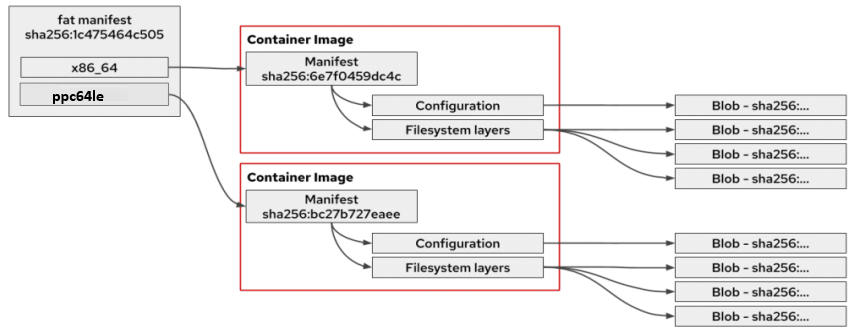
So, we download the specific ppc64le image and push to our local quay server. To make it available to our multus validation pod in our local quay server.
$ podman pull --arch ppc64le registry.redhat.io/odf4/rook-ceph-rhel9-operator
$ podman tag registry.redhat.io/odf4/rook-ceph-rhel9-operator your-registry/odf4/rook-ceph-rhel9-operator
$podman push your-registry/odf4/rook-ceph-rhel9-operator
We also need an httpd server that stays up without requiring security changes in the local openshift-storage namespace, and allows the rook command to use it, when specified in the configmap /config/multus-validation-config.yaml"] in the previously stated command. Pull the community ngix-alpine image.
# podman pull --arch ppc64le docker.io/library/nginx:alpine
# podman tag docker.io/library/nginx:alpine your-registry/library/nginx-alpine:latest
# podman push your-registry/library/nginx-alpine:latest
if you've tried to create a deployment before in a openshift namespace, you will find you get this message.
configmaps is forbidden: User "system:serviceaccount:openshift-storage:default" cannot create resource "configmaps" in API group "" in the namespace "openshift-storage"
The below method works for a temporary pod deployment.
Create a configmap for the options, named multus-validation-config.yaml
|
publicNetwork: "" # Empty to fall back to the primary installation network
clusterNetwork: "openshift-storage/odf-cluster" # Points to your NAD
namespace: "openshift-storage"
serviceAccountName: "rook-ceph-system"
resourceTimeout: "2m" # Sets the environment creation timeout to 2 minutes
flakyThreshold: "10s" # Sets the flakiness latency evaluation buffer to 10 seconds
nginxImage: "your-registry/library/nginx-alpine:latest"
nodeTypes:
storage-nodes:
osdsPerNode: 1 # only 1 disk per node. Grabs 1 IP from the pool in your NAD per node
otherDaemonsPerNode: 2
placement:
nodeSelector:
node-role.kubernetes.io/infra: "" # run only on your infra nodes
|
$ oc create configmap odf-validation-cfg --from-file=multus-validation-config.yaml=multus-validation-config.yaml -n openshift-storage
Temporarily create the rook-ceph-system service account. This is created with the deployment of ODF, but at this stage we have only installed the ODF operator. No deployment of a storage-cluster has happened as yet. Remove this service account when done with testing to allow the operator to recreate it.
$ oc create serviceaccount rook-ceph-system -n openshift-storage
Now, create the pod that will deploy the nginx server that all osd's will connect to with a curl to test your NAD connectivity before the ODF deployment.
Create and deploy the odf-ppc64le-validation.yaml manifest.
apiVersion: v1
kind: ServiceAccount
metadata:
name: odf-test-runner
namespace: openshift-storage
---
apiVersion: rbac.authorization.k8s.io/v1
kind: RoleBinding
metadata:
name: odf-test-runner-binding
namespace: openshift-storage
roleRef:
apiGroup: rbac.authorization.k8s.io
kind: ClusterRole
name: cluster-admin
subjects:
- kind: ServiceAccount
name: odf-test-runner
namespace: openshift-storage
---
apiVersion: v1
kind: Pod
metadata:
name: odf-ppc64le-validator
namespace: openshift-storage
spec:
nodeSelector:
node-role.kubernetes.io/infra: ""
serviceAccountName: odf-test-runner
restartPolicy: Never
# Fixes pod-level restricted security constraints
securityContext:
runAsNonRoot: true
runAsUser: 1000710000 # Standard safe OpenShift arbitrary non-root UID
seccompProfile:
type: RuntimeDefault
containers:
- name: odf-tool
image: your-registry/odf4/rook-ceph-rhel9-operator:sha256-4b3462b5e4ffaeb9741e5310ce03ef042194171863224057831c884c29aeed58
command: ["/usr/local/bin/rook"]
args: ["multus", "validation", "run", "--config", "/config/multus-validation-config.yaml"]
volumeMounts:
- name: config-volume
mountPath: /config
volumes:
- name: config-volume
configMap:
name: odf-validation-cfg |
In your openshift-storage namespace you will only have these 2 operators running before an ODF cluster deployment.
# oc get pods
NAME READY STATUS RESTARTS AGE
odf-console-8696859cb8-blxtx 1/1 Running 0 19h
odf-operator-controller-manager-59d45bb8b7-qtmpl 1/1 Running 0 17h
After you have deployed the validation pod, you should see the below running.
# oc apply -f odf-ppc64le-validation.yaml
serviceaccount/odf-test-runner unchanged
rolebinding.rbac.authorization.k8s.io/odf-test-runner-binding unchanged
pod/odf-ppc64le-validator created
# oc get pods
NAME READY STATUS RESTARTS AGE
multus-validation-test-image-pull-storage-nodes-9gwpm 1/1 Running 0 13s
multus-validation-test-image-pull-storage-nodes-klghs 1/1 Running 0 13s
multus-validation-test-image-pull-storage-nodes-zsmff 1/1 Running 0 13s
multus-validation-test-web-server 1/1 Running 0 13s
odf-console-8696859cb8-blxtx 1/1 Running 0 21h
odf-operator-controller-manager-59d45bb8b7-qtmpl 1/1 Running 0 19h
odf-ppc64le-validator 1/1 Running 0 14s |
The validation pods will restart as the additional interface is added.
# oc get pods
NAME READY STATUS RESTARTS AGE
multus-validation-test-image-pull-storage-nodes-9gwpm 1/1 Terminating 0 43s
multus-validation-test-image-pull-storage-nodes-klghs 1/1 Terminating 0 43s
multus-validation-test-image-pull-storage-nodes-zsmff 1/1 Terminating 0 43s
multus-validation-test-web-server 1/1 Running 0 43s
odf-console-8696859cb8-blxtx 1/1 Running 0 21h
odf-operator-controller-manager-59d45bb8b7-qtmpl 1/1 Running 0 19h
odf-ppc64le-validator 1/1 Running 0 44s |
eventually 2 OSD test pods will be running
# oc get pods
NAME READY STATUS RESTARTS AGE
multus-validation-test-client-storage-nodes-osd-0-lc9dq 1/1 Running 0 58s
multus-validation-test-client-storage-nodes-osd-0-p7jz4 1/1 Running 0 58s
multus-validation-test-client-storage-nodes-osd-0-zjj8x 0/1 ContainerCreating 0 58s
multus-validation-test-web-server 1/1 Running 0 102s
odf-console-8696859cb8-blxtx 1/1 Running 0 21h
odf-operator-controller-manager-59d45bb8b7-qtmpl 1/1 Running 0 19h
odf-ppc64le-validator 1/1 Running 0 103s |
The multus validation will show that 2 pods are connected.
|
2026-09-11 19:23:32.232523 I | multus-validation: continuing: all 3 client pods are not yet 'Running': found 2
2026-09-11 19:23:34.237452 I | multus-validation: continuing: all 3 client pods are not yet 'Running': found 2
2026-09-11 19:23:36.242037 I | multus-validation: continuing: all 3 client pods are not yet 'Running': found 2
2026-09-11 19:23:38.246440 I | multus-validation: continuing: all 3 client pods are not yet 'Running': found 2
RESULT: multus validation test failed: multus validation test timed out: all 3 client pods are not yet 'Running': found 2
Suggested things to investigate before installing with Multus:
- clients not being able to run can mean multus is unable to provide them with addresses
- multus may be unable to provide addresses for pods
- check networking events on the pod and multus logs
- macvlan: NIC or switch hardware/software may block the association of some number of additional MAC addresses on an interface
- macvlan: interfaces and network switching must enable promiscuous mode to allow receiving packets for unknown (Multus) MACs
- macvlan/ipvlan: switch hardware/software may block an interface from receiving packets to an unknown (Multus) IP
leaving multus validation test resources running for manual debugging
|
But if we look at where the pods are running, we find that the webserver and pod that is in still creating are on the same worker node. The NNCP and NAD used in this example is type local-host, which provides for only one pod per interface. So this multus validation works
# oc get pods -o wide
NAME READY STATUS RESTARTS AGE IP NODE NOMINATED NODE READINESS GATES
multus-validation-test-client-storage-nodes-osd-0-lc9dq 1/1 Running 0 2m58s 10.131.0.24 osprod-57ed-worker-4 <none> <none>
multus-validation-test-client-storage-nodes-osd-0-p7jz4 1/1 Running 0 2m58s 10.128.2.78 osprod-57ed-worker-3 <none> <none>
multus-validation-test-client-storage-nodes-osd-0-zjj8x 0/1 ContainerCreating 0 2m58s <none> osprod-57ed-worker-2 <none> <none>
multus-validation-test-web-server 1/1 Running 0 3m42s 10.130.2.21 osprod-57ed-worker-2 <none> <none>
odf-console-8696859cb8-blxtx 1/1 Running 0 21h 10.128.2.27 osprod-57ed-worker-3 <none> <none>
odf-operator-controller-manager-59d45bb8b7-qtmpl 1/1 Running 0 19h 10.128.2.44 osprod-57ed-worker-3 <none> <none>
odf-ppc64le-validator 0/1 Error 0 3m43s 10.131.0.22 osprod-57ed-worker-4 <no |
An alternative to this would be a macvlan NAD to be able to create multiple IP and MAC addresses on the same physical adapter. Then multiple osd pods on each worker's additional network adapter interface.
I shall test this later once the required changes have been made to the upstream top-of-rack (ToR) switch to enable multiple mac addresses on this additional physical adapter added to the workernodes.
let me know how you're testing your multus configuration for OpenShift deployments on IBM Power, and whether this example helped you until we have an official multus test tool for ppc64le.
Ian