Agentic AI on Enterprise WordPress: What Works (and What Breaks) When an AI Agent Builds a Timber/ACF Feature
BhanuKiran Botta, is an IBM Consulting Application Developer and Service Delivery Manager working on enterprise WordPress platforms.
Introduction
AI coding agents can build a real feature on an enterprise WordPress site, but only if you scope what they read, stage what they do, and review the parts WordPress makes subtle.
I deliver on a multi-market consumer-brand site built on WordPress with Timber (Twig templates) and Advanced Custom Fields (ACF), hosted on Azure. I first hand-built a sizeable enhancement: a new custom post type, an ACF data model with a repeater, a bulk CSV importer, short-link routing and country-gated content. I then rebuilt the same feature from its requirements using IBM Consulting Advantage for requirements and IBM Bob as the coding agent, and tested it end to end on a local Docker stack.
Because I had already built it by hand, I could judge the agent's work against a known-good implementation. This article is what I learned, written for WordPress developers rather than AI enthusiasts. Code samples use a generic recipe post type.
1. Why WordPress is hard for AI agents
A typical enterprise WordPress repository is mostly noise from the agent's point of view: WordPress core, dozens of plugins, uploaded media, legacy uploads and database dumps. Your custom code, usually one theme and a few modules, is a small fraction of it.
My first prompt, "analyse this theme", failed outright. Even a trivial "hello" kept failing until I fixed the environment, and once it worked, broad prompts were still unreliable. What worked was excluding everything that is not your code and naming the exact entry points:
uploads/
uploads_old/
database/
*.sql
wordpress/wp-admin/
wordpress/wp-includes/
wordpress/wp-content/plugins/
wordpress/wp-content/uploads/
**/vendor/
**/node_modules/
Analyse only wp-content/themes/<theme>/. Start with single.php, index.php and modules/<module>/setup.php. Explain the custom post types, the routing for ?ref= URLs and the CSV import. Output an architecture note with file paths.
Scoping is not a workaround. It is the single biggest factor in output quality on a WordPress codebase.
2. What the Timber/ACF stack does well for agents
Some WordPress architecture choices make an agent far more effective. Three stood out.
Timber separates data from markup. A PHP controller builds a $context array and hands it to a Twig template. The agent can change data logic without touching HTML, and vice versa, and each change is small enough to review.
$context = Timber::context();
$context['nutrition'] = get_recipe_nutrition($post->ID);
Timber::render('single-recipe.twig', $context);
ACF Local JSON makes the schema code. With Local JSON, every field group lives in acf-json/*.json and syncs automatically. The agent can read the existing schema, write a new field group as a file, and you review it as a diff instead of clicking through wp-admin.
Trait-based registration gives the agent a pattern to copy. If your custom post types share a registration trait, a new type is mostly constants:
class Recipe {
const POST_TYPE_SLUG = 'recipe';
const POST_TYPE_SUPPORTS = ['title'];
use RegisterPostTypeTrait;
}
Agents imitate. The more consistent your existing patterns, the more consistent the new code.
3. Hook order is where you must review closely
The most important WordPress fact for an agent is when code runs, not what it does. An agent asked to "mark this page as reached via a short link" can easily put the check in the template file, because that is where the page is assembled.
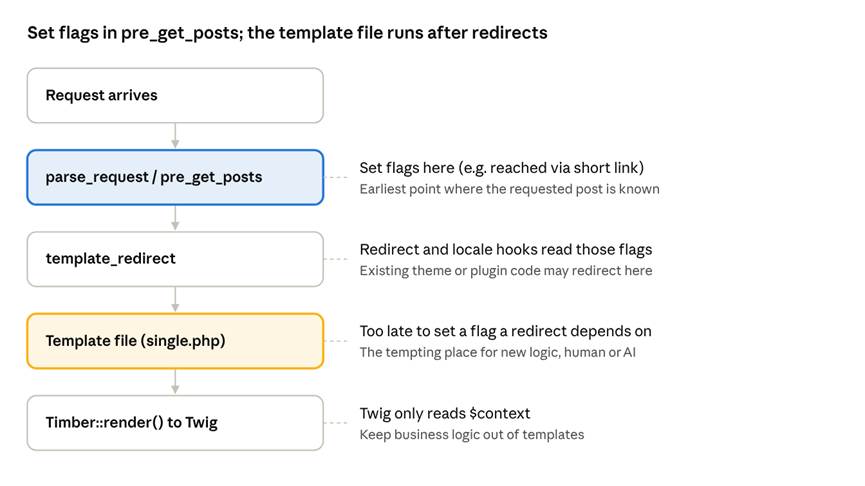
WordPress request lifecycle · where logic must live
In my build, the locale logic on template_redirect read a reached-via-short-link flag to decide whether to redirect by geolocation. A flag set in single.php would have been invisible to it. The fix is to set the flag on pre_get_posts:
add_action('pre_get_posts', function ($query) {
if (!$query->is_main_query() || empty($_GET['recipe_ref'])) { return; }
add_filter('posts_results', function ($posts) {
foreach ($posts as $p) { $p->was_shortlink_access = true; }
return $posts;
});
});
Ask the agent to explain the hook order for your specific URL shape before it writes code, and check its answer against the diagram above.
4. Four WordPress details to review in AI-generated code
These are correct-looking code paths that fail silently. Put them on your review checklist whatever tool wrote the code.
Menu slugs are HTML-escaped. WordPress core builds taxonomy submenu slugs with esc_attr(), so & is stored as &. remove_submenu_page() does an exact match, so a literal & removes nothing:
remove_submenu_page(
'edit.php?post_type=recipe',
esc_attr('edit-tags.php?taxonomy=brand&post_type=recipe')
);
Admin-save filters fire on programmatic inserts. Filters on wp_insert_post_data or pre_post_update written for editors (derive the slug, lock a key field, require fields) also run when an importer calls wp_insert_post(). Remove them around imports and restore them afterwards.
Query strings can trip existing rules. Mature sites carry regexes that bypass geolocation, caching or redirects for certain URLs. A new route that reuses a familiar parameter such as ?ref= can silently inherit those bypasses. Search the codebase for every regex that matches your new URL shape before shipping it.
ACF repeaters need nested rows. CSV columns arrive flat (FORMAT_1_SIZE, FORMAT_2_SIZE ...). The repeater expects an array of rows, and empty slots should be skipped, not saved as blank rows:
for ($n = 1; $n <= 10; $n++) {
$row = ['size' => trim($data["format_{$n}_size"] ?? '')];
if (array_filter($row)) { $rows[] = $row; }
}
update_field('formats', $rows, $post_id);
5. Additive by design
On a live enterprise site the best instruction to an agent is "add beside, never rewrite". Every prompt in my build carried the line Don't change existing behaviour of the existing post type, and the design followed three patterns:
• A new post type next to the old one, with its own templates (single-recipe.twig, views/recipe/*), instead of branching the existing ones.
• Taxonomies declare where they attach. Instead of a hardcoded [Product::POST_TYPE_SLUG] in a shared trait, each taxonomy class defines ATTACHED_POST_TYPES. The new type opts in; nothing else changes.
• Fallback routing, not replacement. The existing ?ref= lookup runs first, unchanged. Only when it finds nothing does the new lookup run. Links already in circulation keep working.
This also makes review easier: the diff to existing files stays small, and each change to a shared file has an obvious reason.
6. Requirements first, then staged agent sessions
An agent builds what it is told. On this project the real requirements were spread across a statement of work and months of client emails, so I fixed that before writing any code.
In IBM Consulting Advantage Agent Studio I built a small agent grounded on a document collection of the SOW and emails. Its instructions require a traceability matrix (requirement, source quote, acceptance criteria, status), open questions, user stories and UAT cases, with a source cited for every requirement and nothing invented. I checked its output against my own requirement list before using it.
That output became IBM Bob's input, and I ran Bob in separate sessions with a human review between each:
1. Analyse: architecture note for the theme, with file paths. No edits.
2. Analyse the risky area: request lifecycle, geolocation and hook order. No edits.
3. Plan: files to add or modify, order and risks. I reviewed and corrected it before approving.
4. Build: one plan step per session, reviewed as a diff.
5. Test: agent-generated test CSVs, import through wp-admin, then the new URLs, on local Docker.
Keeping the stages separate kept each session's context small and gave me natural points to stop a wrong direction early.
7. A reusable pack for WordPress/Timber/ACF projects
Copy these into your agent's rules or keep them as a checklist.
Standing rules for every session
• Work only inside wp-content/themes/<theme>/ unless told otherwise.
• Never modify WordPress core, plugins or vendor code.
• Add beside existing post types and templates; do not change their behaviour.
• Field groups are edited as ACF Local JSON files, never through wp-admin.
• Do not run git commit, push or any database write.
Staged prompts
1. Architecture: "Analyse only <theme>. Start with <entry files>. Explain <flows>. Output an architecture note with file paths. Do not edit files."
2. Lifecycle: "Explain which hooks run, in what order, for <URL shape>, and where each flag is set and read."
3. Plan: "Using <requirements>, plan <feature>. List files to add or modify, order and risks. Do not write code."
4. Build: "Implement step N of the plan only."
5. Test: "Generate test data covering <edge cases> and list manual test steps."
Review checklist
• ☐ Logic that a redirect or locale hook depends on runs early enough (pre_get_posts or earlier).
• ☐ Admin-only filters are removed around programmatic inserts.
• ☐ Menu slugs passed to remove_submenu_page() are built with esc_attr().
• ☐ New URL shapes checked against existing bypass and redirect regexes.
• ☐ Repeaters skip empty CSV slots.
• ☐ New post type excluded from sitemap and search indexing if it must not be discoverable.
• ☐ git diff on every pre-existing file shows only intended changes.
Takeaways
• On WordPress, scope is quality: exclude core, plugins and media, and name the entry files.
• Timber, ACF Local JSON and consistent registration patterns make a codebase agent-friendly; inconsistency makes it guess.
• Hook order and WordPress's quiet conventions are where AI-generated code most needs a human reviewer.
• Requirements grounded in source documents, then staged sessions (analyse, plan, build, test) keep the agent pointed at the right problem.
If you run enterprise WordPress, start with one bounded feature, a local Docker stack and the checklist above. I would like to hear what you find, especially other WordPress-specific traps.
#WordPress, #Timber, #ACF, #Agentic AI, #IBM Bob, #IBM Consulting Advantage