Introduction
IBM Z Multi-Factor Authentication (Z MFA) provides alternate authentication mechanisms for z/OS® networks. Z MFA can be configured to support Single Sign-On (SSO) through the OpenID Connect (OIDC) protocol.
HATS Web Express Logon (WEL) can leverage IBM Z MFA via the OIDC protocol to enable SSO for z/OS applications. This is achieved using the Z MFA OIDC Credential Mapper plug in, which communicates with the IBM Z MFA OIDC service to generate a PassTicket for host authentication.
By combining HATS, OIDC and IBM Z MFA, this integration provides:
- Password less access to z/OS applications.
- Centralized authentication using enterprise Identity Providers (IdPs).
- Multi factor authentication enforced by RACF.
- Elimination of password storage or transmission to the browser.
- Improved user experience through seamless sign-on.
HATS Z MFA OIDC Credential Mapper
The HATS Z MFA OIDC Credential Mapper enables HATS Web Express Logon to integrate with IBM Z MFA using the OIDC protocol. Use this plug-in to communicate with the IBM Z MFA OIDC service to obtain a PassTicket.
Authentication Flow
At runtime, the credential mapper performs the following actions:
- Extract the signed JWT (id_token) and other configured values from the HTTP session.
- Submit the token to the Z MFA jwt2ctc service.
- Receive a PassTicket from the Z MFA service for the provided Host user ID.
- Supply the PassTicket into the HATS WEL logon macro.
Prerequisites
- Enable Z MFA JWT service
Work with your z/OS administrator to enable the Z MFA JWT to CTC (jwt2ctc) service. You must have a valid jwt2ctc URL https://host:port/jwt2ctc/ where HATS can share the request for the MFA generated authentication token. Here is the sample request payload:
{
  "mfaId": "TESTUSER",
  "version": 1,
  "jwt": "jwt-value"
 }
- id_token as an HTTP session attribute
The Credential Mapper requires access to a valid id_token from the HTTP session. You can achieve this in either way below:
Implementation Overview
- Configure a HATS WEL SSO Macro
Record a HATS WEL macro that accepts the z/OS user ID and password. During runtime, the password field is automatically replaced by the PassTicket received from zMFA. Configure this macro to run at the connection event.
Macro Sample:
More information:
https://www.ibm.com/docs/en/hats/10.0.0?topic=wel-how-create-logon-macro
- Configure HATS OIDC support
Configure the OIDC Identity Provider (IdP) in the HATS project settings. The IdP authenticates users and issues the signed JWT needed for zMFA SSO.
Example:
When HATS OIDC support is used, HATS automatically stores the id_token in the HTTP session. For custom OIDC implementations, ensure the token is manually stored as an HTTPSession attribute with the valid JWT token. E.g.:
HttpSession session = request.getSession(false);
……………..
session.setAttribute("id_token", idToken);
……………..
- Enable HATS Web Express Logon
- Open the HATS connection settings.
- Select Use Web Express Logon checkbox.
- Select the Configure button.
- Configure the required Network (Optional) and Credential Mapper settings.
- Capture z/OS user ID for the passticket retrieval
The Z MFA OIDC Credential Mapper supports multiple methods during the authentication process.
-
JWT Mapping: The credential mapper can automatically extract the z/OS host user ID directly from a specific claim ID within the incoming JWT token.
-
Network Security Plugin (Direct Match): If the Network User ID and Host User ID are identical, a custom Network Security plug-in can pass the user ID directly to the credential mapper.
-
External Source Integration: The Host User ID must be retrieved from an external source (such as an API, database, or file), a custom Network Security Plugin can be implemented to fetch and provide this ID to the Credential Mapper.
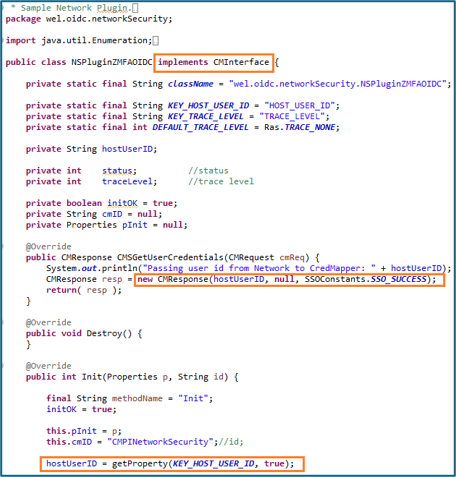
In the sample provided below, the Network Security Plugin retrieves the Host User ID from the Initialized Parameter Wizard and populates it within the CMResponse object. This Host User ID is then made available to the Credential Mapper by enabling the CMPI_zMFA_USE_NETID_AS_HOSTID (more details in section 5) parameter.
- Configure Z MFA OIDC Credential Mapper
Go to the HATS Credential Mapper section and select this credential mapper plugin. This plugin expects the JWT token to be available as an HTTP session object in the incoming request. When using the HATS OIDC feature, HATS manages this automatically; otherwise, you must ensure that the JWT is populated in the session.
More information about this plugin.
- Extracting MF User ID from the JWT Claim: Assume the JWT payload contains ‘preferred_username’ with MF User ID:
{  ……….
  "sub": "1234567890",
  "preferred_username": "johndoe",
  "email": "john.doe@example.com",
  "email_verified": true,
  ………
}
In such case, configure CMPI_zMFA_CLAIMID_AS_HOSTUID with value preferred_username and set CMPI_zMFA_USE_NETID_AS_HOSTID to false.
- Providing the MF User ID via Network Security Plugin:
In this case, set CMPI_zMFA_USE_NETID_AS_HOSTID to true to instruct the mapper to use the value provided through the Network Security Plugin.
Troubleshooting
- To capture detailed log statements in the HATS trace and messages file: Set trace level CMPI_ZMFA_TRACE_LEVEL to 3 or 4 in the plugin.
- To capture detailed log statements in the HATS Trace, update the HATS runtime properties file with values:
trace.UTIL=9
trace.RUNTIME=9
trace.HOD.TRANSPORT=3
- Collect Application server log which will contains additional detailed information.
References
https://www.ibm.com/docs/en/zma/2.4.0?topic=guide-introduction-mfa
https://www.ibm.com/docs/en/zma/2.4.0?topic=oidc-additional-racf-administration-steps
https://www.ibm.com/docs/en/zma/2.4.0?topic=oidc-using-openid-connect-single-sign
https://www.ibm.com/docs/en/zma/2.4.0?topic=formats-jwt2ctc-generate-cached-token-from-jwt-service
https://www.ibm.com/docs/en/hats/10.0.0?topic=other-oidc-configuration-securing-hats-web-application
https://community.ibm.com/community/user/blogs/badal-burathoki/2021/09/01/ibm-hats-sso-implementation-guide
For a detailed overview of HATS capabilities and how we transform legacy Host applications into modern web experiences, reach out to:
badal.b@hcl-software.com
Mainframe.PS@hcl-software.com