BAMOE workflows are designed based on the expected process behavior. But production is always more complex than expected — and deviations create inefficiencies that stay invisible inside the BAMOE runtime.
In this post, I show how to connect BAMOE 9.4.1 to IBM Process Mining through IBM Event Streams, so that every workflow execution automatically surfaces bottlenecks, SLA violations, and rework loops — with no changes to your BPMN or DMN models required.
Part 1 — The Business Case
Why Monitoring BAMOE Workflows Matters
IBM's automation portfolio tells a coherent story: Blueworks Live helps design and map processes, BAMOE orchestrates and automates them, and IBM Process Mining monitors how they actually perform in production. Each product is powerful on its own — but the value multiplies when they work together.
The missing link has historically been the monitoring step. A BAMOE workflow runs, makes decisions, completes tasks — but that execution data stays locked inside the runtime. Teams have no easy way to answer questions like:
- Which steps are taking longer than expected?
- Are there cases failing mid-process that go unnoticed?
- Is the process actually following the designed path, or has it drifted?
IBM Process Mining is purpose-built to answer these questions. It ingests event logs and surfaces the real process: the happy paths, the detours, the bottlenecks, the rework — automatically, with no manual analysis required.
The Value of Connecting BAMOE to IBM Process Mining
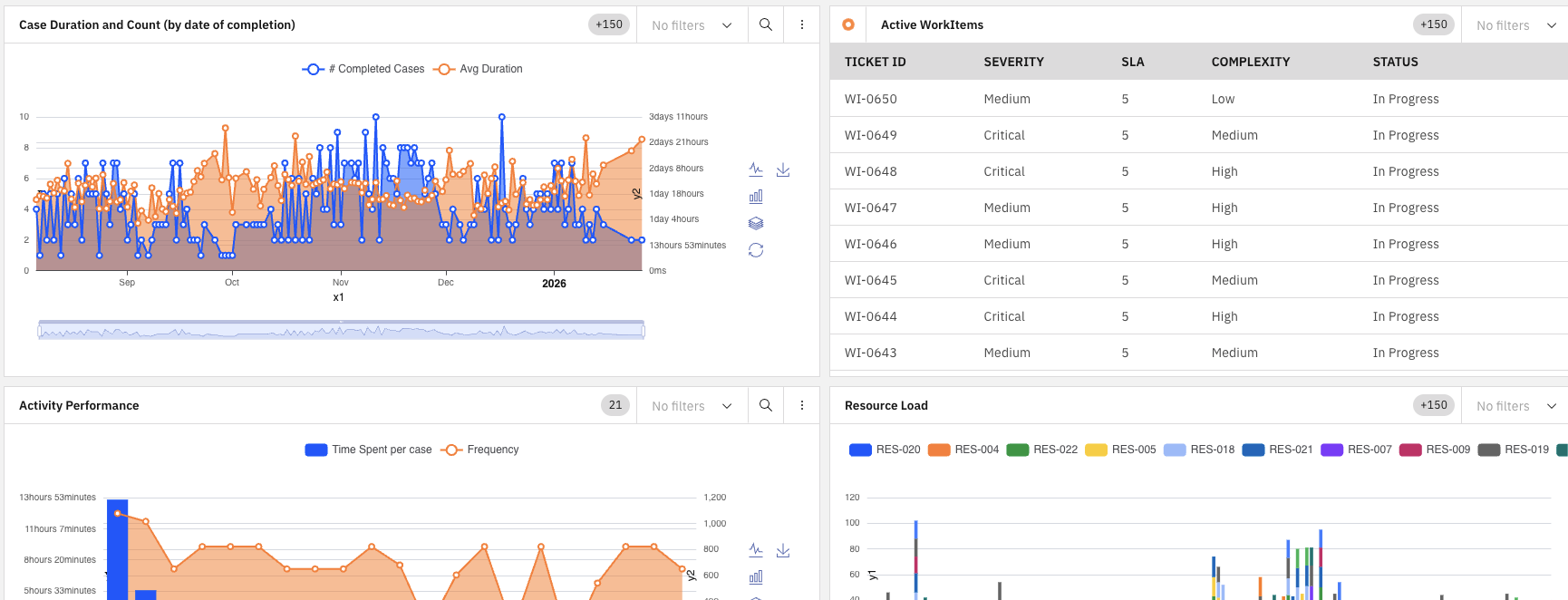
Once events flow from BAMOE into IBM Process Mining, teams gain immediate visibility into:
- Bottlenecks — which steps are consistently slow and why
- SLA violations — which cases exceeded their expected duration
- Rework loops — where work is being repeated unnecessarily
- Exception paths — how often the process deviates from the designed flow, and which variants dominate
This is the feedback loop that makes the combination powerful. BAMOE gives you automated, auditable process execution. IBM Process Mining gives you the evidence to evaluate whether that execution is delivering the expected outcome — and the data to improve it.
The Use Case: Automated SDLC Bug Triage
To make this concrete, I'll use an SDLC scenario any development team can relate to: automated bug triage at release time.
The workflow processes a batch of Jira bugs through two distinct automated phases. First, an AI step analyses each bug's description and classifies its severity. Then a DMN decision table uses that AI-assigned severity — together with the release's Code Delivery Cutoff (DCUT) date — to decide which Fix Version to assign.
The decision logic is simple and auditable. Before the DCUT date, most bugs go to the target release. After it, lower-severity bugs are deferred to the next release ("Parking Lot"):
| Severity |
Before DCUT |
After DCUT |
| Blocker |
Target Version |
Target Version |
| Critical |
Target Version |
Target Version |
| Major |
Target Version |
Target Version |
| Moderate |
Target Version |
Parking Lot |
| Minor |
Parking Lot |
Parking Lot |
"Parking Lot" means deferred to the next release — for example, from 2.2.0 to 2.3.0. This logic lives entirely in a DMN file. No Java code encodes the business rules — they can be visualised, discussed, and modified without touching the application.
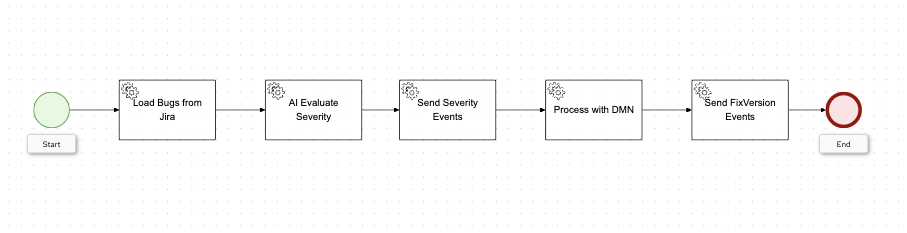
The BPMN workflow that orchestrates this has five tasks:
- Load Bugs from Jira — fetches the bug dataset for the current release
- AI Evaluate Severity — classifies each bug's severity; writes the result back to Jira
- Send Severity Events — publishes one event per bug to IBM Event Streams
- Process with DMN — runs the decision table for each bug; writes the Fix Version back to Jira
- Send FixVersion Events — publishes one event per bug to IBM Event Streams
What IBM Process Mining Reveals
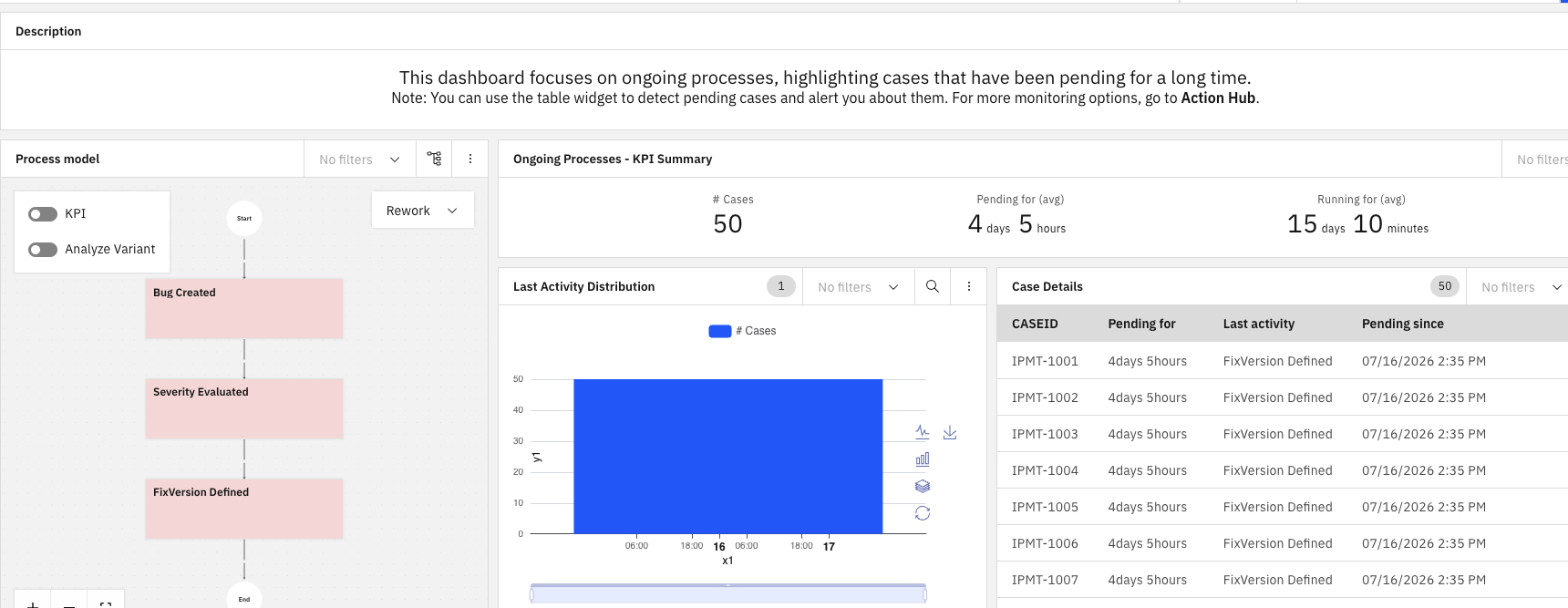
With events flowing, IBM Process Mining reconstructs the process execution automatically. Each bug becomes a case. Each workflow step that emits an event becomes an activity. The result is a live process map built from real execution data.
From this, IBM Process Mining can immediately answer questions like:
- How long does the AI severity evaluation take per bug, on average?
- How long does the DMN fix version assignment take, and does it vary by severity?
- Are there bugs that were severity-evaluated but never reached fix version assignment — indicating a processing failure?
- How do processing times vary across release cycles?
And at the business level: how many bugs are deferred to the Parking Lot version per release? Does that proportion shift as the DCUT date approaches? IBM Process Mining makes these trends visible without any custom reporting or manual data extraction.
Part 2 — How to Set It Up
The Architecture
The integration connects three products through a standard event streaming layer. No additional middleware is required. The only integration point is the IBM Event Streams topic: BAMOE writes to it, IBM Process Mining reads from it.
BAMOE Application
Quarkus · BPMN · DMN |
→
"Severity Evaluated"
& "FixVersion Defined"
events |
IBM Event Streams
Kafka · single topic |
→
Kafka connector |
IBM Process Mining
Process Map · KPIs · Conformance |
Step 1 — Install and Configure BAMOE
If you are not already running BAMOE, start here:
For this integration, you need BAMOE 9.4.1 or later, which includes the PIM add-on.
Step 2 — Set Up IBM Event Streams
IBM Event Streams is the Kafka-compatible event streaming platform that acts as the transport layer between BAMOE and IBM Process Mining.
For this integration, you need a single topic. One topic is sufficient — the activity field in each event distinguishes the different workflow steps.
Step 3 — Enable the BAMOE PIM Add-On
The PIM add-on (bamoe-addons-quarkus-pim for Quarkus, bamoe-addons-spring-boot-pim for Spring Boot) is a dependency you add to your existing BAMOE application. It handles all event emission automatically — no changes to your BPMN or DMN models.
Add the dependency to your pom.xml:
<dependency>
    <groupId>com.ibm.bamoe</groupId>
    <artifactId>bamoe-addons-quarkus-pim</artifactId>
</dependency>
Then configure the Kafka connection in application.properties (inject credentials at runtime via environment variables):
# IBM Event Streams connection
mp.messaging.outgoing.kogito-processinstances-events.connector=smallrye-kafka
mp.messaging.outgoing.kogito-processinstances-events.topic=<YOUR_TOPIC_NAME>
mp.messaging.outgoing.kogito-processinstances-events.bootstrap.servers=<YOUR_BOOTSTRAP_SERVER>
mp.messaging.outgoing.kogito-processinstances-events.security.protocol=SASL_SSL
mp.messaging.outgoing.kogito-processinstances-events.sasl.mechanism=PLAIN
mp.messaging.outgoing.kogito-processinstances-events.sasl.jaas.config=\
    org.apache.kafka.common.security.plain.PlainLoginModule required \
    username="token" password="${EVENT_STREAMS_API_KEY}";
The full configuration reference — including SSL trust store setup — is covered in the BAMOE PIM add-on documentation.
Two emission points: why they matter
In the SDLC workflow, events are emitted at two points in the BPMN process — after the AI severity step and after the DMN fix version step. Both go to the same Kafka topic, but each carries a different activity value: "Severity Evaluated" and "FixVersion Defined".
IBM Process Mining uses the activity field to reconstruct the process flow — so it sees each bug as a case that moves through two distinct activities, with real timestamps for each transition. This is what makes the process map meaningful.
Application structure
BPMN Tasks
| Load Bugs from Jira |
→ |
AI Evaluate Severity |
→ |
Send Severity Events |
→ |
Process with DMN |
→ |
Send FixVersion Events |
Java Services (wired to tasks above)
Bug Loader
reads Jira |
→ |
AI Severity Evaluator
calls LLM · writes Jira |
→ |
Kafka Emitter
activity: Severity Evaluated |
→ |
DMN Processor
runs decision table · writes Jira |
→ |
Kafka Emitter
activity: FixVersion Defined |
The AI Severity Evaluator is a pluggable implementation point: the BPMN task can call any LLM or AI service — IBM watsonx.ai, OpenAI, or a custom model — simply by swapping the underlying Java service.
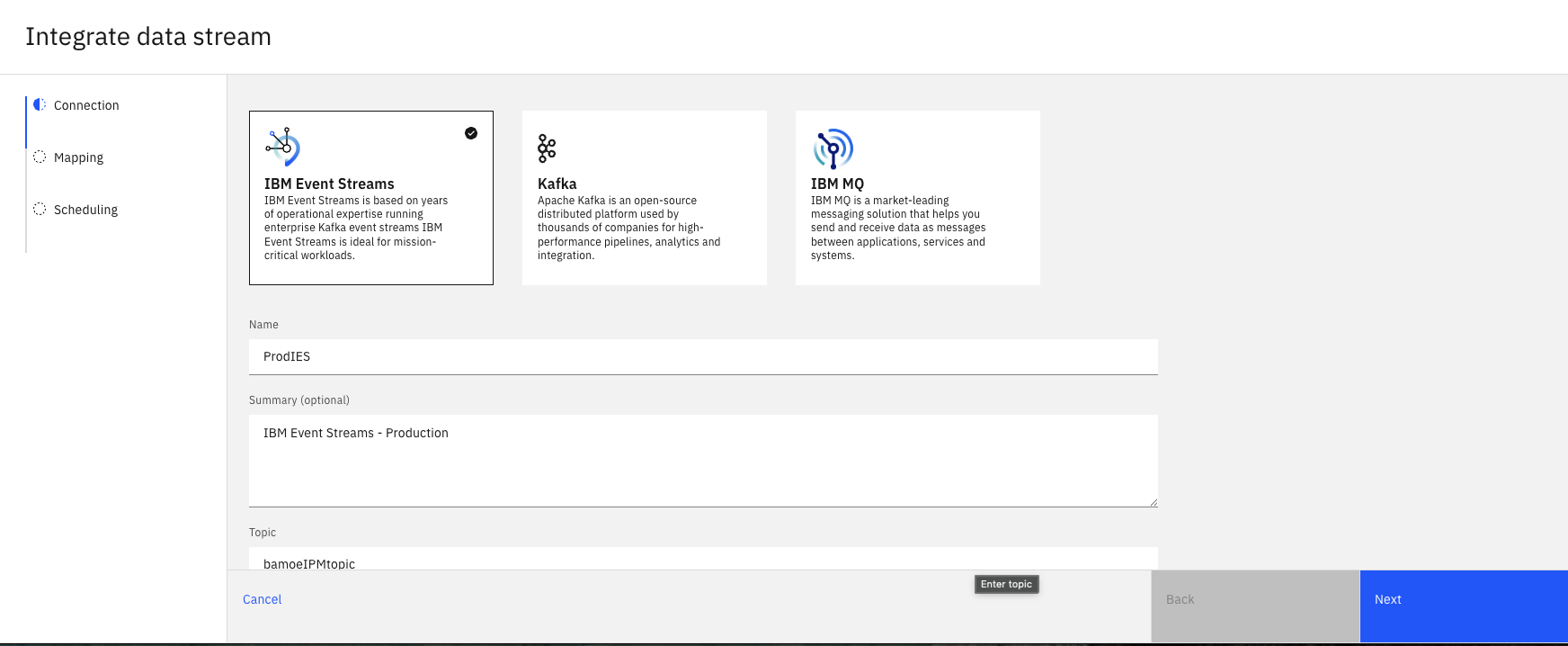
Step 4 — Connect IBM Process Mining to IBM Event Streams
IBM Process Mining can consume events directly from a Kafka topic through a built-in connector.
⚠ Timestamp format: one detail not to overlook
The timestamp format in the events emitted by your BAMOE application must match the format configured in the IBM Process Mining data flow. A mismatch causes IBM Process Mining to fail parsing the timestamp field — the process map loses all duration data, and cases appear collapsed to a single point in time.
In this implementation, timestamps are formatted as yyyy-MM-dd HH:mm:ss. Before going to production, confirm the format your IBM Process Mining data flow expects and align the DateTimeFormatter in your BAMOE application accordingly. Test with a small batch before processing your full event volume.
Step 5 — Run and Verify
Once all four components are connected:
- Trigger your BAMOE workflow (manually or via scheduled job)
- Confirm events appear in the IBM Event Streams topic (use the Event Streams UI or Kafka consumer CLI)
- Open IBM Process Mining and check that cases are appearing in the data flow
- Verify that the process map correctly shows both activities (
Severity Evaluated → FixVersion Defined) with timestamps
Closing Thoughts
BAMOE 9.4.1 makes the connection between process automation and process intelligence straightforward. The PIM add-on handles event emission automatically; IBM Event Streams provides a reliable, scalable transport; and IBM Process Mining turns the resulting event log into actionable insight.
The SDLC bug triage scenario used here is deliberately concrete — a five-task workflow with an AI step, a DMN table, and two Kafka emission points. But the same pattern applies to any BAMOE workflow: loan origination, onboarding, claims processing, order fulfilment. Wherever BAMOE is orchestrating work, IBM Process Mining can now see how that work actually flows.
If you are already running BAMOE in production, adding the PIM add-on and pointing it at an IBM Event Streams topic is a low-friction way to find out what your processes are really doing.
References and Setup Links